1. Giới thiệu
Welcome to your new Powtree Wireless Controller. This manual provides detailed instructions for setting up, operating, and maintaining your controller. Please read this manual carefully before use to ensure optimal performance and longevity of your device.
2. Nội dung gói hàng
- 2 x Powtree Wireless Controllers
- 2 x Cáp sạc USB Type-C
- 2 cuốn hướng dẫn sử dụng (tài liệu này)
3. Sản phẩm hếtview
Familiarize yourself with the various components and controls of your Powtree Wireless Controller.

Hình ảnh: Trên và dưới view of the Powtree Wireless Controller, highlighting key components such as the D-Pad, Action Buttons, Joysticks, Touch Pad, Share button, Options button, Home button, Speaker, 3.5mm stereo port, EXT charging port, Light Bar, and USB Charging Jack.
- D-Pad: Directional Pad for navigation.
- Các nút hành động: Triangle, Circle, Cross, Square buttons for in-game actions.
- Cần điều khiển trái/phải: Analog sticks for precise movement and camera control.
- Bàn di chuột: Multi-touch pad for interactive gameplay.
- Nút chia sẻ: For sharing gameplay content.
- Nút Tùy chọn: For accessing in-game menus and options.
- Nút Home: For returning to the system menu.
- Người nói: Built-in speaker for enhanced audio feedback.
- 3.5mm Stereo Port: Dùng để kết nối tai nghe hoặc bộ tai nghe.
- EXT Charging Port: Để sạc bộ điều khiển.
- Thanh ánh sáng: Indicates player number and provides in-game visual cues.
- Giắc cắm sạc USB: Dùng để kết nối cáp sạc Type-C.
- Các nút L1/L2/R1/R2: Các nút vai và nút cò súng dùng cho nhiều chức năng khác nhau trong trò chơi.
4. Thiết lập
4.1 Kết nối ban đầu
- For the first connection, you must activate the device using the provided USB Type-C cable. Connect one end of the cable to the controller and the other end to your console (PS4/PS5) or PC.
- Once connected, press the Home button on the controller to pair it with your device.
- After successful pairing, you can disconnect the USB cable for wireless use.
Ghi chú: If the controller fails to connect, it is recommended to try a high-power USB Type-C data cable.
4.2 Sạc bộ điều khiển
The controller has a built-in 800mAh lithium battery. To charge:
- Connect the provided USB Type-C charging cable to the controller's USB Charging Jack.
- Connect the other end of the cable to a USB power source (e.g., console, PC, USB wall adapter).
- The controller will fully charge in approximately 2.5 hours. The light bar will indicate charging status.
5. Hướng dẫn vận hành
5.1 Kết nối Bluetooth
The controller uses Bluetooth 4.2 technology, providing a stable connection with a receiving distance of up to 10 meters (390 inches). After initial wired activation, the controller should automatically connect wirelessly to your paired device when powered on.
5.2 Chức năng Turbo
The Turbo function allows for rapid, repeated input of a button press, useful in certain games.
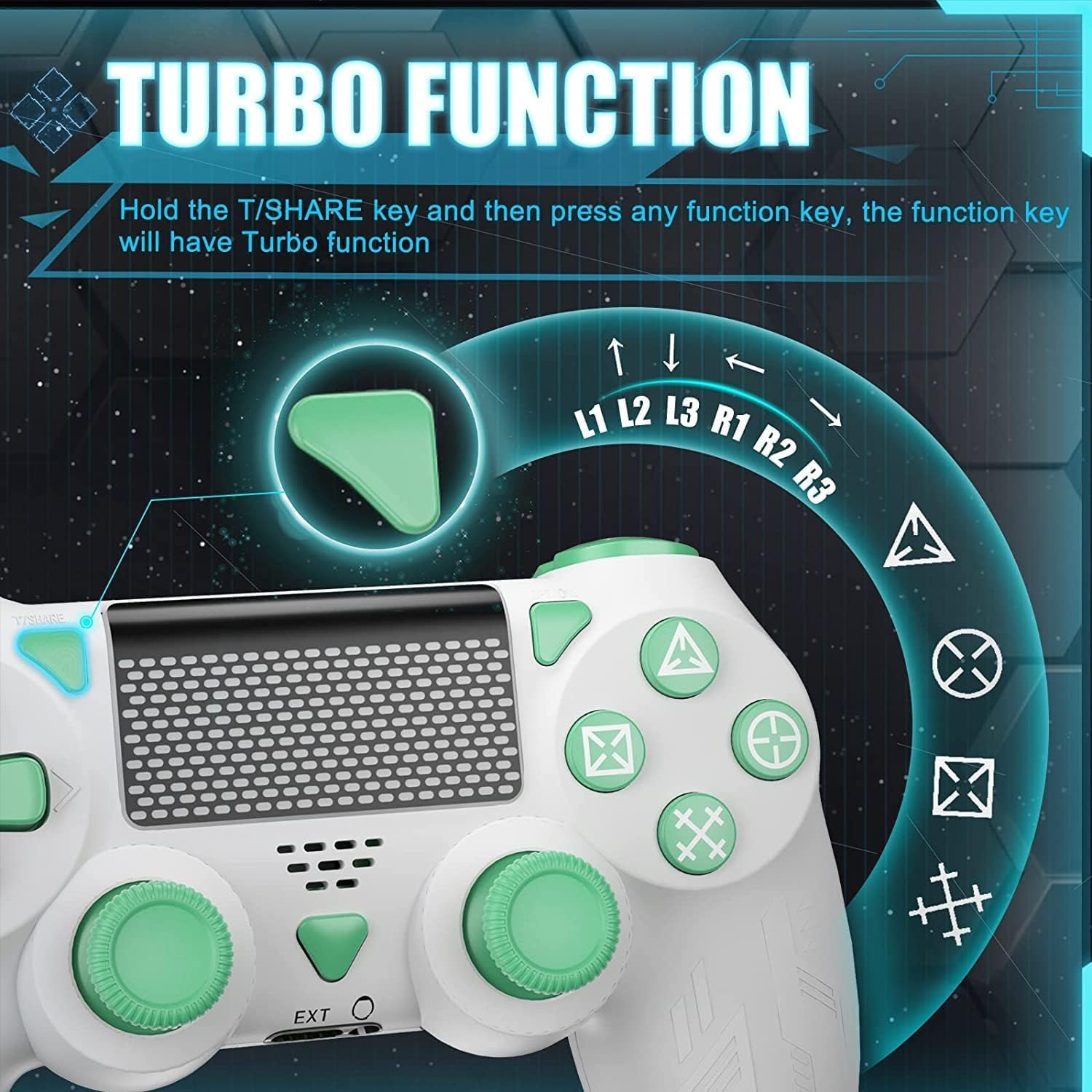
Image: A close-up of the controller showing the 'T/SHARE' button and an arrow pointing to a function button, illustrating the activation of the Turbo function.
To activate the Turbo function: Hold the T/SHARE key, then press any desired function key (e.g., X, O, Triangle, Square, L1, R1, L2, R2). The selected function key will now have Turbo functionality.
5.3 Cảm biến con quay hồi chuyển 6 trục
The built-in 6-axis motion control system enhances gameplay by allowing for intuitive control through movement and rotation.

Image: A controller with arrows indicating motion, alongside icons representing in-game actions like 'Throw Off', 'Rotation of Direction', and 'Shift of Vision', demonstrating how the 6-axis gyro sensor improves accuracy and speed.
This sensor improves accuracy and speed in games that support motion control, allowing for actions like shifting vision, rotating objects, or throwing items by physically moving the controller.
5.4 Rung kép
The controller is equipped with dual vibration motors to provide immersive haptic feedback during gameplay.

Hình ảnh: Một trong suốt view of the controller's grips, showing the internal dual vibration motors emitting blue light, indicating their function in providing haptic feedback.
Experience realistic feedback for in-game events such as collisions, explosions, or weapon recoil, enhancing your gaming immersion.
5.5 Tính năng âm thanh
The controller includes a 3.5mm stereo audio jack for connecting your headset and a built-in speaker for direct audio output from the controller.
5.6 thanh ánh sáng
The front light bar changes color according to game content, providing visual cues and indicating player status.
6. Khả năng tương thích
The Powtree Wireless Controller offers broad compatibility across multiple gaming platforms.

Image: A controller displayed alongside icons for various compatible platforms including PS4/PS4 Pro/PS4 Slim, Steam, iPad/Phone/Android/iOS, and PC.
Nó tương thích với:
- PS4 (P4, P4 Pro, P4 Slim)
- Máy tính cá nhân (Windows)
- Thiết bị Android
- Thiết bị iOS
- Some PS4 games on PS5
7. Bảo trì
7.1 Quản lý thời lượng pin
The 800mAh battery provides approximately 12-15 hours of continuous use on a full charge. To prolong battery life:
- Always shut down the controller when not in use for extended periods.
- Tránh xả hết pin thường xuyên.
- Charge the controller using the provided Type-C cable and a suitable power source.
7.2 Vệ sinh và Bảo quản
- Vệ sinh bộ điều khiển bằng vải mềm, khô. Không sử dụng hóa chất mạnh hoặc vật liệu mài mòn.
- Bảo quản bộ điều khiển ở nơi khô ráo, thoáng mát, tránh ánh nắng trực tiếp và nhiệt độ cao.
- Avoid dropping the controller or exposing it to excessive force.
KHAI THÁC. Xử lý sự cố
- Bộ điều khiển không kết nối: Ensure the controller is charged. For the first connection, use the USB cable to activate it. If issues persist, try a different high-power USB Type-C data cable.
- Độ trễ đầu vào hoặc ngắt kết nối: Ensure the controller is within the 10-meter Bluetooth range. Check for potential interference from other wireless devices.
- Các nút không phản hồi: Try resetting the controller (refer to the device's specific reset procedure, usually a small pinhole button on the back). Ensure the controller is fully charged.
- Vấn đề sạc: Verify the USB Type-C cable and power source are working correctly.
9. Thông số kỹ thuật
| Dung lượng pin | Pin Lithium 800mAh |
| Thời gian sạc | Xấp xỉ 2.5 giờ |
| Thời gian sử dụng | Khoảng 12-15 giờ |
| Kết nối | Bluetooth 4.2 |
| Wireless Dải | Up to 10 meters (390 inches) |
| Kích thước | 17.2 x 14.2 x 12.3cm |
| Cân nặng | 560 grams (for the package) |
| Đặc trưng | Dual Motor Shock, 6-Axis Sensor, Turbo Function, Touchpad, 3.5mm Audio Jack, Built-in Speaker, Light Bar |
10. Bảo hành và Hỗ trợ
For information regarding product returns within 30 days of receipt due to a change of mind, please consult the relevant help page on the retailer's website. If you have received a defective or damaged product, please refer to the retailer's help page on product defects and damages. For specific information on purchases made through a marketplace, consult the marketplace's help page.
If you have any questions or require further assistance with your Powtree Wireless Controller, please contact our customer support team through the retailer's platform or the contact information provided with your purchase.