Giới thiệu
Welcome to the user manual for your Infinity Smartwatch, Model NX 10. This device is designed to enhance your daily life with advanced fitness tracking, communication features, and smart notifications. Featuring a vibrant 1.43" AMOLED screen and robust IP68 water resistance, your smartwatch is built for both everyday use and active lifestyles. Please read this manual carefully to ensure proper operation and maintenance of your device.

Figure 1: Infinity Smartwatch NX 10. This image shows the smartwatch from an angled perspective, highlighting its round AMOLED display, black silicone strap, and two side buttons.
Cài đặt
1. Mở hộp và sạc ban đầu
Upon unboxing, ensure all components are present: the Infinity Smartwatch NX 10 and the charging cable.
- Kết nối cáp sạc từ tính với các điểm sạc ở mặt sau của đồng hồ thông minh.
- Cắm đầu USB của cáp vào bộ chuyển đổi nguồn USB tiêu chuẩn (không kèm theo) hoặc cổng USB của máy tính.
- The watch display will show a charging indicator. Fully charge the device before first use, which typically takes approximately 2 hours.

Figure 2: Smartwatch charging. The image illustrates the smartwatch being charged magnetically, with a green lightning bolt icon on the screen indicating charging status and a "400mAh Battery Capacity" label.
2. Cài đặt và ghép nối ứng dụng
To unlock the full potential of your Infinity Smartwatch, download and install the companion application, Phù hợp với Đám mây Protrên điện thoại thông minh của bạn.
- Scan the QR code provided in the quick start guide (if available) or search for "Fit Cloud Pro" in your smartphone's app store (Google Play Store for Android, Apple App Store for iOS).
- Cài đặt ứng dụng.
- Open the Fit Cloud Pro app and follow the on-screen instructions to create an account or log in.
- Đảm bảo Bluetooth được bật trên điện thoại thông minh của bạn.
- In the app, navigate to the device pairing section and search for your smartwatch (e.g., "NX 10" or similar Bluetooth name).
- Select your smartwatch from the list to initiate pairing. Confirm the pairing request on both your phone and the smartwatch if prompted.
- Once paired, the app will synchronize data with your smartwatch, and you can customize settings.
Hướng dẫn sử dụng
1. Điều hướng cơ bản
- Màn hình cảm ứng: Swipe left/right to navigate between main screens (e.g., activity, heart rate, weather). Swipe up/down to access quick settings or notifications. Tap to select an option.
- Các nút bên: The top button typically acts as a power button (long press) or a back/home button (short press). The bottom button may be customizable or provide quick access to sports modes.

Figure 3: 1.43" AMOLED Screen. This image highlights the vibrant display of the smartwatch, showing a detailed watch face with various data points like time, date, steps, and heart rate.
2. Thực hiện và nhận cuộc gọi
Your Infinity Smartwatch supports Bluetooth calling, allowing you to make and receive calls directly from your wrist when connected to your smartphone.
- Gọi điện thoại: Access the dialer or contacts list on your smartwatch. You can dial a number directly or select a contact to call.
- Để trả lời cuộc gọi: When a call comes in, the smartwatch will display the caller ID. Tap the green answer icon to accept the call or the red icon to decline.

Figure 4: Stay Connected On The Go. This image shows a user interacting with the smartwatch to make a call, illustrating the microphone, dialing, call records, and contacts features.
3. Theo dõi sức khỏe và thể chất
The smartwatch is equipped with multiple sensors to monitor your health and fitness activities.
- Pedometer: Automatically tracks your steps, distance, and calories burned throughout the day.
- Theo dõi nhịp tim: Provides real-time heart rate data. Access this feature from the main menu or set up continuous monitoring in the app.
- Theo dõi huyết áp: Offers blood pressure readings. For accurate results, ensure the watch is worn correctly and remain still during measurement. Lưu ý: Tính năng này chỉ mang tính chất tham khảo và không được sử dụng để chẩn đoán y tế.
- Theo dõi giấc ngủ: Ứng dụng theo dõi kiểu ngủ của bạn, bao gồm giấc ngủ sâu, giấc ngủ nông và thời gian thức giấc. View detailed analysis in the Fit Cloud Pro app.
- Chế độ thể thao: Supports over 100 sports modes, including running, cycling, swimming, and more. Select your desired activity to track specific metrics.

Figure 5: Track Every Move. This image displays the smartwatch tracking a swimming activity, with additional visuals of rock climbing and cycling, indicating its multi-sport tracking capabilities.

Figure 6: More than 110 sports modes. This image shows a variety of colorful icons representing different sports activities supported by the smartwatch, overlaid on a background of a person cycling.
4. Tùy chỉnh
Personalize your smartwatch experience through the Fit Cloud Pro app.
- Mặt đồng hồ: Choose from a wide range of pre-installed watch faces or download new ones via the app. You can also create custom watch faces using your own photos.
- Thông báo: Configure which app notifications you wish to receive on your smartwatch (e.g., calls, SMS, social media alerts).
- Báo thức & Nhắc nhở: Set alarms, sedentary reminders, and hydration reminders through the app.
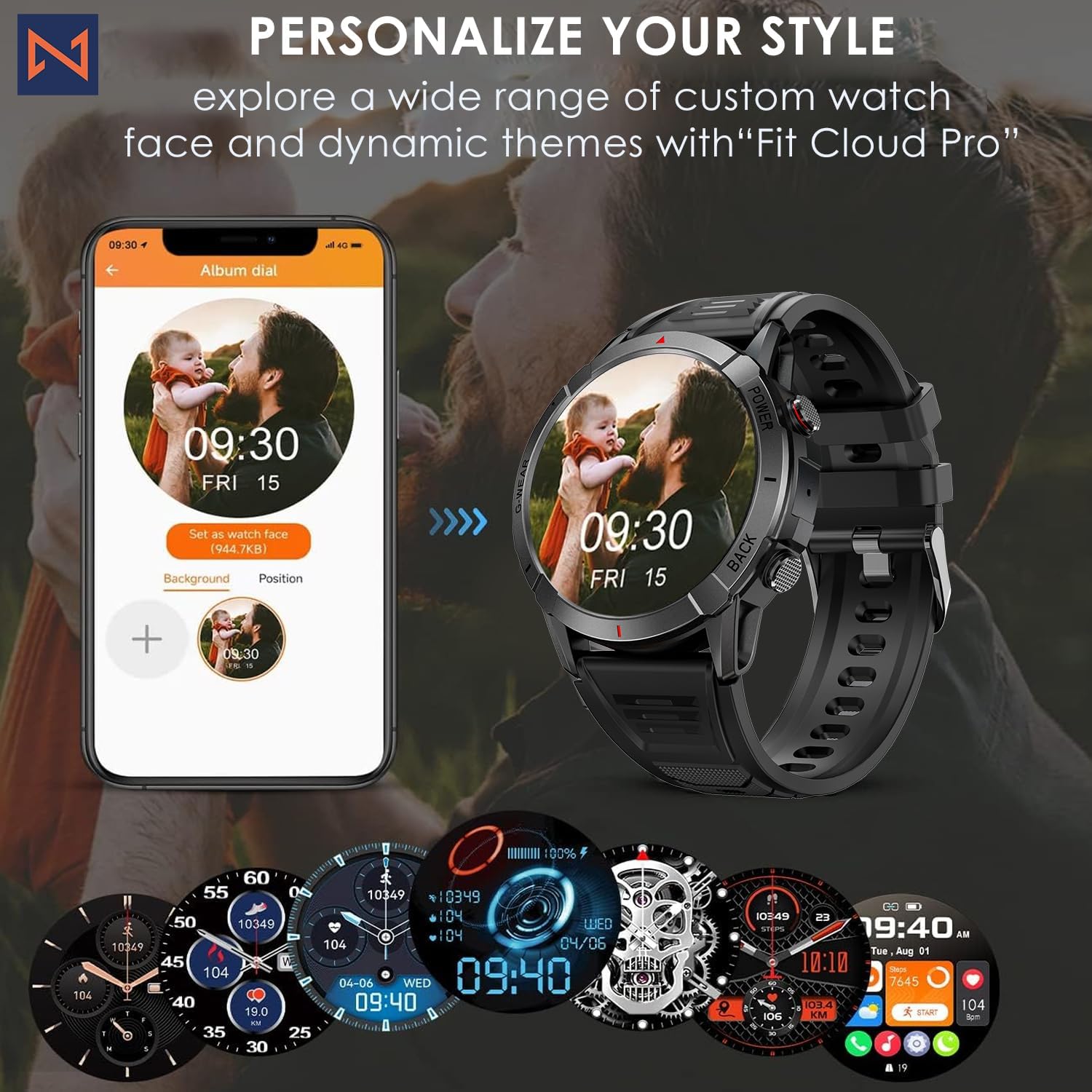
Figure 7: Personalize Your Style. This image demonstrates how to customize watch faces using the "Fit Cloud Pro" app, showing various digital and analog watch face options.
BẢO TRÌ
1. Vệ sinh đồng hồ thông minh của bạn
Vệ sinh thường xuyên giúp duy trì vẻ ngoài và chức năng của thiết bị.
- Lau màn hình và thân máy bằng vải mềm, không xơ.
- For stubborn smudges, dampThấm nhẹ vải với nước. Tránh sử dụng hóa chất mạnh hoặc vật liệu mài mòn.
- Thường xuyên vệ sinh các điểm tiếp xúc sạc để đảm bảo kết nối tốt.
2. Khả năng chống nước (IP68)
Your Infinity Smartwatch is rated IP68, meaning it is resistant to dust and can withstand immersion in water up to 1.5 meters for up to 30 minutes.
- Sản phẩm phù hợp để sử dụng hàng ngày, giặt tay và khi trời mưa nhẹ.
- Avoid prolonged immersion, hot water, steam, or high-pressure water jets (e.g., showering, sauna, diving).
- If the watch gets wet, dry it thoroughly before charging or operating buttons.

Figure 8: Engineered for Adventure. This image highlights the smartwatch's durability features, including waterproof, dustproof, anti-magnetic, and shockproof capabilities, with corresponding icons.
3. Chăm sóc pin
- Để kéo dài tuổi thọ pin, hãy tránh nhiệt độ quá cao.
- Hãy sạc đồng hồ thường xuyên; tránh để pin cạn kiệt hoàn toàn trong thời gian dài.
- Chỉ sử dụng cáp sạc được cung cấp.
Xử lý sự cố
| Vấn đề | Giải pháp khả thi |
|---|---|
| Đồng hồ không bật | Hãy đảm bảo đồng hồ đã được sạc đầy. Kết nối với bộ sạc và đợi vài phút trước khi thử bật nguồn. |
| Không thể ghép nối với điện thoại thông minh |
|
| Dữ liệu sức khỏe không chính xác |
|
| Chưa nhận được thông báo |
|
| Tuổi thọ pin ngắn |
|
Thông số kỹ thuật
| Tính năng | Chi tiết |
|---|---|
| Số hiệu mẫu | NX 10 |
| Trưng bày | 1.43" AMOLED Screen |
| Độ phân giải màn hình | Độ phân giải 466x466 |
| Dung lượng pin | Pin Lithium Polymer 400 mAh |
| Chống nước | IP68 |
| Kết nối | Bluetooth |
| Hệ điều hành | Android (tương thích với iOS) |
| Chất liệu dây đeo | 22mm Silicon Belt |
| Vật liệu trưng bày | Hợp kim kẽm |
| Trọng lượng sản phẩm | 1.76 ounce |
| Dung lượng lưu trữ bộ nhớ | 128MB |
Bảo hành và Hỗ trợ
For warranty information and technical support, please refer to the documentation included with your purchase or visit the official Infinity webđịa điểm.
Manufacturer: Infiniity
For further assistance, you may contact Infiniity customer service through the contact information provided on their official website or within the Fit Cloud Pro application.


