1. Giới thiệu
This manual provides detailed instructions for the setup, operation, and maintenance of your boAt Aavante Bar 490 Bluetooth Soundbar. Please read this manual thoroughly before using the product to ensure proper functionality and to maximize your audio experience.

Image 1.1: The boAt Aavante Bar 490 Bluetooth Soundbar in Classic Black.
2. Nội dung gói hàng
Xác minh rằng tất cả các mục được liệt kê dưới đây đều có trong gói hàng của bạn:
- boAt Aavante Bar 490 Soundbar
- Cáp sạc
- Hướng dẫn sử dụng (tài liệu này)
- Thẻ bảo hành
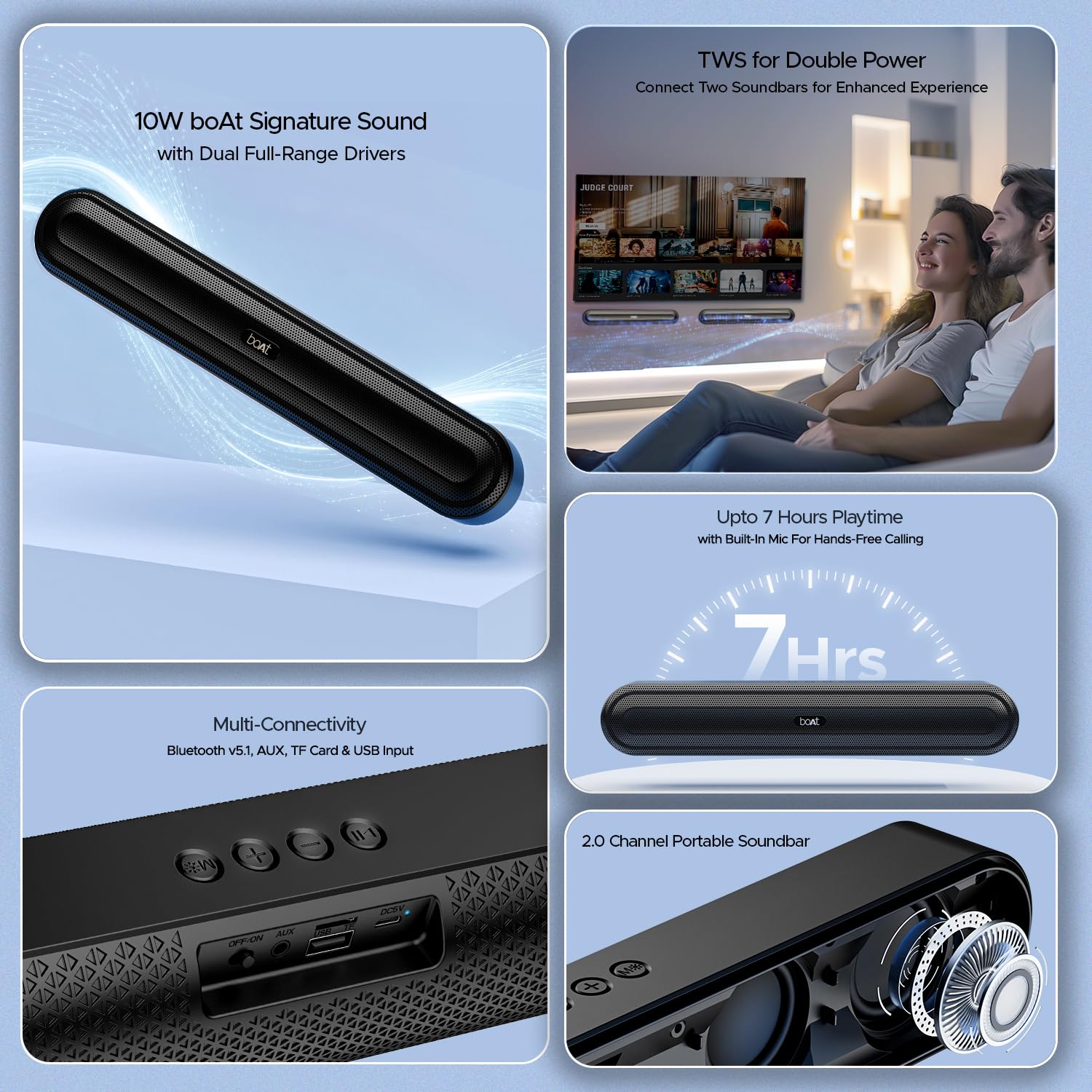
Hình 2.1: Hếtview of the boAt Aavante Bar 490 and its key features, including package contents.
3. Sản phẩm hếtview
3.1. Điều khiển và Cổng
Familiarize yourself with the control buttons and connectivity ports on your Aavante Bar 490.

Hình ảnh 3.1: Cận cảnh view of the control buttons and multi-connectivity ports (Bluetooth v5.1, AUX, TF Card, USB Input) on the soundbar.
- Nút nguồn: Nhấn giữ để bật/tắt nguồn. Nhấn nhanh để chuyển đổi chế độ.
- Giảm âm lượng (-): Giảm âm lượng.
- Tăng âm lượng (+): Tăng âm lượng.
- Nút Phát/Tạm dừng: Phát hoặc tạm dừng nhạc. Trả lời/kết thúc cuộc gọi.
- Nút chế độ (M): Switch between input modes (Bluetooth, AUX, USB, TF Card).
- Công tắc TẮT/BẬT: Công tắc năng lượng chính.
- Cổng AUX: Dùng để kết nối âm thanh có dây.
- Cổng USB: Để phát lại bằng ổ USB.
- Khe cắm thẻ TF: Dùng để phát lại thẻ TF.
- Cổng DC5V: Để sạc thiết bị.
4. Thiết lập
4.1. Sạc loa thanh
Before first use, fully charge the soundbar. Connect the provided charging cable to the DC5V port on the soundbar and the other end to a compatible USB power adapter (not included). The LED indicator will show charging status and turn off when fully charged. A full charge provides up to 7 hours of playback.

Image 4.1: The boAt Aavante Bar 490 highlighting its up to 7 hours of playtime on a single charge.
4.2. Bật/Tắt nguồn
- Ensure the OFF/ON switch at the back is in the "ON" position.
- Press and hold the Power button on the top panel for 3 seconds to power on the soundbar.
- To power off, press and hold the Power button again for 3 seconds.
4.3. Ghép nối Bluetooth
- Power on the soundbar. It will automatically enter Bluetooth pairing mode (indicated by a flashing LED).
- Trên thiết bị của bạn (điện thoại thông minh, máy tính bảng, v.v.), hãy bật Bluetooth và tìm kiếm các thiết bị khả dụng.
- Select "Aavante Bar 490" from the list.
- Once paired, the LED indicator will turn solid blue, and you will hear a confirmation tone.
The soundbar supports Bluetooth v5.1 for stable and efficient wireless connection up to 10 meters.
4.4. Ghép nối TWS (Âm thanh nổi không dây thực sự)
For an enhanced stereo experience, you can pair two Aavante Bar 490 soundbars together.
- Ensure both Aavante Bar 490 units are powered on and in Bluetooth pairing mode (not yet connected to any device).
- On one of the soundbars, double-press the Mode button (M). It will search for the other unit.
- Once successfully paired, you will hear a confirmation tone, and the LED indicators on both units will synchronize.
- Now, connect your device to one of the paired soundbars via Bluetooth as described in Section 4.3. Both soundbars will play audio in stereo.

Image 4.2: Illustration of two boAt Aavante Bar 490 soundbars connected via TWS for an enhanced audio experience.
4.5. Other Connectivity Modes
Press the Mode button (M) to cycle through the following input options:
- Chế độ AUX: Connect an audio device using a 3.5mm AUX cable to the AUX port.
- Chế độ usb: Insert a USB flash drive into the USB port. The soundbar will automatically play audio files.
- Chế độ thẻ TF: Insert a TF (microSD) card into the TF card slot. The soundbar will automatically play audio files.
5. Hướng dẫn vận hành
5.1. Phát lại nhạc
- Phát/Tạm dừng: Nhấn nhanh nút Phát / Tạm dừng.
- Điều chỉnh âm lượng: Nhấn nhanh nút Tăng âm lượng (+) hoặc Giảm âm lượng (-).
- Bài hát tiếp theo: Nhấn giữ nút Tăng âm lượng (+).
- Bản nhạc trước: Nhấn giữ nút Giảm âm lượng (-).
5.2. Gọi điện thoại rảnh tay
When connected via Bluetooth, the built-in microphone allows for hands-free calls.
- Trả lời cuộc gọi: Nhấn nhanh nút Phát / Tạm dừng.
- Kết thúc cuộc gọi: Nhấn nhanh nút Phát/Tạm dừng trong khi gọi.
- Từ chối cuộc gọi: Nhấn và giữ nút Phát/Tạm dừng.
6. Bảo trì
- Keep the soundbar away from water, moisture, and extreme temperatures.
- Vệ sinh thiết bị bằng vải mềm, khô. Không sử dụng chất tẩy rửa có tính mài mòn hoặc dung môi.
- Tránh làm rơi hoặc để loa soundbar chịu những va đập mạnh.
- Bảo quản ở nơi khô ráo, thoáng mát nếu không sử dụng trong thời gian dài.
KHAI THÁC. Xử lý sự cố
| Vấn đề | Nguyên nhân có thể | Giải pháp |
|---|---|---|
| Loa soundbar không bật nguồn. | Low battery; OFF/ON switch is off. | Charge the soundbar; ensure OFF/ON switch is in the "ON" position. |
| Không thể ghép nối qua Bluetooth. | Soundbar not in pairing mode; device Bluetooth is off; too far from device. | Ensure soundbar is in pairing mode; enable Bluetooth on your device; move closer to the soundbar (within 10m). |
| Không có âm thanh. | Âm lượng quá nhỏ; chế độ đầu vào không chính xác; cáp chưa được kết nối đúng cách. | Increase volume; switch to correct input mode (Bluetooth, AUX, USB, TF); check cable connections. |
| Ghép nối TWS không thành công. | One or both units already connected to a device; units too far apart. | Disconnect both units from any Bluetooth devices; ensure they are close to each other during TWS pairing. |
8. Thông số kỹ thuật
- Tên mẫu: Thanh Avante 490
- Loại loa: Thanh âm thanh
- Đầu ra âm thanh: 2.0 Kênh
- Công suất đầu ra: Công suất thực 10W
- Trình điều khiển: Dual Full-Range Drivers
- Phiên bản Bluetooth: v5.1
- Phạm vi Bluetooth: Lên đến 10 mét
- Kết nối: Bluetooth, Aux, USB, Thẻ TF
- Tuổi thọ pin: Lên đến 7 giờ
- Loại pin: Lithium Polymer (bao gồm 1 x 12V)
- Micrô tích hợp: Có (để gọi điện thoại rảnh tay)
- Phương pháp kiểm soát: Nút cảm ứng
- Kích thước sản phẩm: 38.7D x 6.5W x 5.5H Centimet
- Trọng lượng sản phẩm: 650 gam

Image 8.1: Dimensions of the boAt Aavante Bar 490 soundbar.
9. Bảo hành và Hỗ trợ
The boAt Aavante Bar 490 comes with a standard Bảo hành có giới hạn 1 năm kể từ ngày mua. Vui lòng tham khảo Thẻ bảo hành đi kèm để biết các điều khoản và điều kiện chi tiết.
For technical support, service, or warranty claims, please contact boAt customer service:
- E-mail: info@imaginemarketingindia.com
- Nhà sản xuất: Công ty TNHH Tiếp thị Imagine
- Địa chỉ: Unit no. 204 & 205, 2nd floor, D-wing & E-wing, Corporate Avenue, Andheri Ghatkopar Link Road, Mumbai, Maharashtra-400093, India
You can also download the boAt Hearables App for additional features and user guides. Scan the QR code below:

Image 9.1: QR code to download the boAt Hearables App for additional features and support.
10. Video sản phẩm
Video 10.1: Một đoạn giới thiệu ngắnview trưng bàyasing the boAt Aavante Bar 490 Bluetooth Soundbar's features, including 10W RMS sound, dual full-range drivers, 7 hours playback, multi-connectivity, and hands-free calling. This video is provided by the seller.
Video 10.2: Tóm tắt ngắn gọnview of the boAt Aavante Bar 490, highlighting its 10W RMS Signature Sound, dual drivers, and Bluetooth 5.1 connectivity. This video is provided by the seller.


