Giới thiệu
This manual provides comprehensive instructions for the installation, operation, and maintenance of your RTX DTS1419 Three-Phase DIN Rail Energy Meter with WiFi connectivity. Please read this manual thoroughly before installation and use to ensure proper function and safety.
Tính năng sản phẩm
The RTX DTS1419 is an intelligent three-phase energy meter designed for DIN rail mounting. It offers advanced energy monitoring and control capabilities through WiFi connectivity and the Tuya Smart Life application.
Các tính năng chính bao gồm:
- Real-time monitoring of voltage (V), current (A), and power (kW) for each phase.
- Remote control for switching power on or off.
- Clear LCD display for sequential data viewđang.
- Integrated status indicator lights.
- Prepayment function with notifications for exceeding set energy limits.
- Detailed energy consumption statistics for each phase.
- Easy installation on a standard DIN rail.
- Công suất hiện tại tối đa 80A.
- Continuous current rating of 10A per phase.
- Voice control compatibility with Google Home and Amazon Alexa.
- 2.4 GHz WiFi communication for direct router connection (no gateway required).
- Automated scenarios based on predefined measurement values (e.g., automatic shutdown if voltage exceeds limit).
- Archiving function for historical energy data.
Thông tin an toàn
Biện pháp phòng ngừa an toàn
CẢNH BÁO: Installation and maintenance should only be performed by qualified electricians. Disconnect power before installation or servicing to prevent electric shock.
- Ensure all local electrical codes and regulations are followed during installation.
- Không sử dụng thiết bị nếu thấy có dấu hiệu hư hỏng.
- Giữ thiết bị tránh xa nước và độ ẩm cao.
- Không được vượt quá dòng điện định mức tối đa 80A.
- Đảm bảo nối đất thích hợp.
Cài đặt
1. Cài đặt
The RTX DTS1419 is designed for DIN rail mounting within an electrical panel.
- Lắp đặt: Securely attach the energy meter to a standard 35mm DIN rail. Ensure the clip at the bottom locks into place.
- Dây điện: Refer to the wiring diagram below for correct connection of the three phases (L1, L2, L3) and neutral (N). Ensure all connections are tight and secure.

Mô tả hình ảnh: A detailed wiring diagram showing the connection points for the three phases (L1, L2, L3) and neutral (N) on the RTX DTS1419 energy meter. Input terminals are on the left, output terminals on the right. Each phase is clearly labeled with corresponding wire colors (brown, black, grey for phases, blue for neutral) and arrows indicating current flow.
- Bật nguồn: After verifying all connections, restore power to the circuit. The LCD display on the meter should illuminate.
2. App Connection (Tuya Smart Life)
- Tải ứng dụng: Download the "Tuya Smart Life" app from your smartphone's app store (iOS or Android).
- Đăng ký/Đăng nhập: Mở ứng dụng và đăng ký tài khoản mới hoặc đăng nhập vào tài khoản hiện có.
- Thêm thiết bị: In the app, tap the "+" icon to add a new device. Select "Electrical" > "Energy Meter (Wi-Fi)".
- Chế độ ghép nối: On the RTX DTS1419 meter, press and hold the "SET" button until the network indicator light (blue LED) starts blinking rapidly. This indicates pairing mode.
- Kết nối với Wi-Fi: Follow the on-screen instructions in the app to connect the device to your 2.4 GHz Wi-Fi network. Ensure your phone is also connected to the same 2.4 GHz network.
- Thiết bị đã được thêm: Once successfully paired, the network indicator light will become solid, and the device will appear in your Tuya Smart Life app.
Mô tả hình ảnh: The RTX DTS1419 energy meter displayed next to a smartphone showing the Tuya Smart Life application interface. The app displays real-time energy data such as current, active power, and voltage, indicating successful connection and monitoring.
Hướng dẫn sử dụng
1. Giám sát thời gian thực
Once connected to the Tuya Smart Life app, you can monitor various electrical parameters:
- Current Electrical Consumption (I): View the current draw in Amperes (A).
- Current Power Consumption (P): View the active power in Kilowatts (kW).
- Current Supply Voltagđ(V): View tập nhạctage cho từng giai đoạn.
- Current Energy Consumption (kW.h): Track accumulated energy usage in kilowatt-hours.
The meter's LCD display also cycles through these values directly on the device.

Mô tả hình ảnh: Một mặt tiền cận cảnh view of the RTX DTS1419 Three-Phase DIN Rail Energy Meter. The LCD screen clearly displays "U 235.0", indicating a voltage reading of 235.0 Volts. Status indicator lights for Relay, Alert, Active, and Network are visible on the right side, along with the RTX and Tuya logos.
2. Điều khiển từ xa
The Tuya Smart Life app allows you to remotely switch the power on or off for the connected circuit. This function activates the integrated relay within the meter.
- Open the device interface in the Tuya Smart Life app.
- Locate the "On/Off" toggle or button to control the power supply.
3. Energy Statistics and Archiving
The app provides independent energy consumption statistics for each phase and an archiving function for historical data. You can review daily, weekly, or monthly consumption trends.

Mô tả hình ảnh: A screenshot of the Tuya Smart Life app interface, highlighting sections for "totalEle(kWh)" (total energy consumption) and "Gross generation(kWh)". This illustrates the app's capability to display both consumed and potentially generated energy data.
4. Prepayment Function
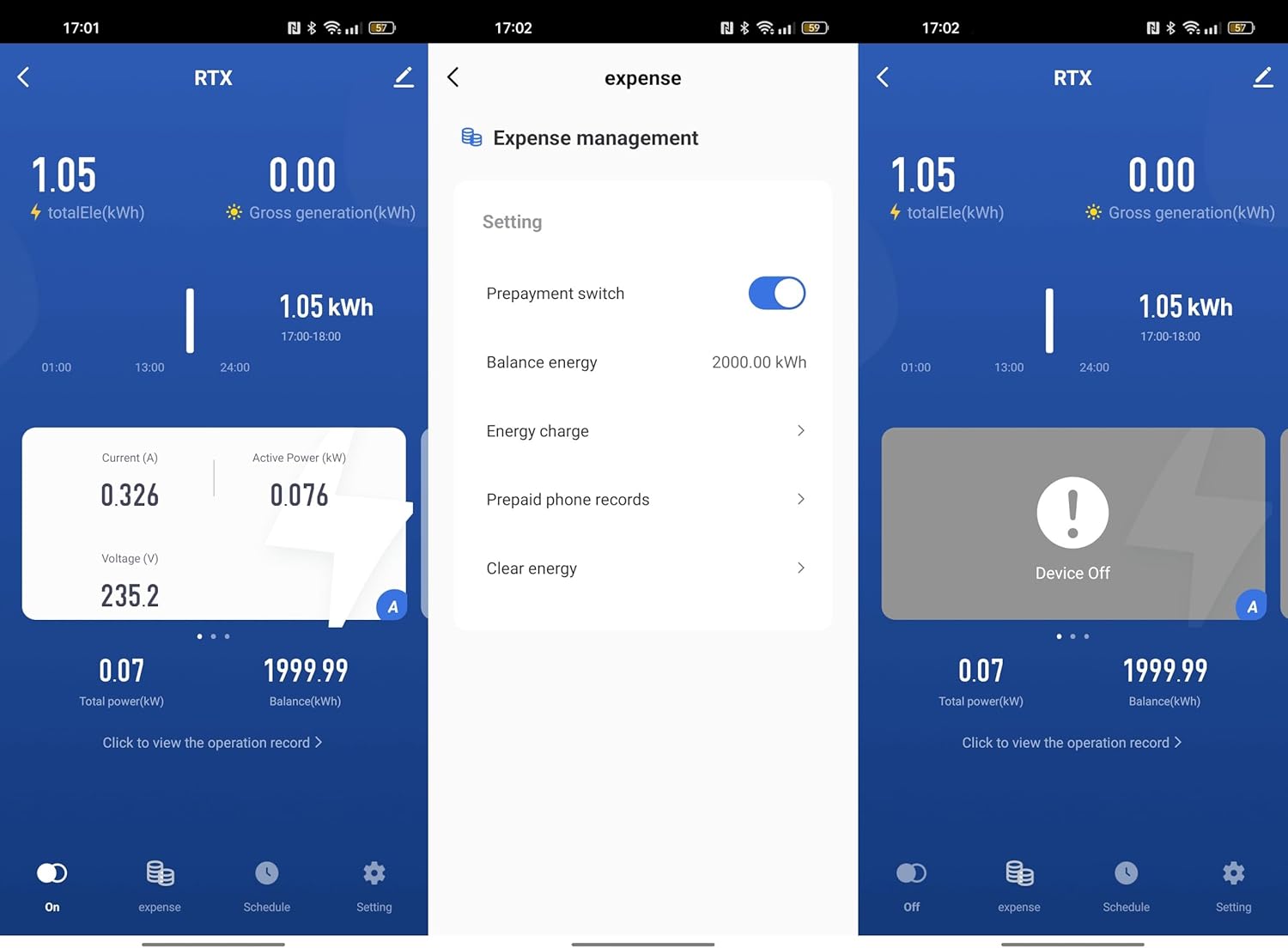
Set an energy limit within the Tuya Smart Life app. The device will notify you if this limit is exceeded, allowing for better energy budget management.

Mô tả hình ảnh: A series of three screenshots from the Tuya Smart Life app. The first shows the main device interface. The second shows the "Expense management" screen with options for "Prepayment switch", "Balance energy", "Energy charge", and "Prepaid phone records". The third shows the device in an "Off" state, indicating remote control functionality.
5. Điều khiển bằng giọng nói
Integrate the RTX DTS1419 with Google Home or Amazon Alexa for voice-activated control. Follow the instructions provided by Google Home or Alexa for connecting Tuya Smart Life devices.
- Enable the "Tuya Smart Life" skill/action in your voice assistant app.
- Link your Tuya account.
- Khám phá các thiết bị.
- Use voice commands such as "Alexa, turn off the main power" or "Hey Google, what is the energy consumption of the meter?" (Specific commands may vary based on setup).
6. Automatic Scenarios
Configure automated actions within the Tuya Smart Life app based on predefined measurement values. For example, you can set the device to automatically shut off if the voltage vượt quá giới hạn an toàn.
- Navigate to the "Smart" or "Automation" section in the Tuya Smart Life app.
- Create a new automation.
- Set conditions based on voltage, current, or power readings from the DTS1419.
- Define actions, such as turning off the meter or sending a notification.
BẢO TRÌ
- Vệ sinh: Lau thiết bị bằng vải khô, mềm. Không sử dụng chất tẩy rửa có tính mài mòn hoặc dung môi.
- Cập nhật chương trình cơ sở: Periodically check the Tuya Smart Life app for available firmware updates for the device to ensure optimal performance and security.
- Kiểm tra kết nối: Regularly inspect wiring connections for tightness and signs of wear.
Xử lý sự cố
| Vấn đề | Nguyên nhân có thể | Giải pháp |
|---|---|---|
| Thiết bị không bật nguồn. | Không có nguồn điện; đấu dây sai. | Check circuit breaker. Verify wiring connections according to the diagram. |
| Không thể kết nối với Wi-Fi. | Incorrect Wi-Fi password; 5GHz network; device not in pairing mode; weak signal. | Ensure correct 2.4 GHz Wi-Fi password. Put device in pairing mode (blinking blue LED). Move router closer or use a Wi-Fi extender. |
| Các bài đọc không chính xác. | Loose wiring connections; faulty device. | Check all wiring connections for tightness. If problem persists, contact support. |
| Điều khiển từ xa không hoạt động. | No internet connection; app issue; device offline. | Check your home internet connection. Ensure the device is online in the Tuya app. Restart the app. |
Thông số kỹ thuật
- Người mẫu: DTS1419
- Thương hiệu: RTX
- Kiểu: Three-Phase DIN Rail Energy Meter
- Kết nối: Wi-Fi (2.4 GHz)
- Dòng điện tối đa: 80A
- Dòng điện liên tục: 10A mỗi pha
- Tậptage: 3x230/400V 50Hz
- Pulse Constant: 800imp / kWh
- Lớp chính xác: 1
- Khả năng tương thích: Tuya Smart Life App, Google Home, Amazon Alexa
- Lắp đặt: Đường ray DIN 35mm
- ASIN: B0CDVLZV9B
Bảo hành và Hỗ trợ
For warranty information, please refer to the documentation provided with your purchase or contact your retailer. For technical support, please visit the RTX webtrang web hoặc liên hệ với bộ phận dịch vụ khách hàng của họ.
Nhà sản xuất: RTX


