1. Giới thiệu
The Gemini GMU-M100 is a handheld UHF wireless microphone system designed for a variety of audio applications. This system provides wireless freedom, allowing users to move without cable restrictions, and is suitable for performances, presentations, karaoke, and more. The system operates within the 512 to 541.7 MHz frequency range (for the US market) and offers a stable signal transmission.
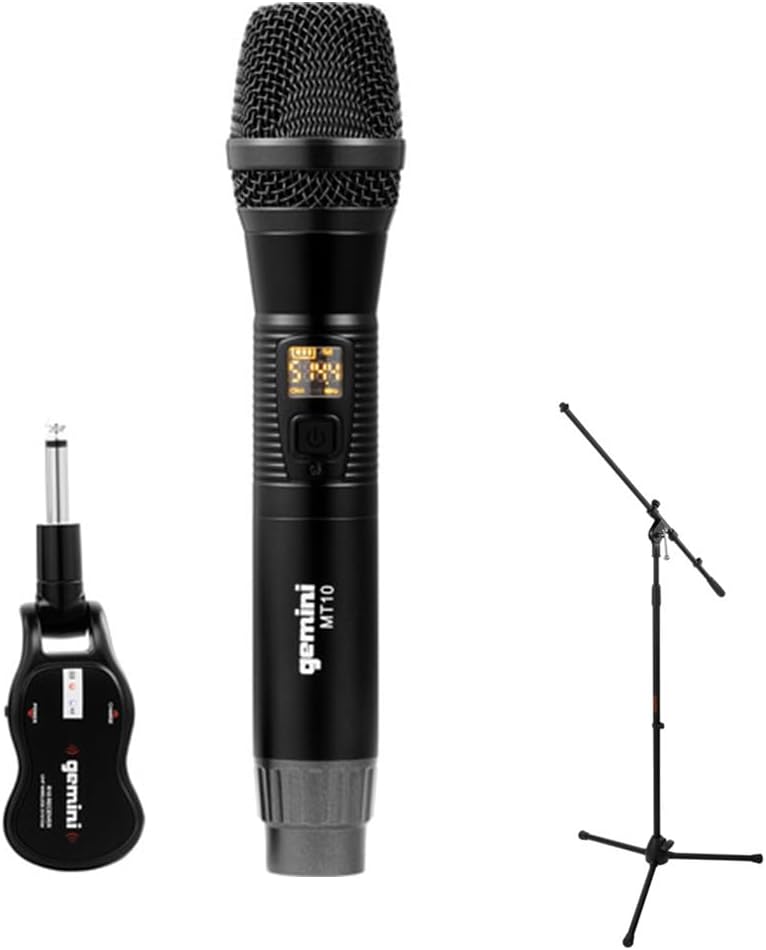
Image 1.1: The Gemini GMU-M100 Handheld UHF Wireless Microphone System, including the handheld microphone, plug-in receiver, and an optional microphone stand.
2. Nội dung gói hàng
Vui lòng kiểm tra nội dung gói hàng để đảm bảo tất cả các mặt hàng đều có sẵn và trong tình trạng tốt:
- GMU-M100 Handheld Wireless Microphone
- GMU-M100 Plug-in Wireless Receiver
- Rechargeable Lithium Batteries (pre-installed or included for both units)
- Cáp sạc Micro-USB
- Hướng dẫn sử dụng (tài liệu này)
Note: Additional accessories such as a microphone stand may be included if purchased as part of a bundle.
3. Sản phẩm hếtview
3.1 Handheld Microphone (MT10)
The handheld microphone features a dynamic capsule with a cardioid pickup pattern, designed to focus on the sound source while minimizing background noise. It includes an LED screen for displaying battery life and frequency information, and a SET button for frequency adjustment.
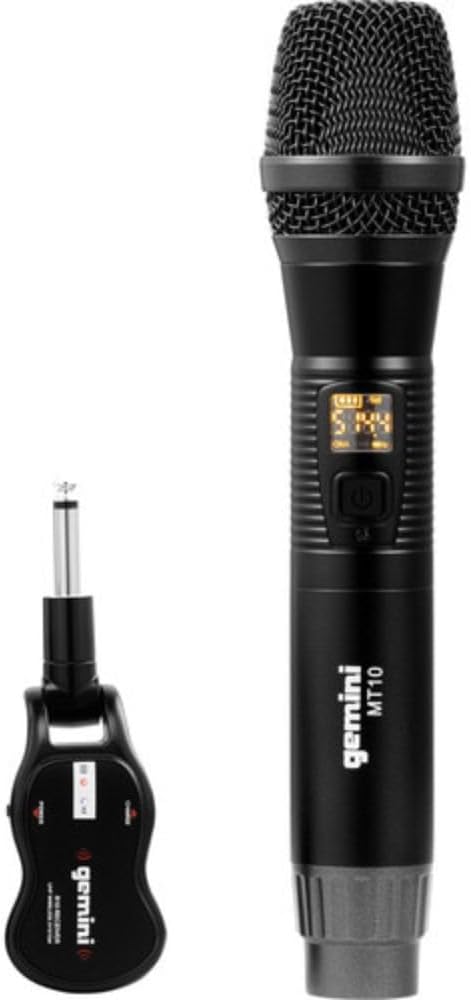
Image 3.1: The GMU-M100 handheld microphone and its compact plug-in receiver.
3.2 Plug-in Receiver (R10)
The compact receiver connects directly to your audio equipment via a standard 1/4" TS plug. It receives the wireless signal from the microphone and outputs it to your PA system, ampamply, hoặc bộ trộn.

Hình ảnh 3.2: Góc cạnh view highlighting the design of the microphone and receiver.
4. Thiết lập
4.1 Sạc các đơn vị
Both the microphone and receiver are powered by rechargeable lithium batteries. Before first use, ensure both units are fully charged.
- Locate the Micro-USB charging port on the bottom of the microphone and on the side of the receiver.
- Connect the included Micro-USB cable to the charging port of each unit and plug the other end into a USB power source (e.g., computer USB port, USB wall adapter).
- The LED indicator on each unit will show charging status (refer to the unit's specific LED behavior for full charge indication).

Image 4.1: Close-up of the microphone's Micro-USB charging port (DC-5V).

Image 4.2: The Micro-USB charging cable provided for both units.
4.2 Battery Installation (Microphone)
The microphone uses a user-replaceable 18650 1200mAh battery. If the battery needs replacement or initial installation:
- Tháo nắp đáy của micro.
- Insert the 18650 battery, ensuring correct polarity (+/-).
- Vặn chặt nắp đáy lại.

Image 4.3: The microphone with its battery compartment open, revealing the 18650 battery.
4.3 Kết nối máy thu
The receiver connects directly to your audio input device.
- Plug the 1/4" TS connector of the receiver into an available 1/4" input jack on your PA speaker, ampamply, bộ trộn âm hoặc thiết bị âm thanh khác.
- Ensure the audio equipment is powered off before connecting the receiver.
4.4 Bật nguồn và ghép nối
Microphone và bộ thu được thiết kế để tự động ghép nối.
- Power on your audio equipment.
- Press and hold the power button on the handheld microphone until the LED screen illuminates.
- Press and hold the power button on the plug-in receiver.
- The units will automatically pair. A successful connection is typically indicated by a stable signal icon on the microphone's LED screen.
5. Hướng dẫn vận hành
5.1 Điều khiển âm lượng
The output volume can be controlled directly from the handheld microphone using the designated volume buttons (if present) or through the connected audio equipment's input gain/volume controls.
5.2 Điều chỉnh tần số
If you experience interference, you can change the operating frequency of the microphone system:
- With the microphone powered on, press the BỘ cái nút.
- The microphone will cycle through available UHF frequencies. The receiver will automatically sync to the new frequency.
- Select a clear frequency to ensure optimal performance.
5.3 Phạm vi không dây
The GMU-M100 system offers a wireless range of over 164 feet (50 meters) in optimal conditions. Obstacles, other wireless devices, and environmental factors can affect this range.
6. Bảo trì
6.1 Chăm sóc pin
- Sạc đầy pin trước khi cất giữ trong thời gian dài.
- Tránh để pin ở nhiệt độ quá cao.
- If the microphone will not be used for a long period, remove the 18650 battery.
6.2 Vệ sinh
- Lau sạch micro và bộ thu bằng khăn mềm, khô.
- Không sử dụng hóa chất mạnh hoặc chất tẩy rửa ăn mòn.
- Avoid moisture contact with electronic components.
KHAI THÁC. Xử lý sự cố
| Vấn đề | Nguyên nhân có thể | Giải pháp |
|---|---|---|
| Không có âm thanh phát ra | Microphone or receiver not powered on; low battery; incorrect connection; receiver not paired. | Ensure both units are charged and powered on. Check all cable connections. Verify pairing (power cycle both units). Adjust volume on microphone and audio equipment. |
| Nhiễu hoặc tĩnh | Operating on a crowded frequency; proximity to other wireless devices; environmental interference. | Nhấn nút BỘ button on the microphone to change to a different frequency. Move away from other wireless devices or sources of electromagnetic interference. |
| Phạm vi không dây ngắn | Obstacles between microphone and receiver; low battery; environmental factors. | Ensure a clear line of sight between microphone and receiver. Fully charge batteries. Reduce distance between units. |
| Microphone LED screen off | Microphone is off; battery is depleted. | Press the power button to turn on. Charge the microphone battery. |
8. Thông số kỹ thuật
| Tính năng | Đặc điểm kỹ thuật |
|---|---|
| Người mẫu | GMU-M100 |
| Yếu tố hình thức của micrô | Hệ thống micrô cầm tay |
| Dải tần số (Mỹ) | 512 - 541.7 MHz |
| Wireless Dải | Over 164 feet (50 meters) |
| Nguồn điện | Rechargeable Lithium Battery (USB Powered) |
| Pin micro | 18650 1200mAh (user-replaceable) |
| Đầu nối máy thu | 1/4" TS Plug |
| Vật liệu | Kim loại |
| Mẫu cực | Đơn hướng (Cardioid) |
| Số lượng kênh | 16 |
| Trọng lượng sản phẩm | 15.7 ounce (khoảng 445g) |
| Kích thước gói hàng | 13 x 5.6 x 2.6 inch (khoảng 33 x 14.2 x 6.6 cm) |
9. Bảo hành và Hỗ trợ
For warranty information, technical support, or service inquiries, please refer to the official Gemini webhoặc liên hệ trực tiếp với bộ phận hỗ trợ khách hàng của họ. Hãy giữ lại hóa đơn mua hàng để yêu cầu bảo hành.
Gemini Customer Support: Xin vui lòng ghé thăm www.geminisound.com/support for the latest support information and contact details.