1. Giới thiệu
This manual provides detailed instructions for the installation, operation, and maintenance of your CP PLUS 4MP Wi-Fi Floodlight Camera, model CP-F42A. Please read this manual thoroughly before using the product to ensure proper functionality and safety. This camera combines high-resolution video surveillance with integrated floodlighting for enhanced security.
2. Thông tin an toàn
- Hãy đảm bảo nguồn điện phù hợp với yêu cầu của máy ảnh.
- Không được tự ý tháo rời hoặc sửa đổi máy ảnh.
- Install the camera in a location where it is protected from extreme weather conditions, although it has an IP54 rating, direct exposure to heavy rain or prolonged submersion is not recommended.
- Keep the camera away from heat sources and direct sunlight.
- Xử lý máy ảnh cẩn thận để tránh hư hỏng vật lý.
- Nếu bạn không chắc chắn về hệ thống dây điện, hãy tham khảo ý kiến của thợ điện có chuyên môn để được lắp đặt.
3. Nội dung gói hàng
Xác minh rằng tất cả các mục đều có trong gói hàng:
- CP PLUS 4MP Wi-Fi Floodlight Camera (CP-F42A)
- Bộ đổi nguồn
- Vít lắp và phích cắm tường
- Hướng dẫn bắt đầu nhanh (không bao gồm trong sách hướng dẫn này)
4. Sản phẩm hếtview
The CP-F42A is an outdoor Wi-Fi floodlight camera designed for surveillance and illumination. It features a 4MP sensor for clear video, H.265 video compression for efficient storage, and a 110° viewing angle. The integrated floodlight provides illumination, and the PIR sensor detects motion up to 12 meters.
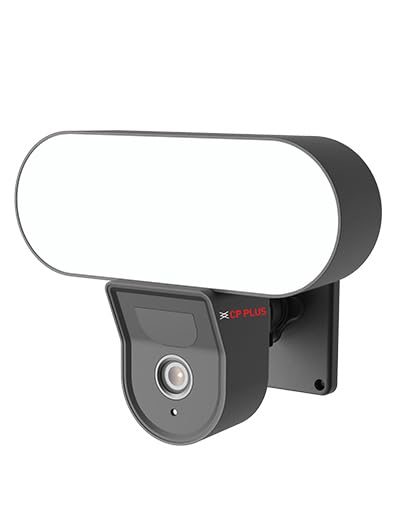
Hình ảnh: Mặt trước view of the CP PLUS 4MP Wi-Fi Floodlight Camera CP-F42A, showing the camera lens and the integrated floodlight panel.
Các thành phần chính:
- Ống kính máy ảnh: Quay video 4MP.
- Floodlight Panel: Cung cấp ánh sáng.
- Cảm biến PIR: Phát hiện chuyển động.
- Micrô: Đối với đầu vào âm thanh.
- Người nói: Dành cho đầu ra âm thanh hai chiều.
- Lắp khung: Để cài đặt an toàn.
5. Thiết lập
5.1 Cài đặt vật lý
- Chọn vị trí: Chọn một địa điểm ngoài trời có tầm nhìn thoáng đãng. view of the area you wish to monitor and within Wi-Fi range. Ensure the mounting surface is sturdy.
- Đánh dấu điểm khoan: Sử dụng khung gắn làm khuôn mẫu để đánh dấu vị trí các lỗ vít trên tường.
- Lỗ khoan: Khoan các lỗ mồi tại các điểm đã đánh dấu. Lắp tắc kê nếu lắp đặt trên tường gạch.
- Gắn máy ảnh: Secure the mounting bracket to the wall using the provided screws. Attach the camera to the bracket.
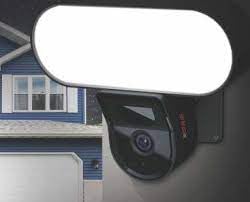
Image: The CP PLUS Floodlight Camera mounted on the exterior of a house, illustrating a typical installation scenario during the day.
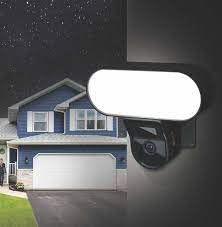
Image: The CP PLUS Floodlight Camera mounted on the exterior of a house at night, with the floodlight illuminated, demonstrating its night-time functionality.
5.2 kết nối nguồn
Connect the provided power adapter to the camera's power input port and then plug it into a suitable electrical outlet. Ensure the connection is secure and protected from moisture.
5.3 Kết nối Wi-Fi và ghép nối ứng dụng
- Tải ứng dụng: Tìm kiếm the "ezyKam+" app (or the recommended CP PLUS app) on your smartphone's app store (iOS or Android) and install it.
- Tạo tài khoản: Mở ứng dụng và đăng ký tài khoản mới hoặc đăng nhập nếu bạn đã có tài khoản.
- Thêm thiết bị: Follow the in-app instructions to add a new device. Select "Floodlight Camera" or a similar option.
- Kết nối với Wi-Fi: The app will guide you through connecting the camera to your home Wi-Fi network. This usually involves scanning a QR code on the camera or entering your Wi-Fi credentials.
- Hoàn tất thiết lập: Sau khi kết nối, bạn có thể đặt tên cho camera và điều chỉnh cài đặt ban đầu.
Image: Branding for CP PLUS ezyKam+ Wi-Fi Floodlight Full Color Camera, indicating compatibility with Alexa and Google Home, relevant for app pairing and smart home integration.
6. Hướng dẫn vận hành
Access all camera functions through the dedicated mobile application.
6.1 Trực tiếp View
Mở ứng dụng và chọn máy ảnh của bạn từ danh sách thiết bị để view the live video feed. You can pinch to zoom and pan across the image.
6.2 Ghi và phát lại
- Ghi thủ công: Nhấn vào nút ghi âm trong buổi phát trực tiếp view to start/stop manual recording.
- Ghi lại sự kiện: The camera automatically records when motion is detected. These recordings are stored on the installed microSD card (if any) or cloud storage (subscription may be required).
- Phát lại: Truy cập foo đã ghitagBạn có thể xem thông qua mục "Phát lại" hoặc "Lịch sử" trong ứng dụng.
6.3 Phát hiện chuyển động và cảnh báo
Configure motion detection sensitivity and areas within the app settings. When motion is detected, the camera can send push notifications to your phone and trigger recording. The PIR sensor has a detection range of 6-12 meters.
6.4 Điều khiển đèn pha
The floodlight can be controlled manually via the app or set to activate automatically upon motion detection during specific times or low-light conditions. Adjust brightness and duration settings in the app.
6.5 Âm thanh hai chiều
Use the microphone and speaker icons in the live view to communicate with visitors or deter intruders. Press and hold the microphone icon to speak, and release to listen.
6.6 Tầm nhìn ban đêm
The camera features infrared (IR) night vision for clear black-and-white video in low-light conditions and can also utilize the floodlight for full-color night vision when activated. The night vision range is up to 12 meters.
7. Bảo trì
7.1 Vệ sinh
Wipe the camera lens and floodlight panel with a soft, damp vải để lau sạch bụi bẩn. Không sử dụng hóa chất mạnh hoặc chất tẩy rửa có tính mài mòn.
7.2 cập nhật chương trình cơ sở
Periodically check the app for available firmware updates. Keeping your camera's firmware up-to-date ensures optimal performance and security features.
7.3 Quản lý lưu trữ
If using a microSD card, regularly check its status in the app. Format the card periodically to maintain performance. Back up important recordings before formatting.
KHAI THÁC. Xử lý sự cố
| Vấn đề | Giải pháp khả thi |
|---|---|
| Camera không bật được. | Check power adapter connection and ensure the outlet is functional. |
| Không thể kết nối với Wi-Fi. | Ensure the camera is within Wi-Fi range. Verify Wi-Fi password. Try resetting the camera and router. |
| Chất lượng video kém. | Check Wi-Fi signal strength. Clean the camera lens. Ensure sufficient lighting. |
| Phát hiện chuyển động không hoạt động. | Adjust motion detection sensitivity and area settings in the app. Ensure there are no obstructions. |
| Floodlight not activating. | Check floodlight settings in the app. Ensure it's set to activate on motion or during low light. |
9. Thông số kỹ thuật
| Tính năng | Chi tiết |
|---|---|
| Số hiệu mẫu | CP-F42A |
| Nghị quyết | 4MP (Effective Still Resolution: 4 MP) |
| Nén Video | H.265, MPEG |
| Viewgóc ing | 110 Độ |
| Khoảng cách PIR | 6 ~ 12 mét |
| Công nghệ không dây | Wi-Fi |
| Tầm nhìn ban đêm | 12 Meters (Infrared, Night Color) |
| Tốc độ khung hình | 20 khung hình mỗi giây |
| Thu phóng quang học | 3x |
| Bảo vệ quốc tế Rating | IP54 |
| Loại cảnh báo | Chỉ chuyển động |
| Nguồn điện | Điện có dây |
| Các thành phần bao gồm | Bộ chuyển đổi |
| Kích thước (D x R x C) | 20 x 12 x 10 Centimet |
| Trọng lượng sản phẩm | 630 gam |
| Sử dụng trong nhà/ngoài trời | Ngoài trời |
| Công nghệ cảm biến ảnh | CMOS |
| Sử dụng được đề xuất | Home Security, Night Vision |
10. Bảo hành và Hỗ trợ
For warranty information and technical support, please refer to the official CP PLUS webtrang web hoặc liên hệ với bộ phận chăm sóc khách hàng của họ. Giữ lại hóa đơn mua hàng để làm bằng chứng mua hàng khi yêu cầu bảo hành.
CP PLUS Chính thức Webđịa điểm: www.cpplusworld.com


