Giới thiệu
This manual provides detailed instructions for the setup, operation, and maintenance of your PDP Afterglow Wave Wireless Headset. Designed for an immersive audio experience, this headset is compatible with Xbox Series X|S, Windows 10/11 PC, PlayStation PS5/PS4, and various Bluetooth-enabled devices.

Image: The PDP Afterglow Wave Wireless Headset, showcasing its black design and customizable RGB lighting on the earcups.
Tính năng sản phẩm
- Ánh sáng RGB có thể tùy chỉnh: Personalize your headset with millions of color combinations and lighting effects via the free PDP Control Hub app.
- Thiết kế thoải mái: Features soft, memory foam ear cushions and swivel earcups for extended gaming sessions and comfortable storage.
- Âm thanh đắm chìm: Equipped with 50mm drivers for clear highs and deep lows.
- Điều khiển thuận tiện: On-ear volume controls and a game/chat balance dial for quick audio adjustments.
- Micrô khử tiếng ồn: Provides clear communication, with a flip-to-mute function for privacy.
- Kết nối đa năng: Connects wirelessly via a low-latency USB dongle to consoles or via Bluetooth to mobile devices.
- Khả năng tương thích rộng: Officially licensed for Xbox, and compatible with Windows 10/11 PC, PlayStation consoles (PS5/PS4), and most Bluetooth devices.
- Tuổi thọ pin dài: Thời gian phát nhạc lên đến 16 giờ chỉ với một lần sạc.
Hướng dẫn thiết lập
1. Sạc tai nghe
Before initial use, fully charge the headset. Connect the included USB charging cable to the headset's charging port and to a powered USB port (e.g., console, PC, USB wall adapter). The headset's RGB lights will pulse during charging and should turn solid when fully charged. A full charge typically takes approximately 8 hours and provides up to 16 hours of battery life.
Image: The headset highlighting its 16-hour battery life for extended gaming sessions.
2. Connecting to Xbox/PC (Wireless Dongle)
- Insert the USB wireless dongle into an available USB port on your Xbox console or PC.
- Power on the headset by pressing and holding the Power button until the lights illuminate.
- The headset and dongle should automatically pair. A solid light on the dongle and headset indicates a successful connection.
- Adjust volume using the on-ear controls.
Image: The headset emphasizing its cross-compatibility with various gaming platforms and Bluetooth devices.
3. Connecting via Bluetooth (Mobile Devices, PS5/PS4)
- Đảm bảo rằng tai nghe đã được tắt nguồn.
- Press and hold the Bluetooth button on the headset until the indicator light begins to flash, indicating pairing mode.
- On your device (e.g., smartphone, tablet, PlayStation console), navigate to Bluetooth settings and select "Afterglow Wave" from the list of available devices.
- Once connected, the headset's Bluetooth indicator light will become solid.
Hướng dẫn sử dụng
Điều khiển tai nghe
- Nút nguồn: Nhấn và giữ để bật/tắt nguồn. Nhấn nhanh để kiểm tra tình trạng pin.
- Quay số âm lượng: Rotate to adjust the overall audio volume.
- Nút điều chỉnh cân bằng giữa game và chat: Điều chỉnh cân bằng giữa âm thanh trò chơi và âm thanh trò chuyện.
- Nút chế độ: Cycles through different RGB lighting effects. Press and hold to turn RGB lights on/off.
- Micrô: Flip the microphone boom up to mute. Flip down to unmute.
Image: Close-up of the headset's noise-canceling microphone, illustrating the flip-to-mute feature.
Ứng dụng Trung tâm Điều khiển PDP
Download the free PDP Control Hub app from the Microsoft Store (for Xbox/PC) or your device's app store (for mobile) to customize your headset:
- Modify RGB lighting zones and effects.
- Adjust audio settings and equalizer presets.
- Cập nhật phần mềm tai nghe.
Image: Diagram showing the customizable RGB lighting zones on the headset, managed via the PDP Control Hub app.
BẢO TRÌ
- Vệ sinh: Hãy dùng khăn mềm, khô để lau tai nghe. Tránh sử dụng chất tẩy rửa có tính ăn mòn hoặc dung môi.
- Kho: Store the headset in a cool, dry place away from direct sunlight and extreme temperatures. The swivel earcups allow for a flat storage position.
- Chăm sóc pin: To prolong battery life, avoid fully discharging the headset frequently. Charge regularly, even if not in use for extended periods.
- Khả năng chống nước: Tai nghe này không chống nước. Tránh tiếp xúc với chất lỏng.
Xử lý sự cố
| Vấn đề | Giải pháp khả thi |
|---|---|
| Không có âm thanh hoặc âm lượng thấp |
|
| Micrô không hoạt động |
|
| Headset disconnects randomly or poor signal |
|
| Đèn RGB không hoạt động |
|
Thông số kỹ thuật
| Tính năng | Chi tiết |
|---|---|
| Tên mẫu | Tai nghe không dây Afterglow Wave |
| Số hiệu mẫu | 049-032-BK |
| Kết nối | Wireless (USB Dongle), Bluetooth |
| Phiên bản Bluetooth | 4.0 |
| Phạm vi Bluetooth | 20 feet |
| Kích thước trình điều khiển âm thanh | Trình điều khiển động 50mm |
| Trở kháng | 32 Ohm |
| Tuổi thọ pin | Lên đến 16 giờ |
| Thời gian sạc | Khoảng 8 giờ |
| Micrô | Khử tiếng ồn, lật màn hình để tắt tiếng. |
| Kiểm soát | On-ear Volume, Game/Chat Balance, Mode Button (RGB) |
| Khả năng tương thích | Xbox Series X|S, Windows 10/11 PC, PlayStation PS5/PS4, Bluetooth devices |
| Cân nặng | 1.19 pound (khoảng 0.54 kg) |
| Vật liệu | Polycacbonat (PC) |
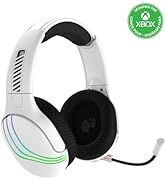
Image: The headset highlighting its 50mm drivers for immersive audio quality.
Thông tin bảo hành
PDP products are covered by a manufacturer's warranty. For specific details regarding your PDP Afterglow Wave Wireless Headset warranty period and terms, please refer to the official PDP webtrang web hoặc liên hệ với bộ phận hỗ trợ khách hàng của họ. Hãy giữ lại hóa đơn mua hàng để yêu cầu bảo hành.
Ủng hộ
For further assistance, technical support, or to download the PDP Control Hub app, please visit the official PDP webđịa điểm:
You can also find FAQs and additional resources on their support pages.


