Giới thiệu
The Xnbada RC03RFB is a wireless 2.4G RF 4-zone remote control designed for RGB, RGBW, and RGBCCT LED strip lights. It offers comprehensive control over color, brightness, and dynamic modes for multiple lighting zones. This manual provides detailed instructions for setup, operation, and maintenance of your remote control.
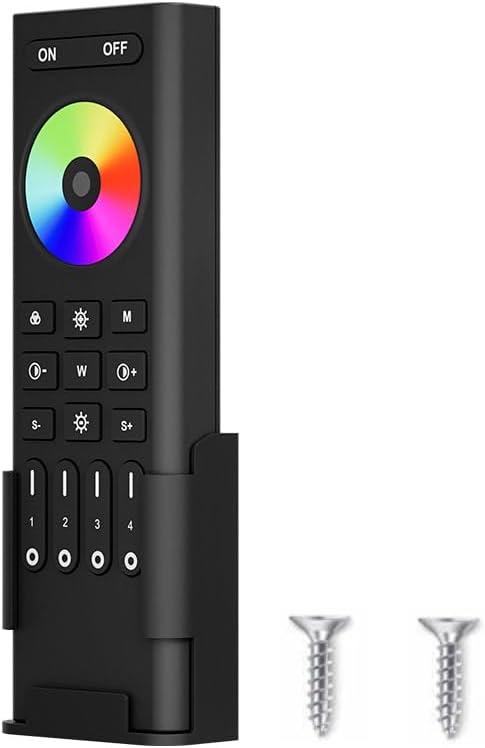
Image: Xnbada RC03RFB Smart Remote Control, showing the remote, its wall-mounted holder, and two small screws for installation.
Thông số kỹ thuật
| Tính năng | Sự miêu tả |
|---|---|
| Thương hiệu | Xnbada |
| Số hiệu mẫu | RC03RFB-YKQ |
| Loại điều khiển | Không dây 2.4G RF |
| Supported LED Types | RGB, RGBW, RGBCCT |
| Vùng kiểm soát | 4 vùng |
| Khoảng cách điều khiển | Lên đến 30 mét (98 feet) |
| Nguồn điện | 2 x Pin AAA (không bao gồm) |
| Kích thước | 5.91 x 2.17 x 0.98 inch (140.1mm x 45.8mm x 17mm) |
| Vật liệu | Nhựa |
| Tính năng đặc biệt | Low power consumption, 16 million colors, fast communication rate, touch screen swipe for color, one-key 7 pure colors. |
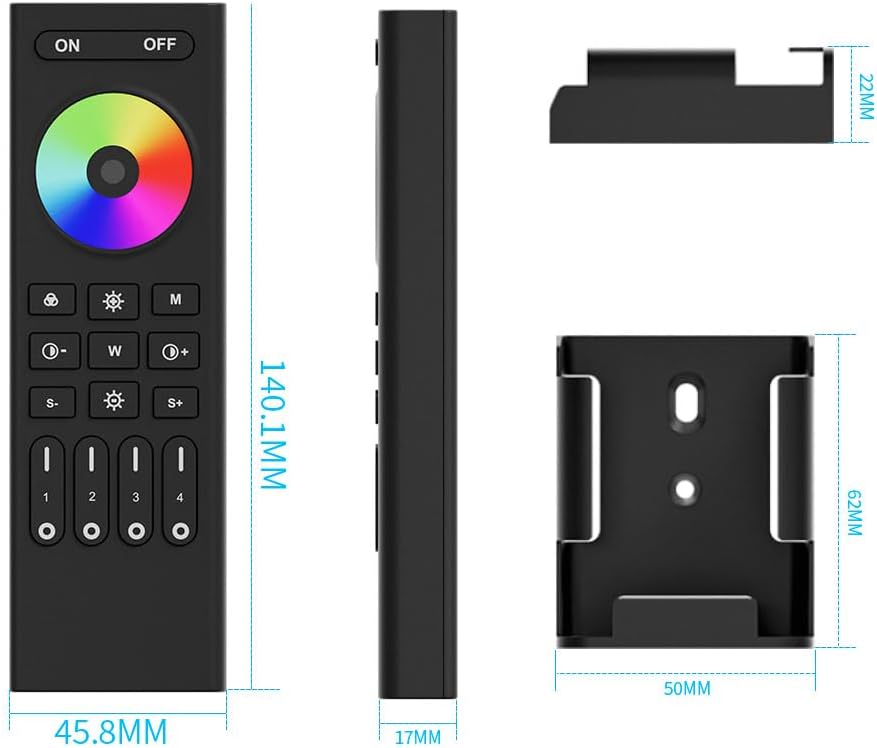
Image: Detailed dimensions of the RC03RFB remote control and its accompanying wall mount.
Sản phẩm trênview
The RC03RFB remote control features a user-friendly layout with a color touch ring and dedicated buttons for various functions. Understanding each button's purpose is key to effective control.

Image: A detailed diagram illustrating the function of each button on the RC03RFB remote control.
- Nút BẬT/TẮT: Press to turn all linked devices ON or OFF.
- Vòng màu: Touch the slider to select from 16 million colors.
- 7 Colors Switching Button: Short press to switch between pure colors (orange, yellow, green, cyan, blue, purple, red). Long press for gradual color changes.
- Brightness Adjustment Buttons (S-/S+): Press to dim or brighten the lights.
- Dynamic Modes Button (M): Press repeatedly to switch between various dynamic lighting modes.
- Color Temperature/Saturation Buttons (W, Sun icon):
- Under white light mode: Press 'W' to change white light to cold white, 'Sun icon' to warm white.
- Under color light mode: Press 'W' to reduce saturation, 'Sun icon' to add saturation.
- Nút ánh sáng trắng: Press to get pure white light.
- Preset Brightness Buttons (30%, 60%, 100%): Quickly set brightness levels.
- Dynamic Mode Speed Buttons (S-/S+): Điều chỉnh tốc độ của chế độ động.
- Zone ON/OFF/Night Light Mode Buttons (1-4): Control individual zones. Short press to turn zone ON/OFF. Long press for night light mode.
Cài đặt
1. Lắp đặt pin
The RC03RFB remote control requires two AAA batteries (not included). Ensure correct polarity when inserting the batteries.
2. Lắp đặt giá treo tường
The remote comes with a wall-mounted holder for convenient storage and access. Use the provided screws to secure the holder to a desired surface.

Image: The RC03RFB remote control shown with its wall mount and a view of its back, indicating the battery compartment.
3. Linking and Unlinking Instructions
The remote control operates using 2.4G RF technology and needs to be linked with compatible LED controllers. The light can only be working after linking with the remote.
Hướng dẫn mã liên kết:
- Switch off the power to the LED light/controller. Wait for at least 10 seconds.
- Switch on the power to the LED light/controller.
- Within 3 seconds of switching on the light, short press the '1' button (or the desired zone button 1-4) on the remote control 3 times.
- The LED light should blink 3 times slowly, indicating successful linking.
Note: If linking fails (light does not blink slowly), please repeat the steps. A light that has already been linked cannot be linked again to the same remote/zone without unlinking first.
Hướng dẫn mã hủy liên kết:
- Switch off the power to the LED light/controller. Wait for at least 10 seconds.
- Switch on the power to the LED light/controller.
- Within 3 seconds of switching on the light, short press the '1' button (or the desired zone button 1-4) on the remote control 5 times.
- The LED light should blink 10 times quickly, indicating successful unlinking.
Note: If unlinking fails (light does not blink quickly), please repeat the steps. Lights that have not been linked do not need to be unlinked.

Image: Visual guide for linking and unlinking the remote control with LED light strips.
Hướng dẫn sử dụng
Kiểm soát cơ bản
- BẬT/TẮT nguồn: Nhấn nút ON button to turn on all linked devices. Press the TẮT button to turn off all linked devices.
- Lựa chọn màu sắc: Sử dụng Nhẫn màu by touching and sliding your finger to select from 16 million colors.
- Điều chỉnh độ sáng: Sử dụng S- Và S+ buttons to decrease or increase brightness. You can also use the preset 30%, 60%, and 100% buttons.
- Ánh sáng trắng: Press the dedicated white light button to switch to pure white illumination.

Image: The remote control demonstrating its 16 million color changeable panel slide control feature.

Image: The remote control illustrating its color temperature and saturation adjustment capabilities.

Image: The remote control demonstrating brightness adjustment, including a night light mode.
Kiểm soát nâng cao
- Chế độ động: Nhấn nút M button to cycle through various pre-programmed dynamic lighting effects. Adjust the speed of these modes using the S- Và S+ nút bấm.
- 4-Zone Group Control: The remote allows you to control up to four independent lighting zones. Use the dedicated buttons labeled 1, 2, 3, 4 to select and control each zone individually. Each zone can control countless LED strip controllers.

Image: A visual representation of how the remote control can manage four separate lighting zones.

Image: Illustration of the simultaneous auto-transmission feature, where the remote signal can be relayed between controllers within 30 meters.
Bộ điều khiển tương thích
The RC03RFB remote control is designed to work with specific Xnbada LED controllers. Compatible models include: C03W, C03Z, C04Z, C04W, C05W, C05Z, WB5, LM052, LM053, LM051. Ensure your controller is compatible for proper functionality.
Image: A selection of compatible LED controllers (C01W, C02W, C03W, C04W, C05W, WB5, FUT037, C01Z, C02Z, C03Z, C04Z, C05Z, LM051, LM053) that can be used with the RC03RFB remote.
BẢO TRÌ
- Vệ sinh: Hãy dùng khăn mềm, khô để lau điều khiển từ xa. Không sử dụng chất tẩy rửa có tính ăn mòn hoặc dung môi.
- Thay thế pin: Replace batteries when the remote's response becomes sluggish or it stops functioning. Ensure to use 2 new AAA batteries.
- Kho: Hãy bảo quản điều khiển từ xa ở nơi khô ráo, thoáng mát, tránh ánh nắng trực tiếp và nhiệt độ quá cao hoặc quá thấp.
Xử lý sự cố
| Vấn đề | Nguyên nhân có thể | Giải pháp |
|---|---|---|
| Điều khiển từ xa không phản hồi | Low or dead batteries; Not linked to controller; Out of range. | Replace batteries; Perform linking procedure (see Setup); Move closer to the controller (within 30m). |
| Lights not changing color/brightness | Incorrect mode selected; Controller incompatibility; Linking issue. | Ensure you are in the correct color/brightness mode; Verify controller model compatibility; Re-link the remote. |
| Linking procedure fails | Incorrect timing; Already linked; Power interruption during linking. | Ensure precise timing (within 3 seconds of power on); Unlink first if already linked; Ensure stable power supply during linking. |
| Inconsistent button response | Interference; Low battery. | Reduce potential interference sources (other 2.4G devices); Replace batteries. |
Video sản phẩm
Video: An official demonstration of the Xnbada RGB RGBW RGBCCT Wireless Smart Remote in action, showcasing its various lighting control features and responsiveness.
Bảo hành và Hỗ trợ
For warranty information or technical support regarding your Xnbada RC03RFB remote control, please contact Xnbada customer service directly. Refer to the product packaging or the official Xnbada webtrang web để biết chi tiết liên hệ.
Xnbada aims to provide innovative home lighting and smart home solutions. For further assistance, visit the official Xnbada Store on Amazon: Xnbada Store.


