1. Thông tin an toàn
THẬN TRỌNG!
- The device may only be used with the supplied power adapter.
- The device is powered by electricity. Caution is advised. Improper use carries the risk of fire, electric shock, and even death.
- Failure to follow instructions can lead to incorrect installation, damaging the device or endangering the user's life.
- The desk frame must not be modified or rebuilt in any way.
- Disconnect the desk from the power supply before performing maintenance.
- Do not use the product before assembly is complete.
- Không sử dụng vật sắc nhọn như dao hoặc kéo khi mở hộp.
- Assembly should be performed at a safe distance from furniture and other obstacles.
- Assembly should be performed out of reach of children, as some parts have sharp edges or may pose a choking hazard.
- Không sử dụng bàn cho mục đích khác ngoài mục đích ban đầu được nhà sản xuất chỉ định.
- Sản phẩm được thiết kế để sử dụng trên bề mặt phẳng và ổn định.
- To prevent damage to the product and risk of injury, check the maximum load capacity of the product (70 kg) and do not exceed it.
- Do not place your entire body weight on the tabletop. The product is intended for use by one person.
- Do not place flammable materials near the device, as there is a risk of fire.
- To prevent damage, keep the product away from direct sunlight.
- It is recommended that the user retighten screws if they become loose.
- Do not disassemble any parts beyond the original installation procedures.
- For general cleaning and maintenance of the desk, use a soft cloth with a mild cleaning agent.
2. Thiết lập và lắp ráp
The MARK ADLER Leader 7.0 desk is designed for straightforward assembly. Please follow the detailed instructions provided in the separate assembly guide included with your product packaging.
2.1 Tháo dỡ
- Carefully remove all components from the packaging. Avoid using sharp objects like knives or scissors directly on the packaging to prevent scratching or damaging the desk parts.
- Hãy kiểm tra xem tất cả các bộ phận được liệt kê trong hướng dẫn lắp ráp có đầy đủ và không bị hư hỏng hay không.
2.2 Vị trí
- Choose a flat, stable, and level surface for the desk. Uneven surfaces can affect the desk's stability and electric mechanism.
- Ensure there is sufficient space around the desk for safe operation, especially when adjusting height, to avoid collisions with walls or other furniture.
- Keep the desk away from direct sunlight and sources of heat or moisture to prevent material damage.
2.3 Các bước lắp ráp
- Refer to the dedicated assembly manual for step-by-step instructions.
- Ensure all connections are secure and screws are tightened appropriately.
- Do not connect the desk to power until assembly is fully completed and verified.

Figure 1: Desk Dimensions and Height Range

Figure 2: Desk in Sitting and Standing Positions
3. Hướng dẫn vận hành
The MARK ADLER Leader 7.0 desk features an intuitive control panel for easy height adjustment and memory functions.
3.1 Bảng điều khiển Overview

Hình 3: Bảng điều khiển
Bảng điều khiển thường bao gồm:
- Màn hình kỹ thuật số: Shows the current desk height in centimeters.
- Up (A) and Down (V) Buttons: Used to manually adjust the desk height.
- Các nút bộ nhớ (1, 2, 3): Lưu và gọi lại các cài đặt chiều cao ưa thích.
- Set (S) Button: Used to save a height setting to a memory button.
3.2 Điều chỉnh độ cao
- Nhấn và giữ Lên (A) nút để nâng bàn lên.
- Nhấn và giữ Xuống (V) nút để hạ thấp bàn.
- Release the button when the desired height is reached. The desk will move smoothly and quietly.
3.3 Thiết lập cài đặt trước cho bộ nhớ
To save a specific height setting:
- Adjust the desk to your desired height using the Up (A) or Down (V) buttons.
- Nhấn nút Bộ (S) button. The display may flash or show 'S'.
- Within a few seconds, press one of the memory buttons (1, 2 hoặc 3) to save the current height to that position. The display may confirm the setting.
3.4 Sử dụng các thiết lập bộ nhớ
To recall a saved height setting:
- Simply press the desired memory button (1, 2 hoặc 3Bàn sẽ tự động di chuyển đến độ cao đã lưu.
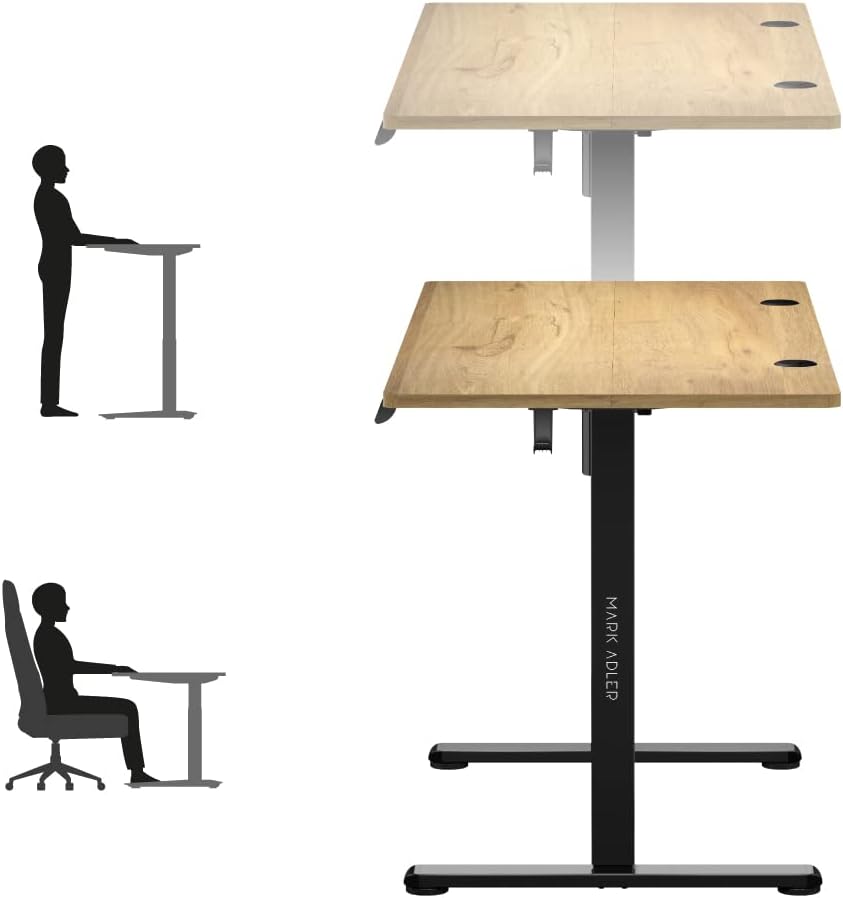
Figure 4: Ergonomic Use - Sitting and Standing
3.5 Quản lý cáp
The desk includes integrated cable entries to help organize your workspace.

Figure 5: Cable Grommet
3.6 Headphone Hook
A convenient hook is provided for hanging headphones or other accessories.

Figure 6: Headphone Hook
4. Bảo trì
Proper maintenance ensures the longevity and safe operation of your MARK ADLER Leader 7.0 desk.
- Vệ sinh: Để vệ sinh thông thường, hãy sử dụng khăn mềm.ampened with a mild cleaning agent. Avoid abrasive cleaners or harsh chemicals that could damage the surface.
- Ngắt kết nối nguồn: Always disconnect the desk from the power supply before performing any cleaning or maintenance tasks.
- Vít chặt: Periodically check all screws and connections. If any feel loose, gently retighten them to ensure stability.
- Chăm sóc môi trường: Keep the desk away from direct sunlight, extreme temperatures, and high humidity to prevent material degradation.
- Không sửa đổi: Do not attempt to modify or disassemble any parts of the desk frame or electric mechanism beyond the original installation procedures. Unauthorized modifications can void your warranty and pose safety risks.
KHAI THÁC. Xử lý sự cố
If you encounter any issues with your MARK ADLER Leader 7.0 desk, please refer to the following common troubleshooting steps:
5.1 Desk Not Moving
- Kiểm tra kết nối nguồn: Ensure the power cable is securely plugged into both the desk and a working wall outlet.
- Kiểm tra bộ đổi nguồn: Verify that the power adapter is the one supplied with the desk and is functioning correctly.
- Cơ chế thiết lập lại: Some electric desks have a reset function. Consult your assembly guide or contact support for specific reset procedures if available.
5.2 Uneven Movement or Noise
- Kiểm tra xem có vật cản không: Ensure there are no objects obstructing the desk's movement path, either above or below the tabletop.
- Phân bố trọng lượng: Make sure the weight on the desk is evenly distributed and does not exceed the maximum load capacity of 70 kg.
- Vít lỏng: Check and tighten any loose screws on the frame or tabletop connections.
5.3 Control Panel Not Responding
- Chu kỳ nguồn điện: Disconnect the power for 30 seconds, then reconnect it.
- Kết nối cáp: Ensure the control panel cable is securely connected to the desk's motor unit.
Nếu những bước này không giải quyết được vấn đề, vui lòng liên hệ với bộ phận hỗ trợ khách hàng để được hỗ trợ thêm.
6. Thông số kỹ thuật
| Tính năng | Chi tiết |
|---|---|
| Thương hiệu | MARK ADLER |
| Số hiệu mẫu | Lãnh đạo 7.0 |
| Màu sắc | Oak (top), Black (frame) |
| Kích thước sản phẩm (D x R x C) | 120 x 60 x 72-118cm |
| Vật liệu | Oak wood, Alloy steel, Metal |
| Tính năng đặc biệt | Electric height adjustment |
| Trọng lượng sản phẩm | 20.7 Kilôgam |
| Tải trọng tối đa | 70kg |
| Phạm vi điều chỉnh chiều cao | 72 cm đến 118 cm |
| Bảng điều khiển | Digital display, 3 memory presets |
| Quản lý cáp | 2 integrated cable entries |
7. Bảo hành và Hỗ trợ
7.1 Thông tin bảo hành
For detailed information regarding the product warranty, please refer to the warranty card included with your purchase or contact the retailer/manufacturer directly. Warranty terms typically cover manufacturing defects under normal use.
7.2 Hỗ trợ khách hàng
If you have any questions, require technical assistance, or need to report an issue that cannot be resolved using the troubleshooting guide, please contact MARK ADLER customer service or your point of purchase. Have your product model number (Leader 7.0) and purchase date ready when contacting support.


