1. Giới thiệu
This manual provides detailed instructions for the setup, operation, and maintenance of your Creative Sound Blaster Katana SE Multi-Channel Gaming Soundbar. Designed for an immersive audio experience, this soundbar features 180W peak power, a bi-amplified 4-driver design, Super X-Fi technology, and customizable RGB lighting. Please read this manual thoroughly before using your device to ensure optimal performance and safety.

Figure 1: Creative Sound Blaster Katana SE Gaming Soundbar
2. Thông tin an toàn quan trọng
- Đọc hướng dẫn này.
- Hãy giữ những hướng dẫn này.
- Hãy chú ý đến mọi cảnh báo.
- Thực hiện theo mọi hướng dẫn.
- Không sử dụng thiết bị này gần nước.
- Chỉ lau sạch bằng vải khô.
- Không chặn bất kỳ lỗ thông gió nào. Lắp đặt theo hướng dẫn của nhà sản xuất.
- Không lắp đặt gần bất kỳ nguồn nhiệt nào như bộ tản nhiệt, thanh nhiệt, bếp lò hoặc các thiết bị khác (bao gồm amplò phản ứng) tạo ra nhiệt.
- Bảo vệ dây nguồn khỏi bị dẫm lên hoặc kẹp, đặc biệt là ở phích cắm, ổ cắm tiện lợi và điểm chúng thoát ra khỏi thiết bị.
- Chỉ sử dụng các phụ kiện/tập tin đính kèm do nhà sản xuất chỉ định.
- Rút phích cắm của thiết bị này khi có sấm sét hoặc khi không sử dụng trong thời gian dài.
3. Nội dung gói hàng
Xác minh rằng tất cả các mục đều có trong gói hàng của bạn:
- Creative Sound Blaster Katana SE Soundbar
- Subwoofer (wired)
- Điều khiển từ xa
- Bộ đổi nguồn
- Cáp USB-C
- Cáp quang
4. Sản phẩm hếtview
The Sound Blaster Katana SE is an all-in-one soundbar designed for powerful and immersive audio. It features a sleek design with integrated controls and a front-facing display.
4.1. Soundbar Components
- Bảng điều khiển trên cùng: Power, Volume Up/Down, Source, Mode, SXFI.
- Màn hình phía trước: Shows current source (USB, AUX, OPTICAL, BT, TV), volume level, and selected sound mode.
- Front Headphone Jack: For connecting headphones directly.
- Micrô tích hợp: Dùng để giao tiếp bằng giọng nói.
- Dải đèn LED RGB: Customizable lighting effects located at the bottom of the soundbar.
- Trình điều khiển: Sinh-amplified 4-driver design for clear and precise audio.

Hình 2: Mặt trước view of the Sound Blaster Katana SE with RGB lighting
4.2. Kết nối bảng điều khiển phía sau
The rear panel provides various ports for connecting to your devices:
- HDMI Out (ARC): Dùng để kết nối với TV có hỗ trợ kênh trả về âm thanh (Audio Return Channel).
- SXFI Out: Dedicated port for Super X-Fi enabled headphones.
- Đầu vào âm thanh USB: For digital audio connection to PC/Mac.
- Aux Trong: Đầu vào âm thanh analog 3.5 mm.
- Quang học trong: Đầu vào âm thanh quang kỹ thuật số.
- Không có phụ đề: Dùng để kết nối loa siêu trầm có dây.
- Công suất đầu vào: Đối với bộ đổi nguồn.

Figure 3: Rear panel with HDMI ARC, SXFI Out, USB Audio In, Aux In, Optical In, Sub Out, and Power Input.
4.3. Loa siêu trầm
The included wired subwoofer enhances bass response for a more dynamic audio experience.

Hình 4: Nội bộ view showing the soundbar's bi-amplified drivers and the subwoofer's design.
5. Thiết lập
Follow these steps to set up your Sound Blaster Katana SE:
- Vị trí: Place the soundbar on a stable surface below your TV or monitor. Position the subwoofer on the floor near the soundbar for optimal bass.
- Kết nối loa siêu trầm: Connect the wired subwoofer cable to the 'Sub Out' port on the soundbar's rear panel.
- Kết nối nguồn: Connect the power adapter to the soundbar's power input and then plug it into a wall outlet.
- Kết nối nguồn âm thanh: Choose your preferred audio connection method (HDMI ARC, Optical, USB, Aux, or Bluetooth) and connect the appropriate cable.
Video 1: Official product video demonstrating the Sound Blaster Katana SE's features and connectivity options.
6. Tùy chọn kết nối
The Sound Blaster Katana SE offers a wide range of connectivity to suit various devices:
- HDMI Out (ARC): Connect to your TV's HDMI ARC port for high-quality audio and control.
- Đầu vào âm thanh USB: Ideal for connecting to PCs, Macs, or gaming consoles that support USB audio.
- Aux Trong: Use a 3.5mm audio cable to connect to devices with an analog audio output.
- Quang học trong: For digital audio connection from TVs, game consoles, or other media players.
- Bluetooth 5.0: Pair wirelessly with your mobile devices, tablets, or computers for convenient audio streaming.
- SXFI Out: Connect Super X-Fi certified headphones for a personalized holographic audio experience.

Figure 5: Soundbar showcasing versatile connectivity with gaming consoles and mobile devices.
7. Hướng dẫn vận hành
7.1. Bật/Tắt nguồn
Nhấn nút Nguồn trên bảng điều khiển phía trên của loa soundbar hoặc trên điều khiển từ xa để bật hoặc tắt thiết bị.
7.2. Điều khiển âm lượng
Use the Volume Up (+) and Volume Down (-) buttons on the soundbar or remote to adjust the audio level. The current volume will be displayed on the front panel.
7.3. Lựa chọn nguồn
Press the 'Source' button on the soundbar or remote to cycle through available input sources (HDMI ARC, USB, Aux, Optical, Bluetooth).
7.4. Chế độ âm thanh
The soundbar features optimized sound modes for different content types. Press the 'Mode' button on the soundbar or remote to switch between:
- Âm nhạc: Đã được tối ưu hóa cho việc phát nhạc.
- Phim: Tối ưu hóa cho âm thanh điện ảnh.
- Trò chơi: Tailored for immersive gaming soundscapes.
- Effects Off: Neutral audio profile.
7.5. Sử dụng điều khiển từ xa
The included remote control provides full functionality for the soundbar, including power, volume, source, mode, SXFI, RGB lighting, and custom buttons.
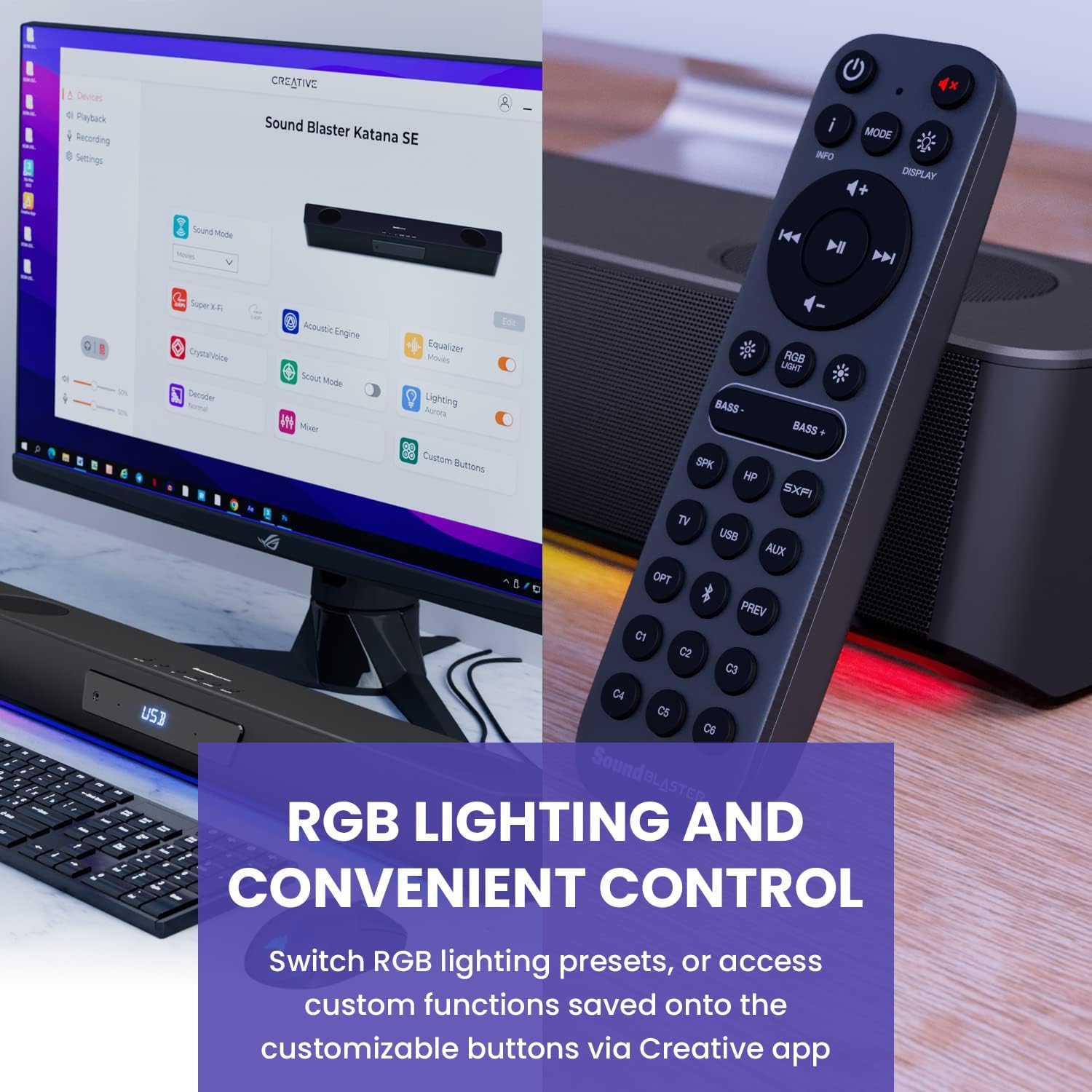
Figure 6: Remote control for the Sound Blaster Katana SE.
7.6. Creative App Customization
For advanced customization, download the Creative app on your PC or Mac. The app allows you to:
- Tune Audio Performance: Adjust EQ settings and activate Sound Blaster processing technologies.
- Tùy chỉnh ánh sáng RGB: Select from various RGB presets or create your own custom lighting effects.
- Map Custom Functions: Assign specific commands to the six customizable buttons on the remote control.

Figure 7: Creative app interface showing sound mode, Super X-Fi, Acoustic Engine, Equalizer, CrystalVoice, Scout Mode, Lighting, Decoder, Mixer, and Custom Buttons.
8. Super X-Fi Technology
Super X-Fi technology personalizes your headphone audio experience for optimized and realistic listening. It recreates the soundstagâm thanh của hệ thống nhiều loa trong tai nghe của bạn.
- Chế độ chiến đấu SXFI: Đạt được một lợi thế cạnh tranhtage in FPS games by accurately pinpointing enemy locations through enhanced audio cues.

Figure 8: Super X-Fi and SXFI Battle Mode for enhanced gaming audio.
9. Micrô tích hợp
The Sound Blaster Katana SE includes a built-in beamforming microphone, allowing you to participate in calls or in-game voice chat directly through the soundbar.
10. Chiếu sáng RGB
The integrated RGB lighting strip can be customized to match your setup or mood. Use the remote control to cycle through presets or the Creative app for advanced color and effect adjustments.
11. Bảo trì
To ensure the longevity and performance of your Sound Blaster Katana SE:
- Giữ thiết bị sạch sẽ bằng cách lau bằng vải khô, mềm.
- Avoid using liquid cleaners or aerosols.
- Đảm bảo các lỗ thông gió không bị tắc nghẽn.
- Không để thiết bị tiếp xúc với nhiệt độ hoặc độ ẩm quá cao.
KHAI THÁC. Xử lý sự cố
Nếu bạn gặp sự cố với loa soundbar, hãy tham khảo các giải pháp phổ biến sau:
- Không có âm thanh: Check all cable connections (power, audio source, subwoofer). Ensure the correct input source is selected on the soundbar. Verify the volume is not muted or too low.
- Âm thanh bị méo: Try reducing the volume. Check audio cable integrity. Ensure the audio source is providing a clean signal.
- Sự cố kết nối Bluetooth: Ensure the soundbar is in Bluetooth pairing mode. Delete the soundbar from your device's Bluetooth list and re-pair. Move closer to the soundbar to reduce interference.
- Điều khiển từ xa không hoạt động: Check battery levels and replace if necessary. Ensure there are no obstructions between the remote and the soundbar.
- Đèn RGB không hoạt động: Check settings in the Creative app. Ensure RGB lighting is enabled via the remote or app.
13. Thông số kỹ thuật
| Tính năng | Đặc điểm kỹ thuật |
|---|---|
| Tên mẫu | 51MF8415AA000 27585486 |
| Loại loa | Thanh âm thanh |
| Kiểu lắp đặt | Giá để bàn |
| Tính năng đặc biệt | Bass Boost, Built In Microphone, Radio, Stereo Pairing, USB Port |
| Sử dụng được đề xuất cho sản phẩm | For Gaming Consoles, For Computers |
| Thiết bị tương thích | Máy tính để bàn, Máy tính xách tay, Máy nghe nhạc MP3, Máy chiếu, Điện thoại thông minh, Máy tính bảng, Tivi |
| Đơn vị đếm | 1.0 Đếm |
| Cấu hình kênh âm thanh vòm | 5.1 |
| Màu sắc | 180W Peak Power with Bluetooth 5.0 |
| Các thành phần bao gồm | Xa |
| Kích thước sản phẩm | 25.6"D x 4.3"W x 3.1"H |
| Trọng lượng sản phẩm | 5.9 Bảng Anh |
| Không thấm nước | SAI |
| Loại bảo hành | Giới hạn |
| Số lượng mặt hàng | 1 |
| Phương pháp kiểm soát | Xa |
| Công nghệ truyền thông không dây | Bluetooth |
| Kích thước loa | 1 inch |
| Nguồn điện | Điện có dây |
| Đường kính loa tweeter | 1 inch |
| Mức độ chống nước | Không chống nước |
| Loại gói khách hàng | FFP |
| Loại trình điều khiển âm thanh | Trình điều khiển động |
| Công nghệ kết nối loa siêu trầm | Không dây |
| Số mức công suất | 1 |
| Sử dụng cụ thể cho sản phẩm | Gaming Consoles, Computers |
| Mã số UPC | 054651195639 |
| Nhà sản xuất | Phòng thí nghiệm sáng tạo |
| Hình dạng | lăng trụ chữ nhật |
| Trọng lượng sản phẩm | 5.9 pound |
| ASIN | B0C5DFMB93 |
| Số hiệu mẫu sản phẩm | MF8415 |
| Ngày đầu tiên có sẵn | Ngày 16 tháng 2023 năm XNUMX |
| Thương hiệu | Sáng tạo |
| Công suất đầu ra tối đa của loa | 100 Watt |
| Đáp ứng tần số | 20000Hz |
| Công nghệ kết nối | Bluetooth |
| Chế độ đầu ra âm thanh | Âm thanh vòm, Âm thanh nổi |
14. Bảo hành và Hỗ trợ
Your Creative Sound Blaster Katana SE comes with a Limited Warranty. For detailed warranty information, product registration, technical support, and customer service, please visit the official Creative webVui lòng truy cập trang web hoặc tham khảo thẻ bảo hành có trong gói hàng của bạn.


