1. Sản phẩm hếtview
The GMBACK Wireless Switch 2 Pro Controller is a versatile gaming controller designed for a wide range of platforms, including Nintendo Switch 2/Switch/Lite/OLED, Apple devices (iPhone, iPad, Mac, TV, Apple Arcade MFi Games), Android devices (phone, tablet, Android TV, TV boxes), PC/Laptop (Windows 7/8/9/10/11), and Steam. It features advanced functionalities such as programmable buttons, 6-axis gyro motion control, adjustable vibration, turbo modes, and customizable RGB lighting to enhance your gaming experience.

Hình ảnh: Mặt trước view of the GMBACK Wireless Switch 2 Pro Controller, showcasing its ergonomic design and illuminated joysticks.
2. Nội dung gói hàng
Vui lòng kiểm tra nội dung gói hàng khi mở hộp để đảm bảo có đầy đủ các mục sau:
- GMBACK Wireless Switch 2 Pro Controller
- Cáp sạc USB
- Hướng dẫn sử dụng (Tài liệu này)
3. Thiết lập và kết nối
3.1 Khả năng tương thích rộng
The controller supports a broad range of devices. Ensure your device's Bluetooth is enabled before attempting to pair.
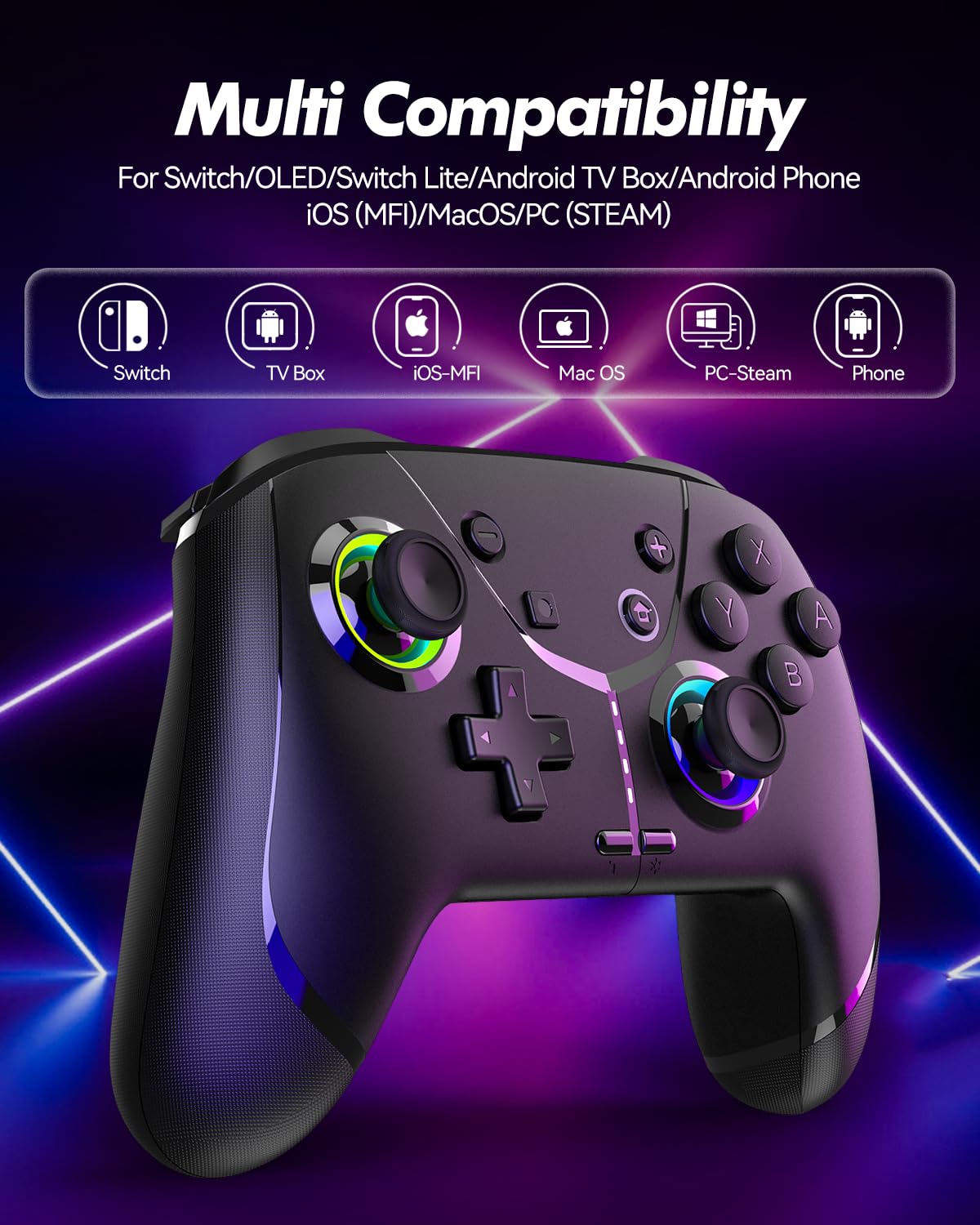
Image: Diagram illustrating the controller's compatibility with Nintendo Switch, TV Box, iOS-MFi, Mac OS, PC-Steam, and Phone devices.
3.2 Kết nối Bluetooth
To pair the controller via Bluetooth:
- Đảm bảo bộ điều khiển được sạc đủ điện.
- Bật bộ điều khiển bằng cách nhấn nút Home.
- Activate Bluetooth pairing mode on the controller (refer to specific device pairing instructions below).
- On your device (Switch, phone, PC), go to Bluetooth settings and search for new devices.
- Select "Pro Controller" or similar from the list to connect.
- Once connected, the indicator lights on the controller will stabilize.
3.3 kết nối có dây
For PC or other compatible devices, you can connect the controller directly using the provided USB cable. This will typically allow for plug-and-play functionality without requiring Bluetooth pairing.
4. Hướng dẫn vận hành
4.1 Programmable Buttons (AR/AL)
The controller features two programmable buttons (AR and AL) on the back. These can be mapped to single buttons or record a sequence of up to 30 seconds of gaming operations.
- Mapping Single Buttons: Press the Program button, then the button you wish to map (e.g., A, B, X, Y, L, R, ZL, ZR, Left Joystick, Right Joystick, D-pad, +,-), then press AR or AL.
- Recording Macros: Press the Program button, then perform the sequence of actions you wish to record. Press AR or AL again to save the macro.

Hình ảnh: Cận cảnh view of the controller's underside, highlighting the AR and AL programmable buttons and their mapping capabilities.
4.2 Motion Controls (6-Axis Gyro Sensor)
The built-in 6-axis gyro sensor allows for precise motion control in compatible games on Switch, mobile phones, PC, and TV. This feature enables intuitive aiming and movement based on the controller's orientation.

Image: Illustration of the 6-axis gyro sensor functionality, showing a user holding the controller with motion lines indicating active control in a racing game.
4.3 Độ rung có thể điều chỉnh
The asymmetric dual motors provide four adjustable vibration intensities (100%, 70%, 50%, 0%) for an immersive gaming experience. Adjust the vibration level to your preference through the controller's settings or specific button combinations (refer to the quick start guide for details).

Image: Visual representation of the dual vibration feature with intensity levels (None, Weak, Medium, Strong) and the auto/manual turbo function.
4.4 Turbo Modes
The controller offers both auto and manual turbo modes with three adjustable speeds (5, 10, or 15 shots per second). This feature allows for rapid, continuous input of a button press, useful in fast-paced games.
- Turbo thủ công: Press the Turbo button and the desired action button simultaneously.
- Tự động tăng áp: Press the Turbo button and the action button twice.
- Điều chỉnh tốc độ: While in Turbo mode, press the Turbo button and move the right joystick up or down to cycle through speeds.
4.5 ABXY Function Switching
Easily switch between Nintendo Switch (A/B/X/Y) and Xbox (Y/X/B/A) button layouts without physically removing buttons. This ensures compatibility and comfort across different gaming platforms.

Image: Depiction of the ABXY button layout switching feature, showing the buttons rotating to indicate the change between Nintendo and Xbox configurations.
4.6 Wake-Up Function and RGB Light
The controller supports a wake-up function for connected devices (e.g., Nintendo Switch). It also features cool RGB lighting around the joysticks, which can be customized or turned off to suit your preference.

Image: The controller with illuminated RGB lights around the joysticks, indicating the "Wake Up & Cool LED Light" feature.
4.7 Chức năng chụp màn hình
A dedicated screenshot button allows you to capture in-game moments instantly on compatible platforms.
5. Sạc và tuổi thọ pin
The controller is equipped with a built-in 800 mAh rechargeable battery, providing approximately 15-20 hours of gameplay on a full charge. Charging time is typically around 3 hours.
- Connect the controller to a USB power source (e.g., console, PC, USB wall adapter) using the provided USB charging cable.
- Đèn báo sẽ hiển thị trạng thái sạc và sẽ tắt hoặc đổi màu khi sạc đầy.

Image: Illustration highlighting the controller's ergonomic design and battery specifications: 800mAh Lithium Battery, 3H Charging Time, and 15-20H Playing Time.
6. Bảo trì
To ensure the longevity and optimal performance of your GMBACK Wireless Switch 2 Pro Controller:
- Hãy giữ cho bộ điều khiển luôn sạch sẽ bằng cách lau chùi bằng vải mềm, khô. Tránh sử dụng hóa chất mạnh hoặc vật liệu mài mòn.
- Bảo quản bộ điều khiển ở nơi khô ráo, thoáng mát, tránh ánh nắng trực tiếp và nhiệt độ cao.
- Tránh làm rơi bộ điều khiển hoặc va chạm mạnh.
- Không được tự ý tháo rời hoặc sửa đổi bộ điều khiển, vì điều này sẽ làm mất hiệu lực bảo hành.
- Hãy sạc bộ điều khiển thường xuyên, ngay cả khi không sử dụng thường xuyên, để duy trì tuổi thọ pin.
KHAI THÁC. Xử lý sự cố
| Vấn đề | Nguyên nhân có thể | Giải pháp |
|---|---|---|
| Bộ điều khiển không bật. | Pin yếu. | Sạc bộ điều khiển trong ít nhất 3 giờ. |
| Không thể ghép nối qua Bluetooth. | Controller not in pairing mode; Bluetooth interference; device Bluetooth off. | Ensure controller is in pairing mode. Turn off and on device Bluetooth. Move closer to the device. Try wired connection. |
| Độ trễ đầu vào hoặc mất kết nối. | Low battery; too far from device; wireless interference. | Charge controller. Move closer to device. Reduce other wireless device interference. |
| Buttons/Joysticks unresponsive. | Lỗi phần mềm; hư hỏng vật lý. | Restart the controller and the connected device. If problem persists, contact customer support. |
| Chức năng rung không hoạt động. | Vibration intensity set to 0%; game does not support vibration. | Adjust vibration intensity. Check game settings. |
8. Thông số kỹ thuật
- Người mẫu: Cảm biến con quay hồi chuyển 6 trục
- Kết nối: Bluetooth
- Khả năng tương thích: Nintendo Switch 2/Switch/Lite/OLED, Apple (iPhone, iPad, Mac, TV, MFi Games), Android (phone, tablet, TV), PC (Windows 7/8/9/10/11), Steam
- Ắc quy: Pin Lithium 800 mAh
- Thời gian sạc: Xấp xỉ 3 giờ
- Thời gian chơi: 15-20 giờ
- Đặc trưng: Programmable Buttons, 6-Axis Gyro, Adjustable Vibration, Turbo Modes, ABXY Function Switching, Wake-up, RGB Light, Screenshot
- Trọng lượng sản phẩm: 11.3 ounce
- Kích thước gói hàng: 6.61 x 5.2 x 2.76 inch
- Nhà sản xuất: GMBACK
9. Bảo hành và Hỗ trợ
GMBACK is committed to providing high-quality products and excellent customer service. For any issues or inquiries regarding your controller, please refer to the following:
- Thông tin bảo hành: Please retain your proof of purchase for warranty claims. Specific warranty terms may vary; refer to the product packaging or contact GMBACK customer support for details.
- Hỗ trợ khách hàng: For technical assistance, troubleshooting, or warranty service, please contact GMBACK customer support through the retailer where you purchased the product or visit the official GMBACK store on Amazon: GMBACK Store.
- Hướng dẫn sử dụng trực tuyến: A PDF version of the user manual may be available for download at https://manuals.plus/m/56f01544f3b9d5425429644adc4053f7681b5d3717aa40f944cdb0f9bfccf36b.


