Giới thiệu
The BuzzTV E5 is a 4K UHD Streaming Media Player designed to deliver an immersive viewing experience with its Android 11 operating system. This manual provides essential information to help you set up, operate, and maintain your device.
Nội dung gói
Xác minh rằng tất cả các mục đều có trong hộp:
- BuzzTV E5 Set Top Box
- Nguồn điện USB Type-C
- 2 x Pin AA
- Điều khiển từ xa IR-200
- Setup/Help Card
- Cáp HDMI

The package includes the BuzzTV E5 Set Top Box, a USB Type-C power supply, two AA batteries for the remote, an IR-200 remote control, a setup/help card, and an HDMI cable.
Sản phẩm trênview
The BuzzTV E5 is a compact and powerful streaming device.

The device features multiple ports for connectivity, including USB 3.0, LAN, TF card slot, AV, Ethernet, HDMI, Optical, and USB-C power input.
Các tính năng chính
- 4K UHD Streaming: Supports ultra-high-definition 4K resolution for crisp visuals.
- Hiệu suất mượt mà: Equipped with 2GB RAM and 32GB storage for responsive operation.
- Hệ điều hành Android 11: Access to a wide range of apps and streaming services with an intuitive interface.
- Easy Setup and Connectivity: HDMI output for TV connection and reliable Wi-Fi.
- Thiết kế nhỏ gọn: Sleek, space-saving form factor.
Hướng dẫn thiết lập
Thiết lập ban đầu
Follow these steps for the initial setup of your BuzzTV E5:
- Kết nối với TV: Connect the BuzzTV E5 to your television using the provided HDMI cable. Insert one end into the HDMI port on the E5 and the other into an available HDMI input on your TV.
- Kết nối nguồn điện: Connect the USB Type-C power supply to the E5 and plug the adapter into a power outlet.
- Chèn pin: Open the battery compartment on the IR-200 remote control and insert the two AA batteries, ensuring correct polarity.
- Bật nguồn: Press the power button on the E5 device or the remote control to turn on the device.
- Cấu hình ban đầu: Follow the on-screen instructions to select your language, connect to your Wi-Fi network, and log in with your Google account.

Hãy đảm bảo tất cả các dây cáp được kết nối chắc chắn trước khi bật nguồn thiết bị.
Hướng dẫn sử dụng
Hoạt động cơ bản
Navigate the Android 11 interface using the IR-200 remote control.
- Điều hướng: Use the directional pad and 'OK' button to select items.
- Nút Home: Press the home button to return to the main screen.
- Nút Quay lại: Use the back button to go to the previous screen.
- Kiểm soát âm lượng: Điều chỉnh âm lượng bằng các nút âm lượng chuyên dụng.
- Truy cập ứng dụng: Access installed applications from the home screen or the Apps menu.
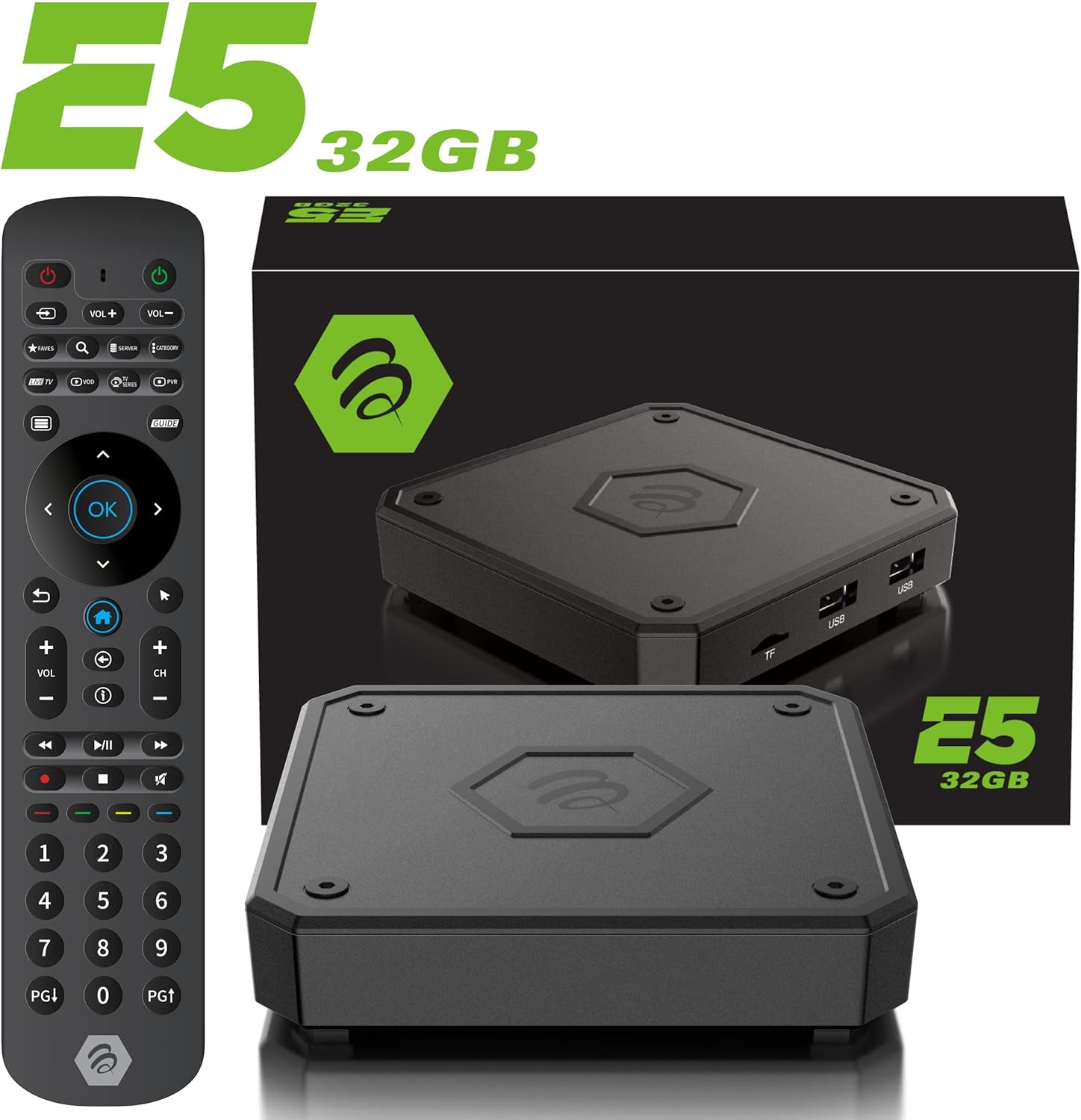
The IR-200 remote provides intuitive control over the BuzzTV E5's functions.
Kết nối
Tùy chọn kết nối
- Wi-Fi: Supports dual-band Wi-Fi (2.4 GHz and 5 GHz) for wireless internet connection.
- Mạng Ethernet: A Gigabit LAN port is available for wired internet connection.
- HDMI: HDMI 2.1 output for high-quality video and audio to your TV.
- USB 3.0: Dùng để kết nối các thiết bị lưu trữ ngoài hoặc thiết bị ngoại vi.
- Đầu ra quang học: Dùng để xuất tín hiệu âm thanh kỹ thuật số cho các hệ thống âm thanh tương thích.
Media Playback & Streaming
Media Playback and Streaming
The BuzzTV E5 supports various media formats and provides access to numerous streaming services via the Google Play Store.
- Các dịch vụ được hỗ trợ: Access Netflix, Disney+, YouTube, Prime Video, Hulu, and many more.
- Truyền thông địa phương: Phát phương tiện files from connected USB drives or TF cards.
Official Product Video: Introducing the BuzzTV 5th Generation Lineup
Video này cung cấp một hơnview of the BuzzTV 5th Generation lineup, highlighting key features and models.
Thông số kỹ thuật
Thông số kỹ thuật
| Tính năng | Chi tiết |
|---|---|
| Tên mẫu | E5 |
| Hệ điều hành | Android 11 |
| ĐẬP | 2GB DDR |
| Kho | 32GB eMMC |
| Nghị quyết | Độ phân giải 4K UHD |
| Kết nối | Wi-Fi (2T2R Dual Band), Ethernet (10/100 Mbps) |
| Cổng | HDMI 2.1, USB 3.0, USB 2.0, Optical Audio, Power Input, MicroSD |
| Bộ vi xử lý | Amlogic S905X4 Quad-core 64bit Cortex-A55 |
| Bộ xử lý đồ họa | Mali-G31 MP2 |
| Bluetooth | 5.0 |
| Kích thước | 3 x 12 x 12 inch |
| Cân nặng | 1.83 pound |

Detailed technical specifications for the BuzzTV E5 model.
Xử lý sự cố
Các vấn đề thường gặp và giải pháp
- Không có điện: Ensure the power adapter is securely connected to both the device and the power outlet. Check if the power button on the device is pressed.
- Không có tín hiệu trên TV: Verify the HDMI cable is correctly connected to both the E5 and the TV. Ensure your TV input is set to the correct HDMI port.
- Sự cố kết nối Wi-Fi: Check your Wi-Fi router and ensure it's working. Re-enter your Wi-Fi password in the E5 settings.
- Điều khiển từ xa không phản hồi: Check if the batteries are correctly inserted and have sufficient charge. Re-pair the remote if necessary (refer to the setup card).
- Ứng dụng bị treo/sập: Try restarting the application. If the issue persists, restart the BuzzTV E5 device.
Bảo hành và Hỗ trợ
For warranty information and technical support, please refer to the official BuzzTV website or the contact information provided on your setup/help card. Keep your purchase receipt for warranty claims.
Online resources and FAQs may also be available on the BuzzTV support page.
Official Product Video: MAG555 Google TV 4K UHD Media Player With Voice Control And HDR From Infomir
This video provides an unboxing and setup guide for a similar Google TV media player, demonstrating general functionality and connectivity.
Official Product Video: MAG555 - revolutionize entertainment with the Google TV
This video showcases the features and user experience of the MAG555 Google TV, highlighting its entertainment capabilities.


