1. Giới thiệu
The MAONO GamerWave DGM20 is a versatile USB condenser microphone designed for gaming, streaming, podcasting, and online communication. It features one-key noise cancellation, stunning RGB lighting, one-click mute with LED indicator, mic gain control, and zero-latency monitoring to enhance your audio experience.
2. Nội dung gói hàng
Vui lòng đánh dấu vào ô cho các mục sau:
- Micro USB chơi game x1
- Đứng x1
- Bộ lọc Pop x1
- Giá đỡ giảm xóc x1
- Cáp USB-C sang USB-A/USB-C 2 trong 1 (x1)
- Hướng dẫn sử dụng x1
- Arm Stand Adapter x1

Image: MAONO GamerWave DGM20 microphone and its included accessories.
3. Thiết lập
The MAONO GamerWave DGM20 microphone is designed for plug-and-play convenience. No additional drivers or software are required for basic functionality.
3.1 Kết nối Micrô
- Attach the microphone to the included stand or an arm stand using the provided adapter. Ensure the pop filter is positioned correctly in front of the microphone.
- Connect the USB-C end of the 2-in-1 cable to the microphone.
- Connect the USB-A or USB-C end of the cable to your computer, laptop, Mac, or Android phone.
- The microphone will be automatically recognized by your device.
Note: This microphone is not compatible with XBOX consoles.
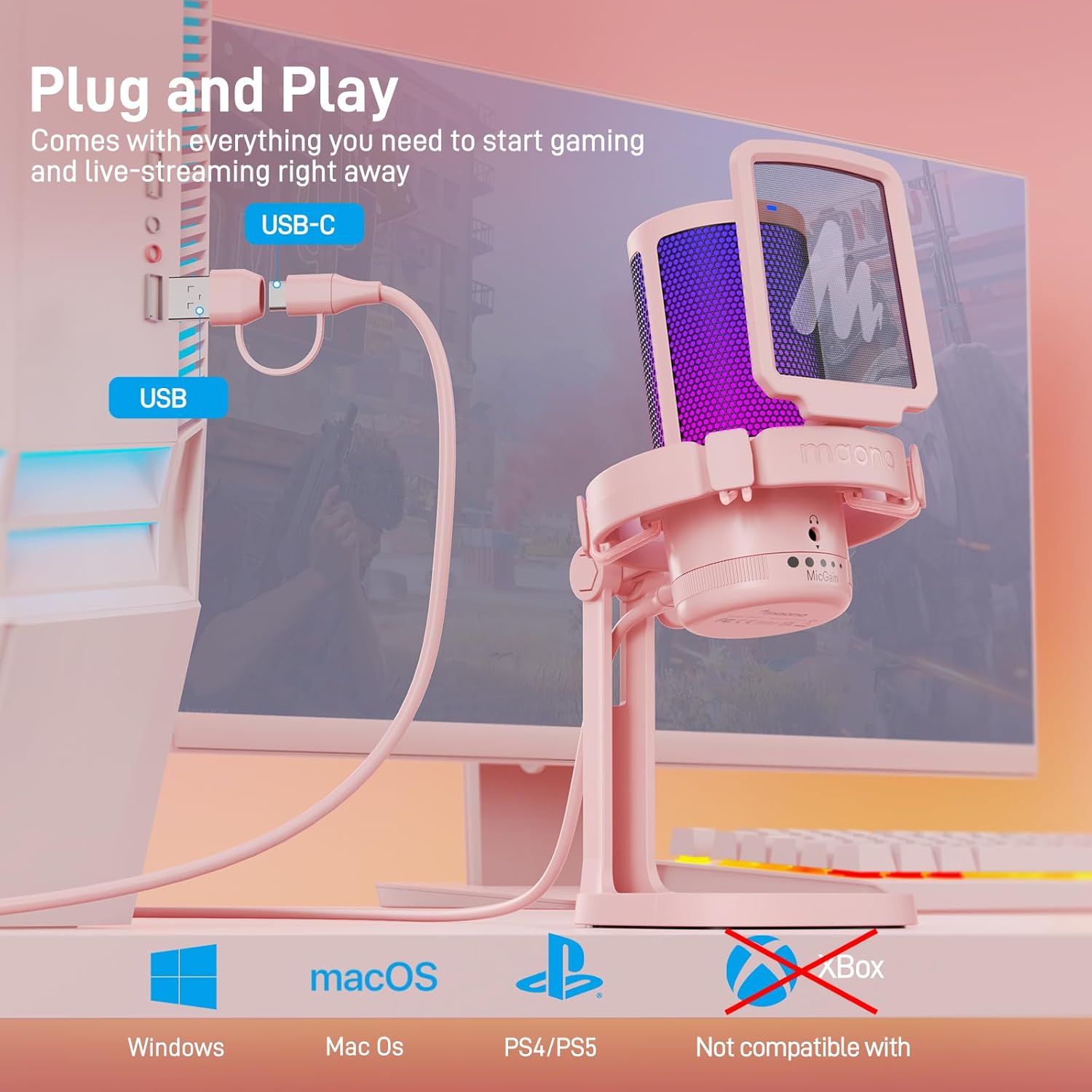
Image: The MAONO GamerWave DGM20 microphone connected to a computer, illustrating its plug-and-play setup.

Image: The MAONO GamerWave DGM20 microphone connected to various devices, including a PC and laptop, highlighting its broad compatibility.
4. Hướng dẫn vận hành
4.1 One-Key Noise Cancellation
The microphone features a one-key noise cancellation function to suppress background noise, ensuring clear voice pickup. Long press the dedicated button on the microphone to activate or deactivate this feature. A blue LED light indicates that noise cancellation is active.

Image: The MAONO GamerWave DGM20 microphone with its one-key noise cancellation feature, showing the difference in audio clarity before and after activation.
Video: A short demonstration of the MAONO GamerWave DGM20 microphone's noise cancellation feature.
4.2 Stunning RGB Lighting
The microphone features customizable RGB lighting with various modes including static solid colors, breathing light, and dynamic multicolor gradients. Tap the light button on the microphone to cycle through the modes. Long press the button to turn off the RGB lights.

Image: The MAONO GamerWave DGM20 microphone showcasing its controllable RGB lighting with static, breathing, and gradient modes.
Video: A demonstration of the MAONO GamerWave DGM20 USB RGB gaming microphone's lighting effects.
4.3 One-Click Mute with LED Indicator
Instantly mute or unmute the microphone with a single tap on the mute button. A green LED light indicates the microphone is active, while a red light signifies it is muted.
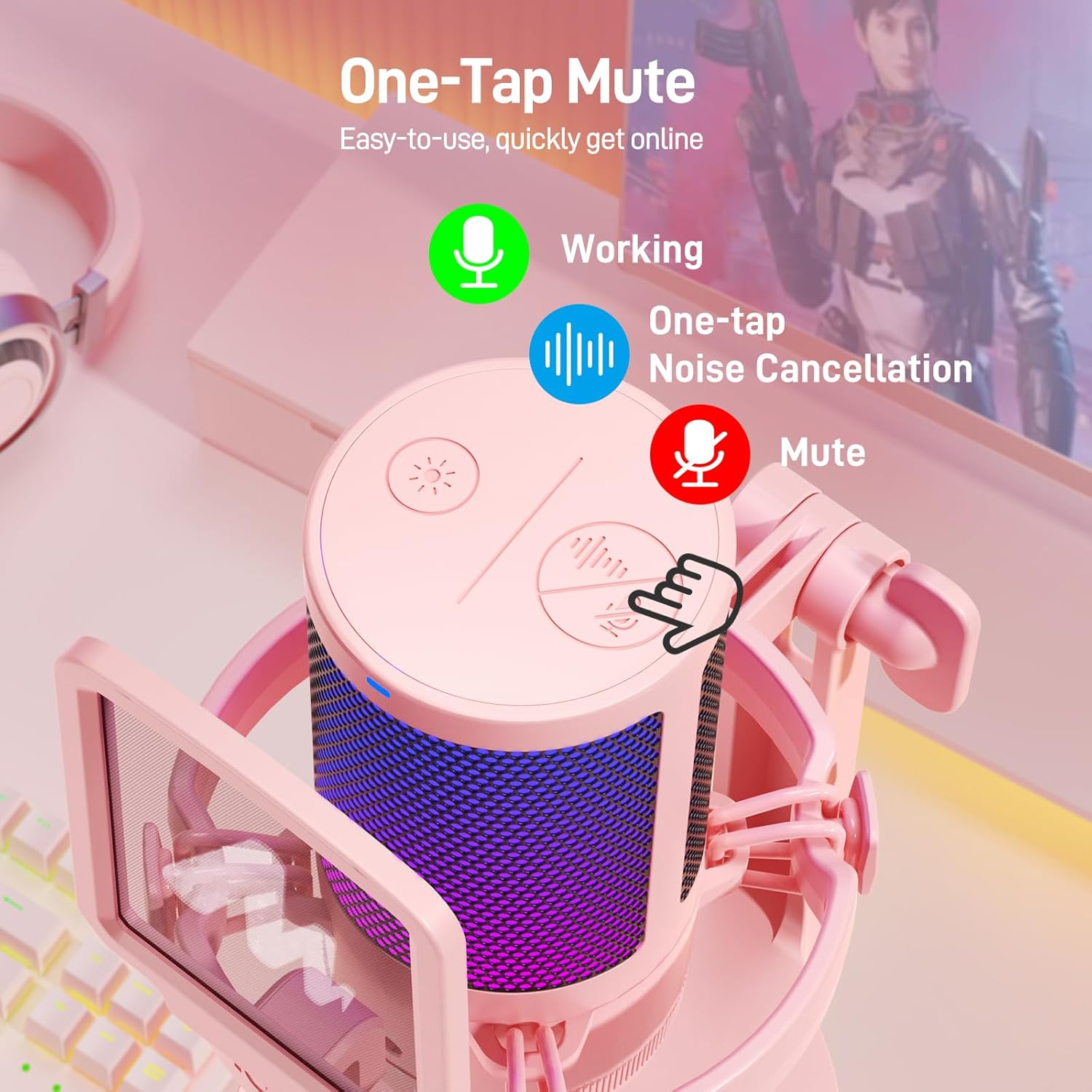
Image: The MAONO GamerWave DGM20 microphone showing the one-tap mute function and its corresponding LED indicator (green for active, red for muted).
4.4 Mic Gain Control and Monitoring
Adjust the microphone's sensitivity using the gain control knob located at the bottom. Turn the knob to increase or decrease the gain to suit your environment and desired audio level. For real-time audio monitoring without latency, plug your headphones into the 3.5mm jack on the microphone.
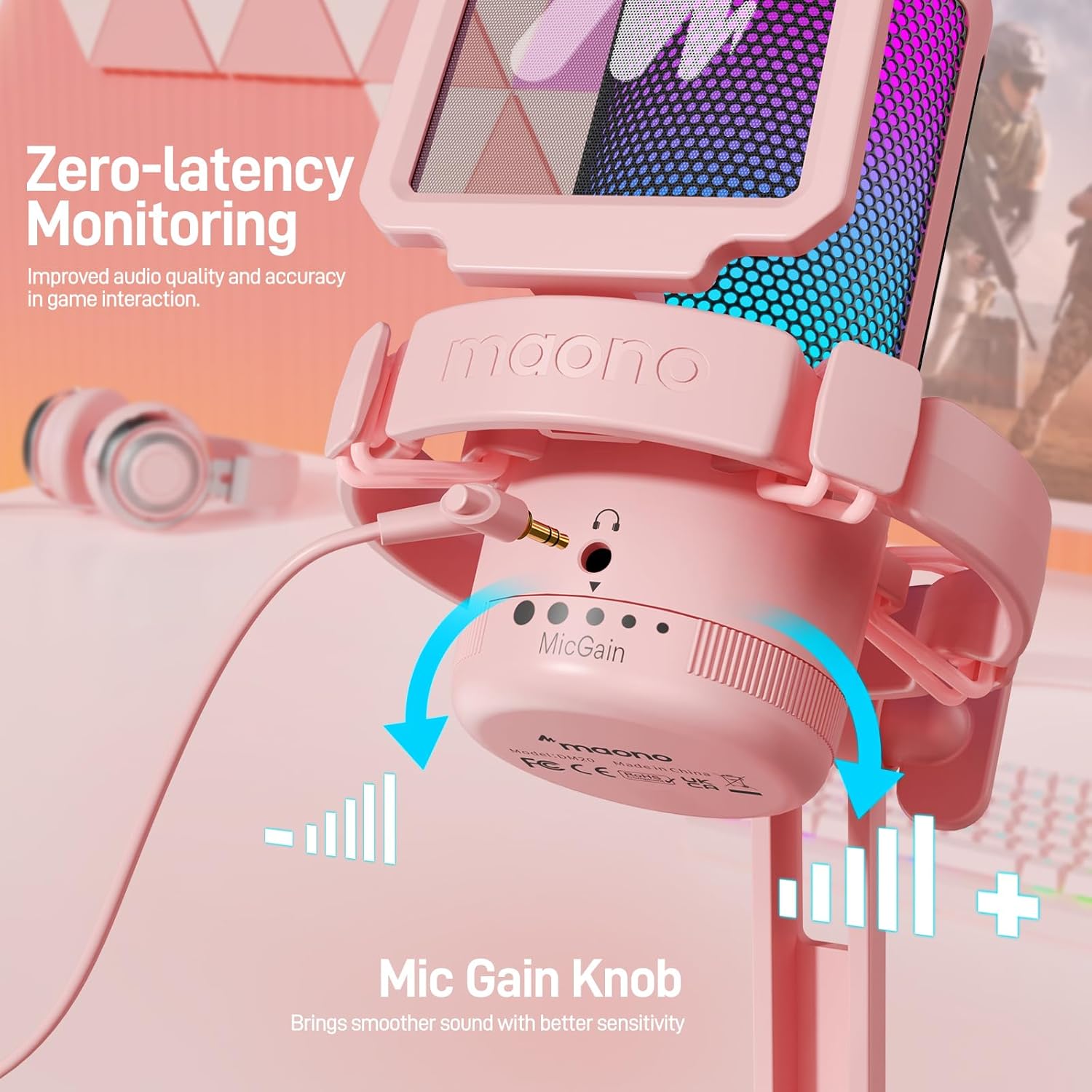
Image: The MAONO GamerWave DGM20 microphone highlighting the mic gain control knob and the 3.5mm jack for zero-latency monitoring.
4.5 Mô hình cực
The GamerWave DGM20 features a cardioid polar pattern, which means it primarily picks up sound from directly in front of the microphone. This design helps to isolate your voice and minimize unwanted background noise, making it ideal for single-speaker applications like streaming and podcasting.
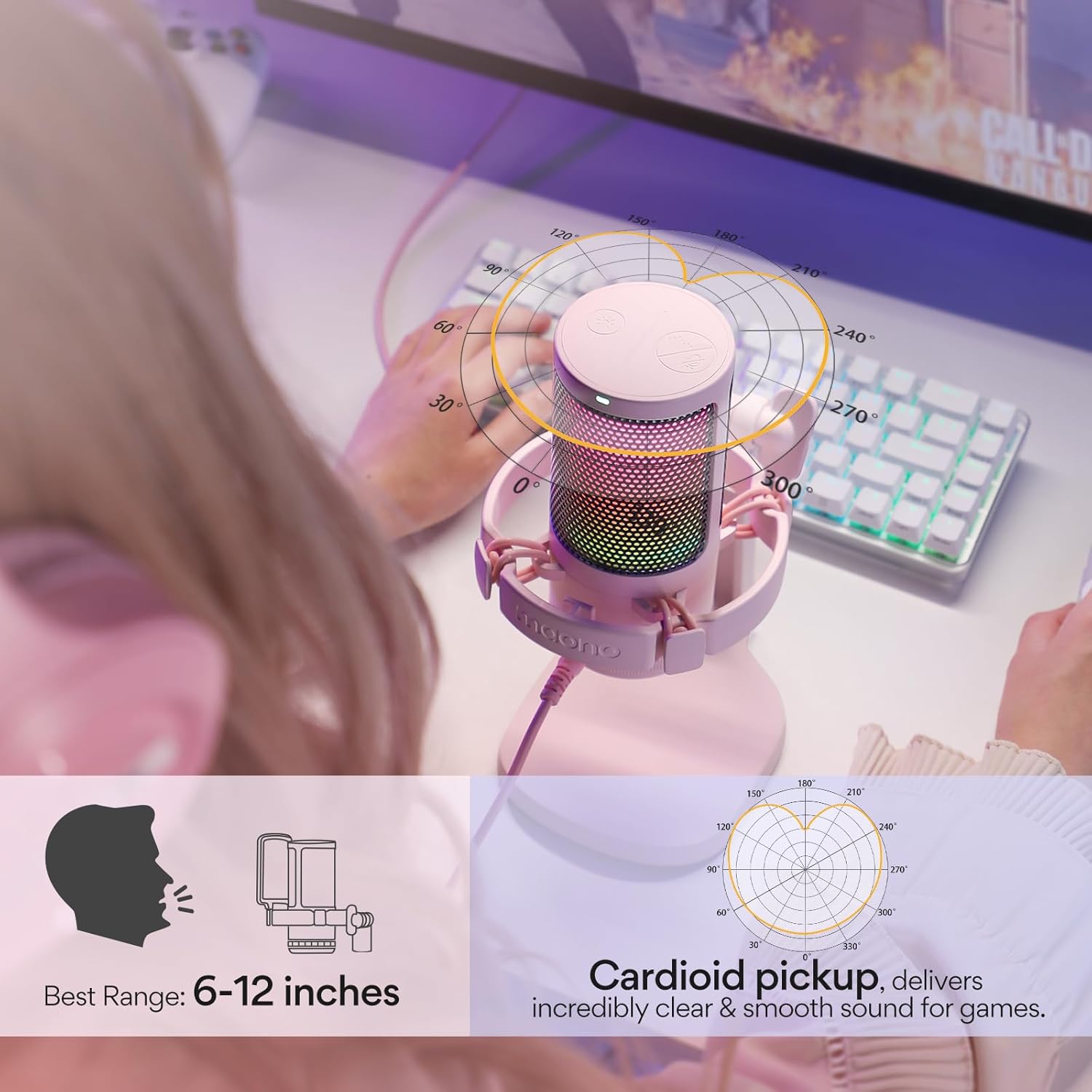
Image: The MAONO GamerWave DGM20 microphone with a diagram illustrating its cardioid pickup pattern, focusing on sound from the front.
5. Khả năng tương thích
The MAONO GamerWave DGM20 is compatible with a wide range of devices:
- Computers (PC, Laptop, Desktop)
- Mac OS devices
- Máy chơi game PlayStation 4 (PS4)
- Máy chơi game PlayStation 5 (PS5)
- Điện thoại Android
Note: This microphone is not compatible with XBOX consoles.
6. Bảo trì
To ensure the longevity and optimal performance of your MAONO GamerWave DGM20 microphone, follow these maintenance guidelines:
- Vệ sinh: Use a soft, dry cloth to wipe the microphone's exterior. Avoid using liquid cleaners or solvents, as they may damage the finish or internal components.
- Kho: Khi không sử dụng, hãy bảo quản micro ở nơi sạch sẽ, khô ráo, tránh nhiệt độ quá cao, độ ẩm cao và ánh nắng trực tiếp.
- Xử lý: Hãy sử dụng micro cẩn thận. Tránh làm rơi hoặc để micro chịu những va đập mạnh, vì điều này có thể ảnh hưởng đến hiệu suất của nó.
- Chăm sóc cáp: Không nên bẻ cong hoặc làm xoắn cáp USB quá mức. Hãy cất giữ gọn gàng để tránh hư hỏng.
KHAI THÁC. Xử lý sự cố
If you encounter issues with your MAONO GamerWave DGM20 microphone, try the following troubleshooting steps:
- Không có âm thanh/Không phát hiện micro:
- Hãy đảm bảo cáp USB được kết nối chắc chắn với cả micro và thiết bị của bạn.
- Try connecting the microphone to a different USB port on your device.
- Verify that the microphone is selected as the input device in your operating system's sound settings and any recording software you are using.
- Khởi động lại máy tính hoặc thiết bị của bạn.
- Chất lượng âm thanh kém/Méo tiếng:
- Adjust the mic gain knob to an appropriate level. Too high gain can cause distortion, while too low can result in faint audio.
- Ensure you are speaking directly into the front of the microphone (where the MAONO logo is visible) due to its cardioid polar pattern.
- Activate the one-key noise cancellation feature if background noise is an issue.
- Kiểm tra xem có vật cản nào giữa miệng và micro không.
- Đèn RGB không hoạt động:
- Tap the RGB light button on the microphone to cycle through modes.
- Hãy đảm bảo micro được cấp nguồn đúng cách thông qua kết nối USB.
- Monitoring Audio Issues:
- Ensure your headphones are securely plugged into the 3.5mm jack on the microphone.
- Check your headphone volume.
8. Thông số kỹ thuật
| Tính năng | Chi tiết |
|---|---|
| Yếu tố hình thức của micrô | Cầm tay |
| Kích thước (D x R x C) | 3.94 x 3.54 x 7.09 inch |
| Trọng lượng sản phẩm | 15.5 ounce |
| Nguồn điện | Điện có dây |
| Vật liệu | Kim loại, Nhựa |
| Signal-to-Noise Ratio | 73 |
| Nền tảng phần cứng | Máy tính, PC, Laptop, Desktop, Mac OS, PS4, PS5 |
| Số lượng kênh | 1 |
| Tên mẫu | GamerWave DGM20 Gaming Mic |
| Công nghệ kết nối | USB |
| Loại đầu nối | USB, USB Type-C |
| Tính năng đặc biệt | Đèn RGB có thể điều chỉnh, Khử nhiễu một chạm, Tắt tiếng một chạm, Điều chỉnh độ nhạy micrô, Giám sát độ trễ bằng không, Cắm và chạy. |
| Màu sắc | Hồng |
| Mẫu cực | Đơn hướng (Cardioid) |
9. Bảo hành và Hỗ trợ
For warranty information and technical support, please visit the official MAONO website or contact MAONO customer service. You can also visit the MAONO Store on Amazon Để biết thêm chi tiết sản phẩm và tài liệu hỗ trợ.


