1. Sản phẩm hếtview
The Tera Pro 1300 is a compact and versatile barcode scanner designed for efficient data capture. It supports 1D and 2D barcodes, including QR codes, from both printed materials and digital screens. This device offers multiple connection options and features a long-lasting battery for extended use.

Image: The Tera Pro 1300 barcode scanner, a compact device designed for portability and ease of use.
Nội dung gói hàng:
- Máy quét mã vạch (x1)
- Cáp USB (x1)
- Bộ chuyển đổi USB 2.4G (x1)
- Hướng dẫn sử dụng (x1)
2. Thiết lập và kết nối
The Tera Pro 1300 offers three connection methods: Bluetooth, 2.4GHz Wireless, and USB Wired. Choose the method that best suits your device and environment.

Image: Visual representation of the three connection modes: Bluetooth, 2.4GHz Wireless via USB dongle, and USB Wired connection.
2.1. Sạc máy quét
Before first use, fully charge the scanner using the provided USB cable. Connect the small end of the USB cable to the scanner's charging port and the other end to a USB power adapter or a computer's USB port. A full charge typically takes 3-4 hours.
2.2. Kết nối Bluetooth
- Đảm bảo máy quét đã được bật.
- Scan the 'Bluetooth Pairing' barcode (refer to the included quick start guide or the full manual for specific barcode).
- On your host device (laptop, PC, mobile phone, tablet), enable Bluetooth and search for available devices.
- Select 'Tera 1300' or a similar name from the list of devices to pair.
- Máy quét sẽ báo hiệu quá trình ghép nối thành công (ví dụ: tiếng bíp hoặc đèn LED đổi màu).
Supports HID, SPP, and BLE modes. Transmission distance is approximately 10m (33ft) in environments with obstacles.
2.3. Kết nối không dây 2.4 GHz
- Cắm USB dongle 2.4G vào cổng USB trống trên máy tính của bạn.
- Đảm bảo máy quét đã được bật.
- The scanner should automatically connect to the dongle. A successful connection is typically indicated by a beep or LED change.
This mode works with Windows XP/7/8/10, Mac OS, and Linux. The transmission distance can reach up to 60m (200ft) in open, barrier-free environments.
2.4. Kết nối có dây USB
- Kết nối máy quét với máy tính của bạn bằng cáp USB được cung cấp.
- The scanner will function as a wired device and will also charge simultaneously.
3. Hướng dẫn vận hành
3.1. Quét cơ bản
Point the scanner's window at the barcode you wish to scan and press the trigger button. A successful scan will typically result in a beep and/or vibration, and the data will be transmitted to your connected device.
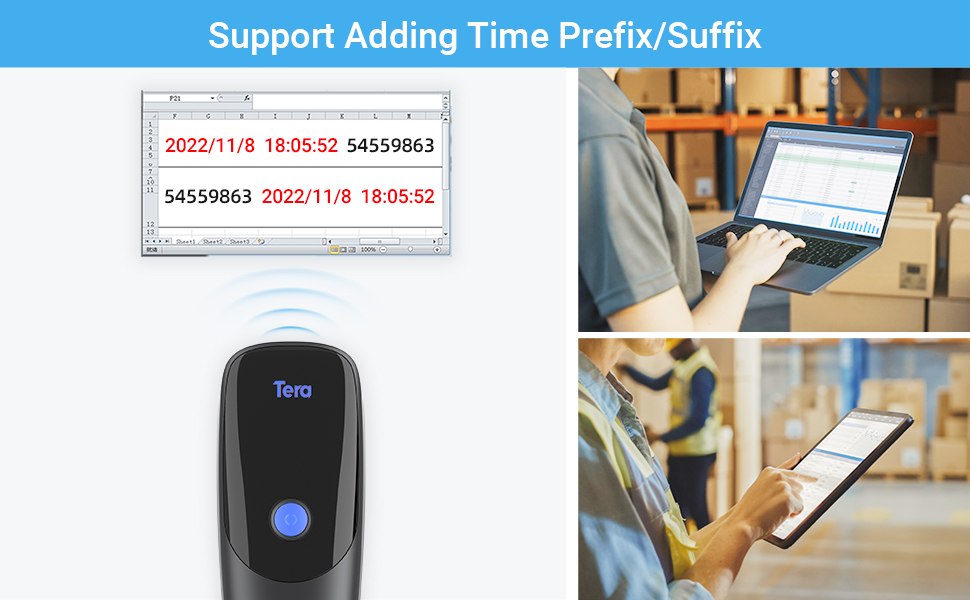
Image: The scanner demonstrates its ability to read various 1D and 2D barcodes, including those that are blurred, damaged, or have wide scanning angles.
3.2. Time Prefix/Suffix Function
This function allows you to add the current time as a prefix or suffix to scanned barcode data. This is useful for tracking the exact time of each scan.
- To enable/disable this feature, scan the specific setting barcodes provided in the full user manual.

Hình ảnh: Example of barcode data being scanned and displayed on a computer screen, demonstrating the time prefix/suffix function.
3.3. Vibration Alert & Upload Modes
The scanner features a vibration alert, which can be used in quiet environments where audible beeps are undesirable. You can turn off the volume and rely on vibration for scan confirmation.
The scanner supports two upload modes:
- Chế độ tải lên tức thì: Barcode data is transmitted immediately after scanning.
- Chế độ lưu trữ: Barcode data is stored internally in the scanner's memory. This mode is useful when the scanner is out of range of the receiver. The internal storage can hold up to 20,000 barcodes. Data can be batch uploaded to your device when reconnected.
3.4. Hỗ trợ đa ngôn ngữ
The scanner supports various keyboard layouts for different languages, including English, German, Spanish, Italian, French, Japanese, Belgian, Portuguese, and Dutch. Refer to the full manual for instructions on how to configure the scanner for your desired language.

Image: The scanner supports multiple languages, indicated by flags of various countries.
4. Bảo trì
4.1. Chăm sóc pin
The Tera Pro 1300 is equipped with a 1200mAh battery, providing approximately 12 hours of continuous scanning or up to two weeks of daily use on a full charge. Standby time is approximately 96 hours.
- Tránh xả hết pin thường xuyên để kéo dài tuổi thọ của pin.
- Bảo quản máy quét ở nơi khô ráo, thoáng mát khi không sử dụng trong thời gian dài.
- Hãy sạc máy quét thường xuyên, ngay cả khi không sử dụng liên tục, để duy trì tuổi thọ pin.
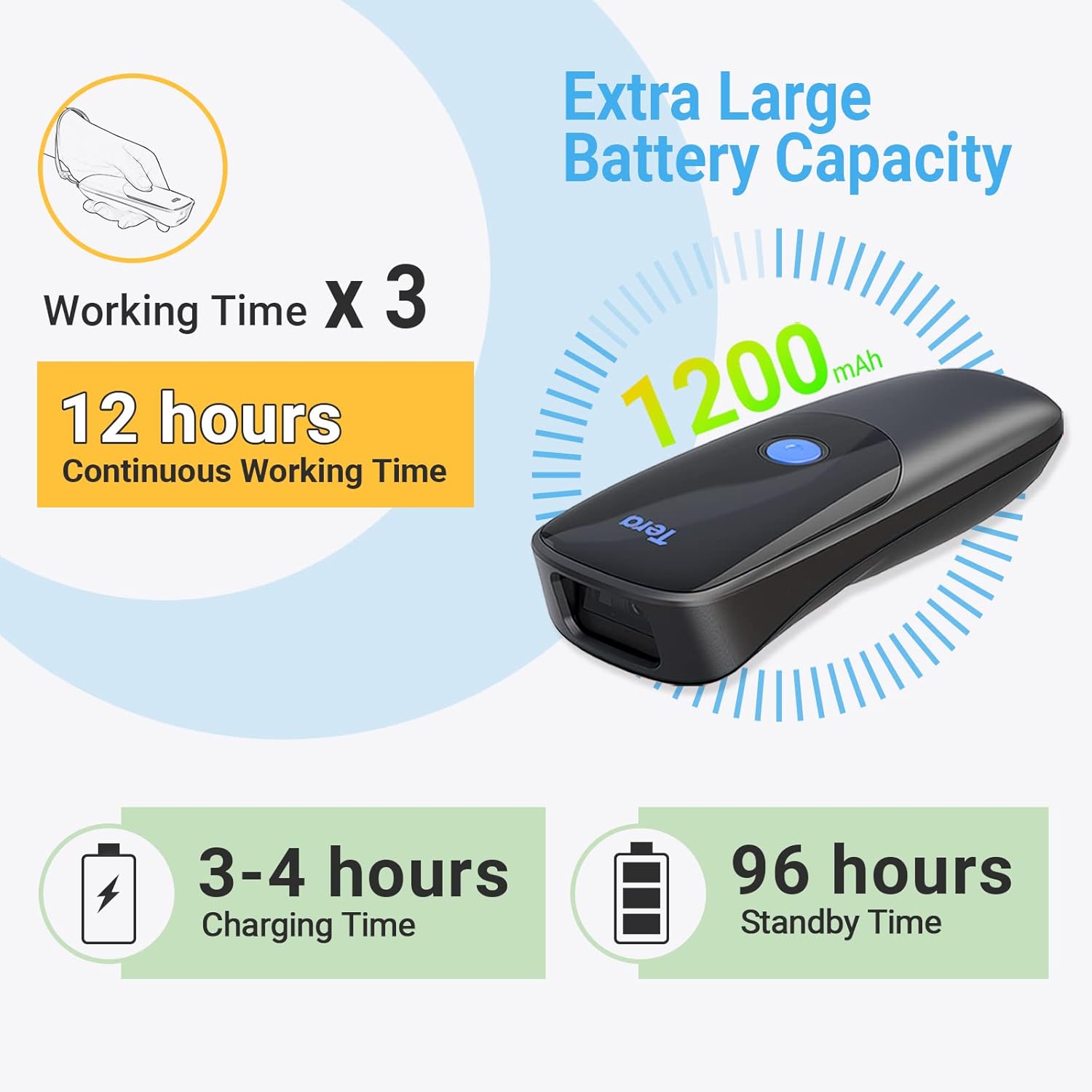
Image: Details on the scanner's 1200mAh battery, offering 12 hours of continuous operation and 3-4 hours charging time.
4.2. Vệ sinh
Để vệ sinh máy quét, hãy sử dụng vải mềm, khô. Đối với vết bẩn cứng đầu, hãy lau nhẹamp cloth can be used, followed by a dry cloth. Avoid using harsh chemicals or abrasive materials, as these can damage the device.
KHAI THÁC. Xử lý sự cố
If you encounter issues with your Tera Pro 1300 scanner, refer to the following common problems and solutions:
| Vấn đề | Giải pháp khả thi |
|---|---|
| Máy quét không bật được. | Hãy đảm bảo pin đã được sạc đầy. Kết nối máy quét với nguồn điện bằng cáp USB. |
| Máy quét không kết nối qua Bluetooth/2.4GHz. | Verify the scanner is in the correct pairing mode. Ensure the dongle is properly inserted for 2.4GHz. Check Bluetooth settings on your host device. Try restarting both the scanner and the host device. |
| Scanned data is incorrect or inconsistent. | Ensure the barcode is clean and undamaged. Try scanning from a different angle or distance. Check if the scanner's configuration (e.g., prefix/suffix settings, keyboard layout) is correct for your needs. Perform a factory reset if necessary (refer to the full manual for the reset barcode). |
| Scanner adds extra characters (e.g., 'a') to scanned data. | This often indicates an incorrect keyboard language setting. Scan the appropriate language setting barcode from the full user manual to match your computer's keyboard layout. |
| Scanner does not read certain barcode types. | Ensure the barcode type is supported by the Tera Pro 1300 (see Specifications section). Some less common barcode types may require specific enabling scans from the manual. |
6. Thông số kỹ thuật
| Tính năng | Chi tiết |
|---|---|
| Số hiệu mẫu | 1300 |
| Kích thước | 6.65 x 4.61 x 1.65 inch |
| Trọng lượng sản phẩm | 7.4 ounce |
| Nguồn điện | Chạy Bằng Pin, Điện Có Dây |
| Dung lượng pin | 1200mAh |
| Thời gian làm việc liên tục | Lên đến 12 giờ |
| Thời gian sạc | 3-4 giờ |
| Thời gian chờ | Lên đến 96 giờ |
| Công nghệ kết nối | Không dây 2.4G, Bluetooth, Cáp USB |
| Thiết bị tương thích | Desktop, Laptop, Smartphone, Tablet (Windows XP/7/8/10, Mac OS, Windows Mobile, Android OS, iOS) |
| 1D Decode Capability | Codabar, Code 11, Code93, MSI, Code 128, UCC/EAN-128, Code 39, EAN-8, EAN-13, UPC-A, ISBN, Industrial 25, Interleaved 25, Standard 25, 2/5 Matrix |
| 2D Decode Capability | QR, PDF417, Data Matrix, Aztec code, Maxi Code |
| Góc thực của View | 10 Độ |
7. Bảo hành và Hỗ trợ
Để biết thông tin về bảo hành và hỗ trợ kỹ thuật, vui lòng tham khảo trang web chính thức của Tera. webBạn có thể truy cập trang web hoặc liên hệ trực tiếp với bộ phận chăm sóc khách hàng của họ. Thông tin liên hệ thường được tìm thấy trên bao bì sản phẩm hoặc trên trang web của nhà sản xuất. webđịa điểm.
You can visit the Tera Store for additional product information and support resources: Cửa hàng Tera trên Amazon


