Giới thiệu
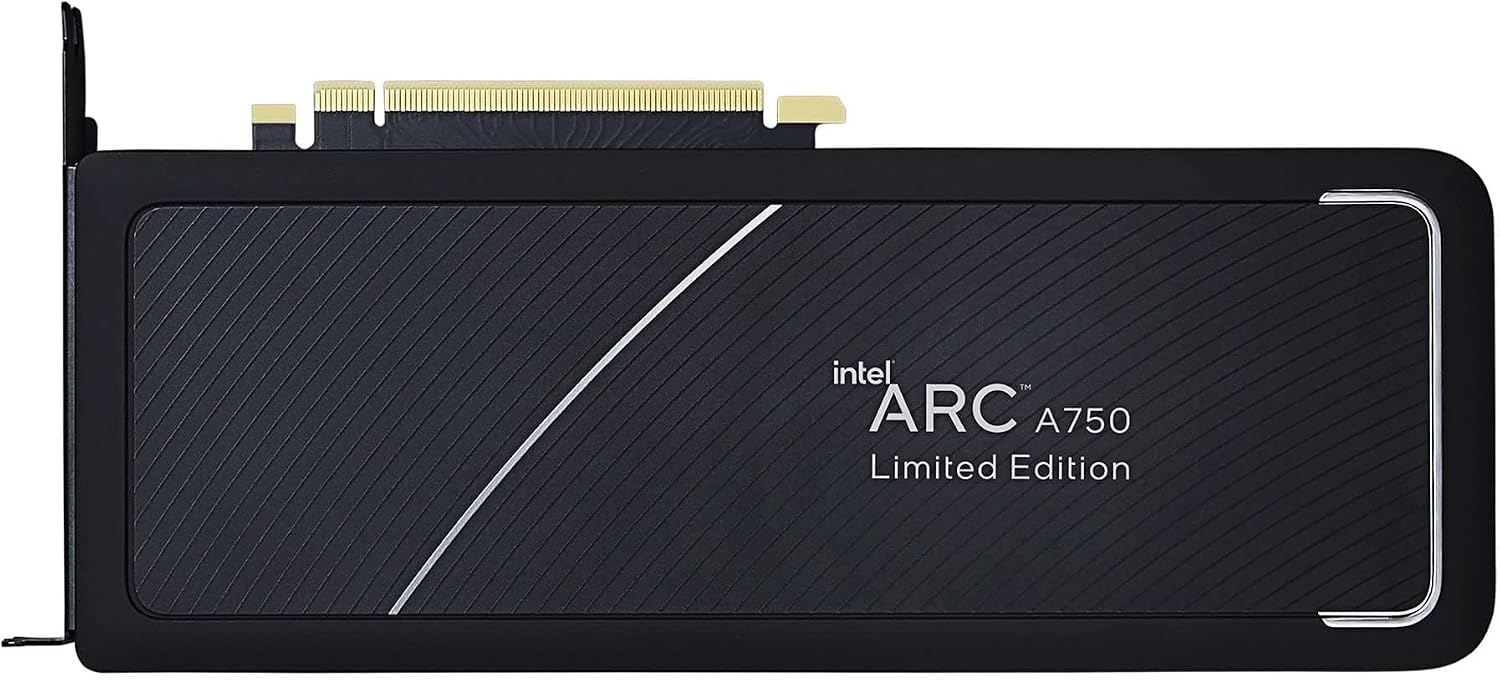
This manual provides essential information for the installation, operation, maintenance, and troubleshooting of your Intel Arc A750 Limited Edition 8GB PCI Express 4.0 Graphics Card. Please read this manual thoroughly before using the product to ensure optimal performance and longevity.
Nội dung gói
Xác minh rằng tất cả các mặt hàng đều có trong bao bì sản phẩm của bạn:
- Intel Arc A750 Limited Edition 8GB PCI Express 4.0 Graphics Card
- Tài liệu (sách hướng dẫn sử dụng này)

Yêu cầu hệ thống
Trước khi cài đặt, hãy đảm bảo hệ thống của bạn đáp ứng các yêu cầu tối thiểu sau:
- PCI Express 4.0 Slot: A motherboard with an available PCI Express 4.0 x16 slot is required for optimal performance. While compatible with PCIe 3.0, performance may be reduced.
- Resizable BAR (ReBAR) Support: For best performance, your system's motherboard and CPU should support and have Resizable BAR enabled in the BIOS/UEFI.
- Bộ cấp nguồn (PSU): A minimum 700W power supply is recommended, especially for 4K gaming or demanding workloads, to ensure stable operation.
- Hệ điều hành: Windows 10 (64-bit) or Windows 11 (64-bit).
- Bộ xử lý: Compatible Intel or AMD processor.
- Bộ nhớ (RAM): 8GB system memory or more.
Cài đặt
1. Cài đặt vật lý
- Chuẩn bị hệ thống của bạn: Tắt máy tính và rút tất cả các dây cáp. Mở vỏ máy tính.
- Xác định khe cắm PCIe: Identify an available PCI Express 4.0 x16 slot on your motherboard. Remove any expansion slot covers that block the slot.
- Cài đặt card đồ họa: Carefully align the graphics card with the PCIe slot. Press down firmly and evenly until the card is securely seated in the slot and the retention clip engages.
- Bảo mật thẻ: Secure the graphics card to the computer case using the screws from the expansion slot covers.
- Kết nối cáp nguồn: Connect the necessary PCIe power cables from your power supply to the graphics card. The Intel Arc A750 typically requires one 8-pin and one 6-pin PCIe power connector. Ensure they are fully seated.
- Đóng nắp máy và kết nối các thiết bị ngoại vi: Close your computer case, reconnect all cables (monitor, keyboard, mouse, power), and power on your system.

2. Cài đặt trình điều khiển
After physical installation, you must install the latest graphics drivers for your Intel Arc A750 card. This is crucial for proper functionality and performance.
- Tải xuống trình điều khiển: Truy cập trang hỗ trợ chính thức của Intel webĐịa điểm (www.intel.com/support/arc) to download the latest drivers for your Intel Arc A750.
- Cài đặt trình điều khiển: Chạy trình cài đặt đã tải xuống và làm theo hướng dẫn trên màn hình. Nên thực hiện cài đặt sạch nếu được yêu cầu.
- Khởi động lại hệ thống: Khởi động lại máy tính sau khi cài đặt trình điều khiển hoàn tất.
- Intel Arc Control Software: The driver package typically includes the Intel Arc Control software, which allows you to monitor performance, update drivers, and customize settings.
Vận hành card đồ họa
The Intel Arc A750 is designed to deliver strong performance for gaming and content creation. Key features include:
Intel Xe Super Sampling (XeSS)
XeSS is an AI-enhanced upscaling technology that leverages machine learning to deliver high-performance, high-fidelity gaming experiences. It reconstructs images with sub-pixel details, enabling higher frame rates while maintaining visual quality.
Real-time Ray Tracing Support
The Intel Arc A750 supports hardware-accelerated ray tracing, allowing for more realistic lighting, shadows, and reflections in supported games and applications. This technology enhances visual immersion by simulating the physical behavior of light.
Intel Arc Control Software
The Intel Arc Control software provides a centralized hub for managing your graphics card. Features include:
- Giám sát hiệu suất: View real-time statistics such as GPU utilization, temperature, and clock speeds.
- Cập nhật trình điều khiển: Easily check for and install the latest graphics drivers.
- Tối ưu hóa trò chơi: Optimize game settings for the best balance of performance and visual quality.
- Creator Features: Access tools for streaming and content creation, including virtual camera setup.
BẢO TRÌ
Proper maintenance ensures the longevity and stable performance of your graphics card:
- Luôn cập nhật trình điều khiển: Regularly check for and install the latest graphics drivers from the Intel support webTrang web. Các bản cập nhật trình điều khiển thường bao gồm cải thiện hiệu năng, sửa lỗi và nâng cao khả năng tương thích.
- Loại bỏ bụi: Periodically clean dust from the graphics card fans and heatsink using compressed air. Ensure the system is powered off and unplugged before cleaning. Dust buildup can impede cooling and lead to overheating.
- Đảm bảo luồng không khí thích hợp: Make sure your computer case has adequate airflow to prevent heat buildup. Ensure no cables or other components are obstructing the graphics card's fans.
Xử lý sự cố
This section addresses common issues you might encounter with your Intel Arc A750 graphics card.
| Vấn đề | Nguyên nhân có thể / Giải pháp |
|---|---|
| No display or black screen after installation. |
|
| Low frame rates or poor performance in games. |
|
| Screen flickering or intermittent black screens. |
|
| Fans are excessively loud or vibrating. |
|
Thông số kỹ thuật
| Tính năng | Chi tiết |
|---|---|
| Thương hiệu | Trí tuệ |
| Số hiệu mẫu | 21P02J00BA |
| Bộ đồng xử lý đồ họa | Intel Arc A750 |
| Kích thước RAM của card đồ họa | 8GB |
| Tốc độ xung nhịp GPU | 2050MHz |
| Giao diện đầu ra video | Cổng kết nối DisplayPort |
| Trọng lượng sản phẩm | 2 pound |
| Kích thước sản phẩm (DxRxC) | 17.3 x 11.1 x 0.1 inch |
| Phiên bản PCI Express | 4.0 |
Bảo hành và Hỗ trợ
The Intel Arc A750 Limited Edition Graphics Card typically comes with a 1-year limited warranty. For detailed warranty information, technical support, or to register your product, please visit the official Intel support webđịa điểm:
You can also find frequently asked questions (FAQs) and community forums on the Intel support page, which can be valuable resources for troubleshooting and optimizing your experience.


