1. Giới thiệu
Welcome to your Rointe CT.0 TSMTIB0 Digital Thermostat. This device is engineered to provide intelligent control for Rointe underfloor heating systems. It features an adaptive start mode and three pre-installed programs, designed for efficient energy management and enhanced comfort in your home.
This manual provides essential information for the safe and effective installation, operation, and maintenance of your thermostat. Please read it thoroughly before use and retain it for future reference. Ensure all installation procedures are performed by a qualified professional.
2. Sản phẩm hếtview
The Rointe CT.0 TSMTIB0 thermostat features a modern design with a backlit display and intuitive button controls for easy interaction.
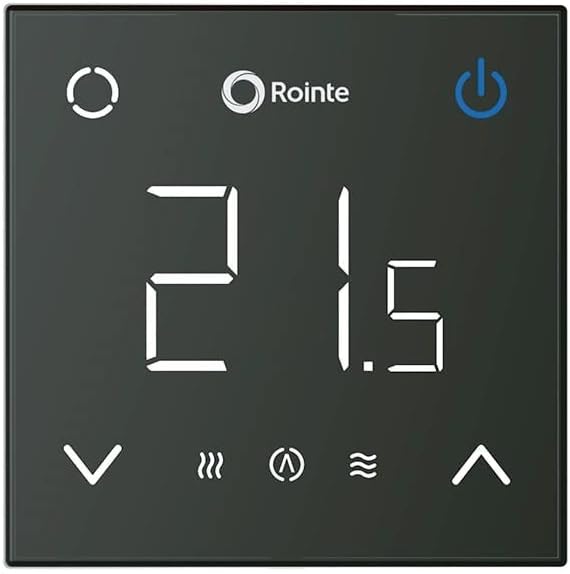
Hình ảnh 1: Đằng trước view of the Rointe CT.0 TSMTIB0 digital thermostat. It features a black square face with a large white digital display showing '21.5'. Above the display are the Rointe logo and a power button. Below the display are temperature adjustment arrows (down and up), and icons for heating mode, adaptive start, and a wave symbol, likely indicating comfort or eco mode.

Hình ảnh 2: Góc cạnh view of the Rointe CT.0 TSMTIB0 digital thermostat, showcasing its slim profile. The display and controls are identical to the front view, providing a clear perspective of the device's physical form.
3. Cài đặt và thiết lập
3.1 Thông tin an toàn
- Việc lắp đặt phải được thực hiện bởi thợ điện có trình độ chuyên môn theo quy định về hệ thống điện địa phương.
- Always disconnect the main power supply before commencing any installation or maintenance work.
- Ensure the thermostat is installed in a dry location, away from direct sunlight or heat sources.
- Không để thiết bị tiếp xúc với độ ẩm hoặc nhiệt độ quá cao.
3.2 Lắp đặt bộ điều nhiệt
- Choose an appropriate wall location, typically 1.5 meters (5 feet) from the floor, away from drafts or heat-emitting appliances.
- Cẩn thận mở van điều nhiệt casing to access the wiring terminals.
- Connect the electrical wiring according to the provided wiring diagram (refer to the separate installation guide for detailed diagrams).
- Secure the thermostat base to the wall using appropriate screws.
- Reattach the front cover of the thermostat, ensuring it clicks securely into place.
3.3 Khởi động ban đầu
After installation, restore power to the circuit. The thermostat display will illuminate. Follow the on-screen prompts to set the initial date, time, and language if applicable. The device may perform a self-test upon first power-up.
4. Hoạt động
4.1 Điều khiển cơ bản
- Nút nguồn: Located at the top right of the display, press to turn the heating system ON or OFF.
- Các nút điều chỉnh nhiệt độ: Located at the bottom of the display (up and down arrows), use these to increase or decrease the target temperature.
- Nút chế độ: (Circular icon, top left) Press to cycle through different operating modes (e.g., Manual, Programmed, Frost Protection).
4.2 Cài đặt nhiệt độ
In Manual mode, press the up or down arrow buttons to adjust the desired room temperature. The new target temperature will be displayed and the system will adjust accordingly.
4.3 Chế độ lập trình
The Rointe CT.0 TSMTIB0 includes an adaptive start mode and three pre-installed programs to optimize energy consumption and comfort.
- Adaptive Start Mode: This intelligent feature learns the heating characteristics of your room and activates the heating system in advance to reach your desired temperature at the programmed time, rather than starting at the programmed time.
- Các chương trình được cài đặt sẵn: The thermostat comes with three factory-set programs. These can be selected via the Mode button or within the settings menu. Refer to the detailed programming section in the full user guide for customization options.
- Custom Programs: You can create and save your own weekly heating schedules to match your lifestyle. Access the programming menu through the thermostat's interface to set specific temperatures for different times of the day and days of the week.
4.4 Chỉ báo hiển thị
The backlit display provides clear information about the current status of your heating system:
- Nhiệt độ hiện tại: Large digits in the center of the display.
- Heating On Indicator: A flame or wave icon typically indicates when the heating element is active.
- Adaptive Start Indicator: An icon (e.g., a clock with an arrow) may appear when adaptive start is active.
- Chỉ báo chương trình: Shows which program (e.g., P1, P2, P3) is currently active.
5. Bảo trì
The Rointe CT.0 TSMTIB0 thermostat requires minimal maintenance to ensure optimal performance.
- Vệ sinh: Lau nhẹ nhàng màn hình và casing với chất liệu mềm, khô hoặc hơi damp Lau bằng vải. Không sử dụng chất tẩy rửa có tính mài mòn, dung môi hoặc hóa chất dạng xịt, vì chúng có thể làm hỏng bề mặt và các bộ phận bên trong.
- Không có bộ phận nào người dùng có thể tự sửa chữa: The thermostat contains no user-serviceable parts. Do not attempt to open or repair the device yourself. Unauthorized repairs will void the warranty and may pose a safety risk.
- Thay thế pin: If your model includes backup batteries for settings retention during power outages, refer to the full installation guide for instructions on safe replacement.
KHAI THÁC. Xử lý sự cố
If you encounter issues with your Rointe CT.0 TSMTIB0 thermostat, please consult the following common problems and solutions before contacting support.
- Không hiển thị/Không có nguồn:
- Check the main power supply to the thermostat and the circuit breaker.
- Ensure all wiring connections are secure (this should be checked by a qualified electrician).
- Đọc nhiệt độ không chính xác:
- Đảm bảo bộ điều nhiệt không tiếp xúc trực tiếp với ánh nắng mặt trời, gió lùa hoặc nguồn nhiệt có thể ảnh hưởng đến cảm biến.
- Verify that the temperature sensor (if external) is correctly installed and connected.
- Chức năng làm nóng không hoạt động:
- Check if the thermostat is in the ON position and not in Frost Protection or OFF mode.
- Ensure the target temperature is set higher than the current room temperature.
- Verify that the heating system itself (e.g., boiler, underfloor heating manifold) is operational.
- Lỗi lập trình:
- Review the programming instructions in the full user guide to ensure schedules are set correctly.
- Consider resetting the thermostat to factory settings and reprogramming if issues persist (refer to the full user guide for reset procedures).
If these steps do not resolve the issue, please contact Rointe customer support or a qualified technician.
7. Thông số kỹ thuật
| Thương hiệu | ROINTE |
| Số hiệu mẫu | TSMTIB0 |
| Loại điều khiển | Nút điều khiển |
| Phong cách | Hiện đại |
| Đèn nền | Đúng |
| Nhà sản xuất | ROINTE |
| Mã số mẫu sản phẩm | 8435556137160 |
| ASIN | B0BDBZXFTT |
8. Bảo hành và Hỗ trợ
8.1 Thông tin bảo hành
The Rointe CT.0 TSMTIB0 thermostat is covered by a manufacturer's warranty. Specific warranty terms and conditions, including duration and coverage details, are provided at the time of purchase or can be obtained directly from Rointe or your authorized dealer. Please retain your proof of purchase for warranty claims.
8.2 Hỗ trợ khách hàng
For technical assistance, troubleshooting beyond the scope of this manual, or warranty inquiries, please contact Rointe customer support through their official website or the retailer from whom you purchased the product. Have your model number (TSMTIB0) and proof of purchase ready when contacting support.


