1. Biện pháp phòng ngừa an toàn
Để đảm bảo hoạt động an toàn và tránh hư hỏng, vui lòng tuân thủ các biện pháp phòng ngừa sau:
- The M9 charger accepts a DC input voltage range of 7-35V. Verify that your power supply voltage is compatible and correctly observe positive and negative polarity during connection.
- Do not operate this product near heat sources, in humid conditions, or in environments containing flammable or explosive gases.
- Always use this product under supervision to prevent potential accidents.
- When the product is not in use, disconnect the input power promptly.
- When utilizing the charging function, set the current appropriate for the battery type and capacity. Avoid setting excessively high charging currents, as this may damage the battery.
2. Sản phẩm hếtview
The ToolkitRC M9 is a versatile multifunction smart charger designed for various battery types and applications. It integrates balance charging, discharging, battery display, signal measurement, signal source, and other functionalities into a single compact device.
2.1 Các tính năng chính
- Đa chức năng: Combines balance charge/discharge, electric display, signal measurer, and signal source.
- Khả năng tương thích pin rộng: Supports LiPo, LiHV, LiFe, Lion, LTO (1-8S), NiMh (1-20S), and Pb (1-10S) batteries.
- Signal Measurement & Output: Measures and outputs PWM/PPM/SBUS signals with microsecond accuracy.
- Drone Battery Compatibility: Automatically activates and charges mainstream drone batteries.
- Firmware Upgrade & Customization: Allows firmware upgrades and customization of voice and boot screen via USB (simulates a U disk).
- Sạc nhanh bằng hai cổng USB: Features USB-A and Type-C ports with up to 65W output for fast charging external devices.
2.2 Nội dung gói
- 1x ToolkitRC M9 Charger
- 1x Hướng dẫn nhanh
- 1x Cáp USB

Figure 2.1: ToolkitRC M9 Charger, packaging, quick manual, and USB cable.

Figure 2.2: Graphic illustrating the M9's all-in-one functionality, including balance charger, watt meter, battery meter, signal source, DC output, and signal tester.
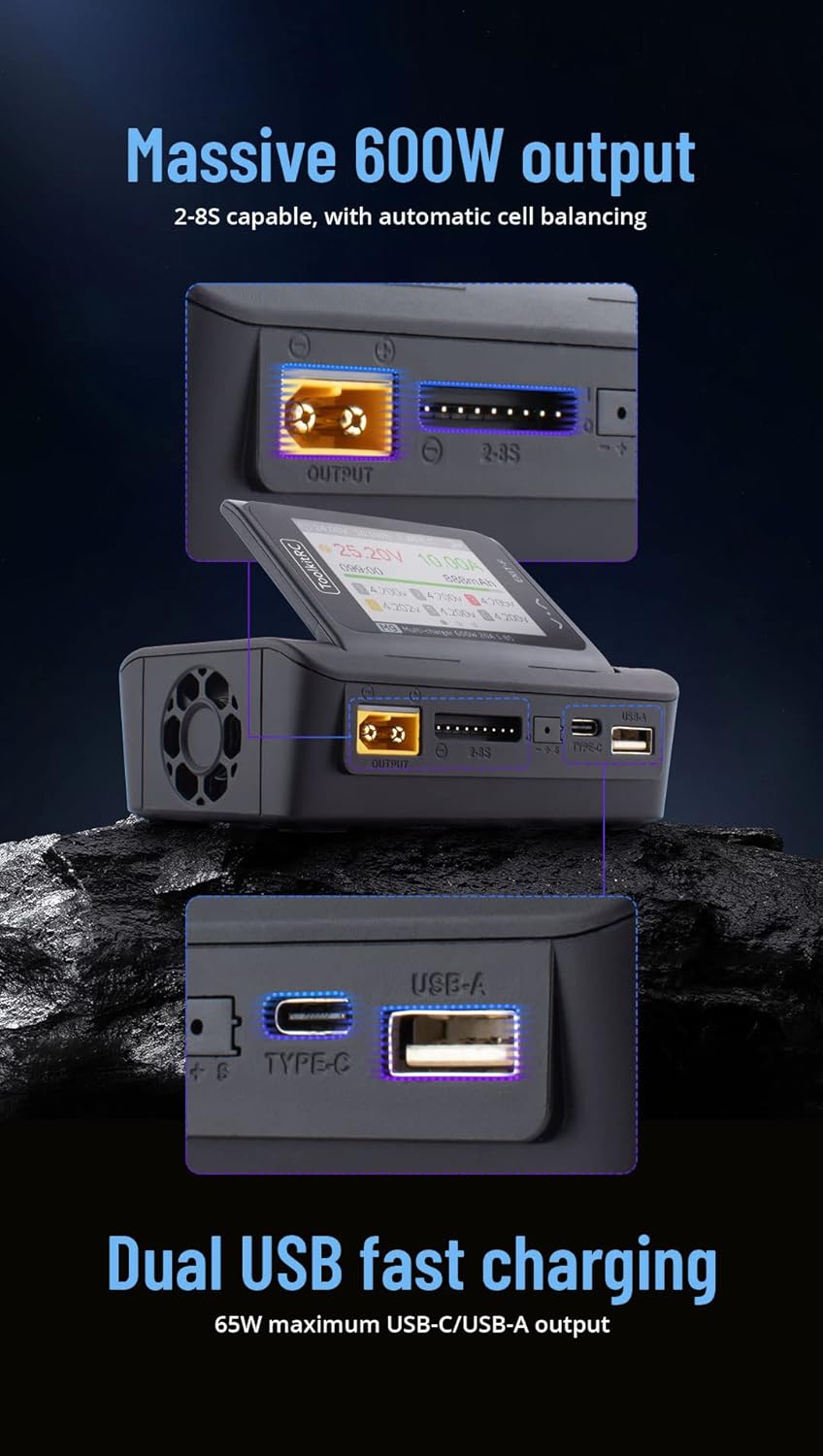
Figure 2.3: Graphic highlighting the M9's massive 600W output (2-8S capable with automatic cell balancing) and dual USB fast charging (65W maximum USB-C/USB-A output).
3. Thông số kỹ thuật
| Tính năng | Đặc điểm kỹ thuật |
|---|---|
| Đầu vào Voltage | Điện áp DC 7-35V @ Tối đa 25A |
| Các loại pin được hỗ trợ | LiPo, LiHV, LiFe, Lion, LTO (1-8S); NiMh (1-20S); Pb (1-10S) |
| Số dư hiện tại | 1000mA @ 4.2V |
| Độ chính xác của cân | <0.005V |
| Sạc điện | 0.1-20A @ 600W |
| Discharge Power (Rec/Ext Mode) | 0.1-20A @ 600W |
| Discharge Power (Internal Mode) | 0.1-3A @ 20W |
| USB Output (A+C) | 5-20V @ 65W (PD, QC, PPS, AFC, SCP) |
| Ô Voltage Đo lường | 1.0V-5.0V @ 1-6S |
| Đo điện trở bên trong | 0.1mΩ-99Ω @ 1-8S |
| Tín hiệu PWM | 880us-2200us @ 20-400Hz (Measure); 500us-2500us @ 20-1000Hz (Output) |
| PPM Signal | 880us-2200us * 8 CH @ 20-50Hz (Measure); 880us-2200us * 8 CH @ 50Hz (Output) |
| Tín hiệu SBUS | 880us-2200us * 16 CH @ 20-100Hz (Measure); 880us-2200us * 16 CH @ 74Hz (Output) |
| Chế độ cấp nguồn | 1-20A @ 1-35V (CC+CV) |
| Màn hình LCD | Màn hình IPS 2.4 inch, độ phân giải 320*240. |
| Kích thước | 108mm x 71mm x 36mm |
| Cân nặng | 235g (Unit); 330g (Packaged) |
4. Thiết lập
4.1 Kết nối nguồn điện
- Ensure your DC power supply provides a voltage nằm trong khoảng từ 7V đến 35V.
- Connect the positive (+) terminal of your DC power supply to the positive input terminal of the M9 charger, and the negative (-) terminal to the negative input terminal. Observe polarity carefully.
- Power on the DC supply. The M9 display should illuminate.
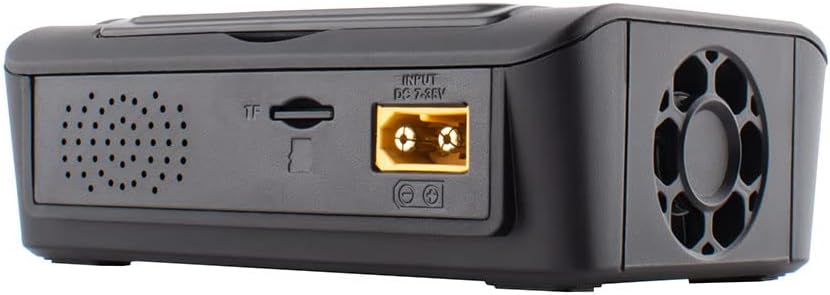
Hình 4.1: Phía sau view of the M9 charger showing the DC 7-35V input port and TF card slot.

Hình 4.2: Mặt trước view of the M9 charger showing the XT60 output port, balance port, Type-C, and USB-A ports.
4.2 Initial Power On and Navigation
Upon successful power-on, the device will display the main interface. Use the scroll knob and buttons to navigate through menus and select options.

Figure 4.3: Close-up of the M9's IPS display showing real-time charging data, including voltage, current, capacity, and individual cell voltagnghĩa là

Hình 4.4: Mặt bên view of the M9, illustrating the adjustable display screen and various ports including output, balance, Type-C, and USB-A.
5. Hoạt động
5.1 Sạc và xả pin
- Connect your battery to the appropriate port (e.g., XT60 for main power, balance port for cell balancing).
- Navigate to the "Charge" or "Discharge" menu on the M9 display.
- Select the battery type (LiPo, LiHV, LiFe, Lion, LTO, NiMh, Pb) and cell count (S).
- Set the desired charging or discharging current. Ensure the current is suitable for your battery's specifications to prevent damage.
- Confirm settings and start the process. Monitor the display for real-time information.
The M9 supports balance charging for multi-cell lithium batteries, ensuring each cell reaches the same voltage để có hiệu suất và tuổi thọ tối ưu.
5.2 Sạc nhanh USB
The M9 features dual USB ports (USB-A and Type-C) for fast charging external devices. These ports support various fast charging protocols (PD, QC, PPS, AFC, SCP) with a maximum output of 65W.
- Connect your device to either the USB-A or Type-C port using a compatible cable.
- The M9 will automatically detect the device and initiate charging.
5.3 Signal Measurement and Output
The M9 can measure and output PWM, PPM, and SBUS signals, useful for testing RC components like servos and ESCs.
- Navigate to the "Signal Measurer" or "Signal Source" menu.
- Select the desired signal type (PWM, PPM, SBUS).
- Follow the on-screen instructions to connect your component for measurement or to configure the output signal parameters.
5.4 Firmware Updates and Customization
The M9 supports firmware updates and customization of the welcome screen and voice packs.
- Connect the M9 to a computer via the USB port. The device will appear as a U disk.
- Sao chép bản cập nhật chương trình cơ sở file or custom voice/image files to the M9's storage.
- Follow the specific instructions provided with the firmware update for installation.
Video 5.1: Một kết thúcview of the ToolkitRC M9 multifunctional charger, demonstrating its ergonomic flip-up display, customizable welcome screen and voice packs, voice-announced menu items, multi-signal output, ESC test functionality, and dual USB fast charging capabilities. This video is provided by Bestpriceic (Seller).
6. Bảo trì
- Hãy giữ cho bộ sạc luôn sạch sẽ và không bị bám bụi bẩn. Sử dụng khăn mềm, khô để lau chùi.
- Bảo quản bộ sạc ở nơi khô ráo, thoáng mát, tránh ánh nắng trực tiếp và nhiệt độ khắc nghiệt.
- Regularly inspect cables and connectors for any signs of wear or damage. Replace damaged components immediately.
- Đảm bảo thông gió thích hợp trong quá trình vận hành để tránh quá nóng.
KHAI THÁC. Xử lý sự cố
7.1 Các vấn đề thường gặp và giải pháp
- Bộ sạc không bật nguồn:
- Verify the DC input voltage nằm trong phạm vi điện áp 7-35V.
- Check power supply connections for correct polarity and secure contact.
- Hãy đảm bảo nguồn điện hoạt động bình thường.
- Charging process not starting or stopping unexpectedly:
- Confirm the battery type and cell count settings match the connected battery.
- Check that the charging current is set appropriately for the battery.
- Inspect battery and charger connections for looseness or damage.
- Ensure the battery is not over-discharged or severely damaged, which might prevent charging.
- Display or navigation issues:
- If the scroll knob is unresponsive or jumps, try pressing it firmly while turning.
- Khởi động lại thiết bị bằng cách ngắt kết nối và kết nối lại nguồn điện.
- Consider performing a firmware update if available, as this may resolve software-related issues.
Đối với các vấn đề không được đề cập ở đây, vui lòng tham khảo mục hỗ trợ.
8. Bảo hành và Hỗ trợ
Để biết thông tin bảo hành, hỗ trợ kỹ thuật hoặc thắc mắc về dịch vụ, vui lòng liên hệ trực tiếp với nhà bán lẻ hoặc nhà sản xuất. Vui lòng giữ lại hóa đơn mua hàng để làm bằng chứng mua hàng.
Manufacturer: Bestpriceic (as per product listing)
For the latest information and firmware updates, please visit the official ToolkitRC webtrang web hoặc liên hệ với kênh hỗ trợ của họ.