1. Giới thiệu
The Echo Dot (4th Gen) is a smart speaker designed to bring the convenience of Alexa into any room of your home. Its spherical design delivers crisp vocals and balanced bass for a full sound experience. With Alexa, you can control your entertainment, manage your smart home devices, get information, set alarms, and connect with others hands-free.
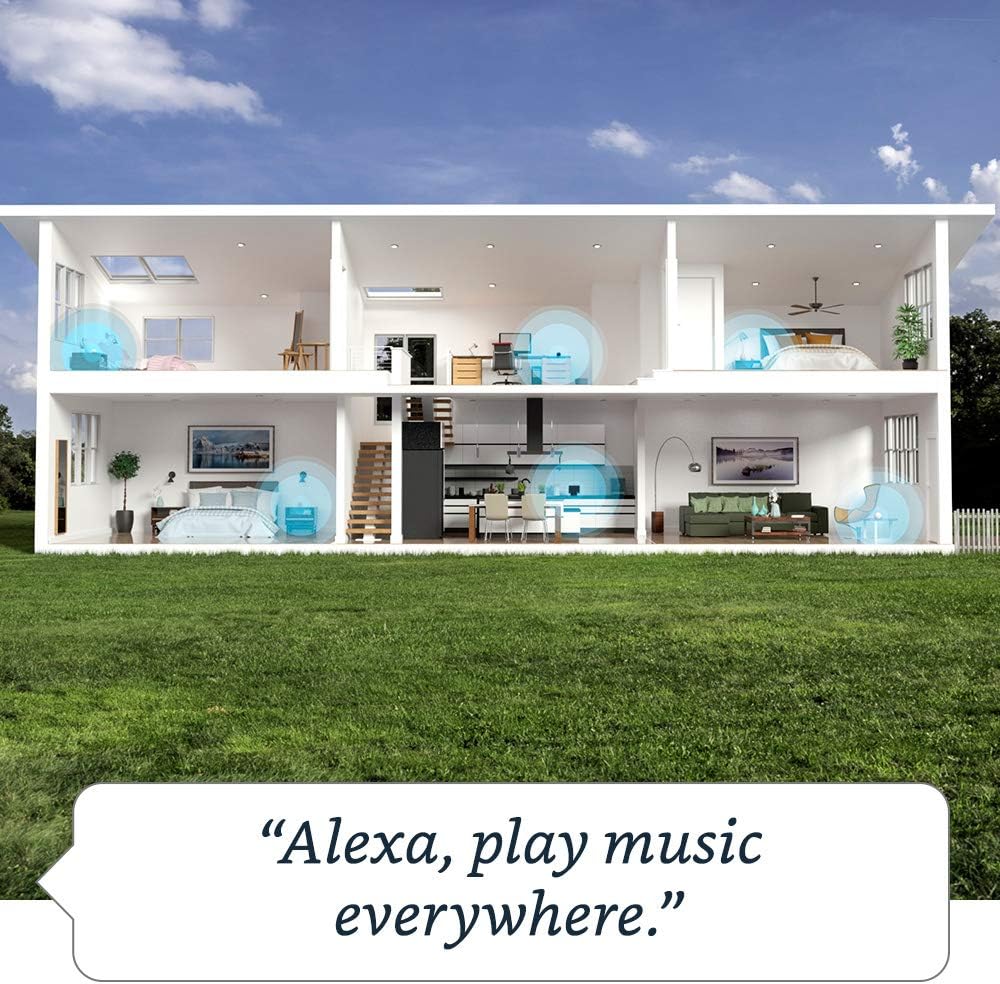
Image: The Echo Dot (4th Gen) showcasing its various capabilities, including music playback, timers, smart home control, information retrieval, intercom features, and news updates.
2. Hướng dẫn cài đặt
Follow these steps to set up your Echo Dot (4th Gen):
- Cắm Echo Dot của bạn vào: Connect the included power adapter to your Echo Dot and then to a power outlet. The light ring on the bottom will turn blue, then orange, indicating it's ready for setup.
- Tải xuống ứng dụng Alexa: Trên điện thoại thông minh hoặc máy tính bảng của bạn, hãy tải ứng dụng Amazon Alexa từ cửa hàng ứng dụng của thiết bị (App Store cho iOS, Google Play Store cho Android).
- Mở ứng dụng Alexa: Log in with your Amazon account credentials. If you don't have an Amazon account, you will need to create one.
- Thêm thiết bị của bạn: In the Alexa app, tap the "Devices" icon at the bottom right. Tap the "+" icon in the top right corner, then select "Add Device". Choose "Amazon Echo" and then "Echo Dot".
- Thực hiện theo hướng dẫn trên màn hình: The app will guide you through connecting your Echo Dot to your Wi-Fi network. Ensure your phone is connected to the same Wi-Fi network you want your Echo Dot to use.
- Xác nhận kết nối: Once connected, the light ring on your Echo Dot will turn off, and Alexa will greet you. Your Echo Dot is now ready to use.
For optimal performance, place your Echo Dot in a central location, away from walls or other obstructions that might block the microphone.
3. Hướng dẫn sử dụng Echo Dot
Your Echo Dot is voice-controlled using the wake word "Alexa". Here are some common functionalities:
Lệnh bằng giọng nói
- Âm nhạc & Âm thanh: "Alexa, play pop music." "Alexa, play my workout playlist on Spotify." "Alexa, volume up." "Alexa, next song."
- Thông tin: "Alexa, what's the weather today?" "Alexa, tell me a joke." "Alexa, what's the news?" "Alexa, how tall is Mount Everest?"
- Hẹn giờ & Báo thức: "Alexa, set a timer for 10 minutes." "Alexa, set an alarm for 7 AM." "Alexa, cancel my alarm."
- Điều khiển nhà thông minh: "Alexa, turn on the living room lights." "Alexa, set the thermostat to 72 degrees." (Requires compatible smart home devices)
- Giao tiếp: "Alexa, call Mom." "Alexa, drop in on the kitchen Echo Dot." "Alexa, announce 'Dinner is ready!'"
Nhạc đa phòng
You can group multiple Echo devices to play music simultaneously across different rooms.

Image: A visual representation of multi-room music, demonstrating how Echo Dots can be linked to play synchronized audio throughout a home.
To set up multi-room music, open the Alexa app, go to "Devices", tap the "+" icon, and select "Combine Speakers" > "Multi-room music".
Thói quen
Automate daily tasks by creating routines in the Alexa app. For example, you can set a routine to turn on lights and play news when you say "Alexa, good morning."

Image: The Echo Dot (4th Gen) integrated into a smart home setup, illustrating its ability to trigger routines based on motion or other events.
Kiểm soát quyền riêng tư
Your Echo Dot is designed with multiple layers of privacy controls. You can press the microphone off button on the top of the device to electronically disconnect the microphones. The light ring will turn red when the microphones are off.
4. Bảo trì
- Vệ sinh: Use a soft, dry, lint-free cloth to clean your Echo Dot. Do not use abrasive cleaners or sprays.
- Cập nhật phần mềm: Your Echo Dot automatically receives software updates over Wi-Fi. Ensure it is connected to the internet for these updates.
- Vị trí: Tránh đặt thiết bị dưới ánh nắng trực tiếp, gần nguồn nhiệt hoặc trong môi trường quá ẩm ướt.
KHAI THÁC. Xử lý sự cố
| Vấn đề | Giải pháp |
|---|---|
| Echo Dot is not responding. | Ensure the microphone is not muted (red light ring). Try saying "Alexa" clearly. Unplug the power adapter from the device or the wall outlet, wait 30 seconds, then plug it back in. |
| Không thể kết nối với Wi-Fi. | Check your Wi-Fi password. Ensure your Echo Dot is within range of your Wi-Fi router. Restart your router and modem. Use the Alexa app to re-configure Wi-Fi settings. |
| Chất lượng âm thanh kém. | Adjust the volume. Ensure the device is not placed in an enclosed space. If connected to external speakers, check the cable connection. |
| Alexa không hiểu các lệnh. | Speak clearly and at a normal volume. Reduce background noise. Ensure you are using the correct wake word ("Alexa"). |
6. Thông số kỹ thuật
| Tính năng | Chi tiết |
|---|---|
| Kích cỡ | 3.9” x 3.9” x 3.5” (100 x 100 x 89 mm) |
| Cân nặng | 12 oz (341.3g) |
| Kết nối Wi-Fi | Wi-Fi băng tần kép hỗ trợ mạng 802.11a/b/g/n/ac (2.4 và 5 GHz). |
| Kết nối Bluetooth | Hỗ trợ A2DP cho truyền phát âm thanh; AVRCP để điều khiển bằng giọng nói các thiết bị di động được kết nối. |
| Âm thanh | 1.6” speaker. 3.5 mm line out. |
| Yêu cầu hệ thống | Wi-Fi connection, Alexa app (Fire OS, Android, iOS, web trình duyệt). |
| Thế hệ | Echo Dot (Thế hệ thứ 4) - Phát hành năm 2020 |
| Ngôn ngữ | Alexa nói tiếng Anh và tiếng Tây Ban Nha |
| Có trong hộp | Echo Dot, power adapter, Quick Start Guide. |
7. Bảo hành và Hỗ trợ
Bảo hành: Your Echo Dot (4th Gen) comes with a 90-day limited warranty and service. Optional 1-year, 2-year, and 3-year extended warranties are available for U.S. customers, sold separately.
Cập nhật bảo mật phần mềm: Thiết bị này nhận được các bản cập nhật bảo mật phần mềm được đảm bảo cho đến ít nhất bốn năm sau khi thiết bị được bán lần cuối dưới dạng thiết bị mới trên hệ thống của chúng tôi. webcác trang web.
Hỗ trợ khách hàng: For further assistance, visit the Amazon Device Support page or contact Amazon Customer Service. You can also find more information and manage your device settings through the Alexa app or by visiting the Alexa Privacy Hub for privacy-related inquiries.


