1. Giới thiệu
This manual provides detailed instructions for the installation, operation, and maintenance of your Lorex 4K WiFi Halow 6-Channel NVR Indoor/Outdoor Security System. This system offers advanced surveillance capabilities with 4K Ultra HD resolution, wire-free battery-powered cameras, and intelligent features designed to enhance your property's security.
Các tính năng chính bao gồm:
- 4K Ultra HD Visual Excellence: Experience superior video clarity and digital zoom.
- Màu sắc nhìn ban đêm: Capture detailed video in color under ambient lighting, or crisp black and white with Infrared Night Vision in complete darkness.
- Wire-Free Security: Battery-operated cameras provide flexible placement with up to 600 motion events per charge.
- Thông báo thông minh: Receive targeted alerts with Person Detection, without recurring monthly fees.
- Đàm thoại hai chiều: Communicate with visitors directly through the Lorex Cirrus app.
- Private Local Storage: Recordings are stored on the included 1TB Hard Drive, ensuring privacy and no subscription fees.
2. Có gì trong hộp
Xác minh rằng tất cả các thành phần đều có sẵn trước khi bắt đầu cài đặt:
- Lorex 4K NVR (Network Video Recorder)
- 4 x Battery-Powered Wireless Cameras
- 4 x Camera Batteries
- Mounting Kits for Cameras
- Bộ đổi nguồn NVR

Image: The Lorex 4K NVR unit with four battery-powered wireless cameras, illustrating the complete system components.
3. Thiết lập
3.1 Thiết lập NVR ban đầu
- Kết nối NVR với nguồn điện bằng bộ đổi nguồn đi kèm.
- Connect the NVR to your router via an Ethernet cable for initial network configuration.
- Connect the NVR to a monitor using an HDMI cable (not included) to complete the on-screen setup wizard.
3.2 Camera Preparation and Installation
- Sạc pin: Fully charge all camera batteries using the provided USB cables and a compatible USB power adapter (not included) before first use.
- Chèn pin: Open the battery compartment on each camera and insert the charged battery pack. Ensure it clicks into place securely.

Image: A hand demonstrates inserting a battery pack into the base of a Lorex wireless security camera.
- Vị trí máy ảnh: Choose optimal locations for your cameras, considering coverage area, Wi-Fi signal strength, and potential obstructions. The cameras are weatherproof (IP65 rated) for outdoor use.
- Lắp đặt: Use the provided mounting kits to securely attach cameras to walls or other surfaces. Adjust the camera angle for desired viewđang.

Image: A Lorex wireless camera is shown being mounted onto an exterior wall, illustrating the installation process.
3.3 Cài đặt và ghép nối ứng dụng
- Tải xuống Tơ Lorex Tải ứng dụng từ cửa hàng ứng dụng trên thiết bị của bạn (Google Play Store hoặc Apple App Store).
- Follow the in-app instructions to create an account and add your NVR system.
- The cameras should automatically pair with the NVR once powered on and within range of the NVR's Wi-Fi Halow connection.

Image: A smartphone displays the Lorex Home app, showing multiple live camera feeds for remote viewđang.
4. Vận hành hệ thống của bạn
4.1 Trực tiếp View và Ghi âm
Truy cập nguồn cấp dữ liệu camera trực tiếp và video đã ghi lại.tage through the Lorex Cirrus app or directly from the NVR connected to a monitor. The system records in 4K Ultra HD, providing clear visuals.

Image: A split image demonstrates the difference between standard video and 4K Ultra HD, highlighting enhanced clarity and detail.
4.2 Chế độ nhìn ban đêm
Your cameras are equipped with two night vision modes:
- Màu sắc nhìn ban đêm: Provides full-color video in low-light conditions where some ambient light is present.
- Tầm nhìn ban đêm hồng ngoại (IR): Automatically activates in complete darkness, providing clear black and white video.

Hình ảnh: Một sự chia tách view shows a backyard scene captured with Infrared Night Vision (monochrome) and Color Night Vision (full color).

Hình ảnh: Một sự chia tách view illustrates the difference between Infrared Night Vision (monochrome) and daytime video capture on an outdoor patio.
4.3 Smart Notifications and Person Detection
The system utilizes Person Detection to minimize false alerts. You will receive notifications on your mobile device only when a person is detected, ensuring you are informed of relevant activity.
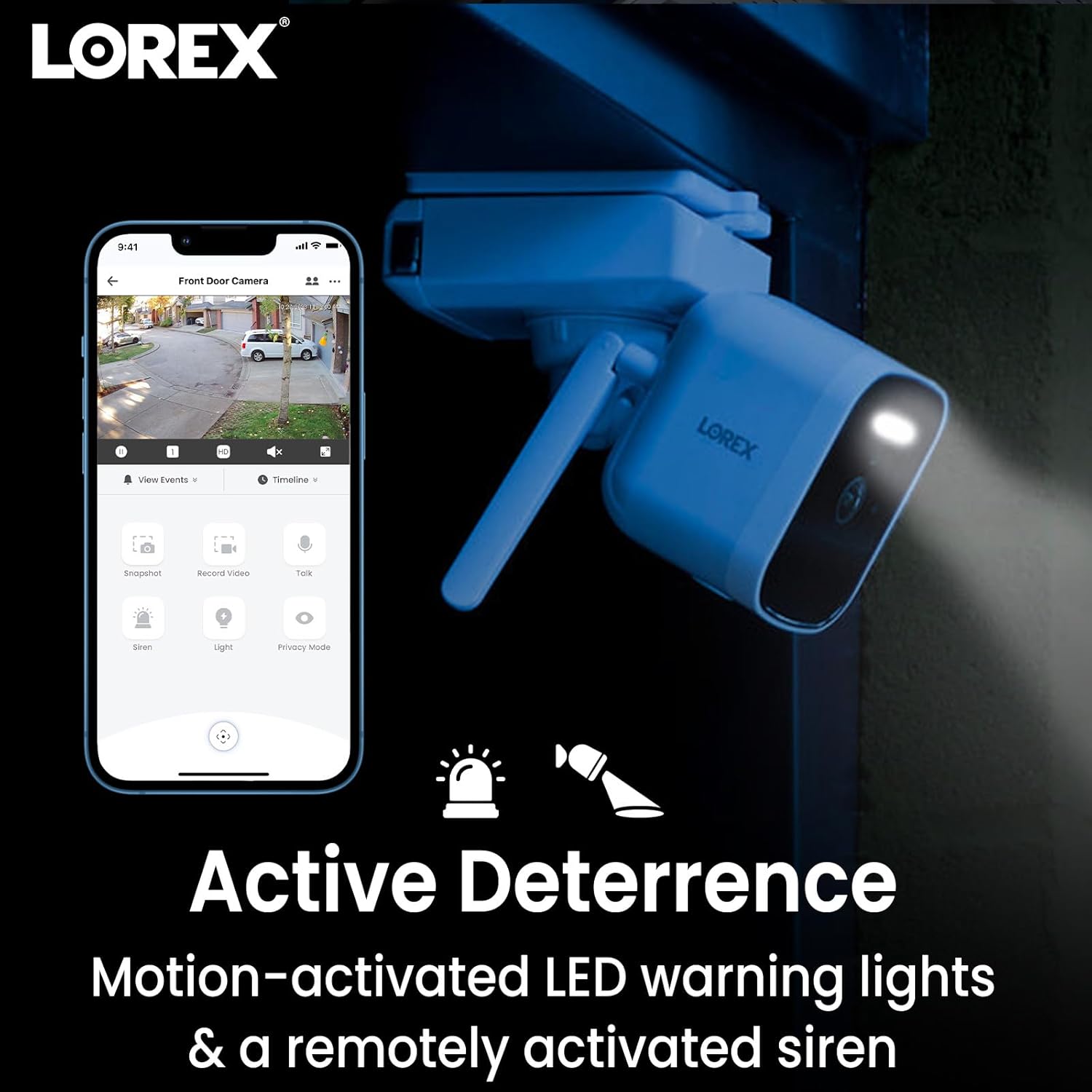
Image: A smartphone screen shows the Lorex app interface with a camera view and notification icons, indicating smart alerts.
4.4 Đàm thoại hai chiều
Use the Lorex Cirrus app to engage in two-way conversations through your camera. This feature allows you to speak to and hear individuals near the camera, such as delivery personnel or visitors.

Image: A delivery driver is shown at a door, with speech bubbles indicating a two-way conversation facilitated by the camera's 2-Way Talk feature.
4.5 Răn đe chủ động
The cameras feature motion-activated LED warning lights and a remotely activated siren. These can be used to deter unwanted visitors or draw attention to an event.

Image: A Lorex camera is shown with its LED warning light activated, accompanied by icons representing motion-activated lights and a siren for active deterrence.
5. Bảo trì
5.1 Quản lý pin
The wireless cameras are powered by rechargeable batteries. Battery life varies based on usage, temperature, and recording frequency. It is recommended to periodically check battery levels via the Lorex Cirrus app and recharge as needed. To recharge, remove the battery pack and connect it to a USB power source.
5.2 Vệ sinh
To ensure optimal performance, periodically clean the camera lenses and housing with a soft, damp Lau sạch bằng vải. Tránh sử dụng các hóa chất mạnh hoặc vật liệu mài mòn có thể làm hỏng máy ảnh.
5.3 Khả năng chống chịu thời tiết
The cameras are rated IP65 weatherproof, meaning they are protected against dust and low-pressure water jets. While designed for outdoor use, avoid submerging the cameras in water or exposing them to extreme weather conditions beyond their rating.

Image: A Lorex camera is shown outdoors with water droplets, accompanied by an IP66 weatherproof icon, indicating its resistance to elements.
KHAI THÁC. Xử lý sự cố
6.1 Không có camera quay video/camera ngoại tuyến
- Kiểm tra nguồn điện: Hãy đảm bảo đầu ghi NVR đã được bật nguồn và pin của camera đã được sạc đầy.
- Kết nối Wi-Fi: Verify that the NVR is connected to your network and cameras are within range of the NVR's Halow Wi-Fi signal. Obstructions can affect signal strength.
- Khởi động lại: Try restarting the NVR and cameras.
- Re-pair Cameras: If a camera consistently loses connection, try re-pairing it with the NVR through the app settings.
6.2 Tuổi thọ pin ngắn
- Motion Events: Frequent motion detection and recording will consume battery faster. Adjust motion sensitivity and recording zones in the app.
- Sống View Cách sử dụng: Excessive use of live view drains battery quickly.
- Nhiệt độ: Nhiệt độ thấp có thể làm giảm hiệu suất pin.
- Sạc: Ensure batteries are fully charged using a reliable power source.
6.3 Excessive/Irrelevant Notifications
- Phát hiện người: Ensure Person Detection is enabled and configured correctly in the app.
- Vùng chuyển động: Adjust motion detection zones to exclude areas with frequent, irrelevant movement (e.g., public sidewalks, trees swaying).
- Độ nhạy: Lower the motion sensitivity setting in the app.
6.4 Vấn đề về ứng dụng
- Cập nhật ứng dụng: Ensure your Lorex Cirrus app is updated to the latest version.
- Kết nối Internet: Kiểm tra xem thiết bị di động của bạn có kết nối internet ổn định hay không.
- Cài đặt lại ứng dụng: Nếu sự cố vẫn tiếp diễn, hãy thử gỡ cài đặt và cài đặt lại ứng dụng.
7. Thông số kỹ thuật
| Tính năng | Chi tiết |
|---|---|
| Tên mẫu | L85591-8AA4B-E |
| Số hiệu mẫu sản phẩm | Raysharp |
| Sử dụng trong nhà/ngoài trời | Ngoài trời |
| Giao thức kết nối | Wi-Fi |
| Công nghệ truyền thông không dây | Wi-Fi |
| Độ phân giải quay video | 4K (Recording at 2K) |
| Số lượng kênh | 6-Channel NVR (4 cameras included) |
| Nguồn điện | Corded Electric (NVR), Battery (Cameras) |
| Pin cần thiết | Yes, 4 Lithium Ion batteries (included) |
| Công nghệ ánh sáng yếu | Màu đêm |
| Loại cảnh báo | Motion Only (with Person Detection) |
| Bảo vệ quốc tế Rating | IP65 |
| Kích thước sản phẩm (L x W x H) | 6.7 x 2.5 x 8.6 inch |
| Trọng lượng sản phẩm | 11.18 pound |
| Nhà sản xuất | Truyền thuyết |
8. Bảo hành và Hỗ trợ
For warranty information, technical support, and additional resources, please visit the official Lorex website or contact Lorex customer service. You can also find support and product information on the Cửa hàng Lorex trên Amazon.
Giữ bằng chứng mua hàng của bạn để yêu cầu bảo hành.