1. Sản phẩm hếtview
The Xigmatek LUX S Arctic (Model EN48298) is a mid-tower PC case designed for computer enthusiasts and gamers. It features a distinctive triangular mesh front panel for optimal airflow and comes equipped with four 120mm X24A A-RGB fans to provide efficient cooling and customizable lighting. The case supports Micro ATX motherboards and is constructed with durable materials, including tempered glass for a clear view của các thành phần bên trong.
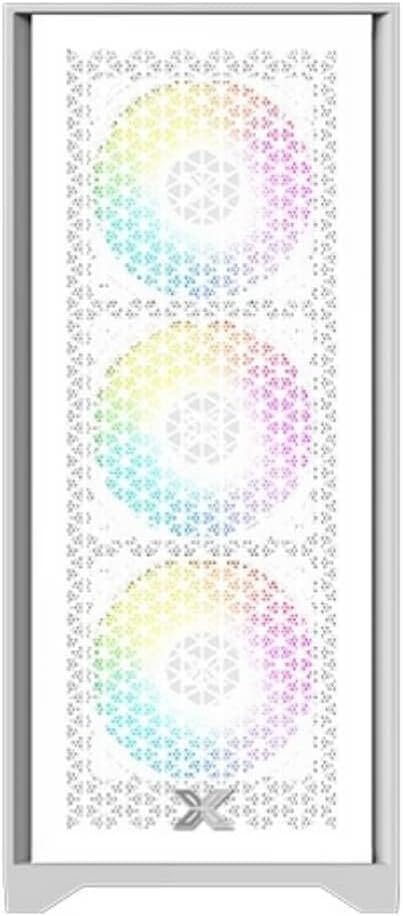
Hình 1.1: Đằng trước view of the Xigmatek LUX S Arctic PC case, showcasing the triangular mesh design and the pre-installed A-RGB fans.
2. Nội dung gói hàng
Before proceeding with installation, please ensure all components listed below are present in your package. If any items are missing or damaged, contact your retailer or Xigmatek support.
- Xigmatek LUX S Arctic Mid-Tower PC Case
- 4 x 120mm X24A A-RGB Fans (pre-installed)
- Accessory box (screws, cable ties, standoffs, user manual)
3. Thiết lập và Cài đặt
Follow these steps to install your computer components into the Xigmatek LUX S Arctic PC case. Ensure your system is powered off and unplugged before beginning any installation.
3.1. Chuẩn bị hồ sơ vụ án
- Đặt hộp đựng lên một bề mặt phẳng và chắc chắn.
- Carefully remove the tempered glass side panel by unscrewing the thumb screws at the rear of the case and gently pulling the panel away.
- Remove the opposite side panel (metal) in a similar manner to access the cable management area.

Hình 3.1: Nội thất view of the PC case, illustrating the spacious layout for component installation.
3.2. Lắp đặt bo mạch chủ
- Install the I/O shield that came with your motherboard into the designated opening at the rear of the case.
- Align your Micro ATX motherboard with the pre-installed standoffs. Ensure all screw holes on the motherboard match the standoffs.
- Cố định bo mạch chủ bằng các ốc vít được cung cấp trong hộp phụ kiện. Không siết quá chặt.
3.3. Lắp đặt bộ nguồn (PSU)
- Locate the PSU mounting area at the rear bottom of the case.
- Slide your PSU into the bay from the rear, ensuring the fan faces the bottom (if the case has a filtered intake) or upwards.
- Cố định bộ nguồn bằng các ốc vít từ phía sau bên ngoài vỏ máy.
3.4. Cài đặt ổ đĩa lưu trữ
The case supports various storage configurations. Refer to the accessory box for specific mounting hardware.
- Ổ SSD 2.5": Mount SSDs to the designated brackets behind the motherboard tray.
- Ổ cứng 3.5": Lắp các ổ cứng HDD vào khay ổ đĩa nằm bên dưới tấm che nguồn.

Hình 3.2: Nội thất phía sau view, highlighting cable management cutouts and storage drive mounting locations.
3.5. Lắp đặt card mở rộng (GPU, v.v.)
- Tháo các nắp che khe cắm PCIe cần thiết ở phía sau thùng máy.
- Insert your expansion card (e.g., graphics card) into the corresponding PCIe slot on your motherboard until it clicks into place.
- Secure the card with a screw to the case chassis.
3.6. Cable Management and Connections
Connect all necessary cables from the PSU to your motherboard and components. Utilize the cable routing cutouts and tie-down points behind the motherboard tray for a clean build and improved airflow.
- Connect front panel headers (Power SW, Reset SW, HDD LED, Power LED) to the motherboard.
- Connect USB 2.0 and USB 3.0 headers to the motherboard.
- Connect audio header to the motherboard.
- Connect the pre-installed A-RGB fans to your motherboard's A-RGB header or a compatible controller. Ensure power is supplied to the fan hub/controller if applicable.
4. Hướng dẫn vận hành
Sau khi tất cả các linh kiện được lắp đặt và dây cáp được kết nối, bạn có thể bật nguồn hệ thống.
- Replace both side panels and secure them with their respective screws.
- Connect your monitor, keyboard, mouse, and power cable to the rear of your PC.
- Hãy gạt công tắc nguồn trên bộ nguồn của bạn sang vị trí 'ON'.
- Nhấn nút nguồn ở mặt trước của vỏ máy.
- The pre-installed A-RGB fans will illuminate. You can control their lighting effects via your motherboard's software (if connected to an A-RGB header) or a dedicated controller (if included with the fans or purchased separately).
5. Bảo trì
Bảo trì thường xuyên giúp đảm bảo hiệu suất tối ưu và tuổi thọ của các thành phần máy tính.
- Bộ lọc bụi: The Xigmatek LUX S Arctic case likely includes removable dust filters (e.g., top, bottom, front). Clean these filters every 1-3 months, depending on your environment, by gently brushing or washing them with water and allowing them to dry completely before reinstallation.
- Vệ sinh nội thất: Periodically (every 6-12 months), open the case and use compressed air to remove dust buildup from fans, heatsinks, and other components. Hold fan blades gently to prevent them from spinning too fast during cleaning.
- Vệ sinh bên ngoài: Lau các bề mặt bên ngoài bằng giẻ mềm, damp cloth. Avoid harsh chemicals that may damage the finish or tempered glass.
KHAI THÁC. Xử lý sự cố
If you encounter issues with your PC build, refer to these common troubleshooting steps.
- Hệ thống không bật nguồn:
- Hãy đảm bảo công tắc nguồn của bộ nguồn đang ở vị trí 'BẬT'.
- Check all power cables (24-pin ATX, 8-pin CPU, GPU power) are securely connected.
- Verify front panel power switch header is correctly connected to the motherboard.
- Quạt không quay/Đèn RGB không sáng:
- Check fan power connections to the motherboard or fan hub.
- Ensure A-RGB cables are correctly connected to the motherboard's A-RGB header or controller.
- Verify that any fan hub or controller is receiving power.
- Không có đầu ra hiển thị:
- Ensure your monitor cable is connected to the graphics card (not the motherboard's integrated graphics ports, unless you are using integrated graphics).
- Tháo lắp lại card đồ họa vào khe PCIe.
- Check graphics card power connections.
For more complex issues, consult your motherboard manual or component manufacturer's support resources.
7. Thông số kỹ thuật
| Tính năng | Chi tiết |
|---|---|
| Thương hiệu | Xigmatek |
| Tên mẫu | LUX S Arctic |
| Số hiệu mẫu | EN48298 |
| Loại trường hợp | Tháp giữa |
| Màu sắc | Trắng Bắc Cực |
| Vật liệu | Tempered Glass (side panel) |
| Khả năng tương thích của bo mạch chủ | MicroATX |
| Quạt được cài đặt sẵn | 4 x 120mm X24A A-RGB Fans |
| Phương pháp làm mát | Không khí |
| Bảng điều khiển I / O phía trước | 2 x USB ports (type not specified, typically USB 2.0/3.0), Audio Jacks |
| Gắn nguồn điện | Rear Mount (bottom) |
| Sử dụng được khuyến nghị | Trò chơi |
8. Bảo hành và Hỗ trợ
For information regarding warranty coverage, technical support, or replacement parts, please refer to the warranty card included with your product or visit the official Xigmatek webđịa điểm.


