1. Giới thiệu
This manual provides detailed instructions for the installation, operation, and maintenance of your SCS Sentinel Audio Intercom System, model PAF0007. This system is designed to provide secure and convenient audio communication and access control for two separate housing units.
Please read this manual thoroughly before installation and operation to ensure proper functioning and to prevent damage to the unit.
2. Nội dung gói hàng
Xác minh rằng tất cả các thành phần đều có trong gói:
- 2 x Internal Audio Handsets
- 1 x Outdoor Street Plate with Protective Visor
- 2 x Bộ đổi nguồn AC
- Vít lắp
- Hướng dẫn sử dụng (tài liệu này)

Hình 1: Hếtview of the SCS Sentinel Audio Intercom System components.
3. Tính năng sản phẩm
- Kết nối có dây: Requires only 2 wires to connect the street plate to each handset, simplifying installation.
- Two-Housing Support: Designed for mini-collective use with one entrance and two separate housing units.
- Door Opening Function: Allows for remote door opening (requires optional 12V electric lock or trigger).
- Outdoor Street Plate: Features an aluminum facade, protective visor, microphone, speaker, and two backlit call buttons with name tags. IP44 protection rating for weather resistance.
- Indoor Handsets: Two high-performance audio handsets with adjustable ringer volume (2 levels) and 16 melodies. Each handset includes a button for door access.
- Khoảng cách hoạt động: Lên đến 100 mét.
4. Thiết lập và Cài đặt
4.1. Biện pháp phòng ngừa an toàn
- Ensure power is disconnected before beginning any wiring.
- Tuân theo tất cả các quy tắc và quy định về điện của địa phương.
- Do not expose components to excessive moisture or extreme temperatures.
4.2. Các bước cài đặt
- Mounting the Outdoor Street Plate:
Choose a suitable location near your entrance, protected from direct heavy rain if possible, though the unit is IP44 rated. Use the provided screws to securely mount the street plate with its protective visor to the wall. Ensure the visor is positioned correctly to shield the unit from elements.

Figure 2: Outdoor Street Plate with Visor.
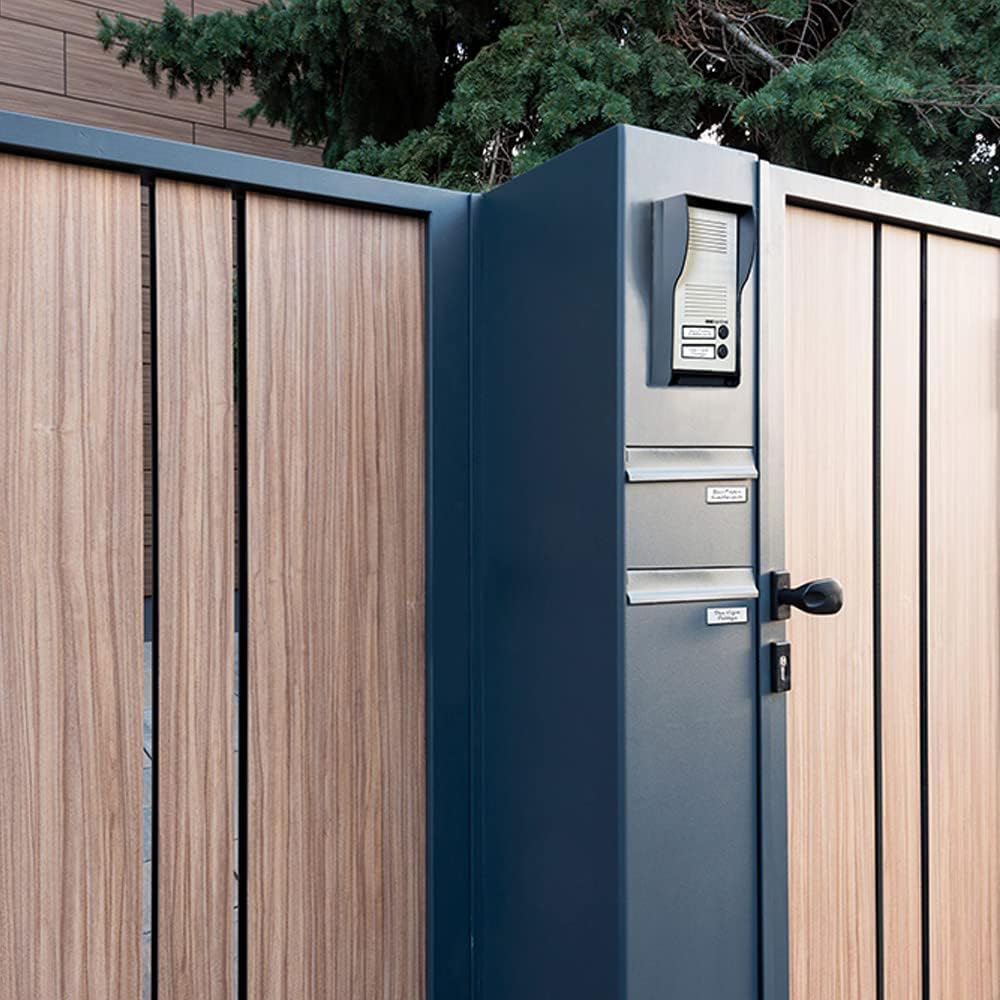
Hình 3: Ví dụample of Outdoor Street Plate Installation on a Gate.
- Mounting the Indoor Handsets:
Select a convenient indoor location for each handset, typically near the main entrance of each housing unit. Mount the handsets securely to the wall using appropriate screws.

Figure 4: Indoor Handsets.
- Kết nối dây điện:
Connect the outdoor street plate to each indoor handset using a 2-wire cable. Ensure correct polarity if specified in the wiring diagram (refer to the diagram provided in the physical manual for precise connections). The maximum operating distance for the wiring is 100 meters.
If connecting an optional 12V electric lock or trigger, refer to its specific wiring instructions and connect it to the designated terminals on the street plate or handset as per the system's wiring diagram.
- Kết nối nguồn điện:
Plug the provided AC adapters into a standard electrical outlet and connect them to the respective indoor handsets. Ensure the power supply is stable.
5. Hướng dẫn vận hành
5.1. Nhận cuộc gọi
- When a visitor presses a call button on the outdoor street plate, the corresponding indoor handset will ring.
- Nhấc ống nghe để thiết lập liên lạc âm thanh hai chiều với người đến thăm.

Figure 5: Operating the Indoor Handset.
5.2. Mở cửa/cổng
- During a conversation, press the designated door opening button on the indoor handset to activate the connected electric lock or trigger.
- The system supports door opening. Gate opening is not directly supported by this model without additional accessories.
5.3. Adjusting Ringer Volume and Melodies
- The indoor handsets feature a ringer volume adjustment with 2 levels. Locate the volume control switch or button on the side or bottom of the handset and adjust as desired.
- The system offers 16 melodies. Refer to the specific instructions for your handset model to cycle through and select your preferred melody.
6. Bảo trì
- Vệ sinh: Use a soft, dry cloth to clean the surfaces of the indoor handsets and outdoor street plate. Do not use abrasive cleaners or solvents.
- Đơn vị ngoài trời: Periodically check the outdoor street plate for any debris or obstructions around the microphone, speaker, and call buttons. Ensure the protective visor is intact and securely fastened.
- Dây điện: Inspect wiring connections periodically for any signs of wear or damage. Ensure all connections remain secure.
KHAI THÁC. Xử lý sự cố
| Vấn đề | Nguyên nhân có thể | Giải pháp |
|---|---|---|
| No sound from handset or street plate. | Loose wiring connection; Power adapter unplugged; Faulty component. | Check all 2-wire connections between the street plate and handsets. Ensure AC adapters are securely plugged in. If problem persists, contact support. |
| Handset not ringing. | Ringer volume set to minimum; Incorrect wiring; Faulty call button. | Increase ringer volume. Verify wiring connections. Test call button on street plate. |
| Door opening function not working. | Electric lock/trigger not connected or faulty; Incorrect wiring for door release. | Ensure the optional electric lock/trigger is correctly installed and wired. Check wiring diagram for door release connections. |
| Chất lượng âm thanh kém (tiếng rè, âm lượng nhỏ). | Interference; Damaged wiring; Obstruction on microphone/speaker. | Check for sources of electrical interference. Inspect wiring for damage. Clean microphone and speaker grilles on both units. |
8. Thông số kỹ thuật
- Người mẫu: PAF0007
- Loại hệ thống: Wired Audio Intercom
- Number of Housings: 2
- Dây điện: Kết nối 2 dây
- Max Operating Distance: 100 mét
- Outdoor Street Plate:
- Material: Aluminium facade
- Xếp hạng bảo vệ: IP44
- Features: 2 backlit call buttons, name tag holders, protective visor
- Kích thước: 107 x 216 x 69 mm (ước chừng)
- Indoor Handsets:
- Ringer Volume: 2 levels
- Melodies: 16
- Nguồn điện: Bộ đổi nguồn AC (có kèm theo)
- Kích thước: 98 x 214 x 40 mm (ước chừng)
- Mở cửa: Yes (requires optional 12V electric lock or trigger)
- Mở cổng: No (direct support)
- Tổng trọng lượng: 1.03 Kilôgam (xấp xỉ)
9. Bảo hành và Hỗ trợ
This SCS Sentinel Audio Intercom System (Model PAF0007) comes with a Bảo hành 2 năm kể từ ngày mua.
The warranty covers defects in materials and workmanship under normal use. It does not cover damage caused by improper installation, misuse, accidents, unauthorized repairs, or acts of nature.
For technical assistance, troubleshooting, or warranty claims, please contact SCS Sentinel customer service. Refer to the contact information provided with your product packaging or visit the official SCS Sentinel webđịa điểm.


