Giới thiệu
Thank you for choosing the Xtorm XP300U Portable Power Station. This device is designed to provide reliable and portable power for various applications, from home use to outdoor camping. With a 300W output and multiple charging options, it ensures your devices stay powered wherever you are. This manual provides essential information on the safe operation, setup, maintenance, and troubleshooting of your power station.
Thông tin an toàn
Vui lòng đọc kỹ tất cả các cảnh báo và hướng dẫn an toàn trước khi sử dụng sản phẩm này để đảm bảo vận hành an toàn và tránh hư hỏng. Giữ lại hướng dẫn sử dụng này để tham khảo sau.
- Không được tháo rời, sửa chữa hoặc thay đổi thiết bị. Việc lắp ráp lại không đúng cách có thể gây cháy hoặc thương tích.
- Không được để thiết bị tiếp xúc với lửa hoặc nhiệt độ cao (trên 60°C/140°F).
- Không sử dụng hoặc bảo quản thiết bị dưới ánh nắng trực tiếp hoặc trong môi trường nóng.
- Không sử dụng hoặc cất giữ thiết bị trong phòng tắm hoặc ở những khu vực tiếp xúc với nước hoặc độ ẩm.
- Không được làm rơi, đập hoặc để thiết bị chịu tác động mạnh.
- Để xa tầm tay trẻ em.
- Chỉ sử dụng cáp sạc và bộ chuyển đổi chính hãng hoặc được chứng nhận.
- Ensure proper ventilation during use and charging. Do not cover the unit.
- In case of leakage from the battery, do not allow the liquid to come into contact with skin or eyes. If contact occurs, wash with plenty of water and seek medical advice.

Image: Safety features of the Xtorm XP300U, highlighting Pure Sine Wave, Short Circuit Protection, Temperature Control, Overcharge Protection, APM Chip, A-Class Batteries, and High Efficiency.
Nội dung gói
Vui lòng kiểm tra nội dung gói hàng khi mở. Nếu thiếu hoặc hư hỏng bất kỳ mặt hàng nào, hãy liên hệ với nhà bán lẻ.
- Xtorm XP300U Portable Power Station
- Bộ sạc tường AC
- Cáp sạc ô tô
- MC4 to DC Cable (for solar panel connection, solar panel not included)
- Hướng dẫn sử dụng

Image: The Xtorm XP300U Portable Power Station displayed with its included accessories: AC wall charger, car charger cable, and MC4 to DC cable.
Sản phẩm trênview
Familiarize yourself with the different parts of your Xtorm XP300U Power Station.
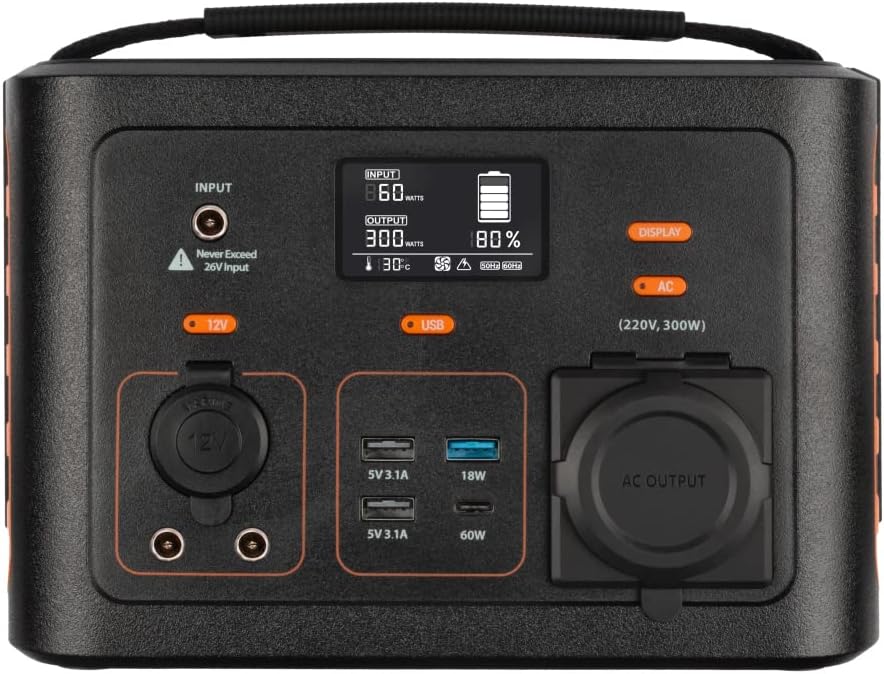
Hình ảnh: Cận cảnh view of the Xtorm XP300U's front panel, showing the digital display, input port, 12V DC output, USB-A and USB-C ports, and AC output socket.
Các tính năng của bảng điều khiển phía trước:
- Màn hình LCD: Hiển thị mức pin, công suất đầu vào/đầu ra và các chỉ báo trạng thái.
- Cổng đầu vào: Dùng để sạc trạm điện thông qua bộ chuyển đổi AC, bộ sạc ô tô hoặc tấm pin mặt trời.
- Đầu ra 12V DC: Dùng để cấp nguồn cho các thiết bị 12V.
- Cổng USB-A: Multiple USB-A outputs for charging various devices (e.g., 5V 3.1A, 18W Quick Charge).
- Cổng USB-C PD: High-speed USB-C Power Delivery output (up to 60W).
- Ổ cắm đầu ra AC: Standard AC outlet for powering household appliances (220V, 300W).
- Các nút điều khiển: Buttons for turning on/off specific outputs (e.g., AC, DC, USB).

Hình ảnh: Trên cùng view of the Xtorm XP300U, highlighting its integrated carrying handle for portability.

Hình ảnh: Phía sau view of the Xtorm XP300U, featuring the Xtorm brand logo and "Portable Power Station 300" text.
Cài đặt
Before first use, it is recommended to fully charge your Xtorm XP300U Power Station.
- Giải nén: Cẩn thận lấy trạm nguồn và tất cả phụ kiện ra khỏi bao bì.
- Initial Charge (AC Wall Charger):
- Connect the AC wall charger to the input port on the power station.
- Plug the AC wall charger into a standard wall outlet.
- The LCD display will show the charging status. Charge until the battery indicator shows 100%.
- Vị trí: Place the power station on a stable, flat surface in a well-ventilated area, away from direct sunlight or heat sources.
Hướng dẫn sử dụng
The Xtorm XP300U offers multiple ways to charge and power your devices.
Sạc trạm điện:
The XP300U can be recharged using four different methods:
Image: Visual representation of the four charging methods for the Xtorm XP300U: via wall socket, USB-C PD, solar panel (not included), and 12V car charger.
- Via Wall Socket (AC Charger): Connect the included AC wall charger to the input port and a wall outlet.
- Qua USB-C PD: Use a compatible USB-C Power Delivery charger (not included) to charge the unit via its USB-C port.
- Thông qua bảng điều khiển năng lượng mặt trời: Connect a compatible solar panel (not included) to the input port using the provided MC4 to DC cable. Ensure the solar panel is placed in direct sunlight for optimal charging.
- Via 12V Car Charger: Connect the included car charger cable to the input port and your vehicle's 12V cigarette lighter socket.
Màn hình LCD sẽ hiển thị nước đầu vào.tage and battery charge status during charging. You can use the outputs even while the power station is charging (pass-through charging).
Using the Outputs:
The XP300U provides various output ports to power different types of devices.

Image: The Xtorm XP300U demonstrating its universal compatibility with icons representing various devices and output types: 1x AC 300W/220V, 1x USB-C PD 60W, 2x DC 5.5mm 60W, 2x USB QC3.0 18W, 1x USB 18W, and 1x 12V Car 120W.
- AC Output (220V, 300W):
- Press the "AC" button to activate the AC output. The AC indicator on the display will light up.
- Plug your device's power cord into the AC outlet.
- Hãy đảm bảo công suất tiêu thụ của thiết bị không vượt quá 300W.
- Press the "AC" button again to turn off the AC output when not in use.
- Đầu ra một chiều (12V):
- Press the "12V" button to activate the DC output. The DC indicator will light up.
- Connect your 12V device to the DC port.
- Press the "12V" button again to turn off the DC output.
- USB Outputs (USB-A, USB-C PD):
- The USB outputs are typically always active when the unit is on.
- Connect your USB-powered devices to the appropriate USB-A or USB-C PD ports.
- The display will show the output wattage dành cho các thiết bị được kết nối.
The power station can provide power for extended periods, depending on the connected devices' power consumption.

Hình ảnh: Examples of device runtimes with the Xtorm XP300U: 17.5 hours for a 10W LED light, 5.5 hours for a 30W small TV, 4 hours for a 40W small coolbox, and 6 hours for a 40W small coolbox (via 12V carplug output).
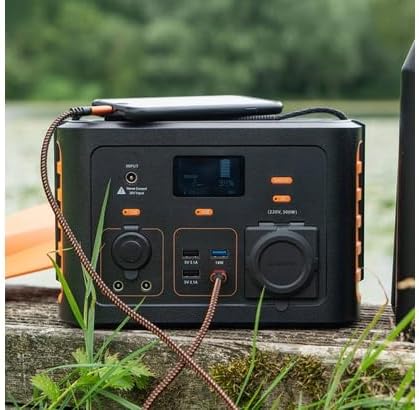
Image: The Xtorm XP300U Portable Power Station being used outdoors on a wooden surface, charging a smartphone, demonstrating its portability and utility in various environments.
BẢO TRÌ
Việc bảo trì đúng cách đảm bảo tuổi thọ và hiệu suất tối ưu của nhà máy điện của bạn.
- Vệ sinh: Dùng vải mềm, khô để lau sạch bên ngoài thiết bị. Không sử dụng chất tẩy rửa có tính mài mòn hoặc dung môi.
- Kho:
- Bảo quản trạm điện ở nơi khô ráo, thoáng mát, tránh ánh nắng trực tiếp và nhiệt độ quá cao hoặc quá thấp.
- Để bảo quản lâu dài, hãy sạc thiết bị đến khoảng 50-80% mỗi 3-6 tháng để duy trì tuổi thọ pin.
- Tránh bảo quản ở môi trường có độ ẩm cao.
- Chăm sóc pin: Do not fully discharge the battery frequently, as this can reduce its lifespan. Recharge promptly when the battery level is low.
Xử lý sự cố
If you encounter issues with your Xtorm XP300U, refer to the following common problems and solutions.
| Vấn đề | Nguyên nhân có thể | Giải pháp |
|---|---|---|
| Thiết bị không bật. | Pin đã cạn hoàn toàn. | Connect the power station to an AC wall outlet and charge it for at least 30 minutes. |
| Ngõ ra AC không hoạt động. | AC output not activated; device exceeds 300W; overheating. | Nhấn nút "AC" để kích hoạt. Kiểm tra thiết bị.tage. Allow unit to cool down if overheated. |
| Cổng USB không sạc được. | Device not compatible; cable faulty. | Ensure device is compatible. Try a different USB cable. |
| Sạc chậm. | Using a low-power charger; environmental factors (e.g., cloudy for solar). | Use the original AC charger or a higher wattage USB-C PD charger. Optimize solar panel placement. |
If the problem persists, please contact Xtorm customer support.
Thông số kỹ thuật
Detailed technical specifications for the Xtorm XP300U Portable Power Station.
| Tính năng | Chi tiết |
|---|---|
| Tên mẫu | XP300U |
| Thương hiệu | Xtorm |
| Công suất đầu ra | 300 Watts (AC) |
| Đầu vào Voltage | 12 Vôn (DC) |
| Nguồn điện | AC Wall, USB-C PD, Solar, Car Charger |
| Sử dụng được đề xuất | Home, Campđang |
| Cân nặng | 3300 gram (3.3 kg) |
| Màu sắc | Quả cam |
| Các thành phần bao gồm | 1 package (Power Station, AC Charger, Car Charger, MC4 to DC Cable) |

Image: Dimensions of the Xtorm XP300U Portable Power Station (240mm x 154mm x 142mm) and its weight (3.3 kg), highlighting its convenient travel size.
Bảo hành và Hỗ trợ
Xtorm products come with a standard warranty. Please refer to the warranty card included in your package or visit the official Xtorm webtrang web để biết các điều khoản và điều kiện bảo hành chi tiết.
For technical support, troubleshooting assistance, or warranty claims, please contact Xtorm customer service:
- Webđịa điểm: www.xtorm.eu (Check for support contact information)
- E-mail: Refer to the Xtorm webtrang web cung cấp địa chỉ email hỗ trợ cụ thể.
- Điện thoại: Refer to the Xtorm webtrang web cung cấp số điện thoại hỗ trợ khu vực.
When contacting support, please have your product model (XP300U) and purchase details ready.