Giới thiệu
The TOUCARE T9S is a high-performance Bluetooth intercom system designed for motorcycle riders. It enables clear communication between up to four riders, offers music sharing, and integrates with your mobile phone for calls and GPS navigation. With advanced noise cancellation and a robust waterproof design, the T9S ensures a reliable and enjoyable riding experience in various conditions.
Các tính năng chính
- 1200M Maximum Distance: Equipped with Bluetooth 5.0 for high compatibility and stability, allowing group communication within a 1200m intercom range.
- Support 4-Riders Intercom: Full-duplex communication for up to 4 riders simultaneously. Universal pairing function ensures compatibility with most Bluetooth headsets and mobile phones.
- Chia sẻ âm nhạc: Share music with another rider, enjoy Hi-Fi stereo music, FM radio, or GPS voice guidance.
- Noise Reduction and IP67 Waterproof: DSP and CVC advanced noise reduction technology for clear communication up to 120km/h. IP67 waterproof rating for all-weather use.
- Ultra-Long Standby Battery: 800mAh rechargeable battery provides up to a week of standby time and 15 hours of working time.

Image: The T9S system supports communication for up to four riders over a distance of 1200 meters.

Image: CVC & DSP Noise Cancellation Technology ensures clear and smooth communication even at high speeds.

Image: The IP67 waterproof rating makes the T9S suitable for use in all weather conditions, including water sports.

Image: The T9S offers extended endurance times for talking, music playback, and standby, supporting long-distance travel.
Nội dung gói
Each TOUCARE T9S package includes the following components:
- 1 x Thiết bị liên lạc nội bộ Bluetooth
- 1 x Hi-Fi Speaker Set
- 1 x Boom Microphone
- 1 x Button Microphone
- 1 x Cáp USB
- 1 x Giá đỡ
- 1 xClamp Đĩa
- 1 x Cờ lê Allen

Image: All components included in the TOUCARE T9S package, ensuring you have everything needed for installation and use.
Sản phẩm trênview và Chức năng Nút
Familiarize yourself with the buttons and indicators on your T9S intercom unit:
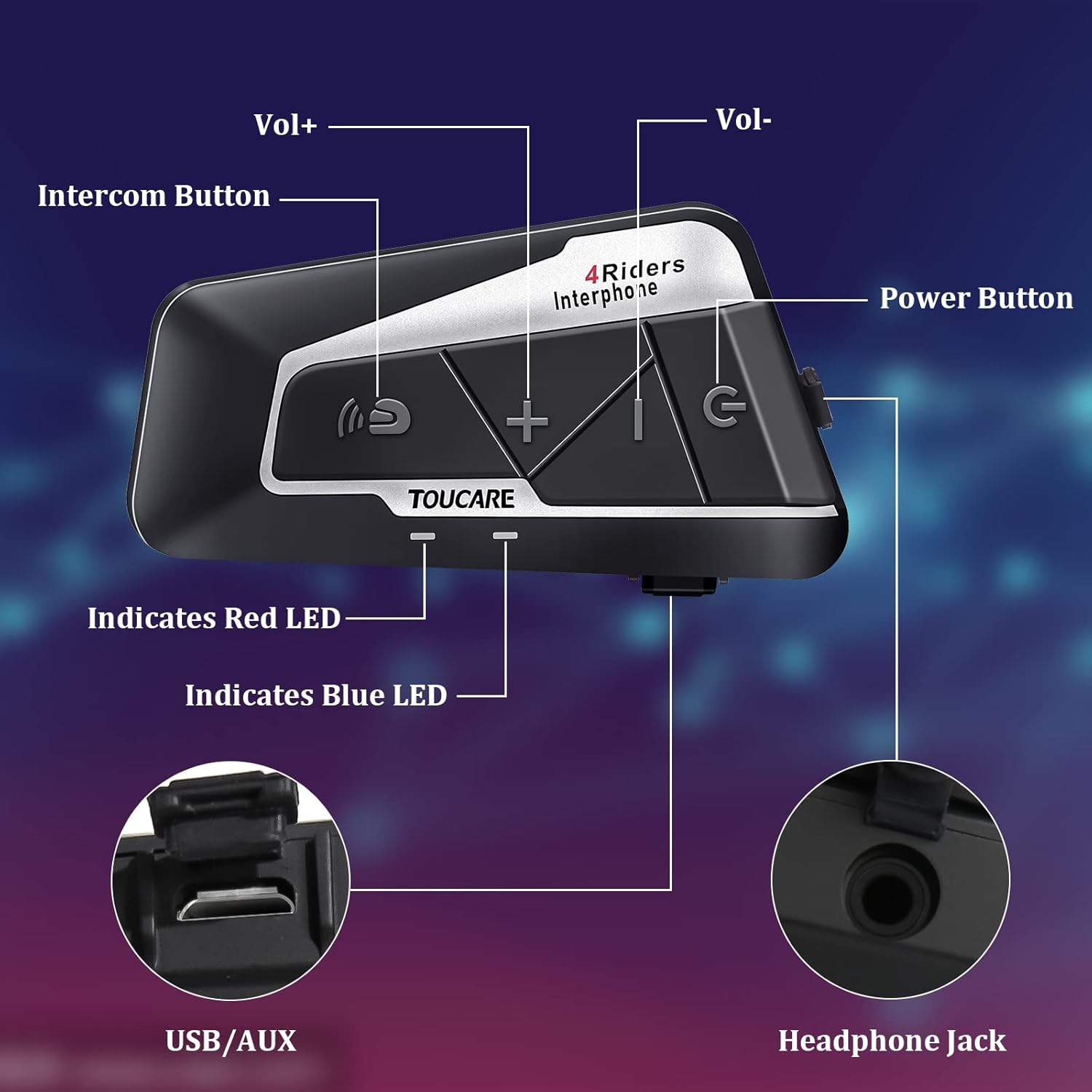
Image: Detailed diagram of the T9S unit, highlighting the location and labels of each button and port.
Power On/Off Button (G)
- Bật/Tắt nguồn: Nhấn và giữ để bật hoặc tắt thiết bị.
- Paired Mobile Phone: Short press to connect/disconnect with a paired mobile phone.
- Lời nhắc điện: Short press to hear battery level prompt.
- Hang up Bluetooth Intercom: Short press during an intercom call to end it.
- Phát / Tạm dừng nhạc: Nhấn nhanh để phát hoặc tạm dừng nhạc.
- Call Answering/Third Party Answer/End/Reject: Quản lý cuộc gọi điện thoại.
Bluetooth Intercom Button (Intercom Icon)
- Âm lượng +: Nhấn nhanh để tăng âm lượng.
- Bài hát cuối: Nhấn và giữ để quay lại bài hát trước đó.
- FM Turn Up: Short press during FM mode to tune up.
- FM Turn On/Off: Long press to turn FM radio on or off.
- Quay số lại số cuối cùng: Double press to redial the last dialed number.
Volume - Button (-)
- Âm lượng -: Nhấn nhanh để giảm âm lượng.
- Bài hát tiếp theo: Nhấn và giữ để chuyển sang bài hát tiếp theo.
- FM Turn Down: Short press during FM mode to tune down.
- FM Turn On/Off: Long press to turn FM radio on or off.
- Quay số bằng giọng nói: Double press to activate voice dialing (if supported by your phone).

Image: The T9S features ultra-large buttons, designed for easy operation even while wearing gloves.
Hướng dẫn cài đặt
Phương pháp cài đặt cố định
Follow these steps to securely install the T9S intercom unit on your helmet:
- Locate and Clean: Identify a suitable flat area on the left side of your helmet for mounting. Ensure the surface is clean and dry.
- Chuẩn bị keo dán: Peel off the protective film from the 3M adhesive on the back of the mounting bracket.
- Áp dụng áp lực: Firmly press the mounting bracket onto the chosen location on your helmet. Apply consistent pressure for several seconds to ensure a strong bond.
- Đơn vị an toàn: Slide the T9S intercom unit onto the mounted bracket until it clicks securely into place.
- Lắp đặt loa và micro: Route the speaker and microphone wires inside the helmet lining. Position the speakers inside the ear pockets and the microphone near your mouth for optimal audio.
Hướng dẫn sử dụng
Ghép nối với điện thoại di động
- Ensure the T9S is powered off.
- Press and hold the Power On/Off button until the LED indicator flashes red and blue alternately, indicating pairing mode.
- On your mobile phone, enable Bluetooth and search for new devices. Select "TOUCARE T9S" from the list.
- Once paired, the LED will flash blue slowly.
Initiating Intercom Communication
- Ensure all T9S units are powered on and within range.
- To initiate a group intercom, short press the Bluetooth Intercom Button on your unit. The units will attempt to connect.
- To end an intercom call, short press the Power On/Off button.
Phát nhạc
- Phát/Tạm dừng: Nhấn nhanh nút Bật/Tắt nguồn.
- Bài hát tiếp theo: Nhấn giữ nút Giảm âm lượng.
- Bài hát trước: Long press the Bluetooth Intercom button.
- Điều chỉnh âm lượng: Short press Volume + or Volume - buttons.
Đài phát thanh FM
- Bật/Tắt: Long press either the Bluetooth Intercom button or the Volume - button.
- Điều chỉnh: Short press the Bluetooth Intercom button.
- Điều chỉnh xuống: Nhấn nhanh nút giảm âm lượng.
Trả lời / Kết thúc cuộc gọi
- Trả lời cuộc gọi: Short press the Power On/Off button when a call comes in.
- Kết thúc cuộc gọi: Short press the Power On/Off button during a call.
- Từ chối cuộc gọi: Long press the Power On/Off button when a call comes in.
- Quay số bằng giọng nói: Double press the Volume - button (requires phone support).
- Quay số lại số cuối cùng: Double press the Bluetooth Intercom button.
Thông số kỹ thuật
| Tính năng | Đặc điểm kỹ thuật |
|---|---|
| Phiên bản Bluetooth | 5.0 |
| Bluetooth chuyên nghiệpfiles Được hỗ trợ | HSP, HFP, A2DP, AVRCP, AGHSP |
| Giờ làm việc | 15 giờ |
| Thời gian chờ | 350 giờ |
| Thời gian sạc | 3 giờ |
| Loại pin | Rechargeable Lithium Battery, 800mAh, 3.7V |
| Kích thước | 89 x 46 x 30mm |
| Cân nặng | 85g |
| Kiểm soát tiếng ồn | Active Noise Cancellation (DSP & CVC) |
| Mức độ chống nước | IP67 |
| Công nghệ kết nối | Không dây |
| Vật liệu | Cao su |
| Loại điều khiển | Voice Control (via phone), Button Control |
BẢO TRÌ
To ensure the longevity and optimal performance of your TOUCARE T9S intercom, follow these maintenance guidelines:
- Vệ sinh: Lau thiết bị bằng vải mềm, damp vải. Không sử dụng hóa chất mạnh, dung môi tẩy rửa hoặc chất tẩy rửa mạnh.
- Kho: Bảo quản thiết bị ở nơi khô ráo, thoáng mát, tránh ánh nắng trực tiếp và nhiệt độ cao khi không sử dụng.
- Chăm sóc pin: For long-term storage, charge the battery to about 50% every three months to prevent deep discharge and extend battery life.
- Tiếp xúc với nước: Although IP67 rated, avoid prolonged submersion. Ensure charging port is dry before charging.
- Quản lý cáp: Hãy thao tác nhẹ nhàng với dây cáp và đầu nối để tránh làm hỏng.
Xử lý sự cố
If you encounter issues with your T9S intercom, try the following solutions:
Không có điện
- Kiểm tra pin: Ensure the unit is fully charged. Connect it to a power source and check if the charging indicator lights up.
- Cài lại: If unresponsive, try holding the Power On/Off button for an extended period (e.g., 10-15 seconds) to force a reset.
Cannot Pair with Mobile Phone/Other Intercoms
- Chế độ ghép nối: Ensure the T9S is in pairing mode (LED flashing red and blue alternately).
- Khả năng hiển thị thiết bị: Make sure Bluetooth is enabled on your phone/other intercoms and they are discoverable.
- Xóa lịch sử ghép nối: On your phone, forget the T9S device and try pairing again. For intercoms, consult the manual for clearing pairing history if available.
- Khoảng cách: Ensure devices are within close proximity (e.g., 1 meter) during pairing.
Poor Audio Quality/No Sound
- Âm lượng: Check if the volume is turned up on both the T9S and the connected device (phone/intercom).
- Vị trí micrô: Ensure the microphone is correctly positioned near your mouth and not obstructed.
- Kết nối loa: Verify that the speakers are securely plugged into the headphone jack.
- Sự can thiệp: Tránh xa nguồn gây nhiễu điện từ mạnh.
- Phần mềm: Kiểm tra của nhà sản xuất website for any available firmware updates that might improve audio performance.
Bảo hành và Hỗ trợ
For warranty information, technical support, or service inquiries, please refer to the warranty card included with your product or visit the official TOUCARE webtrang web. Giữ lại biên lai mua hàng làm bằng chứng mua hàng khi yêu cầu bảo hành.
For further assistance, you may also contact TOUCARE customer service through the contact information provided on their official channels.


