1. Giới thiệu
This manual provides detailed instructions for the setup, operation, and maintenance of your ITECH Fusion 2 S Smartwatch and accompanying Wireless Headphones. The ITECH Fusion 2 S is designed to help you monitor your health and fitness goals, offering features such as heart rate tracking, step counting, sleep monitoring, and multi-sport modes. The included wireless headphones provide an integrated audio experience.
2. Nội dung gói hàng
Vui lòng kiểm tra xem có đầy đủ các mục trong gói hàng của bạn không:
- ITECH Fusion 2 S Smartwatch
- Tai nghe không dây
- USB Charging Cable (for smartwatch)
- USB Charging Cable (for headphones)
- Hướng dẫn sử dụng (tài liệu này)

Image: The ITECH Fusion 2 S Smartwatch and Wireless Headphones displayed within their retail packaging.
3. Hết thiết bịview
3.1. ITECH Fusion 2 S Smartwatch

Image: The ITECH Fusion 2 S Smartwatch with a grey camouflage band shown alongside the matching wireless headphones.
The smartwatch features a touch screen display, a side button for navigation, and sensors on the rear for health monitoring. The display shows time, date, activity data, and notifications.

Image: A close-up of the ITECH Fusion 2 S Smartwatch display, highlighting features such as heart rate monitor, apps and notifications, multi-sports modes, water resistance, calorie tracker, music remote, pedometer, sleep monitor, hydration reminder, and extended 14-day battery life.
3.2. Wireless Headphones
The wireless headphones are over-ear style with cushioned earcups and an adjustable headband. Controls for audio playback and calls are located on the earcup.

Hình ảnh: Mặt A view of the ITECH Wireless Headphones, illustrating features like powerful sound quality, convenient controls, comfort for hours, and a go-anywhere design.

Hình ảnh: Một chi tiết view of the ITECH Wireless Headphones, emphasizing noise isolating fit, built-in microphone, Bluetooth wireless technology, and up to 8 hours of playback.

Image: A diagram of the ITECH Wireless Headphones highlighting the flexible headband, comfortable ear cushion, foldable design, and convenient controls, along with key technical specifications.
4. Thiết lập
4.1. Sạc thiết bị của bạn
Before first use, fully charge both your smartwatch and wireless headphones.
- Đồng hồ thông minh: Connect the USB charging cable to the charging port on the back of the smartwatch and to a USB power source. The battery icon on the screen will indicate charging status.
- Tai nghe không dây: Connect the USB charging cable to the charging port on the headphones and to a USB power source. An indicator light will show charging status and turn off when fully charged.
4.2. Bật/Tắt nguồn
- Đồng hồ thông minh: To power on, press and hold the side button until the screen illuminates. To power off, navigate to the 'Settings' menu on the smartwatch, then select 'Power Off'.
- Tai nghe không dây: Để bật nguồn, nhấn và giữ nút nguồn cho đến khi đèn báo nhấp nháy. Để tắt nguồn, nhấn và giữ nút nguồn một lần nữa cho đến khi đèn báo tắt.
4.3. Ghép nối đồng hồ thông minh với điện thoại thông minh của bạn
The ITECH Fusion 2 S Smartwatch is compatible with both iPhone and Android devices.
- Tải xuống iTECH Wearables ứng dụng từ Apple App Store hoặc Google Play Store.
- Đảm bảo Bluetooth được bật trên điện thoại thông minh của bạn.
- Open the iTECH Wearables app and follow the on-screen instructions to create an account and pair your smartwatch.
- The app will guide you through connecting the smartwatch via Bluetooth. Confirm the pairing request on both your phone and smartwatch.
4.4. Pairing the Wireless Headphones
- Đảm bảo tai nghe đã được tắt nguồn.
- Nhấn và giữ nút nguồn cho đến khi đèn báo nhấp nháy nhanh, báo hiệu chế độ ghép nối.
- Trên điện thoại thông minh hoặc thiết bị hỗ trợ Bluetooth khác, hãy vào cài đặt Bluetooth và tìm kiếm các thiết bị khả dụng.
- Select "ITECH Headphones" (or similar name) from the list to connect. The indicator light will change to a steady blue when successfully paired.
5. Vận hành đồng hồ thông minh
5.1. Điều hướng
- Màn hình cảm ứng: Vuốt sang trái/phải, lên/xuống để điều hướng qua menu và tính năng. Chạm để chọn.
- Nút bên: Nhấn để quay lại màn hình chính hoặc đánh thức thiết bị.
5.2. Mặt đồng hồ
Customize your smartwatch display by changing watch faces. On the home screen, press and hold the display, then swipe left or right to browse available watch faces. Tap to select your preferred design.
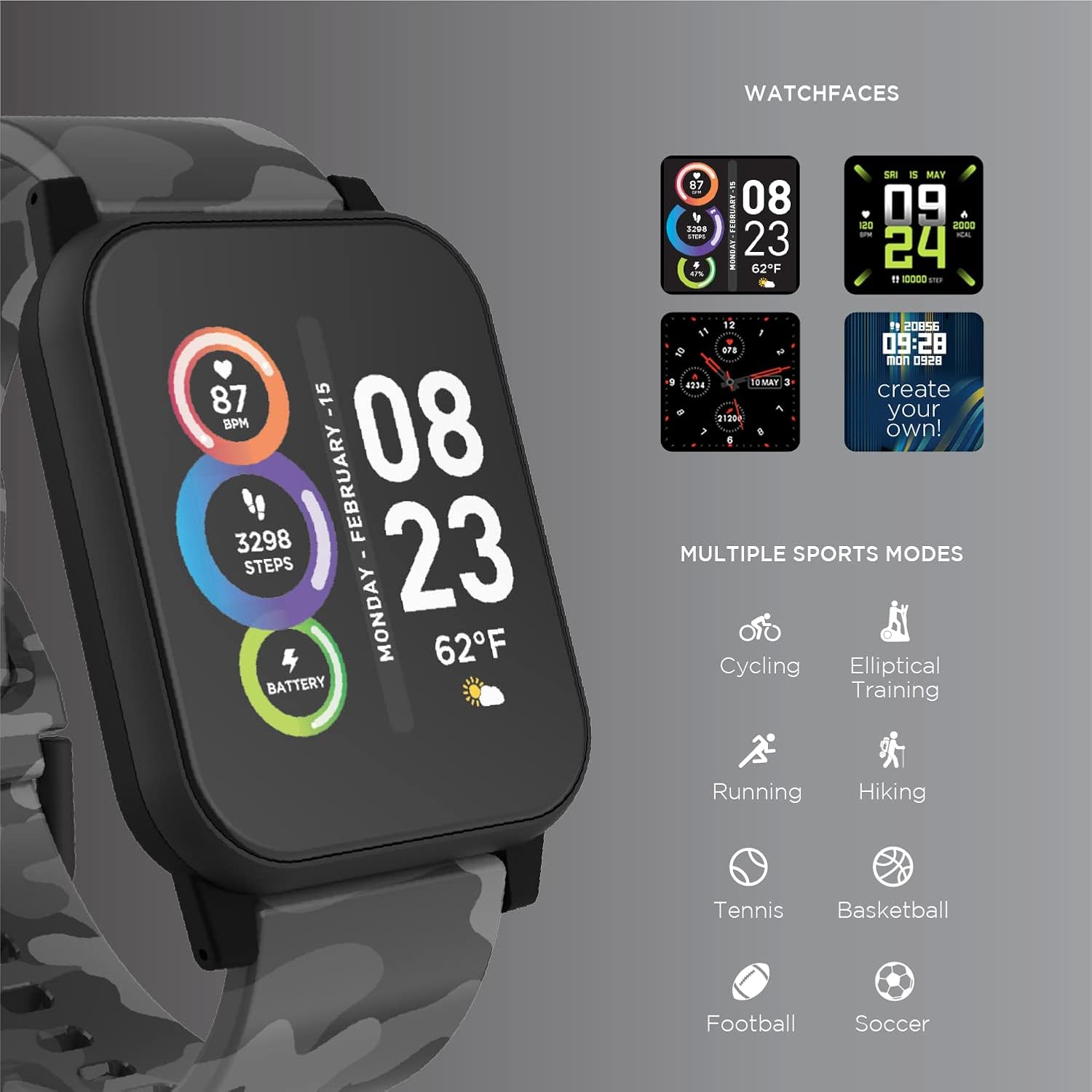
Image: The ITECH Fusion 2 S Smartwatch display showing various customizable watch faces and icons representing multiple sports modes including cycling, elliptical training, running, hiking, tennis, basketball, football, and soccer.
5.3. Các tính năng cốt lõi
- Máy theo dõi nhịp tim: Access the heart rate feature on your smartwatch to measure your heart rate using the built-in optical sensor. Ensure the watch is snug on your wrist for accurate readings.
- Máy đếm bước chân (Máy đo bước): The smartwatch automatically tracks your daily steps, distance, and calories burned. View your progress on the device or in the iTECH Wearables app.
- Theo dõi giấc ngủ: Wear your smartwatch to bed to track your sleep patterns, including light and deep sleep stages. Data is synchronized with the app for detailed analysis.
- Chế độ đa môn thể thao: Select from various sports modes (e.g., running, cycling, hiking) to track specific workout data, including duration, distance, and calories.
- Thông báo tin nhắn: Receive notifications for calls, texts, and app alerts directly on your smartwatch when connected to your smartphone.
- Theo dõi lượng calo: Monitors calories burned throughout the day based on your activity level.
- Nhắc nhở bù nước: Set reminders to drink water at regular intervals through the app.
- Âm nhạc từ xa: Control music playback on your smartphone directly from your smartwatch (play, pause, skip tracks).
5.4. Tích hợp ứng dụng
Để toàn diện view of your health and fitness data, regularly sync your smartwatch with the iTECH Wearables app. The app allows you to set goals, view historical data, customize settings, and manage notifications.
6. Operating the Wireless Headphones
6.1. Kiểm soát
The headphones feature intuitive controls for media playback and call management:
- Nút nguồn: Nhấn và giữ để bật/tắt nguồn. Nhấn nhanh để phát/tạm dừng.
- Nút âm lượng: Nhấn phím '+' để tăng âm lượng, phím '-' để giảm âm lượng.
- Kiểm soát theo dõi: Press and hold '+' for next track, '-' for previous track.
- Quản lý cuộc gọi: Short press power button to answer/end calls. Press and hold to reject calls.
6.2. Tính năng âm thanh
- Chất lượng âm thanh mạnh mẽ: Designed to deliver clear and rich audio.
- Noise Isolating Fit: The over-ear design helps to reduce external noise for an immersive listening experience.
- Micrô tích hợp: Cho phép gọi điện rảnh tay.
6.3. Tuổi thọ pin
The wireless headphones provide up to 8 hours of playback on a single charge, depending on usage and volume levels.

Image: A person wearing the ITECH Fusion 2 S Smartwatch on their wrist and the matching wireless headphones, demonstrating typical use.
7. Bảo trì
7.1. Vệ sinh
- Đồng hồ thông minh: Lau màn hình và dây đeo bằng khăn mềm.ampSử dụng vải không xơ. Tránh sử dụng hóa chất mạnh hoặc vật liệu mài mòn.
- Tai nghe: Gently wipe earcups and headband with a soft, dry cloth. Do not immerse in water.
7.2. Water Resistance (Smartwatch)
The ITECH Fusion 2 S Smartwatch is IP67 water resistant. This means it is protected against dust and can withstand immersion in water up to 1 meter for up to 30 minutes. It is suitable for daily use and light splashes, but not recommended for swimming, showering, or prolonged water immersion.
7.3. Lưu trữ
Store your devices in a cool, dry place away from direct sunlight and extreme temperatures when not in use.
KHAI THÁC. Xử lý sự cố
If you encounter issues with your ITECH Fusion 2 S devices, please refer to the following common solutions:
- Thiết bị không bật nguồn: Ensure the device is fully charged. Try connecting it to a different USB power source.
- Smartwatch not pairing with phone: Ensure Bluetooth is enabled on your phone and the smartwatch is within range. Restart both devices and try pairing again through the iTECH Wearables app.
- Tai nghe không kết nối được: Ensure headphones are in pairing mode (rapidly flashing indicator light). Check your device's Bluetooth settings and try reconnecting.
- Inaccurate heart rate/step readings: Ensure the smartwatch is worn snugly on your wrist, not too tight or too loose. Clean the sensor on the back of the watch.
- Thông báo không xuất hiện: Check app permissions on your smartphone to ensure the iTECH Wearables app has access to notifications. Verify notification settings within the app.
- Audio issues with headphones: Ensure headphones are fully charged and properly paired. Check volume levels on both the headphones and the connected device.
If problems persist, consider performing a factory reset (refer to the smartwatch settings menu or contact customer support for headphones). For further assistance, please contact Itech customer support.
9. Thông số kỹ thuật
| Tính năng | Chi tiết |
|---|---|
| Kích thước sản phẩm | 22.86 x 5.08 x 22.86 cm; 621 g |
| Số hiệu mẫu sản phẩm | 900366B-40-G57 |
| Hệ điều hành | Android (Compatible with iPhone and Android) |
| Tính năng đặc biệt | Heart Rate Monitor, Step Counter, Sleep Monitor, Message Notifications, Multi-Sport Modes |
| Công nghệ kết nối | USB |
| Tiêu chuẩn giao tiếp không dây | Bluetooth |
| Thành phần của pin | Pin Lithium Ion |
| GPS | ĐÚNG VẬY |
| Smartwatch Shape | Quảng trường |
| Smartwatch Screen Size | 1.3 inch |
| Thương hiệu | Itech |
| Tên mẫu | Fusion 2 Bundle |
| Chống nước | IP67 |
| Headphones Playback Time | Lên đến 8 giờ |
| Headphones Driver Diameter | 40mm |
| Headphones Connection Type | Bluetooth®5.0 |
| Trở kháng tai nghe | 32 Ohms ±15% |
| Phản hồi tần số của tai nghe | 20Hz - 20KHz |
10. Bảo hành và Hỗ trợ
Your ITECH Fusion 2 S Smartwatch and Wireless Headphones are covered by a manufacturer's warranty. Please refer to the warranty card included in your package or visit the official Itech webtrang web để biết các điều khoản và điều kiện bảo hành chi tiết.
For technical support, troubleshooting assistance, or warranty claims, please contact Itech customer service through their official webtrang web hoặc thông tin liên hệ được cung cấp trong tài liệu sản phẩm của bạn.


