Giới thiệu
This manual provides comprehensive instructions for the setup, operation, and maintenance of your Reloop RP-7000 MK2 Professional Upper Torque Turntable System. Please read this manual thoroughly before using the product to ensure proper functionality and longevity.
Hướng dẫn an toàn
- Ensure the turntable is placed on a stable, level surface away from direct sunlight, heat sources, and excessive moisture.
- Không để thiết bị tiếp xúc với mưa hoặc hơi ẩm để tránh hỏa hoạn hoặc điện giật.
- Always disconnect the power cord from the outlet before cleaning or performing any maintenance.
- Không tự ý bảo dưỡng thiết bị. Hãy liên hệ với nhân viên bảo dưỡng có trình độ để được hỗ trợ.
- Để xa tầm tay trẻ em.
Nội dung gói
Your Reloop RP-7000 MK2 Professional Upper Torque Turntable System package should include the following items:
- 2 x Reloop RP-7000 MK2 Professional Upper Torque Turntable System
- 2 x Reloop Dust Cover for RP-7000/8000
- Knox Gear Vinyl Record Care System (includes brush, velvet cleaner, stylus brush, and cleaning solution)
- Cáp điện
- Cáp RCA
- Đối trọng
- Slipmats
- Hướng dẫn sử dụng

Image: The complete bundle including two Reloop RP-7000 MK2 turntables, two dust covers, and the Knox Gear vinyl record care solution.
Cài đặt
1. Tháo dỡ và sắp xếp
Carefully remove all components from the packaging. Place the turntable on a flat, stable surface. Ensure there is adequate space around the unit for ventilation and cable connections.

Hình ảnh: Một góc cạnh view of the Reloop RP-7000 MK2 turntable, highlighting its main components.
2. Attaching the Dust Cover
Gently place the dust cover onto the turntable. The dust cover helps protect the platter and tonearm from dust and debris when the turntable is not in use.
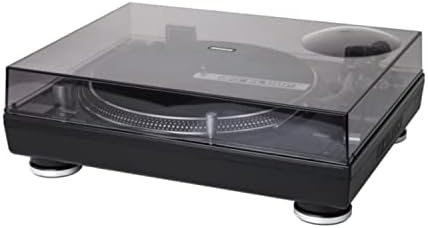
Image: The Reloop RP-7000 MK2 turntable with its protective dust cover in place.
3. Kết nối cáp âm thanh
Connect the RCA cables from the turntable's output to the appropriate input on your mixer or amplifier. Ensure the ground wire is also connected to prevent hum.

Image: Rear panel of the Reloop RP-7000 MK2, displaying the RCA audio outputs, ground terminal, and power connection.
4. Kết nối nguồn điện
Connect the power cable to the turntable and then to a suitable power outlet. Ensure the power switch is in the OFF position before connecting.
Hướng dẫn sử dụng
1. Bật và Tắt nguồn
To power on the turntable, flip the power switch located on the front left side to the ON position. To power off, flip the switch back to OFF.

Hình ảnh: Trên cao view of the Reloop RP-7000 MK2 turntable, illustrating the arrangement of its controls and components.
2. Phát bản ghi
- Đặt một bản ghi trên đĩa.
- Select the appropriate speed (33, 45, or 78 RPM) using the speed buttons.
- Nhấn nút BẮT ĐẦU/DỪNG Nhấn nút để bắt đầu quay đĩa.
- Carefully lower the tonearm onto the record using the cue lever.

Image: The Reloop RP-7000 MK2 turntable with a record playing, demonstrating the tonearm's position.
3. Pitch Control and Reverse Function
Use the pitch fader to adjust the playback speed. The ĐẢO NGƯỢC button allows for reverse playback of the record.
BẢO TRÌ
1. Vệ sinh mâm xoay
Regularly wipe the turntable's surface with a soft, dry cloth. For the dust cover, use a slightly damp cloth and avoid abrasive cleaners. The included Knox Gear Vinyl Record Care System can be used for cleaning records and the stylus.

Image: The Knox Gear Vinyl Record Care System, showing the velvet record brush, stylus brush, and cleaning solution bottle.
2. Chăm sóc bút cảm ứng
Gently clean the stylus using the provided stylus brush. Always brush from back to front. A dirty stylus can degrade sound quality and damage records.
Xử lý sự cố
| Vấn đề | Nguyên nhân có thể | Giải pháp |
|---|---|---|
| Không có điện | Cáp nguồn không được kết nối; Ổ cắm điện bị lỗi | Kiểm tra kết nối cáp nguồn; Thử ổ cắm khác |
| Không có âm thanh | RCA cables not connected; Amplifier/mixer input incorrect; Stylus damaged | Check RCA connections; Select correct input on amplifier/mixer; Inspect and replace stylus if necessary |
| Tiếng ồn ào | Ground wire not connected; Interference | Ensure ground wire is securely connected; Move turntable away from other electronic devices |
| Tốc độ phát lại không chính xác | Wrong speed selected; Pitch fader not centered | Select correct RPM; Adjust pitch fader to center position |
Thông số kỹ thuật
- Thương hiệu: Lặp lại
- Người mẫu: RP-7000 MK2
- Công nghệ kết nối: Có dây
- Tính năng đặc biệt: Balanced S-shaped Tone Arm, Dual Start/Stop Buttons, Precise Motor Control, Reverse Function, Freely Movable Aluminum LED Target Light
- Vật liệu: Nhựa
- Trọng lượng sản phẩm: 4.5 Kilograms (per turntable)
- Màu sắc: Deep black or classic silver metallic
- Thiết bị tương thích: Loa ngoài, tai nghe
Bảo hành và Hỗ trợ
Reloop products are designed and manufactured to the highest quality standards. For warranty information and technical support, please refer to the official Reloop webhoặc liên hệ với nhà phân phối địa phương của bạn. Giữ lại hóa đơn mua hàng để yêu cầu bảo hành.
Để được hỗ trợ thêm, hãy truy cập Reloop Store on Amazon.


