Giới thiệu
This manual provides instructions for the VINABTY AK59-00119A replacement remote control. This remote is designed to be compatible with various Samsung Blu-ray Disc player models, including BD-D8500A, BD-D8900A, BD-D6900M, BD-D6900A, and BD-D8200A. Please read these instructions carefully before use to ensure proper operation.
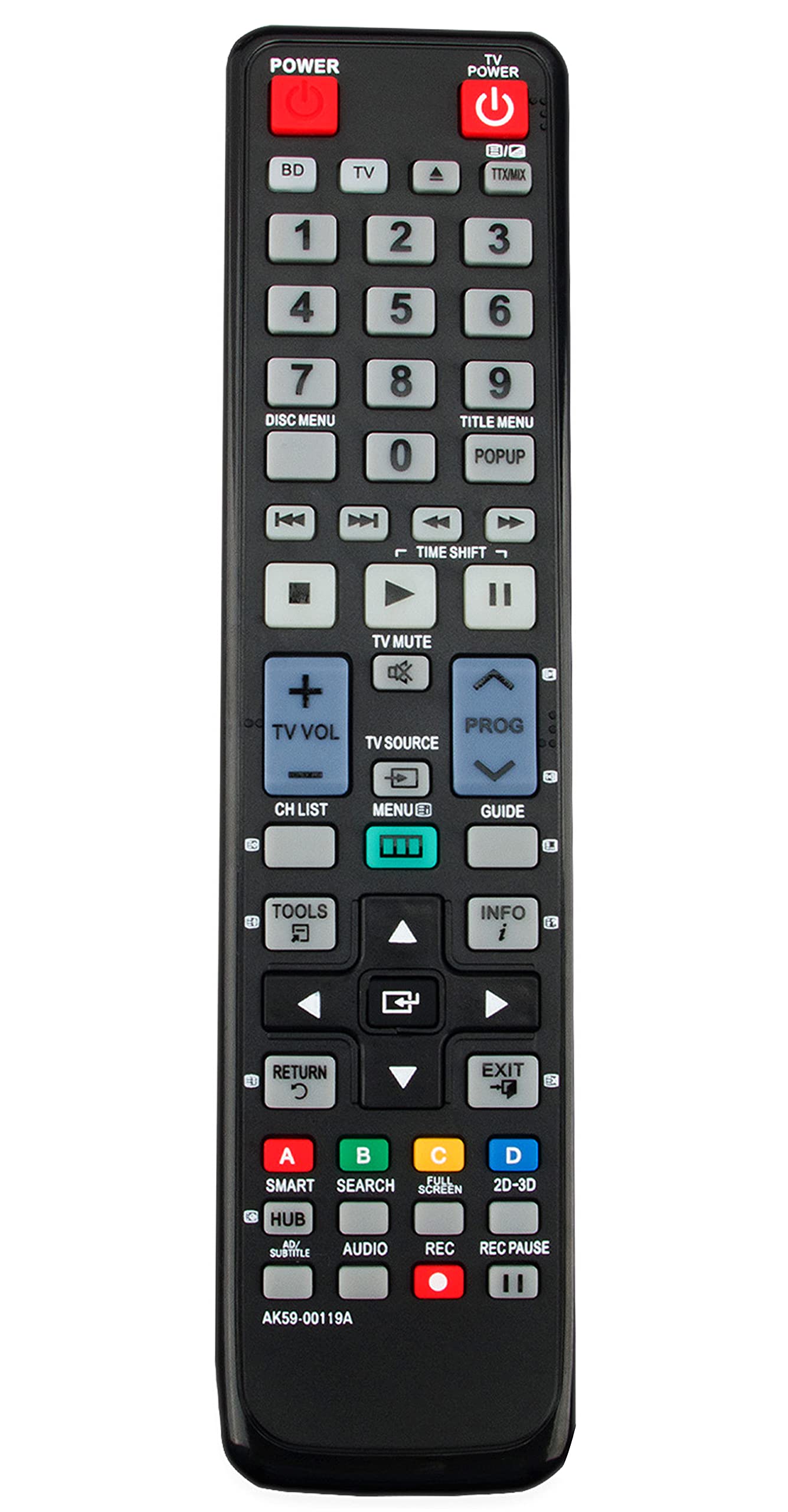
Image: The VINABTY AK59-00119A replacement remote control, black in color, showing its array of buttons.
Cài đặt
Lắp đặt pin
- Xác định vị trí ngăn chứa pin ở mặt sau của điều khiển từ xa.
- Trượt nắp pin xuống dưới hoặc theo hướng mũi tên chỉ để mở nắp.
- Lắp hai pin AAA (không bao gồm), đảm bảo cực dương (+) và cực âm (-) thẳng hàng với các vạch đánh dấu bên trong ngăn chứa.
- Đậy nắp pin lại bằng cách trượt nắp trở lại vị trí cho đến khi nghe thấy tiếng kêu tách.
Sử dụng ban đầu
This replacement remote control is pre-programmed for compatible Samsung Blu-ray Disc players. No additional programming is typically required. After installing the batteries, point the remote control at your Blu-ray player and test its functions.
Vận hành điều khiển từ xa của bạn
The VINABTY AK59-00119A remote control provides full functionality for your Samsung Blu-ray Disc player. Below is a general overview Các chức năng nút bấm thông dụng:
- QUYỀN LỰC: Bật hoặc tắt đầu phát Blu-ray.
- PHÁT/TẠM DỪNG: Bắt đầu hoặc tạm dừng phát đĩa.
- DỪNG LẠI: Dừng phát đĩa.
- REW/FFW: Rewinds or fast-forwards through content.
- NHẢY: Chuyển đến bài hát/chương tiếp theo hoặc trước đó.
- MENU/HOME: Accesses the player's main menu or home screen.
- NÚT MŨI TÊN (Lên, Xuống, Trái, Phải): Điều hướng thông qua các menu và tùy chọn.
- NHẬP/OK: Xác nhận lựa chọn trong menu.
- ÂM LƯỢNG (+/-): Adjusts the volume of the connected audio system (if supported by the player).
- TẮT TIẾNG: Tắt tiếng hoặc bật tiếng âm thanh.
- DỰ ÁN: Mở hoặc đóng khay đĩa.
- NÚT SỐ (0-9): Dùng để chọn bài hát trực tiếp hoặc nhập số.
BẢO TRÌ
Vệ sinh
Để vệ sinh điều khiển từ xa, hãy lau nhẹ bề mặt của nó bằng vải mềm, khô. Đối với vết bẩn cứng đầu, hãy lau nhẹampLau sạch bằng khăn với nước hoặc chất tẩy rửa nhẹ, không gây mài mòn. Tránh sử dụng hóa chất mạnh, dung môi hoặc vật liệu mài mòn, vì chúng có thể làm hỏng lớp hoàn thiện hoặc các linh kiện bên trong của điều khiển từ xa.
Thay thế pin
Replace batteries when the remote's response becomes sluggish or stops working. Always replace both batteries at the same time with new ones of the same type (AAA). Do not mix old and new batteries, or different types of batteries, as this can lead to leakage or malfunction. Dispose of used batteries according to local regulations.
Xử lý sự cố
- Điều khiển từ xa không phản hồi:
- Kiểm tra xem pin đã được lắp đúng cực chưa.
- Thay pin cũ bằng pin mới.
- Hãy đảm bảo không có vật cản nào giữa điều khiển từ xa và cảm biến hồng ngoại của đầu phát Blu-ray.
- Confirm the remote is pointed directly at the Blu-ray player.
- Phạm vi giới hạn:
- Đảm bảo pin còn mới.
- Reduce the distance between the remote and the player.
- Remove any potential sources of infrared interference (e.g., strong lights).
- Các nút cụ thể không hoạt động:
- This remote is designed to be a direct replacement. If specific buttons do not function, ensure your Blu-ray player model is listed as compatible.
- Clean the remote surface, as dirt or debris might be obstructing button presses.
Thông số kỹ thuật
| Tính năng | Chi tiết |
|---|---|
| Kích thước sản phẩm | 7.8 x 2 x 0.7 inch |
| Trọng lượng sản phẩm | 2.8 ounce |
| Thương hiệu | VINABTY |
| Tính năng đặc biệt | Công thái học |
| Màu sắc | Đen |
| Số lượng thiết bị được hỗ trợ tối đa | 1 (Specific Samsung Blu-ray Disc Players) |
| Thiết bị tương thích | Samsung Blu-ray Disc Players (BD-D8500A, BD-D8900A, BD-D6900M, BD-D6900A, BD-D8200A) |
Thông tin bảo hành
Specific warranty details for this VINABTY replacement remote control may vary. Please refer to the product packaging or contact the seller directly for information regarding warranty coverage and terms. Keep your purchase receipt as proof of purchase.
Ủng hộ
For further assistance or inquiries regarding your VINABTY AK59-00119A replacement remote control, please contact the retailer or manufacturer's customer support channels. Provide your product model number (AK59-00119A) and details of your issue for efficient support.
