Hướng dẫn sử dụng: Máy chơi game cầm tay cổ điển ANBERNIC RG351M
Model: RG351M
Giới thiệu
The ANBERNIC RG351M is a portable retro game handheld console designed for an immersive gaming experience. Featuring a 3.5-inch IPS screen and powered by an RK3326 quad-core processor, it supports a wide range of classic game formats. This manual provides essential information for setting up, operating, maintaining, and troubleshooting your device.
Thông tin an toàn
- Không để thiết bị ở nơi có nhiệt độ quá cao, ánh nắng trực tiếp hoặc độ ẩm cao.
- Tránh làm rơi hoặc để thiết bị chịu tác động mạnh.
- Use only the provided USB charging cable and a compatible power adapter (maximum load 2A) for charging.
- Không tự ý tháo rời hoặc sửa chữa thiết bị. Hãy liên hệ với nhân viên bảo trì có trình độ.
- Để thiết bị tránh xa nước và các chất lỏng khác.
- Đảm bảo thông gió thích hợp trong quá trình sử dụng và sạc.
Nội dung gói

Image: The ANBERNIC RG351M console, its retail packaging, and the included USB charging cable.
Vui lòng kiểm tra nội dung gói hàng khi mở hộp để đảm bảo có đầy đủ các mục sau:
- 1 x RG351M Game Console
- 1 x Cáp USB
- 1 x Hướng dẫn sử dụng (tài liệu này)
- 1 x 64GB TF Card (pre-installed with games)
Sản phẩm trênview
Đằng trước View

Hình ảnh: Mặt trước view of the RG351M console, highlighting the 3.5-inch IPS screen, D-pad, dual analog joysticks, and action buttons (A, B, X, Y), along with SELECT and START buttons.
- Màn hình IPS 3.5 inch: Màn hình độ phân giải cao cho hình ảnh rõ nét.
- D-Pad: Directional pad for navigation and game control.
- Cần điều khiển analog: Dual 3D rocker sticks for precise movement.
- Các nút hành động (A, B, X, Y): Các nút nhập liệu chơi game tiêu chuẩn.
- Nút chọn: Used for various in-game functions and menu navigation.
- Nút BẮT ĐẦU: Used for pausing games, confirming selections, and menu navigation.
Trên và Dưới Views (Cổng và Điều khiển)

Image: Top edge of the console, displaying the L1, L2, R1, R2 shoulder buttons, a Type-C OTG port, a 3.5mm earphone jack, and another Type-C port labeled OTG/DC for data transfer and charging.

Image: Bottom edge of the console, showing the TF card slot for expandable storage and the recessed Reset button.
- Các nút L1/L2/R1/R2: Shoulder buttons for additional in-game controls.
- OTG 1 (Type-C): Cổng USB Type-C để truyền dữ liệu.
- Giắc cắm tai nghe 3.5 mm: Để kết nối tai nghe.
- OTG 2 (Type-C / Charging Port): USB Type-C port for data transfer and charging.
- Khe cắm thẻ TF: For inserting the game TF card (supports up to 256GB).
- Nút Đặt lại: A small, recessed button to restart the device if it becomes unresponsive.
- Diễn giả: High-quality double horn stereo speakers.
Mặt sau View

Hình ảnh: Trở lại view of the RG351M console, displaying the ANBERNIC logo, model number (RG351M), and battery specifications (Li-Po 3500mAh).
Cài đặt
1. Sạc ban đầu
Before first use, fully charge the console. Connect the provided USB Type-C cable to the OTG 2 (charging) port on the top of the device and the other end to a compatible USB power adapter (not included, recommended 5V/1.3A to 2A). The charging indicator light will illuminate. A full charge typically takes about 4 hours.
2. Lắp thẻ TF
The console comes with a 64GB TF card pre-installed with games. If you need to remove or insert the TF card, gently push it into the TF card slot on the bottom of the device until it clicks into place. To remove, push it again until it springs out.
Hướng dẫn sử dụng
Bật/Tắt nguồn
- Để bật nguồn: Press and hold the Power button (located on the left side) for a few seconds until the screen illuminates.
- Để Tắt Nguồn: Press and hold the Power button until a power-off menu appears on the screen. Select "Power Off" or "Shutdown". Alternatively, a quick press of the power button will put the device into sleep mode.
Điều hướng hệ thống
The RG351M runs on an open-source Linux system. Use the D-pad or analog joysticks to navigate through menus and game lists. The 'A' button typically confirms selections, and the 'B' button typically goes back.
Chơi trò chơi
Select a game from the main menu. The console supports various game formats including PSP, N64, NDS, PS1, CPS1, CPS2, FBA, NEOGEO, GBA, GBC, GB, SFC, FC, MD, SMS, GG, MSX, PCE, WSC, and transplant games. Refer to specific emulator controls within the system for optimal gameplay.
Kết nối Wi-Fi

Image: The RG351M console showing a game in progress, with an overlay graphic indicating fast Wi-Fi connectivity (2.4GHz 802.11b/g/n).
The RG351M supports 2.4GHz Wi-Fi (802.11b/g/n) for online features, such as game updates or online multiplayer (where supported by the game/emulator).
- Điều hướng đến menu cài đặt hệ thống.
- Chọn "Cài đặt mạng" hoặc "Cài đặt Wi-Fi".
- Bật Wi-Fi và chọn mạng bạn muốn sử dụng từ danh sách.
- Nhập mật khẩu nếu được yêu cầu.
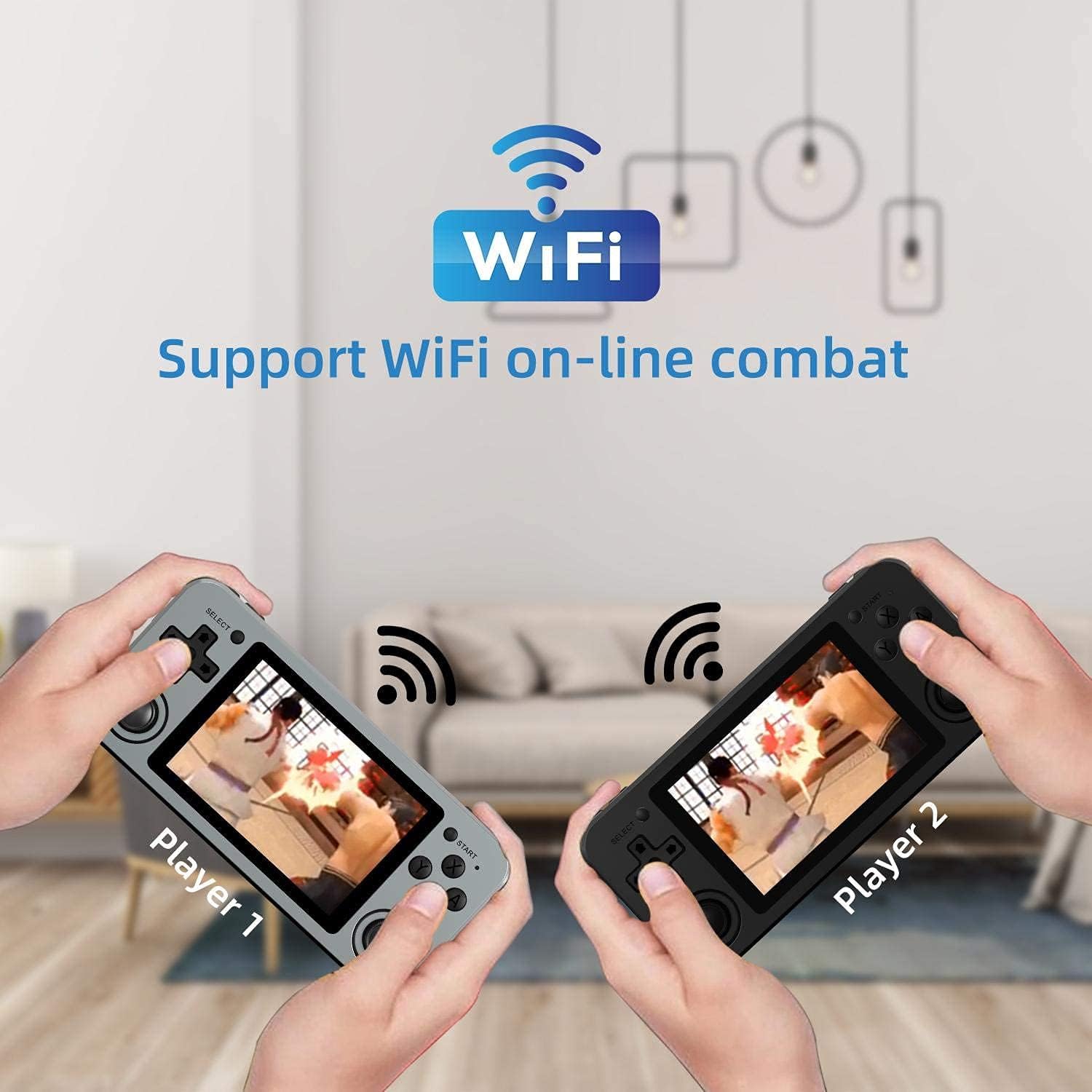
Image: Two RG351M consoles held by hands, illustrating the capability for Wi-Fi online combat between players.
BẢO TRÌ
- Vệ sinh: Use a soft, dry cloth to clean the console's exterior. For the screen, use a microfiber cloth specifically designed for electronics. Do not use liquid cleaners directly on the screen.
- Kho: When not in use for extended periods, store the console in a cool, dry place, away from direct sunlight.
- Chăm sóc pin: Để kéo dài tuổi thọ pin, hãy tránh xả hết pin thường xuyên. Sạc thiết bị thường xuyên, ngay cả khi không sử dụng, để duy trì tình trạng pin tốt.
- Cập nhật phần mềm: Periodically check for system updates (if available through the open-source community) to ensure optimal performance and compatibility.
Xử lý sự cố
| Vấn đề | Giải pháp khả thi |
|---|---|
| Thiết bị không bật nguồn. | Đảm bảo pin đã được sạc. Kết nối bộ sạc và đợi vài phút trước khi thử bật lại. |
| Màn hình bị đóng băng hoặc không phản hồi. | Locate the recessed Reset button on the bottom of the device and press it gently with a thin, non-metallic object (e.g., a paperclip) to restart the console. |
| Games are not loading or running slowly. | Ensure the TF card is properly inserted. Some games may require specific emulator settings or may be too demanding for the hardware. Check online communities for compatibility lists or optimization tips. |
| Không có âm thanh từ loa hoặc tai nghe. | Check the volume level using the volume buttons on the right side of the console. Ensure headphones are fully plugged in. Restart the device. |
| Sự cố kết nối Wi-Fi. | Ensure you are within range of a 2.4GHz Wi-Fi network. Double-check the Wi-Fi password. Restart the console and your Wi-Fi router. |
Thông số kỹ thuật
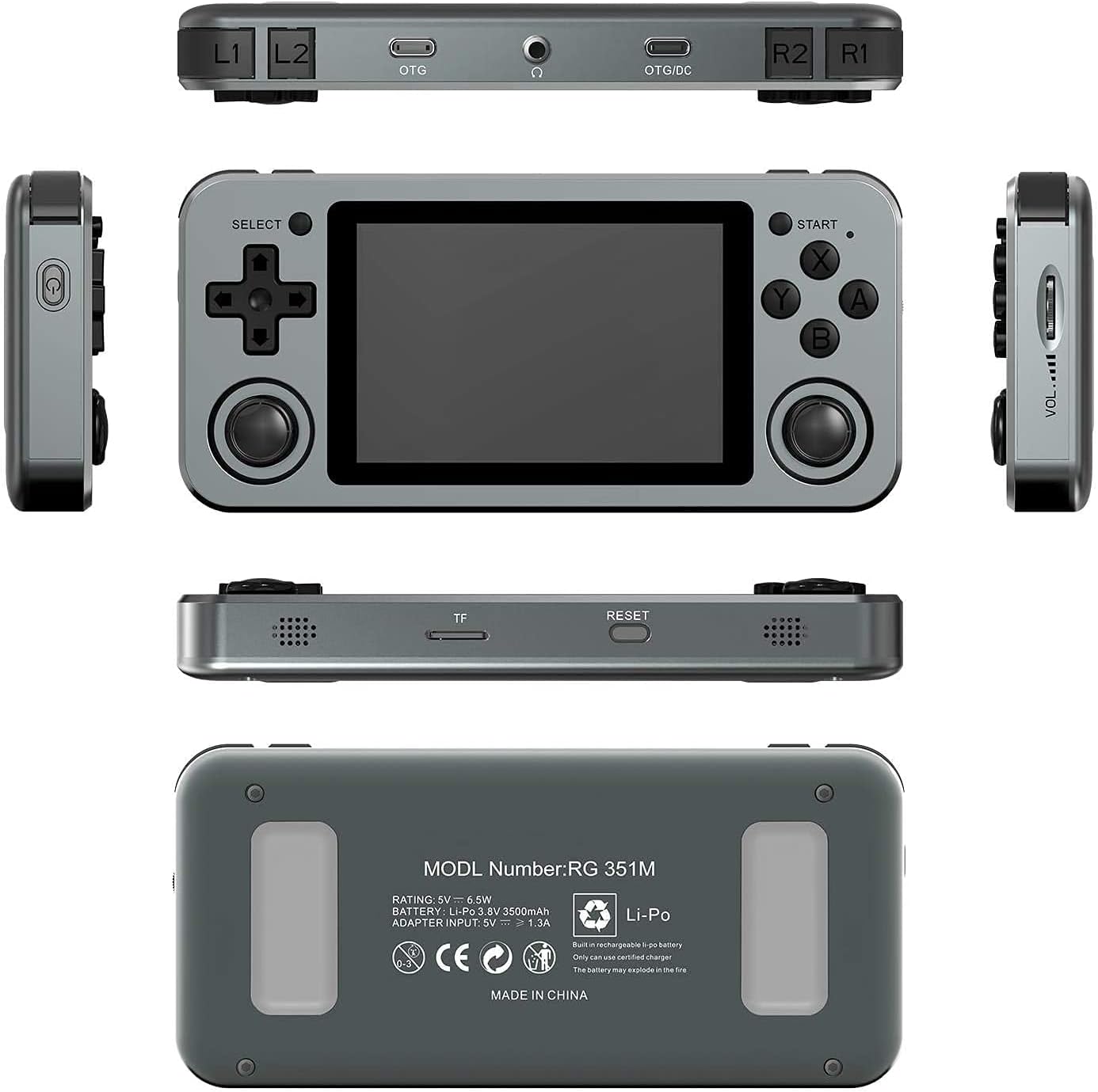
Image: A composite image showing the ANBERNIC RG351M from various angles, including front, top, bottom, sides, and back, providing a comprehensive view of its design and ports.
| Tính năng | Chi tiết |
|---|---|
| Người mẫu | RG351M |
| Bộ vi xử lý | RK3326 quad core 1.5 GHz |
| Bộ xử lý đồ họa | Mali-G31 MP2 |
| ĐẬP | DDR3L 1GB |
| Ký ức | 64GB (Thẻ TF) |
| Màn hình | 3.5 inch IPS, OCA full lamination, 320*480 resolution |
| Hệ thống | Hệ thống Linux mã nguồn mở |
| Ắc quy | Li-polymer 3500 mAh, up to 8 hours battery life |
| Sạc | 1.3A charging, max 2A, USB Type-C, 4 hours full charge |
| Hỗ trợ thẻ TF | Tối đa 256GB |
| Giao diện | TF Card Slot, 3.5mm Earphone, OTG 1 (Type-C), OTG 2 (Type-C Data/Charging) |
| Dimensions (Console) | 15.2cm (L) x 7.1cm (W) x 1.8cm (H) |
| Weight (Console) | 0.19kg (approx. 6.7 oz) |
Bảo hành và Hỗ trợ
For warranty information and technical support, please refer to the retailer or the official ANBERNIC website. Keep your proof of purchase for warranty claims. This manual provides general guidance; specific software-related issues may require consulting community forums or official support channels.


