Giới thiệu
This user manual provides comprehensive instructions for the HW16 Smart Watch. It covers setup, operation, maintenance, and troubleshooting to help you maximize your device's potential. The HW16 Smart Watch features a 1.72-inch full screen, Bluetooth call functionality, music system, heart rate sensor, fitness tracking, and password lock screen, compatible with both iOS and Android devices.
Cài đặt
1. Sạc thiết bị
Before first use, fully charge your HW16 Smart Watch. Connect the magnetic charging cable to the charging points on the back of the watch and plug the USB end into a compatible power adapter (not included) or a computer USB port. The watch display will indicate charging status.
2. Bật / Tắt nguồn
To power on, press and hold the side button until the screen illuminates. To power off, press and hold the side button, then select the power off option on the screen.
3. Ghép nối với điện thoại thông minh của bạn
The HW16 Smart Watch connects via Bluetooth. Download the recommended companion application (e.g., Wearfit Pro APP as mentioned in specifications) from your smartphone's app store. Ensure Bluetooth is enabled on your phone. Open the app, follow the on-screen instructions to search for and pair with your HW16 device. Confirm the pairing request on both your phone and the watch.
Hướng dẫn sử dụng
Điều hướng
The HW16 features a full touch screen. Swipe left/right, up/down to navigate through menus and features. Press the side button to return to the home screen or access the app list.
Chức năng gọi điện qua Bluetooth
Once paired with your phone, the watch supports HD-Dial calls. You can swipe to answer incoming calls, dial numbers directly from the watch, and synchronize your mobile phone call history and address book. This feature allows for hands-free communication.

Image: The HW16 Smart Watch showing its HD-Dial Call feature, including options to answer, dial, and access contacts. This image illustrates the watch's capability for direct phone calls.
Hệ thống âm nhạc
Điều khiển phát nhạc trên điện thoại thông minh đã kết nối trực tiếp từ đồng hồ của bạn. Phát, tạm dừng, chuyển bài hát và điều chỉnh âm lượng mà không cần phải lấy điện thoại ra.
Theo dõi thể dục
The watch tracks various fitness metrics including steps, distance, and calories burned. Utilize the multi-sport mode for specific activity tracking.
Cảm biến nhịp tim
Monitor your heart rate in real-time. Access the heart rate application on the watch to view your current heart rate and historical data.

Hình ảnh: Phía sau view of the HW16 Smart Watch, highlighting the optical heart rate sensor. This sensor uses light to detect blood flow and measure heart rate.
Màn hình khóa mật khẩu
Enhance your privacy and security by setting a password lock for your watch. This prevents unauthorized access to your data.

Image: The HW16 Smart Watch screen showing a numerical keypad for entering a password. This feature provides enhanced security for the device.
Tính năng theo dõi sức khỏe
The HW16 Smart Watch offers comprehensive health data detection, including:
- Nhịp tim: Theo dõi liên tục nhịp tim của bạn.
- Oxy trong máu: Measurement of blood oxygen saturation levels.
- Huyết áp: Estimation of blood pressure (for reference only, not medical device).
- Theo dõi giấc ngủ: Theo dõi các kiểu ngủ, bao gồm giấc ngủ sâu, giấc ngủ nông và thời gian thức giấc.
- Kiểm tra độ bền: Cung cấp thông tin chi tiết về mức độ căng thẳng.
- Tập thở: Bài tập thở có hướng dẫn để thư giãn.
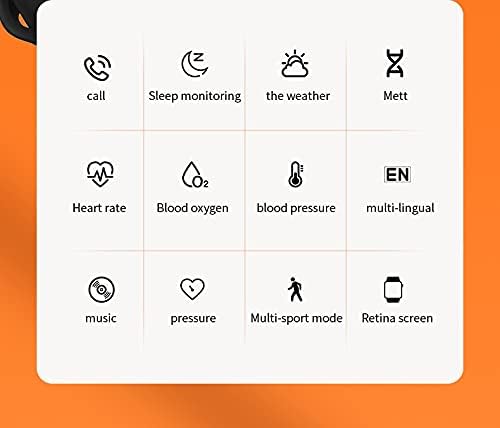
Image: A grid of icons illustrating the various functions of the HW16 Smart Watch, including call, sleep monitoring, weather, Mett, heart rate, blood oxygen, blood pressure, multi-lingual support, music, pressure, multi-sport mode, and Retina screen.
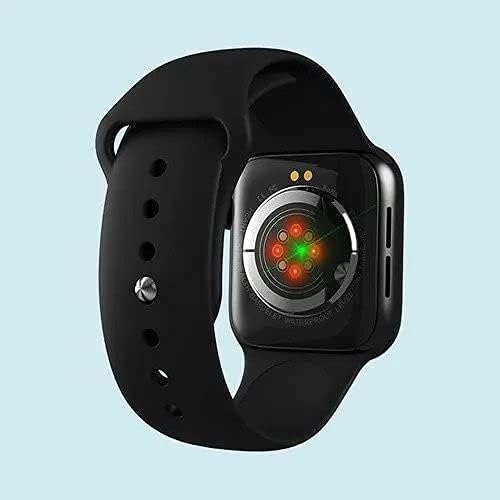
Image: This image showcases the health data detection capabilities of the HW16 Smart Watch, including a MET graph and a custom component display for personalized shortcuts.
Thông số kỹ thuật
| Tính năng | Chi tiết |
|---|---|
| Tên mẫu | HW16 |
| Kích thước hiển thị | 1.72 inch |
| Nghị quyết | 320*385 |
| Công nghệ kết nối | Bluetooth 5.2 |
| Vật liệu thân máy | Zinc alloy + IML injection process |
| Chất liệu dây đeo | Silicon lỏng |
| Dung lượng pin | 250mAh |
| Hệ điều hành tương thích | iOS 10.0 trở lên / Android 5.0 trở lên |
| Kích thước | 43.4mm*38mm*11mm |
| Kích thước vòng đeo tay | 260mm*20mm*2.5mm |
| Tính năng đặc biệt | Camera (remote control), Heart Rate Sensor, Fitness Tracker, Password Lock Screen, Music System |
| Không thấm nước | Yes (implied by "Waterproof" keyword, but no specific IP rating provided) |
| Ngôn ngữ được hỗ trợ | Chinese, English, Arabic, French, German, Spanish, Portuguese, Russian, Thai, Polish, Italian, Japanese, Traditional, Czech, Turkish, Greek, Latin, Romanian, Vietnamese, Danish... |

Image: The HW16 Smart Watch, black casing with a blue strap, displayed on a watch stand. The screen shows time, steps, and various app icons.

Image: The HW16 Smart Watch worn on a wrist, displaying its main menu with various circular app icons for different functions.
BẢO TRÌ
- Vệ sinh: Thường xuyên lau chùi đồng hồ và dây đeo bằng khăn mềm.amp vải. Tránh sử dụng hóa chất mạnh hoặc vật liệu mài mòn.
- Khả năng chống nước: While the watch is waterproof (as per keywords), avoid prolonged submersion or exposure to hot water/steam. Dry the watch thoroughly if it gets wet.
- Sạc: Use only the provided charging cable. Do not force the charger into the port.
- Kho: Bảo quản đồng hồ ở nơi khô ráo, thoáng mát khi không sử dụng.
Xử lý sự cố
Đồng hồ không bật
Ensure the watch is fully charged. Connect it to the charger for at least 30 minutes before attempting to power on again.
Cannot Pair with Phone
- Đảm bảo Bluetooth đã được bật trên điện thoại và đồng hồ.
- Đảm bảo đồng hồ nằm trong phạm vi Bluetooth của điện thoại.
- Khởi động lại cả điện thoại và đồng hồ.
- Clear previous Bluetooth connections on your phone and try pairing again.
- Hãy đảm bảo ứng dụng đi kèm đã được cài đặt và đang chạy.
Dữ liệu sức khỏe không chính xác
Ensure the watch is worn snugly on your wrist, not too loose or too tight. Clean the sensor on the back of the watch regularly. Note that health data is for reference only and not intended for medical diagnosis.
Màn hình không phản hồi
Try restarting the watch. If the issue persists, ensure the screen is clean and dry. If the problem continues, contact customer support.
Bảo hành và Hỗ trợ
For warranty information and customer support, please refer to the documentation included with your purchase or visit the official SmartWatch brand webtrang web. Giữ lại bằng chứng mua hàng để yêu cầu bảo hành.


