Giới thiệu
Thank you for choosing the Opal Selfie Stick OP-Sel-BT-01. This manual provides essential information for the safe and effective use of your device. Please read it thoroughly before operation and retain it for future reference.
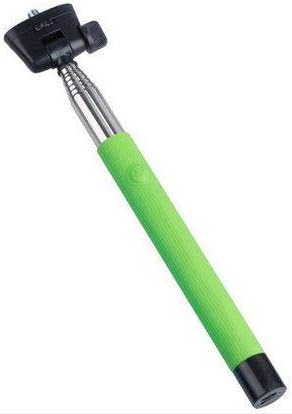
Hình 1: The Opal Selfie Stick OP-Sel-BT-01 in green, showing its extendable arm, phone holder, and comfortable grip.
Tính năng sản phẩm
- Màu sắc: Màu xanh lá
- Vật liệu chính: Thép
- Công suất tải tối đa: 500 gam
- Kết nối: Không dây (Bluetooth)
- Hệ thống tương thích: Android 3.0 trở lên, iOS 4.0 trở lên
Cài đặt
- Mở gậy selfie ra: Gently pull the phone holder section upwards to extend the stick.
- Adjust Phone Holder: Mở điện thoại clamp and securely place your smartphone within it. Ensure the phone is centered and stable. The clamp is designed to hold various phone sizes.
- Bật nguồn: Locate the power button (if applicable, usually on the handle) and press it to turn on the selfie stick. An indicator light may illuminate.
Hướng dẫn sử dụng
Ghép nối Bluetooth
- Ensure the selfie stick is powered on and in pairing mode (indicator light may flash rapidly).
- Trên điện thoại thông minh của bạn, hãy truy cập vào... Cài đặt > Bluetooth.
- Bật Bluetooth và tìm kiếm các thiết bị khả dụng.
- Select "Opal OP-Sel-BT-01" or a similar name from the list of devices.
- Once paired, the indicator light on the selfie stick may turn solid or turn off, indicating a successful connection.
Chụp ảnh / quay video
- Mở ứng dụng camera trên điện thoại thông minh của bạn.
- Kéo dài gậy selfie đến độ dài mong muốn của bạn.
- Position your phone for the desired shot.
- Press the shutter button on the selfie stick handle to capture a photo or start/stop video recording.
BẢO TRÌ
- Vệ sinh: Wipe the selfie stick with a soft, dry cloth. Do not use abrasive cleaners or solvents.
- Kho: Store the device in a cool, dry place away from direct sunlight and extreme temperatures. Retract the stick fully before storage.
- Chăm sóc pin: If the selfie stick has a rechargeable battery, ensure it is charged periodically even when not in use to maintain battery health.
Xử lý sự cố
| Vấn đề | Nguyên nhân có thể | Giải pháp |
|---|---|---|
| Không thể ghép nối với điện thoại | Selfie stick not in pairing mode; Bluetooth off on phone; battery low. | Ensure stick is on and in pairing mode. Turn phone's Bluetooth off/on. Charge the selfie stick. |
| Shutter button not working | Not paired; camera app settings. | Verify successful Bluetooth pairing. Check camera app settings for volume button shutter control. |
| Phone not stable in clamp | Phone not centered; clamp not fully secured. | Re-position phone to be centered. Ensure clamp is firmly gripping the phone. |
Thông số kỹ thuật
- Người mẫu: OP-Sel-BT-01
- Thương hiệu: Đá Opal
- Màu sắc: Màu xanh lá
- Vật liệu chính: Thép
- Công suất tải tối đa: 500 gam
- Kết nối: Không dây (Bluetooth)
- Hệ điều hành được hỗ trợ: Android 3.0 trở lên, iOS 4.0 trở lên
- ASIN: B091DBB122
- Ngày đầu tiên có sẵn: 30 Tháng 2021 năm XNUMX
Bảo hành và Hỗ trợ
For information regarding warranty coverage or technical support, please refer to the documentation included with your purchase or visit the official Opal webĐiều khoản bảo hành cụ thể có thể khác nhau tùy theo khu vực và nhà bán lẻ.
Thông tin an toàn
- Không nên để thiết bị tiếp xúc với nhiệt độ quá cao, độ ẩm hoặc ánh nắng trực tiếp trong thời gian dài.
- Để xa tầm tay trẻ em.
- Không được tự ý tháo rời hoặc sửa đổi thiết bị. Việc này có thể làm mất hiệu lực bảo hành và gây hư hỏng.
- Ensure your phone is securely fastened in the clamp before extending the stick.


