1. Giới thiệu
Thank you for choosing the KALINCO P96 Smartwatch. This device is designed to help you monitor your health, track your fitness activities, and stay connected. This manual provides essential information for setting up, operating, and maintaining your smartwatch to ensure optimal performance and longevity.
2. Sản phẩm hếtview
The KALINCO P96 Smartwatch features a 1.69-inch TFT display and offers a wide range of functionalities:
- Theo dõi sức khỏe: Continuous monitoring of heart rate, blood oxygen (SpO2), blood pressure, and sleep patterns. Includes a menstrual cycle tracking function for women.
- Tùy chỉnh: Split-screen mode for quick access to frequently used functions and over 100 stylish watch faces available via the GloryFit app. You can also upload personal photos as watch faces.
- Chế độ thể thao: Over 100 sports modes (running, cycling, rope skipping, dancing, yoga, etc.) with activity tracking for steps, calories burned, distance, heart rate, and blood oxygen during exercise.
- Thông báo thông minh: Receive text messages and notifications from apps like WhatsApp, Messenger, Facebook, and Instagram directly on your watch. Notifications can be individually deleted from the watch.
- Durability & Battery Life: IP67 water resistance for daily use (hand washing, rain). Equipped with a 260 mAh battery, providing 5-7 days of active use and 15-20 days of standby time with a 2-hour charge.
- Chức năng bổ sung: Features include phone/watch finder, screen brightness adjustment, breathing training, remote photography, music control, sedentary reminder, alarm clock, timer, stopwatch, and weather forecasts.

Image: The KALINCO P96 Smartwatch displaying its 1.69-inch screen with multiple customizable watch faces and user interface elements.
3. Thiết lập
3.1. Sạc đồng hồ thông minh
Before initial use, fully charge your smartwatch. Connect the magnetic charging cable to the charging contacts on the back of the watch and plug the USB end into a standard USB power adapter (not included). A full charge typically takes approximately 2 hours.
3.2. Tải xuống và cài đặt ứng dụng
The KALINCO P96 Smartwatch requires the vinh quangFit application for full functionality and data synchronization. You can download the app from:
- The Apple App Store (for iOS devices)
- Google Play Store (for Android devices)
- Scan the QR code provided in the quick start guide (if available).
The GloryFit app is compatible with smartphones running Android 5.0 or iOS 9.0 and above.
3.3. Ghép nối với điện thoại thông minh của bạn
- Hãy đảm bảo Bluetooth trên điện thoại thông minh của bạn đã được bật.
- Open the GloryFit app on your smartphone.
- Follow the in-app instructions to search for and connect to your KALINCO P96 Smartwatch. The watch will typically appear as 'P96' or a similar device name.
- Nếu được yêu cầu, hãy xác nhận yêu cầu ghép nối trên cả điện thoại thông minh và đồng hồ thông minh của bạn.
Sau khi ghép nối, đồng hồ sẽ đồng bộ hóa thời gian và dữ liệu với điện thoại của bạn.
4. Hướng dẫn vận hành
4.1. Điều hướng cơ bản
- Vuốt lên/xuống: Điều hướng qua các menu và thông báo.
- Vuốt sang trái/phải: Truy cập nhanh các chức năng hoặc các màn hình dữ liệu khác nhau.
- Vỗ nhẹ: Chọn một mục hoặc xác nhận một hành động.
- Nút bên: Press to wake the screen, return to the home screen, or access the main menu.
4.2. Theo dõi sức khỏe
The smartwatch continuously monitors several health metrics:
- Nhịp tim: Cung cấp chức năng theo dõi nhịp tim 24 giờ. View real-time data on the watch or detailed trends in the GloryFit app.
- Oxy trong máu (SpO2): Monitors blood oxygen levels using infrared technology. Access readings on the watch or app.
- Huyết áp: Measures blood pressure. For accurate readings, ensure the watch is worn correctly and remain still during measurement. Consult a medical professional for precise medical data.
- Theo dõi giấc ngủ: Automatically tracks your sleep patterns, including deep sleep, light sleep, and awake times. Review your sleep quality analysis in the GloryFit app.
- Theo dõi chu kỳ kinh nguyệt: A dedicated feature for women to record and track menstrual cycles within the GloryFit app.

Image: The smartwatch interface showing health monitoring features such as blood oxygen, blood pressure, heart rate, and a visual representation of sleep tracking data.
4.3. Chế độ thể thao và theo dõi hoạt động
The P96 Smartwatch supports over 100 sports modes. To use:
- Navigate to the 'Sports' section on your watch.
- Hãy chọn hoạt động bạn muốn tham gia (ví dụ: chạy bộ, đạp xe, yoga).
- Start the activity. The watch will track metrics like steps, calories, distance, and heart rate.
- End the activity to save your data. Detailed reports are available in the GloryFit app.

Image: A visual representation of the smartwatch's 100+ sports modes icons and a smartphone screen displaying detailed daily activity tracking data including steps, distance, and calories.
4.4. Thông báo thông minh
Once paired with your phone, the watch can display notifications:
- Ensure app notifications are enabled in the GloryFit app settings.
- Incoming calls, text messages, and app alerts will vibrate the watch and display content on the screen.
- You can dismiss or delete notifications directly from the watch.

Image: The smartwatch showing icons for various smart notifications (calls, Facebook, Line, Instagram, etc.) and illustrations of vibration reminders for calls, sedentary alerts, and alarms.
4.5. Tùy chỉnh
- Mặt đồng hồ: In the GloryFit app, browse and select from over 100 watch faces. You can also upload your own photos to personalize the watch face.
- Chế độ chia đôi màn hình: Swipe right on the main screen to access the split-screen area, allowing quick selection of frequently used functions.
4.6. Chức năng bổ sung
Explore other useful features:
- Đồng hồ bấm giờ: Sử dụng đồng hồ bấm giờ tích hợp để tính thời gian các hoạt động.
- Dự báo thời tiết: View current weather conditions and forecasts (requires app synchronization).
- Kiểm soát âm nhạc: Kiểm soát việc phát nhạc trên điện thoại thông minh của bạn (phát, tạm dừng, bỏ qua bài hát).
- Điều chỉnh độ sáng: Điều chỉnh độ sáng màn hình để có khả năng hiển thị tối ưu trong các điều kiện ánh sáng khác nhau.
- Tìm điện thoại/đồng hồ: Nếu thất lạc, hãy tìm điện thoại hoặc đồng hồ đã được ghép nối của bạn.
- Tập thở: Bài tập thở có hướng dẫn để thư giãn.
- Chụp ảnh từ xa: Sử dụng đồng hồ của bạn như một nút chụp từ xa cho camera điện thoại.
- Nhắc nhở ít vận động: Nhận thông báo nhắc nhở nếu bạn không hoạt động quá lâu.
- Đồng hồ báo thức và hẹn giờ: Set alarms and timers directly from your watch.
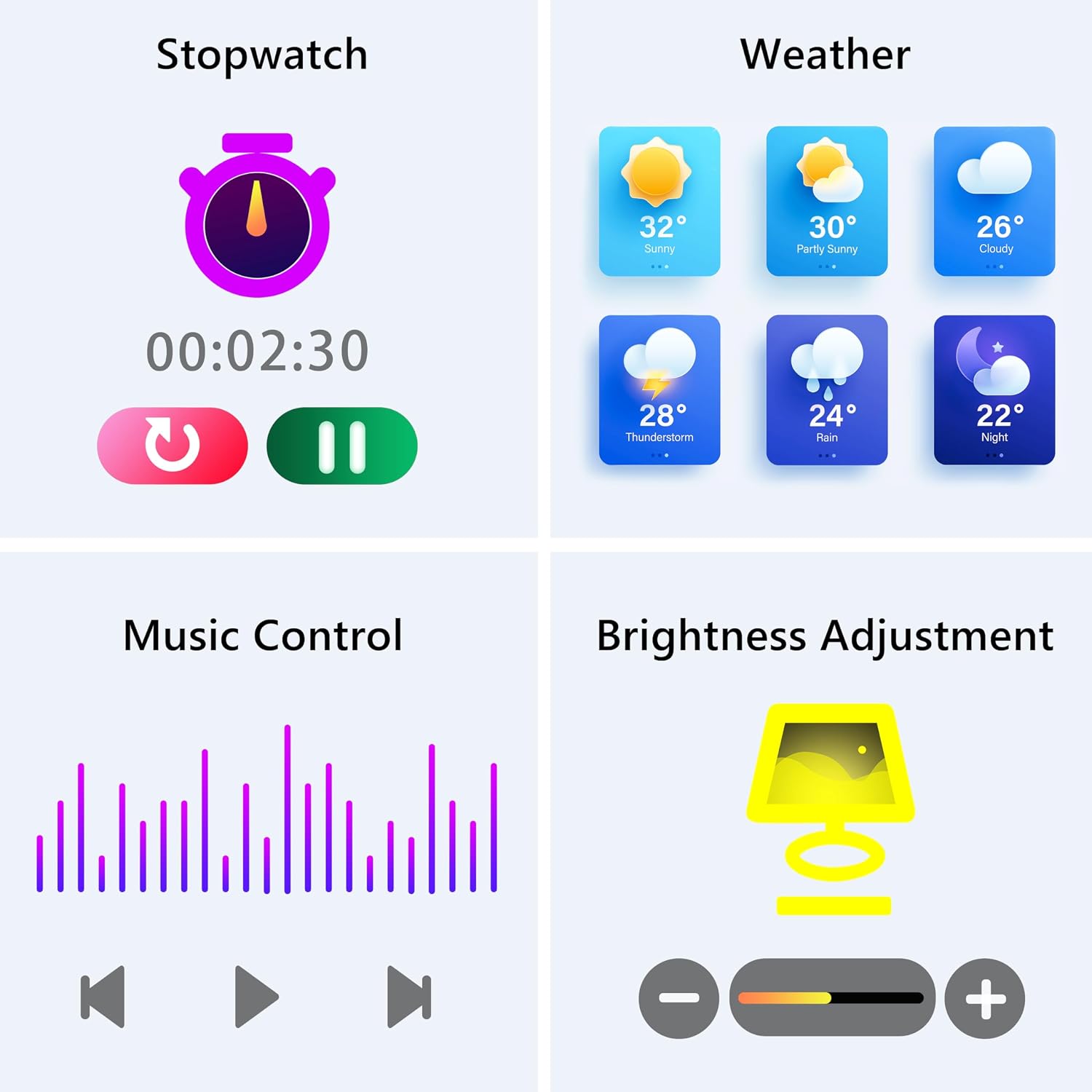
Image: The smartwatch screen showing various utility functions including a stopwatch, weather forecast, music control interface, and brightness adjustment slider.
5. Bảo trì
- Vệ sinh: Regularly clean your smartwatch and strap with a soft, dry cloth. Avoid using harsh chemicals or abrasive materials.
- Khả năng chống nước (IP67): The watch is IP67 water-resistant, meaning it can withstand splashes, hand washing, and rain. It is không suitable for swimming, showering with hot water, or diving. Avoid prolonged exposure to water.
- Chăm sóc pin: Charge the battery fully when indicated. Avoid completely draining the battery frequently to prolong its lifespan. Store the watch in a cool, dry place when not in use for extended periods.
- Cập nhật phần mềm: Keep the GloryFit app updated to ensure your smartwatch has the latest features and performance improvements.
KHAI THÁC. Xử lý sự cố
If you encounter issues with your KALINCO P96 Smartwatch, try the following solutions:
- Đồng hồ không bật: Hãy đảm bảo đồng hồ đã được sạc đầy. Kết nối đồng hồ với bộ sạc trong ít nhất 10-15 phút.
- Không thể ghép nối với điện thoại:
- Đảm bảo Bluetooth được bật trên điện thoại của bạn.
- Hãy đảm bảo đồng hồ nằm trong phạm vi kết nối Bluetooth (thường là 10 mét).
- Khởi động lại cả điện thoại và đồng hồ thông minh của bạn.
- Check if the GloryFit app is updated to the latest version.
- If previously paired, try unpairing and re-pairing the device through the GloryFit app.
- Không nhận được thông báo:
- Verify that notifications are enabled for specific apps in the GloryFit app settings.
- Ensure your phone's notification settings allow the GloryFit app to display alerts.
- Check if the watch is properly connected via Bluetooth.
- Dữ liệu sức khỏe không chính xác:
- Đảm bảo đồng hồ được đeo vừa vặn trên cổ tay, không quá chặt hoặc quá lỏng.
- For blood pressure readings, remain still and follow instructions. Note that smartwatch blood pressure measurements are for reference only and should not replace professional medical equipment.
- Vệ sinh cảm biến ở mặt sau của đồng hồ.
- Thời lượng pin ngắn:
- Giảm độ sáng màn hình.
- Tắt tính năng theo dõi nhịp tim liên tục nếu không cần thiết 24/7.
- Hạn chế số lượng ứng dụng gửi thông báo đến đồng hồ.
Nếu sự cố vẫn tiếp diễn, vui lòng tham khảo mục hỗ trợ để biết thông tin liên hệ.
7. Thông số kỹ thuật
| Tính năng | Chi tiết |
|---|---|
| Thương hiệu | KALINCO |
| Số hiệu mẫu | P96 |
| Kích thước màn hình | 1.69 inch |
| Hệ điều hành | Multiple Versions of Both iOS and Android |
| Công nghệ kết nối | Bluetooth 4.0 |
| Dung lượng pin | 260 mAh (Pin lithium-polymer) |
| Chống nước | IP67 |
| Thiết bị tương thích | Điện thoại thông minh (Android 5.0 trở lên / iOS 9.0 trở lên) |
| Tính năng đặc biệt | Text Messaging, Notification, Health Monitoring |
| GPS | GPS qua điện thoại thông minh |
8. Bảo hành và Hỗ trợ
KALINCO is committed to providing exceptional products. Your KALINCO P96 Smartwatch comes with a Bảo hành 12 tháng kể từ ngày mua.
If you encounter any problems, have suggestions, or require assistance, please do not hesitate to contact KALINCO customer support. We are dedicated to providing you with satisfactory solutions at all times.
For support, please refer to the contact information provided with your product packaging or visit the official KALINCO webđịa điểm.