1. Giới thiệu
The Lepro PR902103-US Smart Table Lamp offers versatile lighting solutions for your home. This LED touch lamp features RGB color changing capabilities, tunable warm to cool white light, and dimmable brightness. It is designed for seamless integration with smart home ecosystems, supporting both Amazon Alexa and Google Assistant for voice control, as well as control via a dedicated mobile application. This manual provides comprehensive instructions for setup, operation, and maintenance.

Figure 1: Lepro Smart Table Lamp trưng bàyasing its app control interface.
2. Có gì trong hộp
Vui lòng kiểm tra xem tất cả các thành phần có trong bao bì không:
- 1 x Lepro Smart Table Lamp (Model: PR902103-US)
- 1 x 4.9 ft USB Cable
- 1 x Bộ đổi nguồn
- 1 x Hướng dẫn sử dụng (tài liệu này)
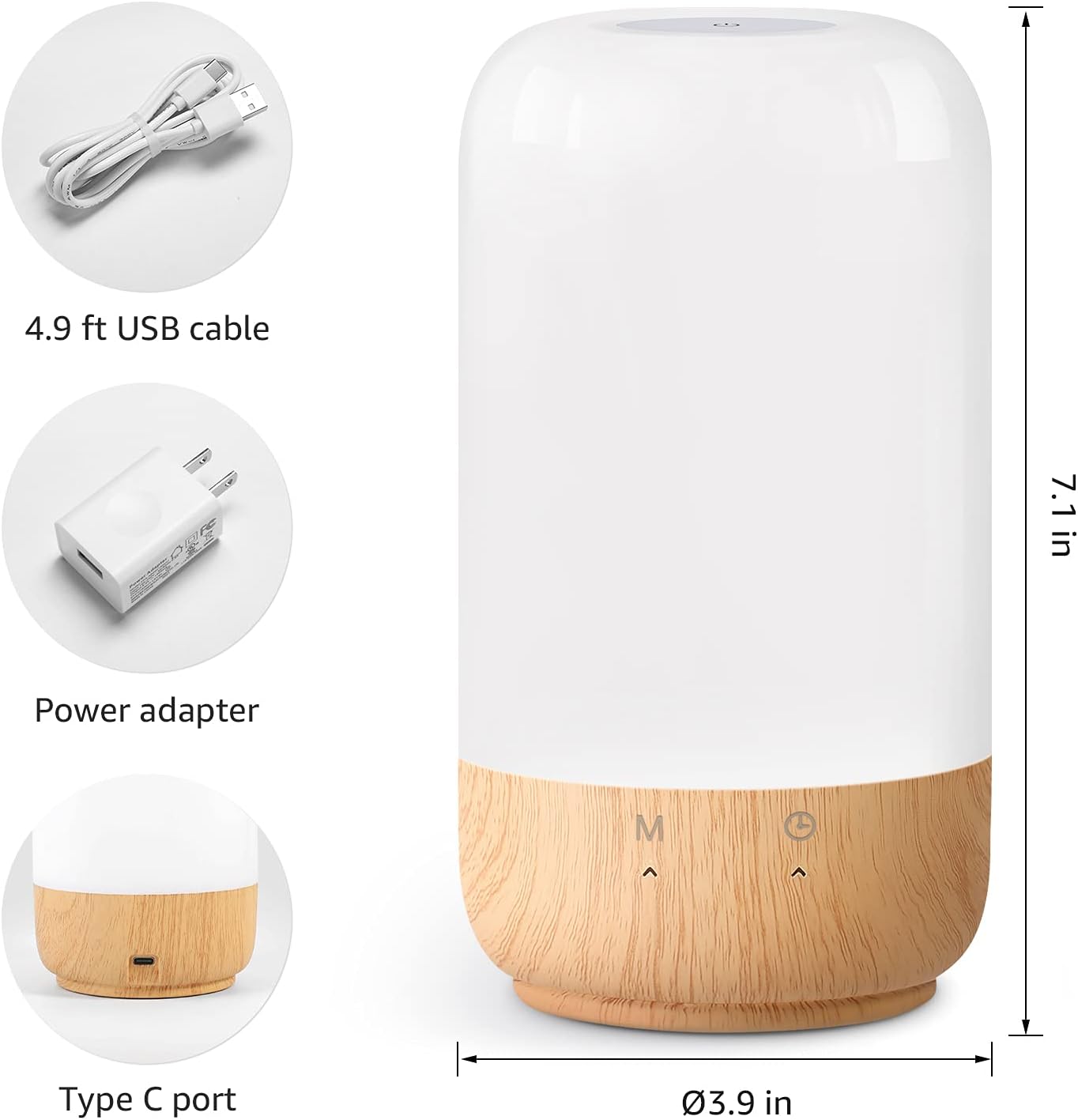
Hình 2: Các thành phần đi kèm và kích thước sản phẩm.
3. Thiết lập
Follow these steps to set up your Lepro Smart Table Lamp:
- Kết nối nguồn điện: Kết nối cáp USB được cung cấp với lamp's Type-C port and the power adapter. Plug the power adapter into a standard wall outlet. The lamp sẽ sáng lên.
- Tải xuống ứng dụng: Download the 'Lepro LampUX' app from your mobile device's App Store (iOS) or Google Play Store (Android).
- Đăng ký tài khoản: Open the 'Lepro LampUX' app and register a new account or log in if you already have one.
- Ghép nối thiết bị:
- Trong ứng dụng, hãy nhấn vào 'Thêm thiết bị' hoặc biểu tượng '+'.
- Select 'Table Lamp' from the lighting category.
- Đảm bảo lamp is powered on. Long press the timer button on the lamp's base for at least 5 seconds until the indicator light blinks rapidly.
- Confirm the indicator light is blinking rapidly in the app and proceed.
- Select your 2.4 GHz Wi-Fi network and enter the password. (Note: The lamp only supports 2.4 GHz Wi-Fi networks. If your router is 5 GHz, please set it to 2.4 GHz during setup.)
- The app will begin adding the device. Once successfully added, you can rename your lamp để dễ nhận dạng hơn.
Video 1: Detailed steps on how to set up your Lepro Smart Lamp sử dụng ứng dụng di động.
4. Hướng dẫn vận hành
The Lepro Smart Table Lamp can be controlled via touch, the mobile app, or voice commands.
4.1. Điều khiển cảm ứng
- Bật/Tắt nguồn: Short press the power button (marked 'M') on the lampcơ sở của.
- Điều chỉnh độ sáng: Slide your finger along the left side of the lamp's base to adjust brightness.
- Color Change (RGB): Slide your finger along the right side of the lamp's base to cycle through RGB colors.
- Chuyển đổi chế độ: Short press the timer button (clock icon) to switch between white light modes (warm white, cool white) and RGB color mode.
4.2. Mobile App Controls
The 'Lepro LampUX' app provides comprehensive control over your lamp:
- Brightness & Color Temperature: Adjust the brightness level and select color temperatures from 2700K (warm white) to 5700K (cool white).
- Lựa chọn màu RGB: Chọn màu sắc từ 16 triệu màu bằng cách sử dụng bảng màu trong ứng dụng.
- Cảnh: Select from pre-set scenes like 'Night', 'Read', 'Meeting', 'Leisure', or customize your own scenes with specific colors and effects.
- Timer & Wake-up: Lên lịch trình cho lamp to turn on/off automatically. Utilize the 'Sunrise Simulation' feature to gradually increase light for a gentle wake-up.

Figure 3: Mobile application interface for controlling lamp cài đặt.

Hình 4: Chữ lamp's timer and wake-up functions in use.
4.3. Điều khiển bằng giọng nói
The Lepro Smart Table Lamp is compatible with Amazon Alexa and Google Assistant. To enable voice control:
- đảm bảo l của bạnamp is successfully paired with the 'Lepro LampUX' app.
- Mở ứng dụng Amazon Alexa hoặc Google Home.
- Truy cập vào mục 'Kỹ năng & Trò chơi' (Alexa) hoặc 'Tương thích với Google' (Google Home).
- Tìm kiếm and enable the 'Lepro LampUX' skill/service.
- Link your 'Lepro LampUX' account with your Alexa/Google account.
- Sau khi kết nối, bạn có thể sử dụng các lệnh thoại như:
- "Alexa, turn on [Lamp Name]."
- "Hey Google, set [Lamp Name] to warm white."
- "Alexa, change [Lamp Name] to blue."
- "Hey Google, dim [Lamp Name] to 50%."

Figure 5: Voice control integration with Amazon Alexa.
Video 2: Demonstration of the Lepro Smart Table Lamp working with Alexa and Google Home.
5. Bảo trì
To ensure the longevity and optimal performance of your Lepro Smart Table Lamp, please follow these maintenance guidelines:
- Vệ sinh: Ngắt nguồn điện trước khi vệ sinh. Sử dụng vải mềm, khô để lau lamp's surface. Avoid using abrasive cleaners, solvents, or harsh chemicals, as these may damage the finish or electronic components.
- Kho: Nếu lưu trữ lamp Để sử dụng lâu dài, hãy đảm bảo sản phẩm sạch sẽ và khô ráo. Bảo quản nơi khô ráo, thoáng mát, tránh ánh nắng trực tiếp và nhiệt độ cao.
- Xử lý: xử lý lamp cẩn thận. Tránh làm rơi hoặc va đập mạnh.
KHAI THÁC. Xử lý sự cố
If you encounter issues with your Lepro Smart Table Lamp, tham khảo các vấn đề và giải pháp phổ biến sau đây:
| Vấn đề | Nguyên nhân có thể | Giải pháp |
|---|---|---|
| Lamp không bật. | Không có nguồn điện. | Kiểm tra xem bộ đổi nguồn có được cắm chắc chắn vào ổ cắm khôngamp và ổ cắm trên tường. Đảm bảo ổ cắm hoạt động bình thường. |
| Không thể kết nối với Wi-Fi. | Incorrect Wi-Fi band (5 GHz). Mật khẩu không đúng. Tín hiệu Wi-Fi yếu. | Ensure your Wi-Fi network is 2.4 GHz. Verify the Wi-Fi password. Move the lamp closer to your router. |
| Điều khiển bằng giọng nói không hoạt động. | Skill not enabled/linked. Tên thiết bị không chính xác. | Ensure the 'Lepro LampUX' skill is enabled and linked in your Alexa/Google Home app. Use the exact device name configured in the app. |
| Lamp không phản hồi. | Lỗi phần mềm tạm thời. | Rút phích cắmamp from the power outlet for 10 seconds, then plug it back in to perform a soft reset. |
7. Thông số kỹ thuật
| Tính năng | Chi tiết |
|---|---|
| Thương hiệu | Bệnh phong |
| Số hiệu mẫu | PR902103-Mỹ |
| Kích thước sản phẩm | 3.9"D x 3.9"W x 7.1"H |
| Trọng lượng sản phẩm | 1.19 pound |
| Vật liệu | Nhựa, gỗ |
| Loại nguồn sáng | DẪN ĐẾN |
| Cái gì?tage | 7 watt |
| Độ sáng | 350 Lumen |
| Màu sáng | RGB + CCT (Tunable White 2700-5700K) |
| Phương pháp kiểm soát | App, Touch, Voice (Alexa, Google Assistant) |
| Kết nối | Chỉ hỗ trợ WiFi 2.4 GHz |
| Sử dụng trong nhà/ngoài trời | Trong nhà |
8. Bảo hành và Hỗ trợ
Lepro products are designed and manufactured to the highest quality standards. For warranty information and technical support, please refer to the contact details provided on the product packaging or visit the official Lepro webtrang web. Giữ lại biên lai mua hàng làm bằng chứng mua hàng khi yêu cầu bảo hành.


