1. Giới thiệu
The Tycon TPSC2440NMPPT is an advanced Maximum Power Point Tracking (MPPT) solar charge controller designed for efficient battery charging from solar panels. It automatically adjusts to 12V or 24V battery systems and supports various battery types including Flooded, AGM, GEL, and Lithium, with a customizable USER setting. This controller features an integral LCD display for monitoring key system parameters.
2. Hướng dẫn an toàn
Vui lòng đọc và hiểu tất cả hướng dẫn trước khi lắp đặt và vận hành. Việc không tuân theo các hướng dẫn này có thể dẫn đến điện giật, hỏa hoạn hoặc thương tích nghiêm trọng.
- Hãy đảm bảo tất cả dây dẫn được phân cực đúng cách và kết nối chắc chắn.
- Do not disassemble or attempt to repair the controller. Refer to qualified service personnel.
- Lắp đặt bộ điều khiển ở khu vực thông gió tốt, tránh xa các vật liệu dễ cháy và khí ăn mòn.
- Always disconnect the battery and solar panel before installing or moving the controller.
- Đeo thiết bị bảo hộ cá nhân (PPE) phù hợp trong quá trình lắp đặt.
- The controller is designed for indoor use or protected outdoor environments (IP32 rating). Avoid direct exposure to water.
3. Sản phẩm hếtview
The TPSC2440NMPPT controller is equipped with several features to optimize solar charging and battery management:
- Công nghệ MPPT: Tối đa hóa khả năng thu năng lượng từ tấm pin mặt trời.
- Auto-Ranging Voltage: Compatible with 12V or 24V battery arrays.
- Multimode Load Operation: Offers 5 selectable modes for load control.
- Soft Start Load Output: Powers high capacitive loads safely.
- Automatic Battery Equalization: Performs 30-day equalization for optimal battery health.
- Conformal Coated Electronics: Provides environmental protection.
- TVS Lightning Protection: Enhances durability against electrical surges.
- Integral LCD Display: Hiển thị dung lượng pintage, Capacity, Charging Capacity, Temperature, Load Current, and Solar Current.
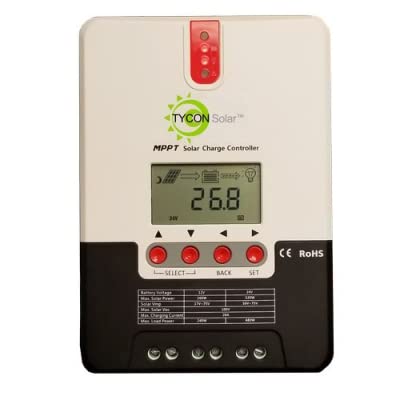
Hình 1: Mặt trước view of the Tycon TPSC2440NMPPT Solar MPPT Battery Charging Controller, showing the LCD display and connection terminals.
4. Thiết lập và Cài đặt
Thực hiện theo các bước sau để cài đặt đúng cách:
- Lắp đặt: Choose a suitable location for mounting the controller. Ensure good ventilation and protection from direct sunlight and moisture.
- Kết nối pin: Connect the battery to the controller's battery terminals first. Ensure correct polarity (+ to + and - to -). The controller will automatically detect the battery voltage (12V hoặc 24V).
- Kết nối bảng điều khiển năng lượng mặt trời: Connect the solar panel array to the controller's solar input terminals. Observe correct polarity. Ensure the open-circuit voltage of the solar array does not exceed the controller's maximum input voltage (110V at 25°C).
- Kết nối tải (Tùy chọn): If using the load output, connect your DC loads to the controller's load terminals. Do not exceed the rated load current (20A Max).
- Cảm biến nhiệt độ: Connect the included battery temperature probe cable to the designated port on the controller. Place the sensor near the battery for accurate temperature compensation.
- Bật nguồn: Khi mọi kết nối đã an toàn, bộ điều khiển sẽ bật nguồn và bắt đầu hoạt động.
5. Hướng dẫn vận hành
The integral LCD display provides real-time information about your solar charging system. Use the buttons (if present, assuming standard UP/DOWN/SET) to navigate through the display menus and adjust settings.
5.1 Thông tin hiển thị trên màn hình LCD
- Pin Voltage: Vol hiện tạitage của pin được kết nối.
- Dung lượng pin: Estimated state of charge.
- Dung lượng sạc: Current power being delivered to the battery.
- Nhiệt độ pin: Temperature measured by the external probe.
- Tải hiện tại: Current being drawn by connected DC loads.
- Solar Current: Current being generated by the solar panels.
5.2 Cài đặt loại pin
The controller supports Flooded, AGM, GEL, and Lithium battery types. A USER setting allows for custom charge parameters. Refer to the on-screen menu for selecting and configuring the battery type.
5.3 Load Operation Modes
The controller offers 5 selectable load operation modes. Consult the device's menu for details on each mode and how to select them, typically involving timed operation or dusk-to-dawn control.
6. Bảo trì
Việc bảo trì thường xuyên đảm bảo hiệu suất tối ưu và tuổi thọ của bộ điều khiển sạc năng lượng mặt trời.
- Kiểm tra kết nối: Kiểm tra định kỳ tất cả các kết nối dây điện để đảm bảo độ kín và chống ăn mòn.
- Làm sạch bộ điều khiển: Keep the controller clean and free of dust. Use a dry cloth for cleaning. Do not use liquids.
- Tình trạng pin: Theo dõi lượng pintage and capacity on the LCD. Ensure batteries are properly maintained according to their manufacturer's guidelines.
- Thông gió: Hãy đảm bảo khu vực lắp đặt luôn được thông gió tốt để tránh quá nhiệt.
KHAI THÁC. Xử lý sự cố
| Vấn đề | Nguyên nhân có thể | Giải pháp |
|---|---|---|
| Không hiển thị/Không có nguồn | Kết nối pin lỏng lẻo; Điện áp pintage too low; Blown fuse (external, if applicable). | Kiểm tra các kết nối và cực tính của pin. Sạc pin nếu dung lượng thấp.tage is below operating threshold. Check and replace any external fuses. |
| Không sạc bằng năng lượng mặt trời | Solar panel not connected; Incorrect polarity; Insufficient sunlight; Damaged solar panel/wiring. | Verify solar panel connections and polarity. Ensure panels are receiving adequate sunlight. Inspect panels and wiring for damage. |
| Tải không hoạt động | Load disconnected; Overload; Short circuit; Battery voltage quá thấp. | Check load connections. Reduce load if exceeding 20A. Check for short circuits. Ensure battery is sufficiently charged. |
| Các bài đọc không chính xác | Loose connections; Faulty sensor. | Check all wiring connections. Ensure temperature sensor is properly connected and placed. |
8. Thông số kỹ thuật
- Người mẫu: TPSC2440NMPPT
- Tự động Voltage: 12V/24V (System)
- Amptại: 40A
- Dòng tải định mức: Tối đa 20A
- Tải điện dung tối đa: 10,000uF
- Đầu vào năng lượng mặt trời tối đa Voltage: 110V (25°C), 90V (25°C)
- Max Power Point Range: 2VDC to 75VDC (Battery Volts)
- Hiệu suất chuyển đổi: 96% bình thường
- MPPT Tracking Efficiency: 99%
- Tự tiêu thụ: 1W
- Bù nhiệt độ: -3.0mV/°C/Ô
- Kích thước dây tối đa: 8AWG
- Tậptage and Current Accuracy: +/-2%
- Tiếp đất: Đất âm
- Bảo vệ môi trường: IP32
- Kích thước sản phẩm: 12 x 9 x 6 inch
- Trọng lượng sản phẩm: 5.16 pound
- Kiểu hiển thị: Màn hình tinh thể lỏng


