Sản phẩm trênview
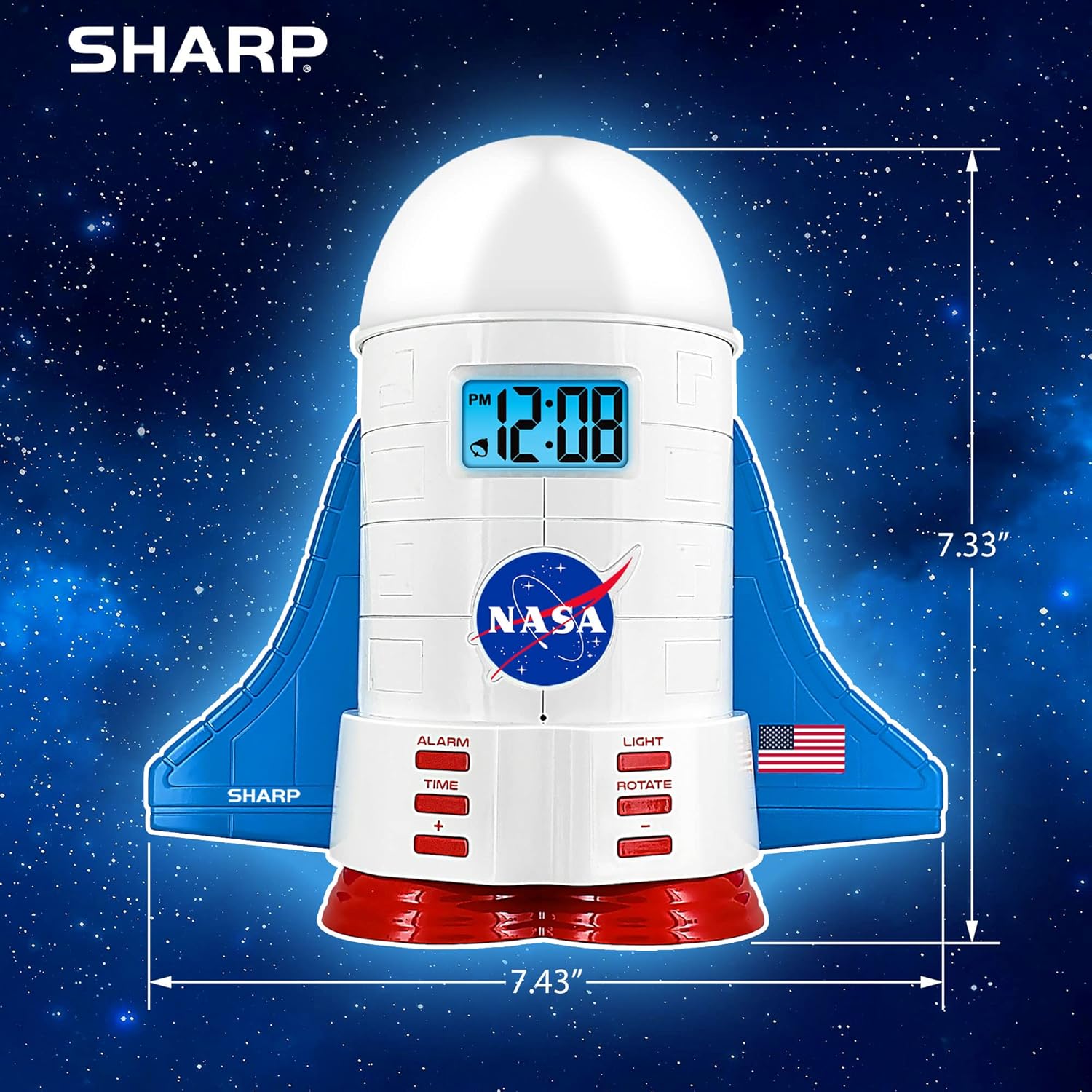
This manual provides instructions for the Sharp NASA Space Shuttle Night Light Alarm Clock. This device combines an alarm clock with a space-themed nightlight and projection feature, designed to enhance a child's bedroom environment.

Cài đặt
Tháo dỡ
- Cẩn thận loại bỏ tất cả các thành phần khỏi bao bì.
- Hãy kiểm tra xem tất cả các mặt hàng được liệt kê trong phần "Có gì trong hộp" đều có đầy đủ.
Kết nối nguồn điện
The alarm clock can be powered via the included electric adapter. For continuous operation of all features, including the nightlight and projection, direct power is recommended.
For battery backup, insert appropriate batteries (not included) into the battery compartment located at the base of the unit. This ensures timekeeping and alarm function during power outagnghĩa là

Hướng dẫn sử dụng
Thiết lập thời gian
- Nhấn nút THỜI GIAN cái nút.
- Sử dụng + Và - các nút để điều chỉnh giờ và phút.
- Nhấn THỜI GIAN một lần nữa để xác nhận.
Cài đặt báo thức
- Nhấn nút BÁO THỨC cái nút.
- Sử dụng + Và - các nút để cài đặt thời gian báo thức mong muốn.
- Nhấn BÁO THỨC again to activate the alarm. An alarm icon will appear on the display.
Chức năng báo lại
To temporarily silence the alarm, tap the top of the unit. The alarm will sound again after a short interval.
Nightlight and Projection Features
The unit features light-up wings and a rocket booster base, along with a rotating projection cap.

Đèn kích hoạt
Nhấn nút ÁNH SÁNG button to cycle through the 4 color options for the wings and booster lights.
Projection Caps
The device includes two interchangeable space-themed projection caps and a frosted nightlight cap. Twist counter-clockwise to attach or remove caps.

Phép chiếu xoay
Nhấn nút QUAY button to activate or deactivate the rotation of the projected images.
BẢO TRÌ
- Clean the unit with a soft, dry cloth. Avoid abrasive cleaners or solvents.
- Ensure the projection caps are free from dust or smudges for clear image projection.
- Replace batteries in the backup compartment as needed to maintain time settings during power interruptions.
Xử lý sự cố
| Vấn đề | Nguyên nhân có thể | Giải pháp |
|---|---|---|
| Clock not displaying time | Không có điện | Ensure the electric adapter is securely plugged in. Check battery backup. |
| Báo thức không kêu | Alarm not set or deactivated | Verify alarm time is set and activated (alarm icon visible). |
| Projection unclear or dim | Dust on cap or insufficient darkness | Clean the projection cap. Ensure the room is sufficiently dark for optimal projection. |
| Chiếu không quay | Rotate function off | Nhấn nút QUAY button to activate the rotation feature. |
Thông số kỹ thuật
- Thương hiệu: Sắc
- Số hiệu mẫu: Sharp NASA e Shuttle Alarm Clock
- Nguồn điện: Electric Adapter (Battery backup for timekeeping)
- Loại nguồn sáng: DẪN ĐẾN
- Nightlight Colors: 4 lựa chọn
- Projection Themes: 2 interchangeable space scenes
- Trưng bày: LCD với đèn nền màu xanh
- Kích thước: 7.43 x 1.5 x 7.43 inch
- Cân nặng: 1.33 pound
- Vật liệu: Nhựa
- Tính năng đặc biệt: Color Changing, Snooze Function, Rotating Projection
Bảo hành và Hỗ trợ
Để biết thông tin bảo hành hoặc hỗ trợ kỹ thuật, vui lòng tham khảo trang web chính thức của nhà sản xuất. webtrang web hoặc liên hệ với dịch vụ khách hàng của họ.
Nhà sản xuất: Sắc
UPC: 049353005447
ASIN: B08PL6K2C5


