1. Giới thiệu
This user manual provides essential information for the safe and efficient installation, operation, and maintenance of your TOA Electronics PC-1860 5-Inch Ceiling Mount Speaker. Please read this manual thoroughly before using the product and retain it for future reference.
The PC-1860 is designed for clear audio reproduction in various indoor environments, featuring a compact design suitable for ceiling installation.
2. Biện pháp phòng ngừa an toàn
CẢNH BÁO:
- Ensure all electrical connections are made by qualified personnel and comply with local electrical codes.
- Do not install the speaker in locations exposed to direct water spray or excessive humidity, as the product is not waterproof.
- Luôn ngắt nguồn điện trước khi thực hiện bất kỳ cài đặt, bảo trì hoặc khắc phục sự cố nào.
- Use appropriate mounting hardware and ensure the ceiling structure can support the speaker's weight (approximately 10 pounds).
- Avoid placing heavy objects on the speaker or subjecting it to strong impacts.
THẬN TRỌNG:
- Do not attempt to modify or repair the speaker yourself. Refer all servicing to qualified service personnel.
- Keep the speaker away from heat sources and direct sunlight to prevent damage.
- Hãy đảm bảo thông gió tốt xung quanh loa để tránh quá nhiệt.
3. Nội dung gói hàng
Xác minh rằng tất cả các mục được liệt kê dưới đây đều có trong gói hàng của bạn:
- 1 x TOA Electronics PC-1860 5-Inch Ceiling Mount Speaker
- 1 x Bộ lọc lưới
- Hướng dẫn sử dụng này
4. Thiết lập và Cài đặt
Proper installation is crucial for optimal performance and safety. It is recommended that installation be performed by a qualified technician.
4.1 Tháo dỡ
Carefully remove the speaker and all accessories from the packaging. Inspect for any signs of damage during transit. If damage is found, contact your supplier immediately.
4.2 Lựa chọn vị trí lắp đặt
Choose a suitable location in the ceiling that can structurally support the speaker's weight. Ensure there are no obstructions such as electrical conduits, water pipes, or structural beams in the chosen area. Maintain adequate clearance for wiring and ventilation.
4.3 Các bước cài đặt
- Chuẩn bị lỗ mở trần nhà: Cut a circular hole in the ceiling at the selected location, ensuring the diameter matches the speaker's mounting requirements. Refer to the speaker's physical dimensions for precise measurements.
- Kết nối dây: Route the speaker wire from your amplifier or audio source to the ceiling opening. Connect the wires to the speaker terminals, observing correct polarity (+ to + and - to -). Ensure connections are secure.
- Insert Speaker into Opening: Carefully insert the speaker into the prepared ceiling opening. The mounting clips (visible in the image) are designed to secure the speaker in place.
- Bảo vệ loa: Engage the mounting clips by tightening the screws (if applicable) or by pushing them outwards until they firmly grip the ceiling material. Ensure the speaker is flush with the ceiling surface and securely held.
- Attach Mesh Filter: If not pre-installed, attach the included mesh filter to the speaker grille. This helps protect the speaker from dust and debris.
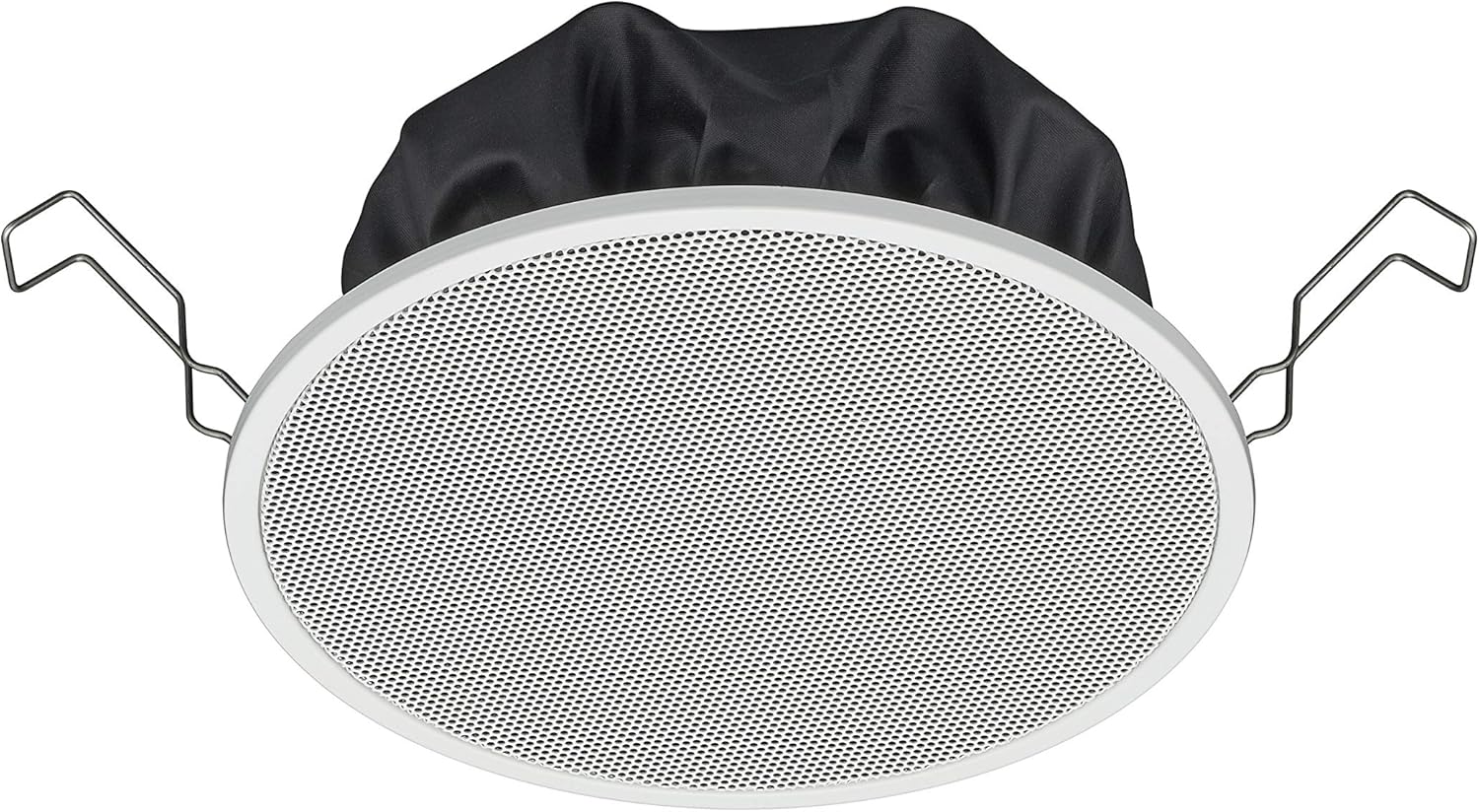
Figure 1: TOA Electronics PC-1860 5-Inch Ceiling Mount Speaker, showing the white grille, black rear enclosure, and metal mounting clips. This image illustrates the speaker's design for flush ceiling installation.
5. Hướng dẫn vận hành
The TOA Electronics PC-1860 is a passive speaker designed to reproduce audio from an external amplifier or audio source. It does not require direct power or complex controls.
5.1 Phát lại âm thanh cơ bản
- Bật nguồn Ampngười lót: Đảm bảo âm thanh của bạn amplifier or receiver is powered on and connected to your audio source (e.g., MP3 player, desktop, projector, television).
- Điều chỉnh âm lượng: Use the volume controls on your amplifier or audio source to set the desired listening level.
- Điều khiển bằng giọng nói (nếu có): If your connected audio system supports voice control, you may be able to manage playback and volume through voice commands directed at your audio source device. The speaker itself does not have integrated voice control functionality but can reproduce audio from devices that do.
- Radio Functionality (if applicable): If your connected audio source is a radio receiver, the speaker will reproduce the radio broadcast. The speaker itself does not contain a radio tuner.
The PC-1860 is designed for straightforward audio output. All primary controls for audio source selection, volume, and equalization will be managed through your connected amplifier hoặc hệ thống âm thanh.
6. Bảo trì
Regular maintenance ensures the longevity and optimal performance of your speaker.
- Vệ sinh: Gently wipe the speaker grille and frame with a soft, dry cloth. For stubborn dirt, a slightly damp cloth can be used, followed by a dry cloth. Avoid using harsh chemicals, solvents, or abrasive cleaners.
- Loại bỏ bụi: Periodically use a soft brush or a vacuum cleaner with a brush attachment to remove dust from the grille, especially the mesh filter.
- Điều tra: Occasionally inspect the speaker for any visible damage or loose connections. If any issues are found, refer to the troubleshooting section or contact support.
- Môi trường: Ensure the installation environment remains within recommended temperature and humidity levels.
KHAI THÁC. Xử lý sự cố
If you encounter issues with your PC-1860 speaker, refer to the following common problems and solutions:
| Vấn đề | Nguyên nhân có thể | Giải pháp |
|---|---|---|
| Không có âm thanh từ loa |
|
|
| Âm thanh bị méo hoặc không rõ ràng |
|
|
| Loa không được gắn chắc chắn |
|
|
If the problem persists after attempting these solutions, please contact TOA Electronics customer support.
8. Thông số kỹ thuật
Below are the key technical specifications for the TOA Electronics PC-1860 5-Inch Ceiling Mount Speaker:
| Tính năng | Chi tiết |
|---|---|
| Tên mẫu | PC-1860 |
| Thương hiệu | Điện tử TOA |
| Loại loa | Trên trần nhà |
| Kiểu lắp đặt | Gắn trần nhà |
| Kích thước loa | 5 inch |
| Loại trình điều khiển âm thanh | Trình điều khiển động |
| Chế độ đầu ra âm thanh | Stereo (when paired with another speaker) |
| Màu sắc | Trắng |
| Các thành phần bao gồm | 1 x Bộ lọc lưới |
| Không thấm nước | SAI |
| Trọng lượng sản phẩm | 10 pound (xấp xỉ) |
| Nguồn điện | Điện có dây (qua) ampngười lót) |
| Phương pháp kiểm soát | Voice (via compatible external devices) |
| Sử dụng được đề xuất | Construction, Industrial |
| Thiết bị tương thích | Desktop, MP3 Player, Projector, Television (via ampngười lót) |
9. Thông tin bảo hành
The TOA Electronics PC-1860 speaker comes with a Limited Warranty. Specific terms and conditions of the warranty, including coverage period and claim procedures, are subject to the policies of TOA Electronics.
For detailed warranty information, please refer to the official TOA Electronics webhoặc liên hệ trực tiếp với bộ phận chăm sóc khách hàng của họ. Giữ lại bằng chứng mua hàng để yêu cầu bảo hành.
10. Hỗ trợ khách hàng
If you require further assistance, have questions not covered in this manual, or need technical support, please contact TOA Electronics customer service.
- Hỗ trợ trực tuyến: Visit the official TOA Electronics webtrang web dành cho các câu hỏi thường gặp, tài liệu sản phẩm và biểu mẫu liên hệ.
- Thông tin liên lạc: Refer to the TOA Electronics website for current phone numbers and email addresses for your region.
When contacting support, please have your product model (PC-1860) and purchase information readily available.


