Giới thiệu
This manual provides comprehensive instructions for setting up, operating, maintaining, and troubleshooting your Mercusys MR50G AC1900 Dual-Band Wi-Fi 5 Router. The MR50G is designed to deliver high-speed wireless connectivity with AC1900 speeds, Gigabit Ethernet ports, and advanced features like MU-MIMO and Beamforming.

Hình ảnh: Mặt trước view of the Mercusys MR50G router, illustrating its dual-band capabilities with 5GHz (1300 Mbps) and 2.4GHz (600 Mbps) speeds.
Hướng dẫn thiết lập
1. Nội dung gói hàng
Xác minh rằng gói của bạn chứa các mục sau:
- Mercusys MR50G AC1900 Dual-Band Wi-Fi 5 Router
- Bộ đổi nguồn
- Cáp Ethernet
- Quick Installation Guide (User Guide)
2. Kết nối vật lý
Hãy làm theo các bước sau để kết nối bộ định tuyến của bạn:
- Tắt nguồn: Ngắt nguồn điện khỏi modem và bộ định tuyến (nếu có).
- Kết nối Modem với Bộ định tuyến: Connect one end of the provided Ethernet cable to the WAN port (usually blue) on your MR50G router and the other end to your modem's Ethernet port.
- Kết nối thiết bị (Tùy chọn): For wired connections, connect your computer or other devices to the LAN ports (yellow) on the MR50G router using Ethernet cables.
- Bật nguồn: Connect the power adapter to the router's power port and plug it into a power outlet. Power on your modem, then power on the MR50G router.
- Chờ đợi các chỉ báo: Wait for the router's LED indicators to stabilize. The Power LED should be solid green.
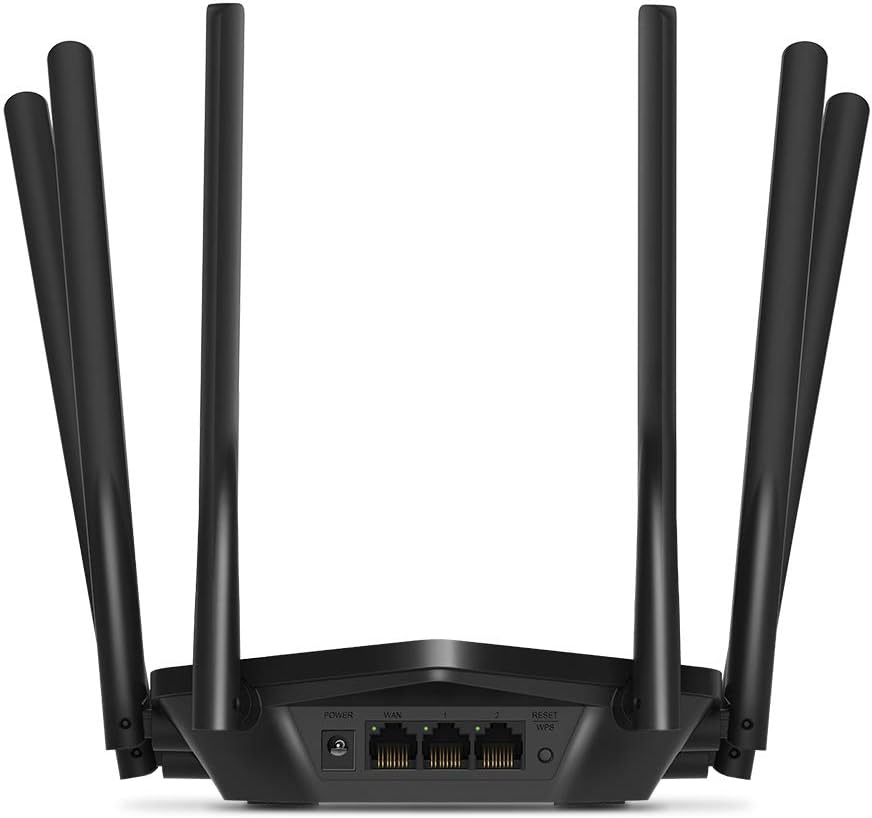
Hình ảnh: Phía sau view of the Mercusys MR50G router, illustrating the power input, WAN port (blue), and three LAN ports (yellow) for wired connections, along with the Reset/WPS button.
3. Cấu hình ban đầu
Để cấu hình bộ định tuyến lần đầu tiên:
- Kết nối với Wi-Fi: Connect your computer or mobile device to the router's default Wi-Fi network (SSID and password are typically printed on a label on the bottom of the router).
- Truy cập Web Giao diện: Mở một web trình duyệt và loại
mwlogin.netor192.168.1.1vào thanh địa chỉ. - Tạo mật khẩu đăng nhập: Follow the on-screen instructions to create a login password for the router's management page.
- Hướng dẫn thiết lập nhanh: The Quick Setup wizard will guide you through basic internet and wireless settings.
Hướng dẫn sử dụng
1. Cài đặt Wi-Fi cơ bản
Sau khi đăng nhập vào web giao diện:
- Tên Mạng (SSID): Navigate to the Wireless settings to change your Wi-Fi network names (SSIDs) for both 2.4 GHz and 5 GHz bands.
- Mật khẩu: Set a strong, unique password for your Wi-Fi networks. The MR50G supports WPA3 for enhanced security.
- Loại bảo mật: It is recommended to use WPA2-PSK/WPA3-Personal for optimal security.
2. Hoạt động băng tần kép
MR50G hoạt động trên hai dải tần số:
- 2.4 GHz: Cung cấp phạm vi phủ sóng rộng hơn và khả năng xuyên tường tốt hơn, phù hợp cho việc sử dụng internet thông thường và các thiết bị cũ.
- 5 GHz: Offers faster speeds and less interference, ideal for bandwidth-intensive activities like 4K streaming and online gaming, but with a shorter range.
You can configure separate SSIDs for each band or use Smart Connect to combine them into a single SSID, allowing the router to automatically assign devices to the optimal band.
3. Chế độ điểm truy cập
To use the MR50G as an Access Point (AP) to extend an existing wired network:
- Kết nối: Connect an Ethernet cable from your existing router's LAN port to one of the MR50G's LAN ports (not the WAN port).
- Định cấu hình: Log into the MR50G's web interface, navigate to the Operation Mode settings, and select "Access Point Mode". Follow the prompts to complete the setup.
4. Tính năng nâng cao
- MU – MIMO: Multi-User, Multiple-Input, Multiple-Output technology allows the router to communicate with multiple devices simultaneously, improving network efficiency.
- Định hình chùm tia: Tập trung tín hiệu Wi-Fi về phía các thiết bị được kết nối, tăng cường cường độ và phạm vi tín hiệu.
- Hỗ trợ VPN: The router supports VPN functionality, allowing for secure remote access or connection to VPN services. Refer to the router's web interface for specific VPN client/server configurations.
- Kiểm soát của phụ huynh: Quản lý và hạn chế quyền truy cập internet cho các thiết bị hoặc người dùng cụ thể.
- Mạng khách: Tạo một mạng Wi-Fi riêng cho khách, đảm bảo an toàn cho mạng chính của bạn.
BẢO TRÌ
1. Cập nhật chương trình cơ sở
Regularly check for and install firmware updates to ensure optimal performance, security, and access to new features. Firmware updates can typically be found in the router's web interface under System Tools or Advanced settings.
2. Đặt lại bộ định tuyến
If you encounter persistent issues or forget your login password, you may need to reset the router to its factory default settings:
- With the router powered on, press and hold the Reset/WPS button on the back panel for approximately 5-10 seconds until the LED indicators flash.
- Release the button and wait for the router to restart. All settings will be restored to factory defaults.
3. Vị trí tối ưu
For the best Wi-Fi coverage and performance:
- Place the router in a central location in your home or office.
- Avoid placing it near obstructions like thick walls, metal objects, or large appliances (microwaves, refrigerators) that can interfere with Wi-Fi signals.
- Elevate the router if possible, as Wi-Fi signals tend to spread downwards.

Image: Mercusys MR50G router positioned on a table, demonstrating a typical placement for optimal signal distribution within a living space.
Xử lý sự cố
1. Không có truy cập Internet
- Kiểm tra kết nối: Hãy đảm bảo tất cả các cáp Ethernet được kết nối chắc chắn vào đúng cổng (WAN với modem, LAN với các thiết bị).
- Khởi động lại thiết bị: Khởi động lại modem, sau đó là bộ định tuyến, rồi đến các thiết bị được kết nối.
- Kiểm tra đèn LED WAN: Verify that the WAN LED on the router is lit, indicating a connection to the modem.
- Trạng thái ISP: Liên hệ với Nhà cung cấp dịch vụ Internet (ISP) của bạn để xác nhận không có dịch vụ nàotagở khu vực của bạn.
2. Tốc độ Wi-Fi chậm
- Vị trí đặt bộ định tuyến: Ensure the router is placed optimally (refer to "Optimal Placement" section).
- Sự can thiệp: Move the router away from other electronic devices that may cause interference.
- Lựa chọn ban nhạc: For speed-critical applications, ensure your device is connected to the 5 GHz band.
- Tối ưu hóa kênh: Trong bộ định tuyến web Trên giao diện, hãy thử thay đổi kênh Wi-Fi cho cả băng tần 2.4 GHz và 5 GHz sang kênh ít tắc nghẽn hơn.
- Phần mềm: Đảm bảo chương trình cơ sở của bộ định tuyến được cập nhật.
3. Cannot Access Router Management Page
- Địa chỉ IP: Ensure you are using the correct address (
mwlogin.netor192.168.1.1). - Kết nối có dây: Try accessing the page from a computer connected directly to the router via an Ethernet cable.
- Xóa bộ nhớ đệm của trình duyệt: Xóa của bạn web Kiểm tra bộ nhớ cache và cookie của trình duyệt, hoặc thử sử dụng trình duyệt khác.
- Tường lửa/Chống vi-rút: Tạm thời vô hiệu hóa bất kỳ tường lửa hoặc phần mềm diệt vi-rút nào trên máy tính của bạn có thể đang chặn quyền truy cập.
- Khởi động lại bộ định tuyến: If all else fails, perform a factory reset (refer to "Resetting the Router" section).
Thông số kỹ thuật
| Người mẫu | MR50G (EU) |
| Tiêu chuẩn không dây | IEEE 802.11a / b / g / n / ac |
| Tính thường xuyên | 2.4 GHz và 5 GHz (Băng tần kép) |
| Tốc độ dữ liệu | AC1900 (600 Mbps trên băng tần 2.4 GHz, 1300 Mbps trên băng tần 5 GHz) |
| Cổng Ethernet | 1 cổng WAN Gigabit, 3 cổng LAN Gigabit |
| Ăng-ten | 6 Ăng-ten đa hướng cố định |
| Bảo vệ | WPA-PSK / WPA2-PSK / WPA3-Personal |
| Kích thước (Rộng x Sâu x Cao) | 15.72 x 17.56 x 4.5cm |
| Cân nặng | 450 gam |
| Tính năng đặc biệt | MU-MIMO, Beamforming, Access Point Mode, VPN Support, Parental Controls, Guest Network |
| Đầu vào nguồn điện | 100-240V ~ 50/60Hz |
Bảo hành và Hỗ trợ
Mercusys products come with a limited warranty. For detailed warranty information, please refer to the warranty card included with your product or visit the official Mercusys webđịa điểm.
For technical support, firmware updates, and additional resources, please visit the Mercusys support website. You can typically find contact information and FAQs there.
Official Mercusys Webđịa điểm: www.mercusys.com


