Giới thiệu
This manual provides detailed instructions for the operation and maintenance of your GTMEDIA Z3 Portable DAB+/FM RDS Radio. Please read this manual thoroughly before using the device to ensure proper functionality and to maximize your listening experience.
Thông tin an toàn quan trọng
- Không để thiết bị tiếp xúc với mưa, hơi ẩm hoặc nhiệt độ quá cao hoặc quá thấp.
- Tránh làm rơi hoặc để thiết bị chịu tác động mạnh.
- Không tự ý tháo rời hoặc sửa chữa thiết bị. Vui lòng liên hệ nhân viên có trình độ để được bảo dưỡng.
- Chỉ sử dụng cáp sạc và bộ đổi nguồn được chỉ định.
- Để xa tầm tay trẻ em.
Nội dung gói
Đảm bảo tất cả các mục đều có trong gói hàng:
- 1 x GTMEDIA Z3 DAB+/FM Radio
- 1 x Cáp sạc USB
- 1 x Hướng dẫn sử dụng

Image: The GTMEDIA Z3 radio, its retail box, USB charging cable, and user manual.
Sản phẩm trênview
The GTMEDIA Z3 is a portable DAB+/FM RDS radio featuring a 2.4-inch TFT-LCD screen. It supports 60 preset stations for both DAB+ and FM, and includes functions such as clock, alarm, and sleep timer. The device is powered by a rechargeable 18650 lithium battery.
Điều khiển và hiển thị bảng mặt trước
- Nút nguồn/chế độ chờ: Turns the radio on/off or puts it in standby mode.
- Nút quét: Initiates station scanning.
- Nút DAB/FM: Chuyển đổi giữa chế độ DAB+ và FM.
- Nút Menu: Truy cập menu chính.
- Nút EQ: Điều chỉnh cài đặt bộ cân bằng âm thanh.
- Nút đặt trước: Truy cập các kênh đã được cài đặt sẵn.
- Volume/Select Knob: Adjusts volume and navigates/selects menu options.
- 2.4-inch TFT-LCD Display: Hiển thị thông tin nhà ga, thời gian và các lựa chọn thực đơn.
Bảng điều khiển phía sau và các cổng
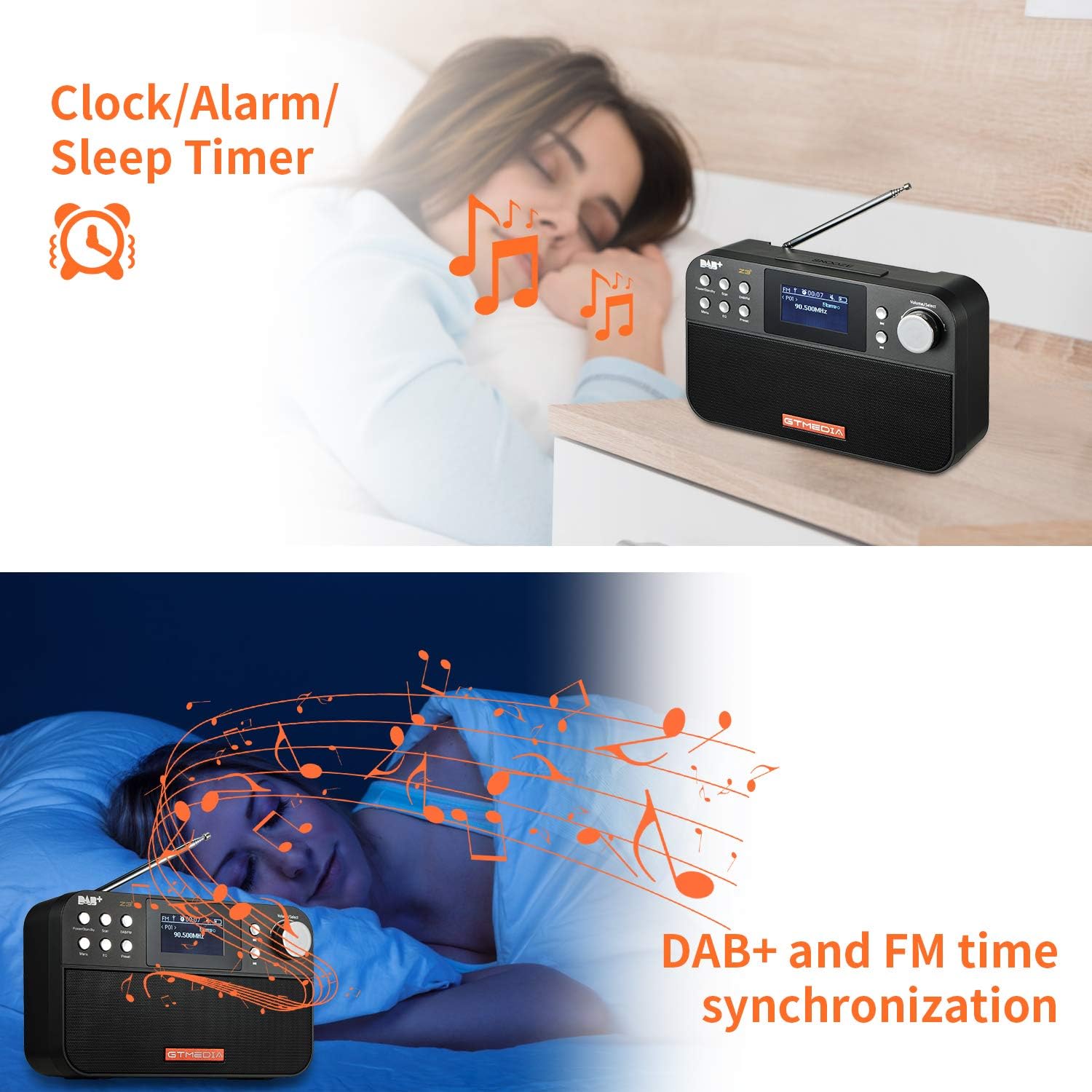
Image: The back of the GTMEDIA Z3 radio, highlighting the 18650 lithium battery compartment and the DC 5V USB charging port.
- 18650 Lithium Battery Compartment: Chứa pin sạc.
- DC 5V USB Charging Port: Để sạc thiết bị.
Hướng dẫn thiết lập
1. Sạc pin
- Locate the USB charging port on the rear of the radio.
- Connect the provided USB charging cable to the radio and to a compatible USB power adapter (DC 5V, ≥1500mA) or a computer USB port.
- The battery indicator on the display will show charging status. A full charge typically provides 4-7 hours of operation.
Image: The GTMEDIA Z3 radio's rear panel, illustrating the USB charging port and battery specifications.
2. Bật nguồn ban đầu và lựa chọn ngôn ngữ
- Nhấn và giữ Nguồn/Chế độ chờ để bật radio.
- Upon first use, you may be prompted to select a language. Use the Volume/Select knob to navigate and press to confirm your choice. English is the default language.
3. Đồng bộ hóa thời gian
The clock can be set manually or synchronized automatically with DAB+ or FM signals.
- Đồng bộ hóa tự động: When tuned to a DAB+ or FM station that broadcasts time information, the radio will automatically update its clock.
- Điều chỉnh thủ công: Access the system settings via the Thực đơn button to manually set the time and date.
Hướng dẫn sử dụng
1. Radio Modes (DAB+/FM)
Chế độ chuyển đổi:
Nhấn nút DAB / FM Nút này dùng để chuyển đổi giữa chế độ radio DAB+ và FM.
Quét tìm trạm:
- Quét tự động (FM): Ở chế độ FM, nhấn nút Quét button to automatically search for and store available stations.
- Local Scan (DAB+): Ở chế độ DAB+, nhấn nút Quét button to perform a local scan for DAB+ stations. Manual tuning is also supported.
Đặt trước Trạm:
The radio supports 60 preset stations for both FM and DAB+ (10 quick access presets). To save a station:
- Dò đến đài mong muốn.
- Nhấn và giữ Cài đặt trước cái nút.
- Sử dụng Volume/Select knob to choose a preset number and press to confirm.
Để gọi lại kênh đã lưu, hãy nhấn nhanh nút Cài đặt trước nút và sử dụng Volume/Select núm để chọn.
FM RDS Station Name Display:
When tuned to an FM station broadcasting RDS (Radio Data System) information, the 2.4-inch TFT-LCD screen will display the station name and other relevant data.
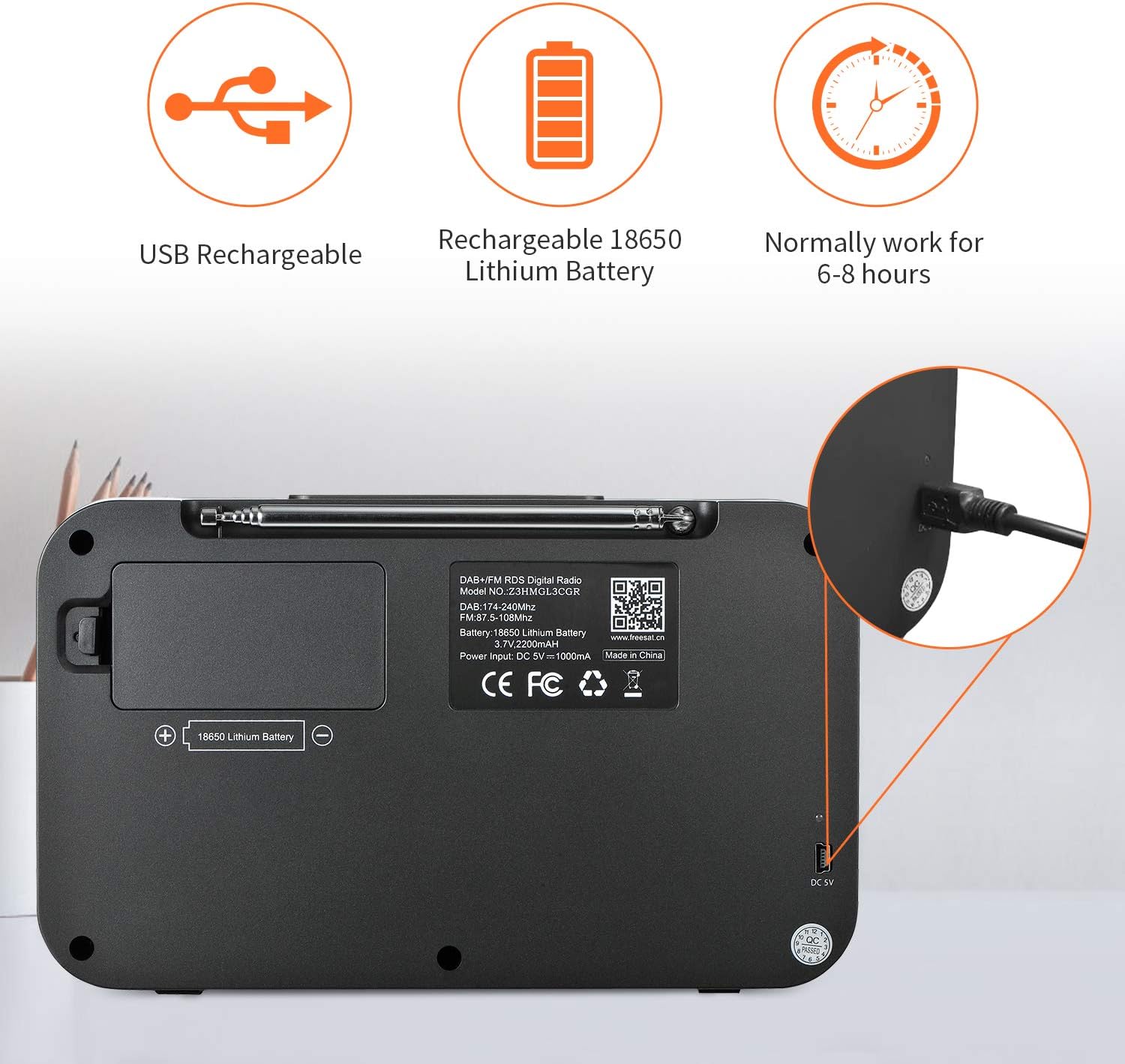
Image: The GTMEDIA Z3 radio's display showing "FM" and "90.500MHz" along with a station name, demonstrating the RDS feature.
2. Clock, Alarm, and Sleep Timer
The GTMEDIA Z3 radio includes integrated clock, alarm, and sleep timer functions for enhanced convenience.

Image: The GTMEDIA Z3 radio with icons representing clock, alarm, and sleep timer functions, depicted in a bedroom setting.
Cài đặt báo thức:
- Nhấn nút Thực đơn button and navigate to the "Alarm" settings.
- Sử dụng Volume/Select knob to set the alarm time, duration, and alarm source (e.g., buzzer, DAB+, FM).
- Xác nhận cài đặt của bạn.
Cài đặt hẹn giờ ngủ:
- Nhấn nút Thực đơn button and navigate to the "Sleep Timer" settings.
- Sử dụng Volume/Select knob to choose the desired sleep duration (e.g., 15, 30, 60 minutes).
- Radio sẽ tự động tắt sau thời gian đã đặt.
3. Phát lại nhạc
The GTMEDIA Z3 supports playback of various music formats including MP3, FLAC, and WAV. Playback modes include single play, repeat, and shuffle. Specific instructions for accessing and controlling music playback are typically found within the device's menu system.
BẢO TRÌ
Vệ sinh:
- Lau sạch radio bằng một miếng vải mềm, khô.
- Không sử dụng chất tẩy rửa dạng lỏng hoặc vật liệu mài mòn.
Chăm sóc pin:
- Để kéo dài tuổi thọ pin, tránh xả pin hoàn toàn thường xuyên.
- Sạc pin thường xuyên, ngay cả khi không sử dụng radio thường xuyên.
- Khi không sử dụng trong thời gian dài, hãy cất giữ radio ở nơi khô ráo, thoáng mát.
Xử lý sự cố
| Vấn đề | Nguyên nhân có thể | Giải pháp |
|---|---|---|
| Không có điện | Pin đã hết. | Sạc pin bằng cáp USB được cung cấp. |
| Thu sóng radio kém | Tín hiệu yếu; ăng-ten chưa được kéo dài. | Extend the telescopic antenna fully. Try repositioning the radio. Perform a new scan for stations. |
| Không có âm thanh | Volume too low; Mute activated. | Tăng âm lượng bằng cách sử dụng Volume/Select knob. Check if mute is active in settings. |
| Hiển thị không rõ ràng | Độ sáng màn hình quá thấp. | Adjust LCD brightness in the system settings. |
Thông số kỹ thuật
| Tính năng | Chi tiết |
|---|---|
| Thương hiệu | TRUYỀN THÔNG GTMEDIA |
| Người mẫu | Z3 |
| Công nghệ Tuner | DAB Plus, FM RDS |
| Các băng tần radio được hỗ trợ | DAB+ (174.92-239.20 MHz), FM (87.5-108 MHz) |
| Trưng bày | 2.4-inch TFT-LCD (240 x 320 pixels) |
| Các đài phát thanh cài sẵn | 60 FM, 60 DAB+ |
| Nguồn điện | Pin chạy bằng |
| Loại pin | 18650 Lithium Battery (3.7V 2200mAh) |
| Giờ hoạt động | 4-7 hours (typical) |
| Đầu vào sạc | DC 5V, ≥1500mA (via USB) |
| Công nghệ kết nối | USB |
| Tính năng đặc biệt | Portable, Clock, Alarm, Sleep Timer, USB Upgradeable |
| Trọng lượng sản phẩm | 620 gam |
| Kích thước sản phẩm | 20 x 5 x 12cm |
| Nhiệt độ hoạt động | 0~+45°C |
| Nhiệt độ lưu trữ | -10~+60°C |
| Định dạng nhạc | MP3, FLAC, WAV |

Image: Dimensions of the GTMEDIA Z3 radio, showing approximate measurements of 200mm x 120mm x 50mm.
Nâng cấp phần mềm
The GTMEDIA Z3 radio supports firmware upgrades via a USB connection to a PC. For the latest firmware and detailed instructions, please visit the official support webđịa điểm.

Image: The GTMEDIA Z3 radio connected to a laptop via a USB cable, indicating its upgradeable feature.
Bảo hành và Hỗ trợ
For technical support, warranty information, or any questions regarding your GTMEDIA Z3 radio, please visit the official GTMEDIA support webđịa điểm: