Vạnview Hướng dẫn sử dụng camera an ninh ngoài trời W6
Kiểu: W6
Giới thiệu
Welcome to the user manual for your Wansview W6 Outdoor Security Camera. This guide provides detailed instructions to help you set up, operate, and maintain your camera system, ensuring optimal performance and security for your home or property. Please read this manual thoroughly before using the product.

Figure 1: Wansview W6 Outdoor Security Camera (4-pack)
Có gì trong hộp
Upon opening your Wansview W6 camera package, verify that all the following components are included:
- Vạnview W6 Camera Unit
- Hướng dẫn cài đặt nhanh
- Bộ đổi nguồn
- Mounting Accessories (Screws, Wall Anchors, Small Screwdriver)
- Ăng ten WiFi
- Cáp Ethernet
- Giấy chứng nhận sự phù hợp
Cài đặt
1. Tải xuống ứng dụng
Tải xuống 'Wans'view Cloud' app from your mobile device's app store (available on iOS and Android). Create an account or log in if you already have one.
2. Bật nguồn
Connect the power adapter to the camera and plug it into a power outlet. The camera will power on and its indicator light will begin to flash.
3. Kết nối mạng
người Vạnview W6 camera supports both Wi-Fi and Ethernet connections. For Wi-Fi setup, ensure your router is broadcasting a 2.4GHz network, as the camera does not support 5GHz Wi-Fi. Follow the in-app instructions to connect your camera to your home network. For Ethernet connection, simply plug an Ethernet cable from your router into the camera's Ethernet port.
Ghi chú: If you need to change the Wi-Fi connection after initial setup, a physical reset of the camera may be required. Ensure you have easy access to the camera's reset button.
4. Lắp đặt
Select a suitable outdoor location for your camera, ensuring a strong Wi-Fi signal if using a wireless connection. Use the provided mounting accessories to securely attach the camera to a wall or other stable surface. The camera's cable requires a hole of approximately 1.5 inches for proper routing through a wall.
Các tính năng hoạt động
Full HD 1080P Video & Enhanced Night Vision
người Vạnview W6 camera delivers clear 1080P Full HD video, allowing you to monitor your property with high detail. Equipped with 12 built-in infrared LEDs, it provides crystal-clear night vision up to 25 feet, automatically switching between day and night modes for continuous surveillance.

Hình 2: Khả năng quan sát ban ngày và ban đêm
Smart Motion Detection Tracking
Receive real-time alerts on your smartphone when motion is detected. The camera's intelligent motion detection helps you stay informed about activities around your house immediately. You can customize the sensitivity level and detection zones within the app.

Hình 3: Cảnh báo phát hiện chuyển động
Fluent Two-Way Audio
Communicate directly with visitors or deter intruders using the built-in microphone and speaker. The two-way audio feature provides clear sound quality, allowing for effective interaction through the Wansview ứng dụng đám mây.

Hình 4: Giao tiếp âm thanh hai chiều
Micro SD Card & Cloud Storage
Safely store your footage locally on a micro SD card (up to 128GB, not included) or utilize the optional cloud storage service. You can replay, download, and delete recorded footage at any time through the app.

Hình 5: Các tùy chọn lưu trữ
Đa-view Video Streaming on One Screen
người Vạnview Cloud app allows you to display live feeds from up to four Wansview cameras simultaneously on your smartphone or tablet, providing a comprehensive overview of your monitored areas.

Hình 6: Multi-View Phát trực tuyến
Works with Alexa Echo Show
Integrate your Wansview W6 camera with Amazon Alexa Echo Show devices. Simply connect your camera to Alexa and use voice commands like "Alexa, show me the Front Door" to view the live stream on your Echo Show screen.
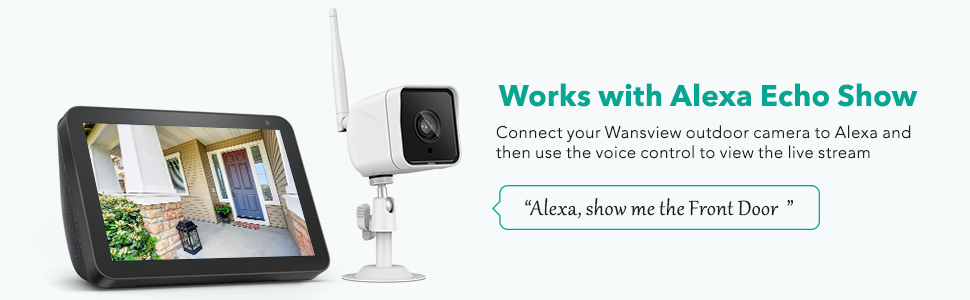
Hình 7: Tích hợp Alexa
BẢO TRÌ
người Vạnview W6 camera is designed for outdoor use with an IP66 waterproof rating, ensuring protection against dust and strong jets of water. To maintain optimal performance and longevity:
- Thường xuyên vệ sinh ống kính máy ảnh bằng vải mềm, khô để đảm bảo chất lượng hình ảnh rõ nét.
- Periodically check the power and network cable connections to ensure they are secure and free from damage.
- Avoid using harsh chemicals or abrasive cleaners on the camera's surface.
- Ensure the camera is mounted securely to prevent accidental falls or damage.

Hình 8: Thiết kế chống nước IP66
Xử lý sự cố
If you encounter issues with your Wansview W6 camera, consider the following common solutions:
- Tín hiệu Wi-Fi yếu: Ensure the camera is within range of a strong 2.4GHz Wi-Fi signal. Obstacles like thick walls or other electronic devices can interfere. Consider relocating the camera or using a Wi-Fi extender.
- Difficulty Changing Wi-Fi: If you need to connect the camera to a new Wi-Fi network, you may need to perform a factory reset by pressing the physical reset button on the camera's cable.
- Những thách thức trong quá trình lắp đặt: Be aware that the camera's cable requires a relatively large hole (approx. 1.5 inches) for routing through walls. Plan your installation carefully to accommodate this.
- Độ rõ nét âm thanh hai chiều: If two-way audio is unclear at higher volumes, try adjusting the volume settings in the app or speaking closer to your device's microphone.
- Motion Detection Recording Length: Motion-triggered recordings are typically short (e.g., 10 seconds). If you require longer continuous recording, consider subscribing to cloud storage or ensuring sufficient local SD card storage for continuous recording settings if available.
For further assistance, please refer to the Wansview Cloud app's help section or visit the official Wansview ủng hộ webđịa điểm.
Thông số kỹ thuật
| Tính năng | Chi tiết |
|---|---|
| Thương hiệu | muốnview |
| Số hiệu mẫu | W6 |
| Giao thức kết nối | Ethernet, Wi-Fi (2.4GHz) |
| Độ phân giải quay video | 1080p, 720p |
| Tính năng đặc biệt | Night Vision, Local Recording, Motion Sensor, 2-Way Audio, HD Resolution |
| Sử dụng trong nhà/ngoài trời | Ngoài trời |
| Bảo vệ quốc tế Rating | IP66 |
| Nguồn điện | Điện có dây (5 watt) |
| Vật liệu | Nhôm |
| Kích thước sản phẩm (L x W x H) | 4.6 x 1.96 x 5.27 inch |
| Trọng lượng sản phẩm | 4.39 pound |
| Loại bộ điều khiển | Amazon Alexa |
| Kho | Thẻ SD (tối đa 128GB), Lưu trữ đám mây |
Bảo hành & Hỗ trợ
For information regarding product warranty, returns, or technical support, please visit the official Wansview website or contact their customer service directly. Details can typically be found on the brand's official Amazon store page or through the Wansview Cloud application.


