1. Giới thiệu
The TP-Link Archer TX50E is an AX3000 Wi-Fi 6 and Bluetooth 5.2 PCIe Adapter designed to upgrade your desktop computer's wireless capabilities. It provides ultra-fast Wi-Fi speeds, improved network efficiency, and broader Bluetooth connectivity, making it ideal for demanding applications like online gaming, 4K/8K video streaming, and VR experiences. This adapter features a specialized heatsink for enhanced stability and includes high-gain antennas for extended signal coverage.

Image: The Archer TX50E PCIe adapter installed in a desktop computer, showcasing its Wi-Fi 6 and Bluetooth 5.3 capabilities.

Image: Key features of the Archer TX50E, including Wi-Fi 6, Bluetooth 5.3, WPA3 security, Windows 11/10 compatibility, and included low-profile dấu ngoặc.
2. Nội dung gói hàng
Xác minh rằng gói của bạn chứa các mục sau:
- TP-Link Archer TX50E AX3000 Wi-Fi 6 Bluetooth 5.2 PCIe Adapter
- Hai ăng-ten có độ khuếch đại cao
- Chuyên nghiệp thấpfile Dấu ngoặc
- Quick Installation Guide (not listed in JSON, but typical)
- Đĩa CD tài nguyên (dành cho trình điều khiển)

Image: The retail box for the Archer TX50E adapter, showing the product and its main features.
3. Hướng dẫn thiết lập
Follow these steps to install your Archer TX50E adapter into your desktop computer.
3.1 Cài đặt phần cứng
- Tắt máy tính của bạn: Tắt máy tính và rút dây nguồn khỏi ổ cắm điện.
- Mở vỏ máy tính: Tháo tấm ốp bên hông của vỏ máy tính để tiếp cận bo mạch chủ.
- Install the PCIe Adapter: Locate an available PCIe X1 slot on your motherboard. Carefully insert the Archer TX50E adapter into the slot until it is firmly seated. Secure the adapter with a screw if your case requires it.
- Kết nối cáp USB Bluetooth: Connect the provided Bluetooth USB cable to the adapter and then to an available F_USB connector on your motherboard. This connection is essential for Bluetooth functionality.
- Gắn Anten: Connect the two high-gain antennas to the antenna connectors on the adapter. Adjust their orientation for optimal signal reception.
- Đóng thùng máy tính: Replace the side panel of your computer case and plug the power cable back into the wall outlet.
- Bật nguồn: Bật máy tính của bạn lên.

Image: The Archer TX50E adapter with its two high-gain antennas, installed in a desktop computer's PCIe slot.

Image: Illustration demonstrating how the high-gain antennas extend Wi-Fi coverage for the desktop PC.
3.2 Cài đặt trình điều khiển
After hardware installation, you need to install the drivers for both Wi-Fi and Bluetooth functionality. The Archer TX50E supports Windows 11/10 (64-bit) only.
- Lắp đĩa CD tài nguyên: Insert the provided resource CD into your computer's CD/DVD drive. If you do not have a CD/DVD drive, download the latest drivers from the official TP-Link webĐịa điểm (www.tp-link.com).
- Chạy trình cài đặt: Open the CD/DVD drive or the downloaded driver package and run the setup file (e.g., Autorun.exe).
- Cài đặt trình điều khiển Wi-Fi: Follow the on-screen instructions to install the Wi-Fi driver. This typically involves accepting the license agreement and choosing an installation type.
- Cài đặt trình điều khiển Bluetooth: After the Wi-Fi driver installation is complete, proceed to install the Bluetooth driver by following the on-screen prompts.
- Khởi động lại máy tính: Restart your computer to ensure all driver changes take effect.
Ghi chú: Do not run the Bluetooth and Wi-Fi driver installers at the same time. Install them sequentially.
4. Hướng dẫn vận hành
4.1 Kết nối với Wi-Fi
Once the Wi-Fi driver is installed, your computer can connect to Wi-Fi 6 networks.
- Click the Wi-Fi icon in the system tray (usually bottom-right corner of your screen).
- Chọn mạng Wi-Fi mong muốn từ danh sách.
- Nhập khóa bảo mật mạng (mật khẩu) nếu được yêu cầu.
- Nhấp vào 'Kết nối'.
The Archer TX50E supports Wi-Fi 6 (802.11ax) for speeds up to 2402 Mbps on the 5 GHz band and 574 Mbps on the 2.4 GHz band, offering a smoother experience with 75% lower latency. Technologies like MU-MIMO and OFDMA boost network throughput and efficiency, especially in multi-device environments.
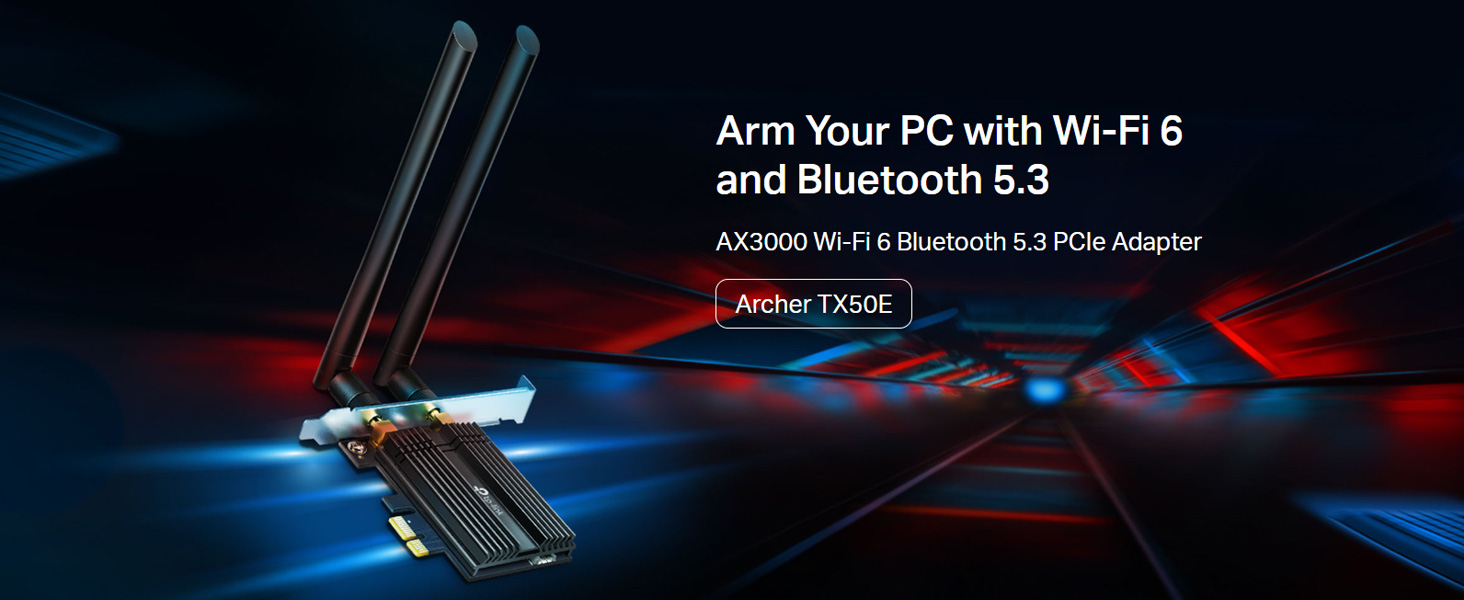
Image: Comparison of Wi-Fi 6 (2402 Mbps) and Wi-Fi 5 (867 Mbps) speeds, illustrating the performance benefits for VR.

Image: Diagram explaining how MU-MIMO and OFDMA reduce latency and improve network efficiency for multiple devices.
4.2 Sử dụng Bluetooth
With the Bluetooth driver installed and the USB cable connected, you can pair Bluetooth devices.
- Đảm bảo thiết bị Bluetooth của bạn đang ở chế độ ghép nối.
- Trên máy tính của bạn, hãy đi tới Cài đặt > Thiết bị > Bluetooth và các thiết bị khác.
- Bật Bluetooth và nhấp vào 'Thêm Bluetooth hoặc thiết bị khác'.
- Chọn 'Bluetooth' và chọn thiết bị của bạn từ danh sách để ghép nối.
The adapter features Bluetooth 5.2, offering faster speeds and broader coverage compared to previous Bluetooth versions, ensuring reliable connections for your peripherals.

Image: The Bluetooth 5.2 adapter connecting to various devices such as headphones, game controllers, mouse, and keyboard.
KHAI THÁC. Xử lý sự cố
If you encounter issues with your Archer TX50E adapter, refer to the following common solutions:
- Không có Wi-Fi hoặc Bluetooth: Ensure the adapter is correctly seated in the PCIe slot and the Bluetooth USB cable is securely connected to both the adapter and the motherboard's F_USB header. Verify that drivers are installed correctly in Device Manager.
- Tốc độ Wi-Fi chậm: Check antenna connections and orientation. Ensure your router supports Wi-Fi 6 and is configured for optimal performance. Update drivers to the latest version from the TP-Link webđịa điểm.
- Thiết bị Bluetooth không ghép nối: Make sure the Bluetooth device is in pairing mode and within range. Confirm the Bluetooth driver is installed and enabled in Device Manager.
- Kết nối không liên tục: This could be due to interference. Try repositioning your computer or antennas. Ensure your operating system is up to date.
- Sự cố cài đặt trình điều khiển: If the CD does not work, download drivers directly from the TP-Link support website. Ensure you are installing the correct 64-bit drivers for Windows 10 or Windows 11.
6. Thông số kỹ thuật
Detailed technical specifications for the TP-Link Archer TX50E:
| Tính năng | Sự miêu tả |
|---|---|
| Số hiệu mẫu | Cung thủ TX50E |
| chuẩn không dây | IEEE 802.11ax/ac/n/a (5 GHz), IEEE 802.11ax/n/g/b (2.4 GHz) |
| Phiên bản Bluetooth | Bluetooth 5.2/5.0/4.2/4.0 |
| Tốc độ truyền dữ liệu | Lên đến 3000 Mbps (2402 Mbps trên 5 GHz, 574 Mbps trên 2.4 GHz) |
| Giao diện | PCIe X1 |
| Ăng-ten | Hai ăng-ten băng tần kép độ lợi cao |
| Hỗ trợ hệ điều hành | Windows 11/10 (64-bit) only |
| Bảo vệ | WPA3, WPA2, WPA, WEP |
| Kích thước (D x R x C) | 15 x 20 x 3.9 cm (Sản phẩm) |
| Trọng lượng sản phẩm | 200 gam |
| Tính năng đặc biệt | Heat Sink, MU-MIMO, OFDMA, Ultra-Low Latency |

Hình ảnh: Cận cảnh view of the Archer TX50E's specialized heatsink and gold-plated connectors, designed for stability and reliability.
7. Bảo hành và Hỗ trợ
Để biết thông tin về bảo hành, hỗ trợ kỹ thuật và đăng ký sản phẩm, vui lòng truy cập trang web chính thức của TP-Link. webtrang web hoặc liên hệ với dịch vụ khách hàng của họ.
- Chính thức Webđịa điểm: www.tp-link.com
- TP-Link India Support: Toll Free 1800-209-4168, support.in@tp-link.com
Vui lòng giữ lại biên lai mua hàng để yêu cầu bảo hành.