1. Giới thiệu
The IK Multimedia AXE I/O SOLO is a premium 2-in/3-out USB audio interface designed for guitarists and musicians. It offers high-resolution 24-bit, 96 kHz audio conversion, advanced guitar tone shaping features, and comes bundled with powerful software like AmpliTube 5 SE and TONEX SE. This manual provides detailed instructions for setting up, operating, and maintaining your AXE I/O SOLO.

Hình 1.1: Góc phía trước view of the IK Multimedia AXE I/O SOLO USB Audio Interface.
2. Có gì trong hộp
Upon unpacking your AXE I/O SOLO, please ensure all the following items are present:
- AXE I/O SOLO Audio Interface
- Cáp USB-A đến USB-B
- Registration Card with Software Download Instructions
If any items are missing or damaged, please contact IK Multimedia support immediately.
3. Thiết lập
3.1. Cài đặt trình điều khiển
- Đăng ký sản phẩm của bạn: Visit the IK Multimedia website and register your AXE I/O SOLO using the provided serial number. This will grant access to software downloads and updates.
- Tải xuống trình điều khiển: From your IK Multimedia user area, download the latest drivers for your operating system (Windows or macOS).
- Cài đặt trình điều khiển: Follow the on-screen instructions to install the drivers. It is recommended to restart your computer after installation.
3.2. Kết nối phần cứng
Connect your AXE I/O SOLO to your computer and other audio equipment as follows:
- Kết nối USB: Connect the supplied USB cable from the AXE I/O SOLO's USB 2.0 port to an available USB port on your computer. The device is USB bus-powered.
- Instrument Input (Input 1): Connect your guitar or bass to the 1/4" TS input on the front panel.
- Microphone/Line Input (Input 2): Connect a microphone (XLR) or a line-level instrument (1/4" TRS) to the combo jack on the rear panel. Ensure 48V phantom power is enabled for condenser microphones.
- Line Outputs (1/L, 2/R): Connect your studio monitors or an external mixer to the 1/4" TRS Line Out jacks on the rear panel.
- Amp Đầu ra: Connect the 1/4" TS Amp Out jack on the front panel to your guitar amplifier's input for re-amping or direct monitoring through an amp.
- Tai nghe: Connect your headphones to the 1/4" TRS Headphone jack on the front panel.
- Vào/ra MIDI: Connect MIDI devices to the 5-pin DIN MIDI In and Out ports on the rear panel.
- Kiểm soát bên ngoài: Connect expression pedals or footswitches to the 1/4" TS Switch/Pedal 1 and 2 inputs on the rear panel for hands-free control of software parameters.
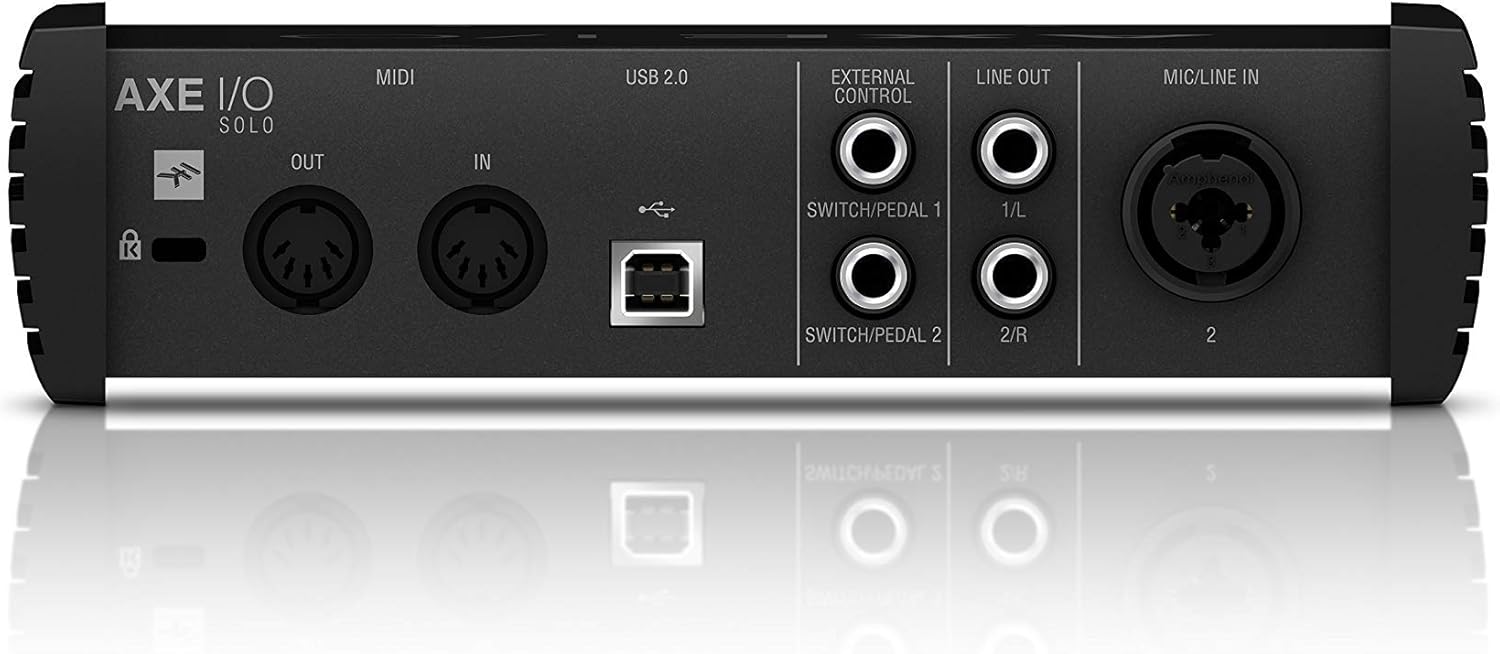
Figure 3.1: Rear panel showing USB, MIDI, External Control, Line Out, and Mic/Line In connections.
4. Hướng dẫn vận hành
4.1. Điều khiển bảng mặt trước

Figure 4.1: Front panel controls including Gain, Z-Tone, Monitor, Headphones, and Master knobs, along with input switches.
- GAIN (Input 1 & 2): Adjusts the input level for connected instruments or microphones. The LED meters indicate signal strength and clipping.
- Z-TONE (Input 1): This unique feature allows you to vary the impedance of the instrument input.
- NHỌN: Higher impedance for a tighter, sharper sound.
- BOLD: Lower impedance for a thicker, bolder sound.
- PASSIVE/ACTIVE Switch (Input 1): Selects the appropriate input impedance for passive or active guitar pickups.
- PURE/JFET Switch (Input 1): Switches between a transparent PURE preamp and a Class A JFET input for a warmer, tube-like tone.
- 48V Button (Input 2): Activates +48V phantom power for condenser microphones. The LED illuminates when active.
- Núm điều khiển MÀN HÌNH: Blends between the direct input signal (DIRECT) and the playback signal from your computer (DAW) for zero-latency monitoring.
- HEADPHONES Knob: Controls the output volume for the headphone jack.
- Núm CHỦ: Controls the overall output volume for the Line Outputs.
5. Tích hợp phần mềm
The AXE I/O SOLO includes a powerful software bundle to enhance your recording and tone-shaping experience.
5.1. AmpliTube 5 SE
AmpliTube 5 SE provides a comprehensive suite of virtual guitar and bass amplifiers, cabinets, stompboxes, and rack effects. It allows you to create detailed signal chains and achieve a wide range of tones.

Figure 5.1: AXE I/O SOLO in use with a guitar and a laptop running AmpliTube 5 SE.

Hình 5.2: Các AmpliTube 5 SE software interface, showing various virtual ampchất bổ sung và hiệu ứng.
5.2. TONEX SE
TONEX SE utilizes AI Machine Modeling technology to capture the sound of any amp, cabinet, or pedal and turn it into a Tone Model. You can play, practice, and record with thousands of Tone Models available.

Figure 5.3: The TONEX SE software interface, displaying various Tone Models and their settings.
5.3. Software Activation
After installing the drivers, follow the instructions provided with your registration card to download and activate AmpliTube 5 SE and TONEX SE from your IK Multimedia user account. Ensure your AXE I/O SOLO is connected during the activation process.
6. Bảo trì
- Vệ sinh: Hãy dùng khăn mềm, khô để lau sạch bên ngoài thiết bị. Tránh sử dụng chất tẩy rửa có tính ăn mòn hoặc dung môi.
- Kho: Store the AXE I/O SOLO in a cool, dry place away from direct sunlight and extreme temperatures when not in use.
- Chăm sóc cáp: Luôn cầm cáp ở phần đầu nối, không phải phần dây dẫn, để tránh làm hỏng.
KHAI THÁC. Xử lý sự cố
If you encounter issues with your AXE I/O SOLO, consider the following common solutions:
- Không có âm thanh:
- Check all cable connections (USB, instrument, monitors, headphones).
- Ensure the AXE I/O SOLO is selected as the input/output device in your computer's sound settings and your DAW.
- Adjust GAIN, MONITOR, HEADPHONES, and MASTER knobs.
- Verify that the correct input mode (PASSIVE/ACTIVE, PURE/JFET) is selected for your instrument.
- Sự cố trình điều khiển:
- Reinstall the latest drivers from the IK Multimedia webđịa điểm.
- Thử kết nối với một cổng USB khác trên máy tính của bạn.
- Đảm bảo hệ điều hành của bạn được cập nhật.
- Phần mềm không nhận diện được thiết bị:
- Ensure the AXE I/O SOLO drivers are correctly installed and the device is connected.
- Check your DAW's audio preferences to ensure the AXE I/O SOLO is selected as the audio device.
- Verify software activation status.
- Âm thanh bị méo:
- Reduce the input GAIN to prevent clipping (check the CLIP LEDs).
- Ensure the correct input mode (PASSIVE/ACTIVE) is selected for your instrument.
For further assistance, refer to the official IK Multimedia support resources.
8. Thông số kỹ thuật
| Tính năng | Chi tiết |
|---|---|
| Trọng lượng sản phẩm | 2.2 pound (1000 gram) |
| Kích thước sản phẩm | 7.68 x 7.68 x 2.09 inch |
| Số hiệu mẫu sản phẩm | IP-INT-AXEIOSOLO-IN |
| Thiết bị tương thích | Máy tính cá nhân |
| Giao diện phần cứng | USB |
| Hệ điều hành | Mac (cũng tương thích với Windows) |
| Thương hiệu | IK Đa Phương Tiện |
| Công nghệ kết nối | USB |
| Số lượng kênh | 2 |
| Ngày đầu tiên có sẵn | Ngày 12 tháng 2020 năm XNUMX |
9. Bảo hành & Hỗ trợ
9.1. Thông tin bảo hành
The IK Multimedia AXE I/O SOLO is covered by a manufacturer's warranty. Please refer to the warranty card included with your product or visit the official IK Multimedia webtrang web để biết các điều khoản và điều kiện chi tiết về phạm vi bảo hành và thời hạn bảo hành.
9.2. Hỗ trợ khách hàng
For technical support, product registration, software downloads, or any other inquiries, please visit the official IK Multimedia support page:
Bạn cũng có thể tìm thấy hướng dẫn sử dụng đầy đủ ở định dạng PDF tại đây: AXE I/O SOLO User Manual (PDF)


