1. Giới thiệu
This manual provides detailed instructions for the installation, configuration, and operation of your Lorex 2K Dual Lens Indoor Wi-Fi Security Camera, model W463AQD-E. Please read this manual thoroughly before using the product to ensure proper functionality and safety. Keep this manual for future reference.

Image 1.1: Lorex 2K Dual Lens Indoor Wi-Fi Security Camera with its retail packaging.
2. Nội dung gói hàng
Verify that all items listed below are included in your package. If any items are missing or damaged, please contact Lorex customer support.
- 1 × 2K Dual-Lens Indoor Pan-Tilt Camera
- 1 × 32GB MicroSD Card (pre-installed)
- 1 × 6.5 ft (2 m) Power Cable
- 1 × Giá đỡ
- 3 × Neo & Ốc Vít
- 1 × Bộ đổi nguồn
3. Sản phẩm hếtview
Familiarize yourself with the components and features of your Lorex security camera.
3.1 Các thành phần của máy ảnh

Hình ảnh 3.1: Mặt trước view of the camera, showing the dual lenses and call button.

Hình ảnh 3.2: Bên view of the camera, highlighting its dome shape.

Hình ảnh 3.3: Trở lại view of the camera, showing the power input and reset button.

Image 3.4: Bottom label displaying model number W463AQD-E and other regulatory information.
3.2 Các tính năng chính
- Video HD 2K: Quay video rõ ràng và chi tiết footage.
- Thiết kế ống kính kép: Cung cấp khả năng giám sát nâng cao.
- 360° Pan-Tilt: Remotely adjust the camera's viewing angle to cover a full 360-degree area.
- Tự động theo dõi: Tự động theo dõi chuyển động được phát hiện trong phạm vi hoạt động của nó. view.
- Smart Person & Pet Detection: Differentiates between human and pet activity to reduce false alerts.
- Tầm nhìn ban đêm IR: Provides clear video in low-light conditions up to 33 feet.
- Nói chuyện hai chiều: Cho phép giao tiếp thời gian thực thông qua micro và loa tích hợp của camera.
- Quick Call Button: Enables visitors to initiate a call to your connected device.
- Lưu trữ linh hoạt: Supports local storage via an included 32GB MicroSD card and optional cloud storage or Lorex Fusion recorders.
- Chế độ riêng tư: Physically hides the camera lens for enhanced privacy when needed.
- Kết nối Wi-Fi: Connects to your home network wirelessly (2.4GHz).
4. Thiết lập
4.1 Thiết lập ban đầu và kết nối ứng dụng
- Bật nguồn: Kết nối bộ chuyển đổi nguồn với máy ảnh và cắm vào ổ cắm điện. Máy ảnh sẽ bật nguồn và bắt đầu quá trình khởi động.
- Download Lorex Home App: Download the Lorex Home app from the App Store (iOS) or Google Play Store (Android) on your smartphone or tablet.
- Tạo tài khoản: Mở ứng dụng Lorex Home và làm theo hướng dẫn trên màn hình để tạo tài khoản mới hoặc đăng nhập vào tài khoản hiện có.
- Thêm thiết bị: Tap the '+' icon in the app to add a new device. Scan the QR code located on the bottom of your camera or on its packaging.
- Kết nối với Wi-Fi: Follow the app's prompts to connect the camera to your 2.4GHz Wi-Fi network. Ensure your mobile device is connected to the same Wi-Fi network during setup.
- Hoàn tất thiết lập: Once connected, follow the remaining steps in the app to name your camera and finalize the setup process.

Image 4.1: The Lorex Home application interface for managing camera feeds.
4.2 Gắn máy ảnh
The camera can be placed on a flat surface or mounted to a ceiling or wall using the included mounting bracket.
- Chọn Vị trí: Select a suitable indoor location with a clear view and within range of your Wi-Fi network.
- Đánh dấu các lỗ: Place the mounting bracket at the desired location and mark the screw holes with a pencil.
- Lỗ khoan: Drill pilot holes at the marked spots. If mounting on drywall, insert the included anchors.
- Giá đỡ an toàn: Align the mounting bracket with the holes and secure it using the provided screws.
- Gắn Camera: Twist the camera onto the mounting bracket until it clicks securely into place.
5. Hoạt động
5.1 Trực tiếp View và Kiểm soát
Truy cập trực tiếp view of your camera through the Lorex Home app. From the live view screen, you can control various camera functions.
- Xoay và nghiêng: Use the directional controls in the app to remotely adjust the camera's horizontal (pan) and vertical (tilt) angles.
- Thu phóng kỹ thuật số: Pinch to zoom in or out on the live video feed.
- Ống kính kép View: The app may offer options to switch between or combine views from the dual lenses.

Image 5.1: Camera shown with a smartphone displaying the dual lens live view trong ứng dụng Lorex Home.
5.2 Two-Way Talk and Call Button
The camera features two-way audio for communication and a physical call button.
- Nói chuyện hai chiều: Trong cuộc sống view, tap the microphone icon to speak through the camera's speaker. Tap again to end.
- Nút gọi: A person near the camera can press the physical call button on the camera to initiate a call to your connected mobile device.

Image 5.2: Demonstrating two-way talk functionality via the Lorex Home app.

Image 5.3: A user pressing the quick call button on the camera.
5.3 Phát hiện chuyển động và cảnh báo
The camera uses smart detection to identify important events.
- Phát hiện thông minh: The camera can detect and differentiate between people and pets, sending specific alerts to your phone.
- Tự động theo dõi: When motion is detected, the camera can automatically pan and tilt to follow the subject.
- Tùy chỉnh: Adjust motion detection zones and sensitivity settings within the Lorex Home app to minimize unwanted alerts.

Image 5.4: Auto-tracking feature following a baby's movement.

Hình ảnh 5.5: Một hình ảnh khác view of the auto-tracking feature in action.

Image 5.6: Smart motion detection alerting to a person's presence.

Image 5.7: Pet detection and auto-tracking following a dog.
5.4 Night Vision and Smart Lighting
The camera provides clear surveillance even in low-light conditions.
- Tầm nhìn ban đêm IR: Infrared LEDs provide black and white video up to 33 feet in complete darkness.
- Hệ thống chiếu sáng an ninh thông minh: The camera features integrated lighting that can be configured to activate upon motion detection or on a schedule.

Image 5.8: Comparison of daytime and IR night vision footage of a sleeping baby.

Image 5.9: Clear night vision image of a baby sleeping.

Image 5.10: The camera's smart security lighting feature in action.
5.5 Ghi và Lưu trữ
Your camera offers multiple options for storing recorded video footage.
- Lưu trữ cục bộ: A 32GB MicroSD card is pre-installed for local recording. This ensures your footage is stored directly on the device.
- Lưu trữ đám mây: Optional cloud storage plans are available for off-site backup of your recordings. Refer to the Lorex Home app for details.
- Lorex Fusion Recorders: The camera is compatible with Lorex Fusion recorders for integrated system storage.

Image 5.11: The included 32GB MicroSD card for private and secure local storage.
5.6 Chế độ riêng tư
Activate Privacy Mode to physically conceal the camera lens when surveillance is not desired.
- Kích hoạt: Privacy Mode can be activated through the Lorex Home app. When active, the camera lens will rotate downwards, blocking its view.
- Chấm dứt hoạt: Deactivate Privacy Mode via the app to resume normal operation.
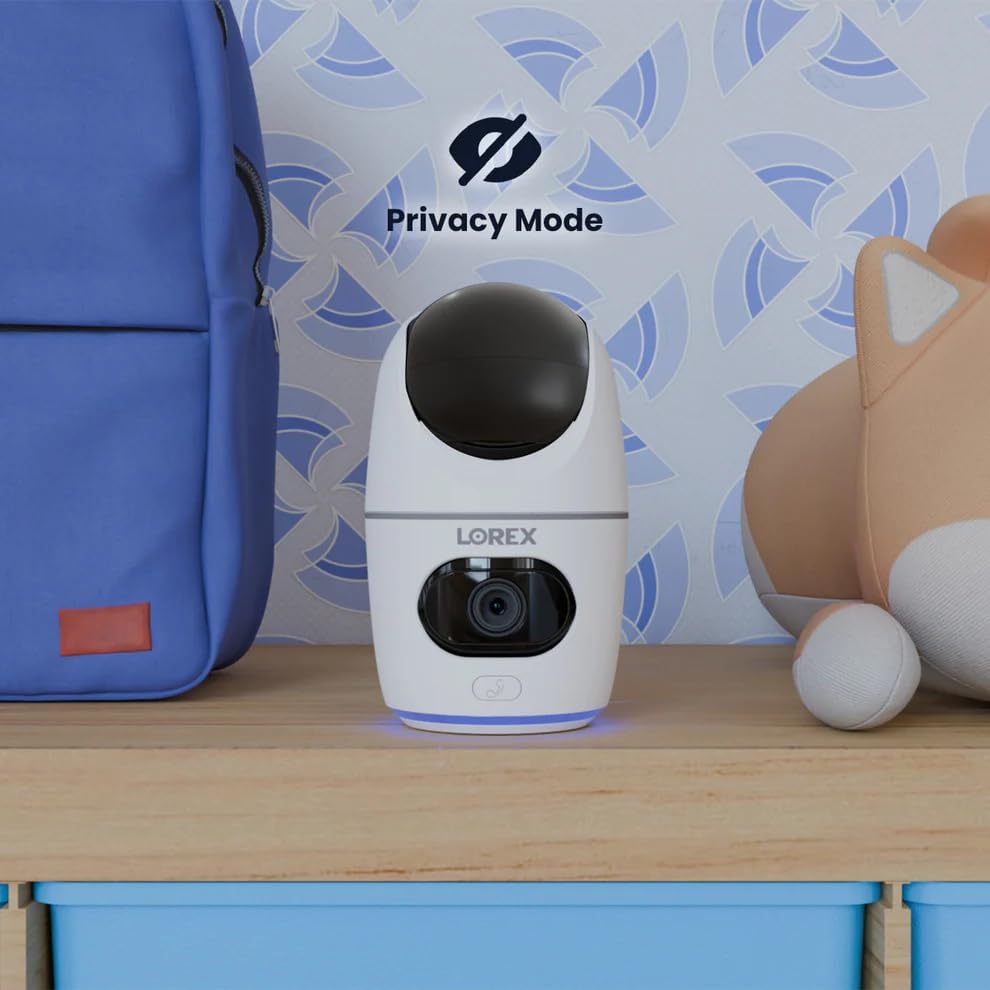
Image 5.12: The camera in Privacy Mode, with the lens retracted.
6. Bảo trì
- Vệ sinh: Dùng vải mềm, khô để lau ống kính và thân máy ảnh. Tránh sử dụng chất tẩy rửa có tính mài mòn hoặc dung môi.
- Cập nhật chương trình cơ sở: Regularly check the Lorex Home app for available firmware updates to ensure optimal performance and security.
- Thẻ MicroSD: Periodically check the status of the MicroSD card in the app. If the card is full and continuous recording is enabled, older footage will be overwritten. Back up important footage khi cần thiết.
- Nguồn điện: Ensure the camera is connected to a stable power source. Avoid using third-party power adapters that are not specified for this device.
KHAI THÁC. Xử lý sự cố
| Vấn đề | Giải pháp |
|---|---|
| Camera đang ngoại tuyến hoặc bị ngắt kết nối. |
|
| Không thể kết nối với Wi-Fi. |
|
| No video or poor video quality. |
|
| Thông báo chuyển động xuất hiện quá thường xuyên hoặc không được nhận. |
|
8. Thông số kỹ thuật
| Tính năng | Chi tiết |
|---|---|
| Số hiệu mẫu | W463AQD-E |
| Độ phân giải video | 2K (1440p) |
| Độ phân giải tĩnh hiệu quả | 4MP |
| Viewgóc ing | 360 Degrees (Pan-Tilt), 135 Degrees (Field of View) |
| Tầm nhìn ban đêm | 33 Feet (IR Night Vision) |
| Kết nối | Wi-Fi (2.4 GHz) |
| Kho | 32GB MicroSD Card (included), supports up to 256GB, Cloud Storage (optional), Lorex Fusion compatible |
| Âm thanh | Đàm thoại hai chiều (Mic và loa tích hợp) |
| Phát hiện | Smart Person & Pet Detection, Auto-Tracking |
| Nguồn điện | Corded Electric (5V=2A) |
| Kích thước (D x R x C) | 5 x 6 x 5 inch |
| Trọng lượng sản phẩm | 15.2 ounce |
| Sử dụng trong nhà/ngoài trời | Chỉ trong nhà |
| Các thành phần bao gồm | Camera, 32GB MicroSD Card, Power Cable, Mounting Bracket, Power Adapter |
9. Bảo hành và Hỗ trợ
For warranty information, technical support, or additional resources, please visit the official Lorex webtrang web hoặc liên hệ với bộ phận dịch vụ khách hàng của họ.
- Truyền thuyết Webđịa điểm: www.lorex.com
- Hỗ trợ khách hàng: Tham khảo Lorex website for contact details and support hours.
Bạn nên đăng ký sản phẩm để nhận thông tin cập nhật và hỗ trợ.


