1. Giới thiệu
The TOTU HDMI Switch (Model TT-HS001B) is designed to connect up to four HDMI source devices to a single display, such as a TV or monitor. This device allows for seamless switching between multiple HDMI inputs, supporting high-resolution video and audio formats. It is ideal for users with multiple HDMI-enabled devices and limited HDMI ports on their display.
2. Nội dung gói hàng
Vui lòng xác minh rằng tất cả các mục được liệt kê dưới đây đều có trong gói hàng của bạn:
- 1 x TOTU HDMI Switch (Model TT-HS001B)
- 1 x Bộ điều khiển từ xa IR
- Bộ đổi nguồn 1 x 5V
- 1 x Hướng dẫn sử dụng (tài liệu này)

Image: The TOTU HDMI Switch package contents, showing the main switch unit, the remote control, the power adapter, and the user manual.
3. Sản phẩm hếtview
The TOTU HDMI Switch features a compact design with clearly labeled ports and controls for ease of use.

Image: The TOTU HDMI Switch unit, remote control, and power adapter. The switch unit displays its front panel with input indicators and control buttons, and its rear panel with HDMI input/output ports.
Các tính năng của bảng điều khiển phía trước:
- Nút công tắc điện: Used to manually cycle through the HDMI input sources.
- Input Indicators (1, 2, 3, 4): LED lights indicating the currently active HDMI input.
- Bộ thu tín hiệu điều khiển từ xa hồng ngoại: Receives signals from the included infrared remote control.
- Nút nguồn: Bật hoặc tắt thiết bị.
- Đèn báo nguồn: LED light indicating the power status of the device.
Các tính năng của bảng điều khiển phía sau:
- Cổng nguồn DC 5V: Connects to the provided 5V power adapter.
- Cổng xuất HDMI: Connects to your display (TV, monitor, projector).
- HDMI Input Ports (1, 2, 3, 4): Connects to your HDMI source devices (e.g., gaming consoles, Blu-ray players, streaming devices).
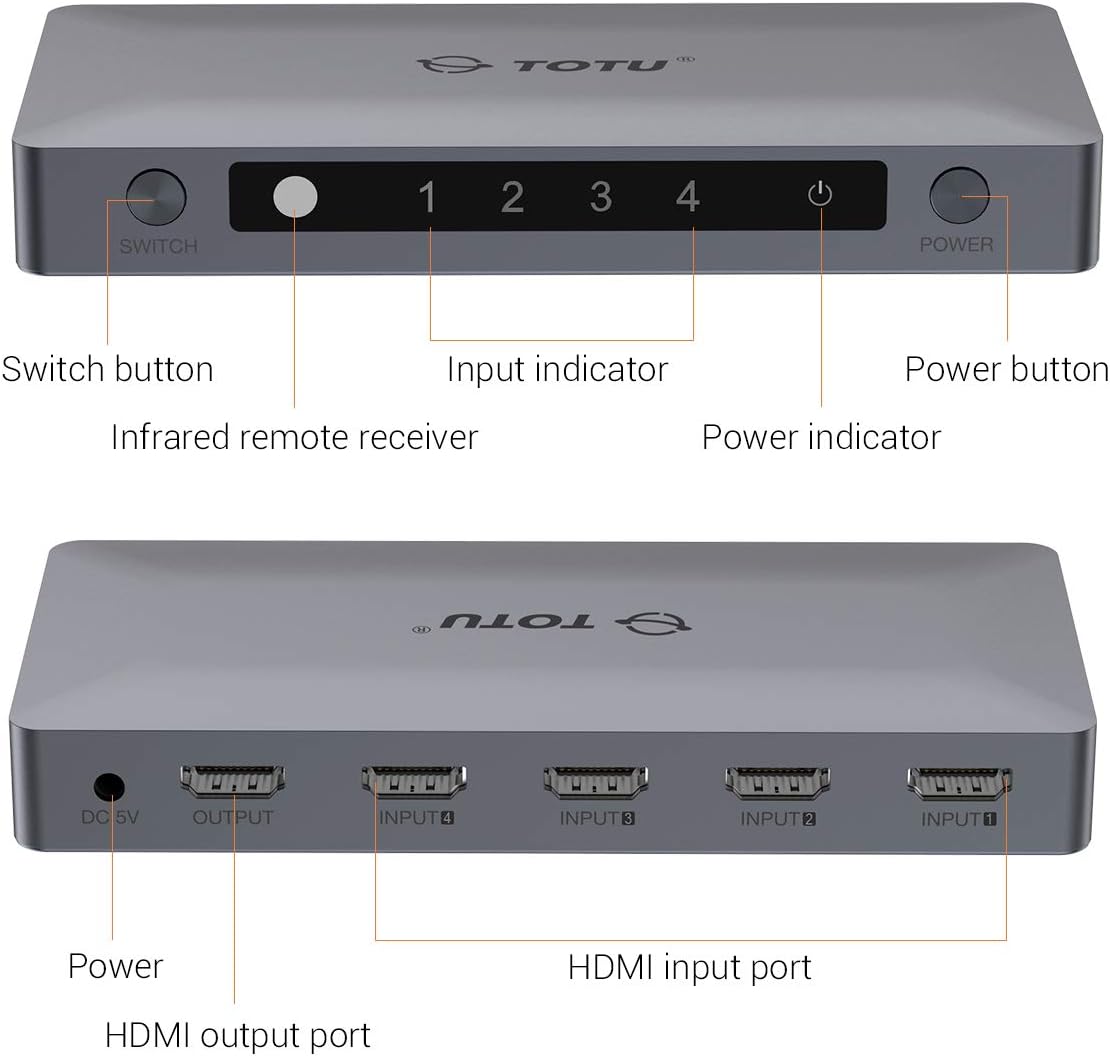
Image: A detailed diagram illustrating the front and rear panels of the TOTU HDMI Switch, with each button and port clearly labeled for identification.
4. Hướng dẫn thiết lập
Follow these steps to set up your TOTU HDMI Switch:
- Kết nối các thiết bị nguồn HDMI: Connect up to four HDMI source devices (e.g., PS4, Xbox, Blu-ray player, Apple TV) to the HDMI Input ports (INPUT 1-4) on the rear panel of the TOTU HDMI Switch using HDMI cables.
- Kết nối với màn hình: Connect one end of an HDMI cable to the HDMI Output port on the rear panel of the TOTU HDMI Switch and the other end to an HDMI input port on your display (TV, monitor).
- Kết nối nguồn: Plug the provided 5V power adapter into the DC 5V Power Port on the rear panel of the TOTU HDMI Switch, then plug the adapter into a power outlet. The power indicator LED on the front panel should illuminate.
- Bật nguồn thiết bị: Power on your display and all connected HDMI source devices.

Image: A visual guide demonstrating how to connect various HDMI source devices (Laptop/PC, Apple TV Box, PS4/PS3, DVD Player) to the input ports of the TOTU HDMI Switch, which then connects to a single display via its output port.

Image: A comparison illustrating the convenience of using the HDMI switch to manage multiple devices connected to a single TV, eliminating the need for frequent manual cable changes.
5. Hướng dẫn vận hành
The TOTU HDMI Switch offers multiple methods for switching between input sources:
Chuyển đổi thủ công:
Nhấn nút Nút chuyển đổi on the front panel of the device to cycle through the connected HDMI input sources (Input 1, Input 2, Input 3, Input 4). The corresponding input indicator LED will light up to show the active source.
Chuyển đổi điều khiển từ xa:
Use the included IR remote control to select your desired input source directly. Press the numbered buttons (1, 2, 3, 4) on the remote to switch to the corresponding HDMI input. The remote also includes 'V' and '^' buttons for cycling through inputs.

Image: A diagram illustrating the use of the IR remote control to switch between different displays or input sources connected to the HDMI switch, providing convenient control from a distance.
Chuyển đổi tự động:
The switch supports automatic switching to the current active port when only one input device is active. If multiple devices are active, you will need to switch manually using the button on the device or the remote control.
KHAI THÁC. Xử lý sự cố
If you encounter issues with your TOTU HDMI Switch, please refer to the following common solutions:
- Không có hình ảnh/tín hiệu:
- Hãy đảm bảo tất cả các cáp HDMI được kết nối chắc chắn với thiết bị nguồn, bộ chuyển mạch và màn hình.
- Verify that the power adapter is correctly connected and the power indicator LED on the switch is on.
- Try connecting the HDMI source device directly to the display to confirm the source device and cable are functioning correctly.
- Cycle through the input sources on the switch manually or with the remote to ensure the correct input is selected.
- Khởi động lại tất cả các thiết bị được kết nối (nguồn, bộ chuyển mạch, màn hình).
- Poor Picture Quality/Flickering:
- Ensure you are using high-quality HDMI 2.0 cables, especially for 4K 60Hz content.
- Check if the resolution and refresh rate settings on your source device are compatible with your display and the HDMI switch.
- Hãy thử dùng một loại cáp HDMI khác.
- Điều khiển từ xa không hoạt động:
- Ensure there are no obstructions between the remote control and the IR remote receiver on the switch.
- Kiểm tra và thay pin cho điều khiển từ xa nếu cần thiết.
- Hãy đảm bảo bạn đang ở trong phạm vi hoạt động hiệu quả của điều khiển từ xa.
7. Thông số kỹ thuật
| Tính năng | Đặc điểm kỹ thuật |
|---|---|
| Mô hình sản phẩm | TT-HS001B |
| Phiên bản HDMI | HDMI 2.0 (backward compatible with V1.4, V1.3, V1.2, V1.0) |
| Max Resolution | 4K@60Hz (3840 x 2160) |
| Độ sâu màu | Màu sâu lên đến 36-bit |
| Hỗ trợ HDCP | HDCP 2.2 Pass-Through |
| Hỗ trợ 3D | Đúng |
| HDMI Channel Bandwidth | Lên đến 18 Gbps |
| Cổng đầu vào | 4xHDMI |
| Cổng đầu ra | 1xHDMI |
| Phương pháp kiểm soát | Manual Button, IR Remote Control, Auto-Switching |
| Nguồn điện | Điện áp một chiều 5V |
| Kích thước sản phẩm | 5.91 x 2.76 x 0.79 inch |
| Trọng lượng sản phẩm | 4.6 ounce |
| Màu sắc | Bạc |

Image: A television screen displaying high-resolution 4K 60Hz content, connected to a laptop through the TOTU HDMI Switch, demonstrating its capability to support advanced video formats.

Image: A television screen showing 3D content, indicating the HDMI switch's compatibility with 3D viewing experiences. Note: All connected units must support 3D for this feature to function.
8. Bảo trì
To ensure optimal performance and longevity of your TOTU HDMI Switch, follow these maintenance guidelines:
- Keep the device in a cool, dry place away from direct sunlight, heat sources, and moisture.
- Tránh đặt vật nặng lên trên công tắc.
- Lau sạch thiết bị bằng vải mềm, khô. Không sử dụng chất tẩy rửa dạng lỏng hoặc bình xịt.
- Đảm bảo thông gió thích hợp xung quanh thiết bị để tránh quá nóng.
9. Bảo hành và Hỗ trợ
TOTU provides efficient customer service. If you have any questions or require assistance with your product, please contact us. We aim to provide the fastest and most efficient service within 24 hours.
For support, please refer to the contact information provided with your product or visit the official TOTU webđịa điểm.


