Hướng dẫn an toàn quan trọng
Please read this manual carefully before operating the fan and retain it for future reference. Failure to follow these instructions may result in electric shock, fire, or serious injury.
- Đảm bảo nguồn điện voltage phù hợp với nhãn đánh giá trên quạt.
- Không được nhúng quạt, phích cắm hoặc dây điện vào nước hoặc các chất lỏng khác.
- Hãy rút phích cắm quạt ra khỏi ổ điện khi không sử dụng, khi di chuyển quạt từ vị trí này sang vị trí khác và trước khi vệ sinh.
- Để quạt xa tầm tay trẻ em và vật nuôi.
- Không vận hành quạt bằng dây hoặc phích cắm bị hỏng.
- Không được đưa ngón tay hoặc vật khác vào lưới tản nhiệt khi quạt đang hoạt động.
- Đặt quạt trên bề mặt phẳng, chắc chắn để tránh bị đổ.
Thành phần sản phẩm
Familiarize yourself with the parts of your Midea FS40-15AR Pedestal Fan.

Hình ảnh: The Midea FS40-15AR Pedestal Fan, showing its main body, fan head, base, and the included remote control.
- Đầu quạt: Includes front and rear grilles, fan blades, and motor housing.
- Bảng điều khiển: Located on the fan body, with LED display and control buttons.
- Chân đế có thể điều chỉnh: Cho phép điều chỉnh độ cao.
- Căn cứ: Giúp quạt hoạt động ổn định.
- Điều khiển từ xa: Để thuận tiện thao tác từ xa.
Thiết lập và lắp ráp
Follow these steps to assemble your Midea FS40-15AR Pedestal Fan.
- Lắp ráp cơ sở: Attach the fan stand to the base. Ensure it is securely fastened.
- Điều chỉnh chiều cao: The fan features an adjustable stand. Loosen the height adjustment knob, extend or retract the stand to the desired height, and then tighten the knob securely.

Hình ảnh: Illustration of the fan's adjustable height mechanism, showing arrows indicating upward and downward movement.
- Hội đầu quạt: Secure the rear grille, fan blades, and front grille to the motor housing according to the diagrams in the full manual (not provided here). Ensure all components are correctly aligned and locked into place.
- Vị trí: Place the assembled fan on a firm, level surface. Ensure there is adequate space around the fan for optimal airflow and oscillation.
- Kết nối nguồn điện: Cắm dây nguồn vào ổ cắm điện phù hợp (220-240V).
Hướng dẫn sử dụng
Your Midea FS40-15AR fan can be operated using the control panel on the unit or the included remote control.
Bảng điều khiển


Hình ảnh: Icons illustrating key features: 3 modes, 26 speeds, and a low noise level of 30 dB.
- Nút nguồn: Nhấn để BẬT hoặc TẮT quạt.
- Điều chỉnh tốc độ: Use the speed control buttons to select from 26 available speed settings. The current speed will be displayed on the LED screen.
- Nút chế độ: Cycle through the available modes:
- Chế độ bình thường: Provides continuous airflow at the selected speed.
- Chế độ tự nhiên: Mô phỏng gió tự nhiên bằng cách thay đổi tốc độ quạt.
- Chế độ ngủ: Operates at a very low speed and noise level (as low as 27 dB) for quiet operation, ideal for sleeping.
- Chế độ tiết kiệm: Adjusts fan speed automatically based on room temperature to optimize energy consumption.
- Nút dao động: Press to activate or deactivate the 80-degree oscillation function, which distributes air across a wider area.
- Nút hẹn giờ: Set the fan to automatically turn off after a specified period, up to 12 hours. Each press typically increases the timer by 1 hour.
Điều khiển từ xa
The remote control allows for convenient operation of all fan functions from a distance.

Hình ảnh: The remote control for the Midea FS40-15AR fan, highlighting the power button and the 12-hour timer function.

Hình ảnh: A hand holding the remote control, pointing towards the Midea FS40-15AR fan, demonstrating wireless operation.
- Insert batteries into the remote control (type and orientation usually indicated inside the battery compartment).
- Point the remote control towards the fan's receiver for optimal response.
- Tất cả các chức năng có sẵn trên bảng điều khiển đều có thể truy cập được thông qua điều khiển từ xa.
BẢO TRÌ
Việc vệ sinh và bảo dưỡng thường xuyên sẽ đảm bảo hiệu suất tối ưu và tuổi thọ của quạt.
- Vệ sinh bên ngoài:
- Luôn rút phích cắm của quạt trước khi vệ sinh.
- Lau các bề mặt bên ngoài bằng giẻ mềm, damp vải. Không sử dụng chất tẩy rửa có tính mài mòn hoặc dung môi.
- Đảm bảo không có nước lọt vào vỏ động cơ hoặc các bộ phận điện.
- Vệ sinh lưới tản nhiệt và lưỡi dao:
- Periodically remove the front grille (refer to assembly instructions for removal) to clean dust from the fan blades.
- Use a soft cloth or a vacuum cleaner with a brush attachment to remove dust.
- Hãy đảm bảo tất cả các bộ phận đều khô hoàn toàn trước khi lắp ráp lại và vận hành quạt.
- Kho:
- Nếu cất giữ quạt trong thời gian dài, hãy vệ sinh kỹ lưỡng.
- Store it in its original packaging or cover it to protect it from dust.
- Bảo quản ở nơi khô ráo, thoáng mát.
Xử lý sự cố
If you encounter any issues with your Midea FS40-15AR fan, refer to the following common problems and solutions.
| Vấn đề | Nguyên nhân có thể | Giải pháp |
|---|---|---|
| Quạt không quay. | Không có nguồn điện. Dây nguồn không được cắm đúng cách. | Kiểm tra xem ổ cắm điện có hoạt động không. Ensure the power cord is securely plugged into the outlet and the fan. |
| Luồng khí yếu. | Tốc độ quạt được đặt quá thấp. Grilles or blades are dusty. | Tăng tốc độ quạt. Rút phích cắm của quạt và vệ sinh lưới tản nhiệt và cánh quạt theo hướng dẫn bảo trì. |
| Quạt phát ra tiếng ồn bất thường. | Các bộ phận rời. Obstruction in the fan blades. | Unplug the fan and check for any loose components or foreign objects. Ensure the fan is on a stable surface. |
| Điều khiển từ xa không hoạt động. | Pin chết. Có vật cản giữa điều khiển từ xa và quạt. | Thay pin cho điều khiển từ xa. Hãy đảm bảo có đường truyền tín hiệu thông suốt giữa điều khiển từ xa và bộ thu tín hiệu của quạt. |
| Dao động không hoạt động. | Chức năng dao động đã tắt. Vật cản cơ học. | Press the oscillation button to activate it. Check for any obstructions preventing the fan head from rotating. |
Nếu sự cố vẫn tiếp diễn sau khi đã thử các giải pháp này, vui lòng liên hệ với bộ phận hỗ trợ khách hàng.
Thông số kỹ thuật
Technical details for the Midea FS40-15AR DC Pedestal Fan.
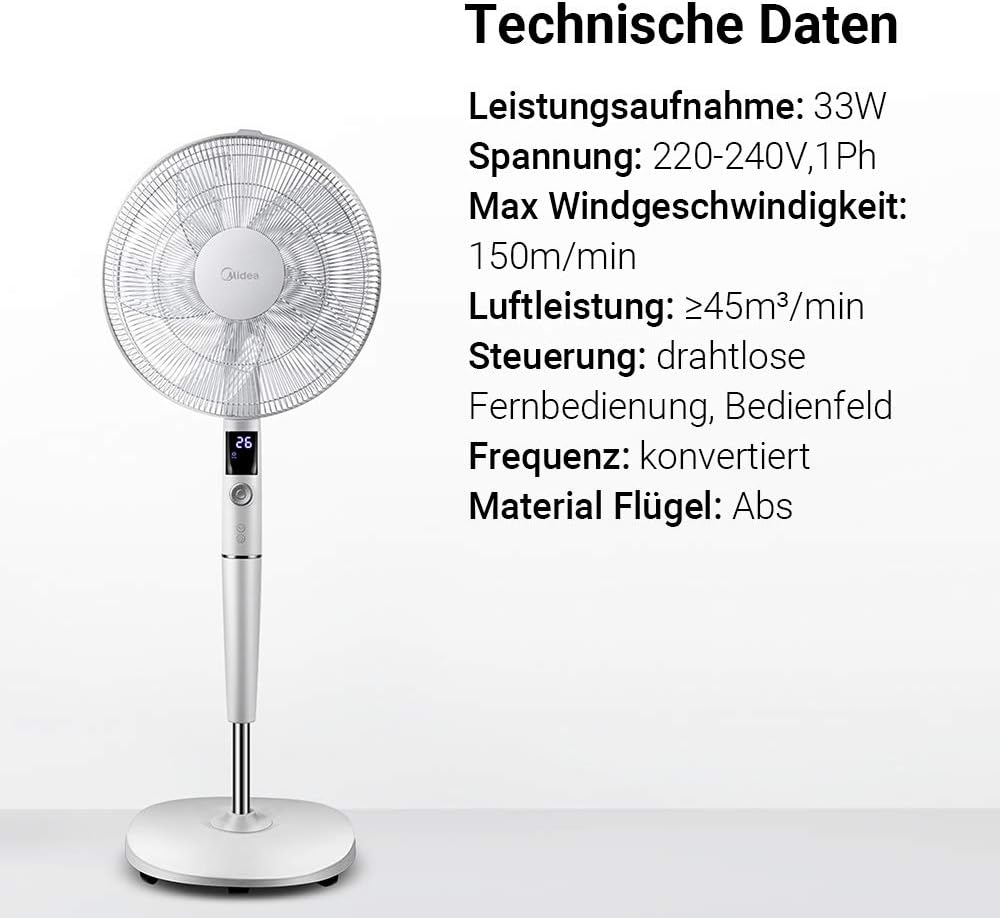
Hình ảnh: A visual representation of the Midea FS40-15AR fan alongside its technical data, including power consumption, voltage, and control methods.
| Tính năng | Chi tiết |
|---|---|
| Số hiệu mẫu | FS40-15AR |
| Thương hiệu | Midea |
| Kiểu | Quạt đặt chân DC |
| Tiêu thụ điện năng | 30 Watt |
| Tậptage | 220-240V |
| Tốc độ gió tối đa | 150 m/phút |
| Luồng không khí | ≥45 m³/min |
| Số lượng tốc độ | 26 |
| Mức độ tiếng ồn | 27 Decibels (min) |
| Góc dao động | 80 độ |
| Chức năng hẹn giờ | Lên đến 12 giờ |
| Phương pháp kiểm soát | Wireless Remote Control, On-unit Control Panel |
| Vật liệu (Lưỡi dao) | Nhựa ABS |
| Kích thước sản phẩm (D x R x C) | 45.3 x 40 x 137cm |
| Cân nặng | 7.8kg |
| Tính năng đặc biệt | Adjustable Height, Tiltable Head, ECO Mode, Sleep Mode |
Bảo hành và Hỗ trợ
Để biết thông tin bảo hành và hỗ trợ khách hàng, vui lòng tham khảo thẻ bảo hành đi kèm sản phẩm hoặc truy cập trang web chính thức của Midea. webtrang web. Giữ lại biên lai mua hàng làm bằng chứng mua hàng.
For technical assistance or service inquiries, please contact Midea customer service through their official channels.
- Hỗ trợ trực tuyến: www.midea.com/global/support
- Thông tin liên lạc: Refer to your regional Midea webTrang web này cung cấp thông tin liên hệ địa phương.