Giới thiệu
The Jasco 45852 Smart Dimmer is a Zigbee-certified plug-in device designed for wireless control of your home's plug-in lights. It allows for remote dimming and on/off functionality, integrating with various Zigbee-compatible gateways and smart home systems. This manual provides instructions for setup, operation, and maintenance of your smart dimmer.
Tính năng sản phẩm
- Khả năng tương thích với Zigbee: Works with Zigbee-certified gateways, including Amazon Echo Plus, Echo Show (2nd gen), SmartThings, Wink, PEQ, and Logitech Harmony Home Hub Extender.
- Dual Outlet Design: Features one Zigbee-controlled, polarized outlet for dimming and one always-on, grounded outlet.
- Hoạt động từ xa: Control ON/OFF and brightness functions of indoor plug-in dimmable LED, CFL, incandescent, and halogen lighting from mobile devices.
- Giám sát năng lượng: Provides energy reporting to help reduce electrical costs.
- Thiết kế tiết kiệm không gian: Side-access outlets and compact construction allow for discreet placement without blocking the second outlet of a duplex receptacle.
- Kiểm soát thủ công: Includes a manual On/Off and program button on the device.
- Phạm vi không dây: Up to 150ft from the controller or closest Zigbee device.

Hình ảnh: The Jasco 45852 Smart Dimmer showing its polarized wirelessly controlled outlet, grounded always-on outlet, and the manual On/Off & Program button. Its design ensures the second wall outlet remains free for use.
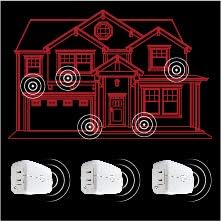
Hình ảnh: A diagram illustrating how multiple Jasco Smart Dimmers can extend the Zigbee wireless range throughout a home, creating a mesh network for reliable control.
Thiết lập và cài đặt
- Vị trí: Plug the Jasco 45852 Smart Dimmer into a standard 120V AC wall outlet. Ensure it is placed within range of your Zigbee gateway or another Zigbee device to ensure proper network connectivity. The compact design allows it to fit behind furniture and leave the second outlet free.
- Kết nối thiết bị: Plug the dimmable light fixture you wish to control into the polarized smart outlet of the dimmer. The other grounded outlet provides continuous power and is not dimmable.
- Pairing with a Zigbee Gateway:
- Follow the instructions provided by your specific Zigbee gateway (e.g., Amazon Echo Plus, SmartThings, Wink) to add a new device.
- Typically, this involves putting your gateway into "discovery" or "pairing" mode.
- Once your gateway is in pairing mode, press the manual On/Off & Program button on the Jasco Smart Dimmer. The LED indicator on the dimmer will flash to indicate pairing mode and then turn solid when successfully paired.
- Ghi chú: When pairing with SmartThings, it may be recognized as a "GE" device.
- Kiểm tra: After successful pairing, test the dimmer by using your gateway's app or voice commands (if applicable) to turn the connected light on/off and adjust its brightness.
The Jasco 45852 Smart Dimmer is compatible with Amazon Alexa devices when connected through a certified hub, or directly with Echo Plus and Echo Show (2nd gen). It is not compatible with Philips Hue (Zigbee Light Link – ZLL).
Hướng dẫn sử dụng
Kiểm soát thủ công
The manual On/Off & Program button on the front of the dimmer allows for direct control of the connected light.
- Press the button once to turn the connected light ON or OFF.
- To adjust brightness manually, press and hold the button. Release when the desired brightness level is reached.
Remote Control via Zigbee Gateway
Once paired with your Zigbee gateway, you can control the dimmer wirelessly using your gateway's mobile application, computer interface, or voice commands (if supported by your gateway and voice assistant).
- Điều khiển bật/tắt: Use the app or voice command to toggle the light connected to the smart outlet.
- Làm mờ: Adjust the brightness level from 0-100% through your smart home app. Dimming lights can help reduce energy costs and extend bulb life.
- Lên lịch: Create custom schedules for your lights to turn on/off or dim at specific times.
- Cảnh: Integrate the dimmer into custom scenes with other smart devices for automated lighting scenarios.

Hình ảnh: The Jasco Smart Dimmer being controlled wirelessly by various devices such as a smartphone, tablet, and PC, demonstrating its integration into a smart home ecosystem for customized scenes and scheduled events.

Hình ảnh: A graphic illustrating energy monitoring capabilities, showing a graph of energy usage over time, highlighting how dimming can reduce energy consumption and save money.
BẢO TRÌ
The Jasco 45852 Smart Dimmer requires minimal maintenance.
- Vệ sinh: Disconnect the dimmer from the power outlet before cleaning. Wipe the device with a soft, dry cloth. Do not use liquid cleaners or sprays.
- Cập nhật chương trình cơ sở: Periodically check your Zigbee gateway's application for any available firmware updates for connected devices. Follow the gateway's instructions for applying updates.
Xử lý sự cố
| Vấn đề | Nguyên nhân có thể / Giải pháp |
|---|---|
| Light does not turn on or dim. |
|
| LED lights blink or glow dimly when off. |
|
| Dimmer cannot pair with gateway. |
|
| Điều khiển từ xa không phản hồi. |
|
Thông số kỹ thuật
| Tính năng | Chi tiết |
|---|---|
| Số hiệu mẫu | 45852 |
| Nguồn điện | 120 VAC, 60Hz |
| Maximum Load (Dimmable Outlet) | 300W Incandescent, 100W Dimmable LED/CFL |
| Maximum Load (Always-On Outlet) | 15 Amps, 1800W Resistive |
| Giao thức kết nối | Zigbee |
| Wireless Dải | Up to 150 ft. from controller or closest Zigbee device |
| Nhiệt độ hoạt động | 32-104°F (0-40°C) |
| Kích thước (D x R x C) | 4 x 1.4 x 2.4 inch (101.6 x 35.6 x 60.9 mm) |
| Trọng lượng sản phẩm | 7.2 ounce |
| Màu sắc | Trắng |
| Cách sử dụng | Chỉ sử dụng trong nhà |

Hình ảnh: A diagram showing the physical dimensions of the Jasco 45852 Smart Dimmer, measuring 4 inches in length, 1.4 inches in width, and 2.4 inches in height.

Hình ảnh: The product packaging for the Jasco Plug-In Smart Dimmer, displaying key specifications such as maximum load for incandescent and dimmable LED/CFL bulbs, ampthời đại, voltage, wireless range, and operating temperature.
Thông tin bảo hành
The Jasco 45852 Smart Dimmer comes with a Bảo hành có giới hạn 2 năm. For detailed terms and conditions, please refer to the warranty documentation included with your product or visit the official Jasco webđịa điểm.
Hỗ trợ khách hàng
For further assistance, technical support, or to inquire about warranty claims, please contact Jasco customer support.
- Webđịa điểm: Visit the official Jasco Products webtrang web dành cho các câu hỏi thường gặp, tài nguyên hỗ trợ và thông tin liên hệ.
- Điện thoại/Email: Refer to the product packaging or Jasco's webtrang web để biết thông tin liên lạc mới nhất.


