1. Giới thiệu
The Waveshare Industrial RS232/RS485 to Ethernet Converter is a robust device designed for reliable data transmission between serial devices (RS232/RS485) and an Ethernet network. It features a high-performance M4 series 32-bit ARM processor, ensuring stable and efficient operation in industrial environments. This converter supports dual serial ports, allowing independent operation of RS232 and RS485 interfaces simultaneously. Its versatile working modes and configuration options make it suitable for a wide range of applications.
2. Tính năng
- Bộ xử lý: M4 series 32-bit ARM processor with up to 120MHz frequency for fast, stable, and reliable performance.
- Giao diện Ethernet: 10/100M Auto-MDI/MDIX, compatible with both cross-over and straight-through cables.
- Dual Serial Ports: Independent RS232 and RS485 interfaces operating simultaneously.
- Configurable Baudrate: Supports 600bps to 230.4Kbps with five parity options (None, Odd, Even, Mark, Space).
- Multi-Indicators: LEDs for monitoring communication and working status.
- Chế độ làm việc: TCP Server, TCP Client, UDP Server, UDP Client, HTTPD Client (supports GET and POST).
- Hỗ trợ Modbus: Suitable for industrial applications.
- Websocket Support: Bi-directional transparent data transmission with RS232/RS485 via webtrang.
- Phương pháp cấu hình: Thông qua webpage, AT commands, serial protocol, and network protocol.
- Tùy chỉnh: Supports customized heartbeat packets, registration packets, and webtrang.
- RFC2217-like Protocol: Communicates with devices whose serial settings may change.
- Độ ổn định của kết nối: KeepAlive mechanism, auto re-connecting, and time-out reboot.
- Tính năng mạng: DNS domain name resolution, DHCP (auto-obtained or static IP).
- Phần mềm: Upgradable via the network.
- Đặt lại các tùy chọn: Restore to factory settings via software and/or hardware.
- Địa chỉ MAC: Comes with a default MAC address, which is customizable.
- Công cụ phần mềm: Module configuration software, TCP/UDP testing tool, VCOM virtual serial port software.
3. Nội dung gói hàng
Xác minh rằng tất cả các mục được liệt kê dưới đây đều có trong gói hàng của bạn:
- Waveshare Industrial RS232/RS485 to Ethernet Converter
- Bộ đổi nguồn (DC 5V)
- Cáp Ethernet
- RS232 Male-to-Male Cable
- RS232 Male-to-Female Cable

Image: The package contents include the main converter unit, a power adapter, an Ethernet cable, and two RS232 cables (male-to-male and male-to-female).
4. Sản phẩm hếtview
4.1. Các thành phần và chỉ số
The converter features several ports and LED indicators to monitor its status and facilitate connections.
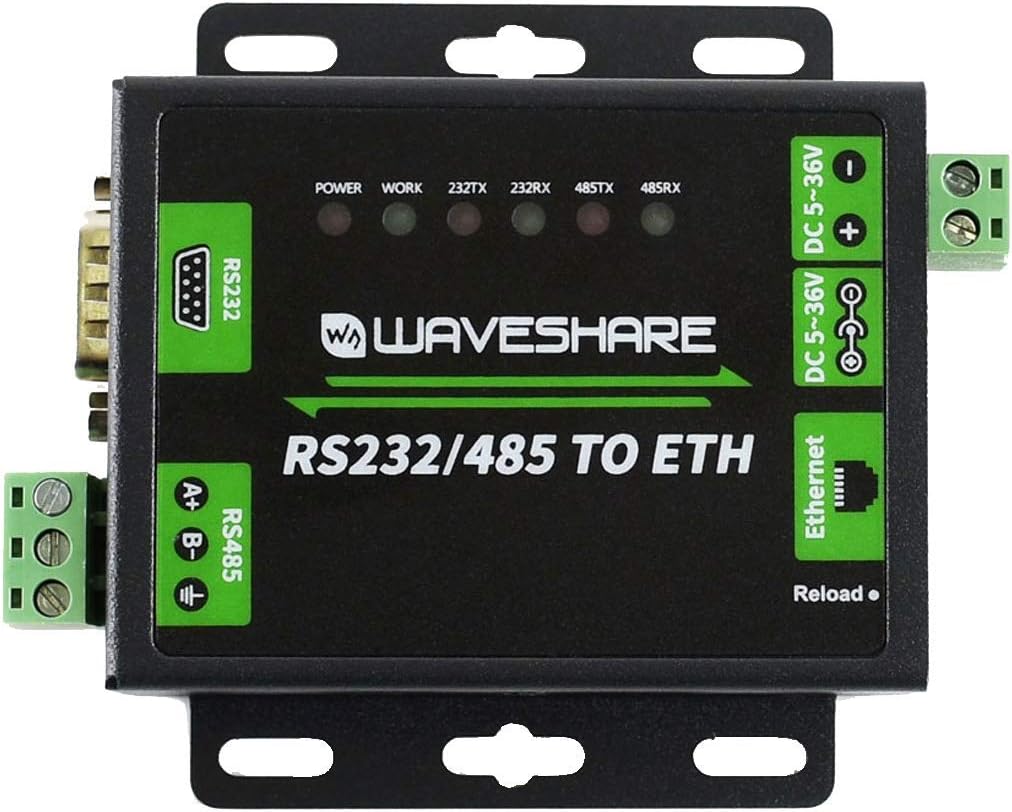
Hình ảnh: Trên cùng view of the converter highlighting the RS232 port, RS485 terminals, Ethernet port, DC power input, and LED indicators.
- ĐÈN LED NGUỒN: Cho biết trạng thái nguồn điện.
- WORK LED: Indicates device working status.
- 232TX/232RX LEDs: Indicate data transmission/reception activity on the RS232 port.
- 485TX/485RX LEDs: Indicate data transmission/reception activity on the RS485 port.
- Nút tải lại: Used for factory reset or other specific functions as per configuration.
4.2. Cổng
- Cổng RS232: Đầu nối DB9 tiêu chuẩn dành cho giao tiếp nối tiếp RS232.
- Cổng RS485: Screw terminals for RS485 differential pair (A+, B-) and ground.
- Cổng mạng: RJ45 connector for 10/100M Ethernet connection.
- Đầu vào nguồn DC: Barrel jack for DC 5-36V power supply.
- DC 5-36V Terminals: Screw terminals for alternative DC 5-36V power input.

Hình ảnh: Bên view of the converter showing the DB9 RS232 port and the green screw terminals for RS485.

Hình ảnh: Bên view of the converter showing the RJ45 Ethernet port and the DC power input barrel jack.
5. Thiết lập
5.1. Kết nối ban đầu
- Kết nối nguồn: Connect the provided power adapter to the DC power input port (DC 5-36V). The POWER LED should illuminate.
- Kết nối Ethernet: Connect an Ethernet cable from the converter's RJ45 port to your network switch or router.
- Kết nối các thiết bị nối tiếp: Connect your RS232 device to the DB9 port and/or your RS485 device to the RS485 screw terminals.
5.2. Thiết lập mặc định
The device comes with default network settings for initial configuration.

Image: Bottom label of the converter displaying default configuration details.
- IP mặc định: 192.168.0.7
- Tên người dùng: quản trị viên
- Mật khẩu: quản trị viên
- Đầu vào: DC 5-36V/500mA
- Default MAC Address: (Specific address printed on the label, e.g., 9CA525RD7B9A)
It is recommended to change the default login credentials after initial setup for security purposes.
6. Chế độ hoạt động
The converter supports various operating modes to suit different network communication requirements:
- Máy chủ TCP: The converter listens for incoming TCP connections from clients.
- Máy khách TCP: The converter initiates a TCP connection to a specified remote server.
- Máy chủ UDP: The converter listens for incoming UDP packets.
- Máy khách UDP: The converter sends UDP packets to a specified remote host and port.
- Máy khách HTTPD: Supports HTTP GET and POST requests for data transmission.
- xe buýt: Optimized for Modbus protocol communication, commonly used in industrial automation.
- Webổ cắm: Enables bi-directional transparent data transmission between the serial port and a webtrang.
7. Cấu hình
The converter's settings can be configured using several methods:
- Webtrang: Access the converter's web interface by entering its IP address (default: 192.168.0.7) into a web browser. This provides a graphical interface for all settings.
- Lệnh AT: Configuration can be performed by sending specific AT commands via the serial port.
- Giao thức nối tiếp: A dedicated serial protocol allows for programmatic configuration.
- Giao thức mạng: Configuration can also be done over the network using specific protocols.
- Phần mềm cấu hình: Waveshare provides dedicated software for easy configuration on a host computer.
8. Bảo trì
- Nâng cấp chương trình cơ sở: The device firmware can be upgraded via the network to incorporate new features or bug fixes. Refer to the Waveshare website for the latest firmware and upgrade instructions.
- Khôi phục cài đặt gốc: If configuration issues arise, the device can be restored to its factory default settings via software or by pressing the 'Reload' button (refer to specific instructions for the button sequence).
- KeepAlive Mechanism: The built-in KeepAlive mechanism helps detect broken connections and automatically re-establishes them, ensuring continuous operation.
- Time-out Reboot: Configure a time-out reboot (no-data reboot) to ensure long-term stable connections, especially in environments where intermittent communication might occur.
KHAI THÁC. Xử lý sự cố
If you encounter issues with the converter, consider the following:
- Không có điện: Hãy đảm bảo bộ chuyển đổi nguồn được kết nối đúng cách và cung cấp điện áp theo thông số kỹ thuật.tage (DC 5-36V). Check the POWER LED.
- Không có kết nối mạng: Verify the Ethernet cable connection. Check network settings (IP address, subnet mask, gateway). Ensure the Ethernet port LEDs are active.
- Lỗi giao tiếp nối tiếp: Check serial port wiring (RS232 pinout, RS485 A+/B- polarity). Verify baudrate, data bits, parity, and stop bits settings match the connected serial device. Observe 232TX/RX and 485TX/RX LEDs for activity.
- Không thể truy cập Web Giao diện: Ensure your computer's IP address is in the same subnet as the converter's default IP (192.168.0.x). Try pinging the converter's IP address.
- Kết nối không liên tục: Check for network interference or cable issues. Review KeepAlive and time-out reboot settings.
- Khôi phục cài đặt gốc: If configuration becomes problematic, perform a factory reset.
For further assistance, refer to the Waveshare official webhoặc liên hệ với bộ phận hỗ trợ kỹ thuật của họ.
10. Thông số kỹ thuật
| Tính năng | Đặc điểm kỹ thuật |
|---|---|
| Bộ xử lý | M4 series 32-bit ARM, 120 MHz |
| ĐẬP | LPDDR4 |
| Tốc độ bộ nhớ | 120MHz |
| Giao diện Ethernet | 10/100M Auto-MDI/MDIX |
| Cổng nối tiếp | 1x RS232 (DB9), 1x RS485 (Screw Terminal) |
| Tốc độ truyền | 600b / giây ~ 230.4Kb / giây |
| Parity Options | Không, Lẻ, Chẵn, Dấu, Dấu cách |
| Đầu vào nguồn điện | DC 5-36V (Barrel Jack or Screw Terminal) |
| Hệ điều hành | Linux (nội bộ) |
| Trọng lượng sản phẩm | 1.1 pound (khoảng 0.5 kg) |
| Kích thước gói hàng | 8.07 x 6.18 x 1.89 inch (khoảng 20.5 x 15.7 x 4.8 cm) |
| Số hiệu mẫu | RS232 / 485 ĐẾN ETH |
| Công nghệ kết nối | Mạng Ethernet |
10.1. Kích thước vật lý

Image: Technical drawing showing the dimensions of the converter in millimeters (e.g., 85.70mm height, 82.76mm width, 25.20mm depth).
11. Bảo hành và Hỗ trợ
For warranty information, technical support, and additional resources, please visit the official Waveshare website. You can find detailed documentation, software downloads, and contact information for customer service there.
Waveshare Official Webđịa điểm: www.waveshare.com


