1. Giới thiệu
Thank you for choosing the Hama TH-130 Thermo/Hygrometer. This device provides accurate measurements of indoor temperature and humidity, helping you maintain a comfortable and healthy environment. Please read this instruction manual carefully before using the device to ensure proper operation and to prevent damage.
2. Hướng dẫn an toàn
- Keep the device away from moisture, direct sunlight, and extreme temperatures.
- Không được mở thiết bị. Việc sửa chữa chỉ nên được thực hiện bởi nhân viên có trình độ.
- Keep packaging materials away from children due to choking hazards.
- Use only the specified battery type. Incorrect battery usage can lead to leakage or explosion.
- Tháo pin nếu không sử dụng thiết bị trong thời gian dài.
3. Nội dung gói hàng
- Hama TH-130 Thermo/Hygrometer
- 1 x CR2025 Lithium Metal battery (included)
- Hướng dẫn sử dụng này
4. Hết thiết bịview
The Hama TH-130 features a clear digital display for temperature and humidity readings. It is designed for tabletop placement.
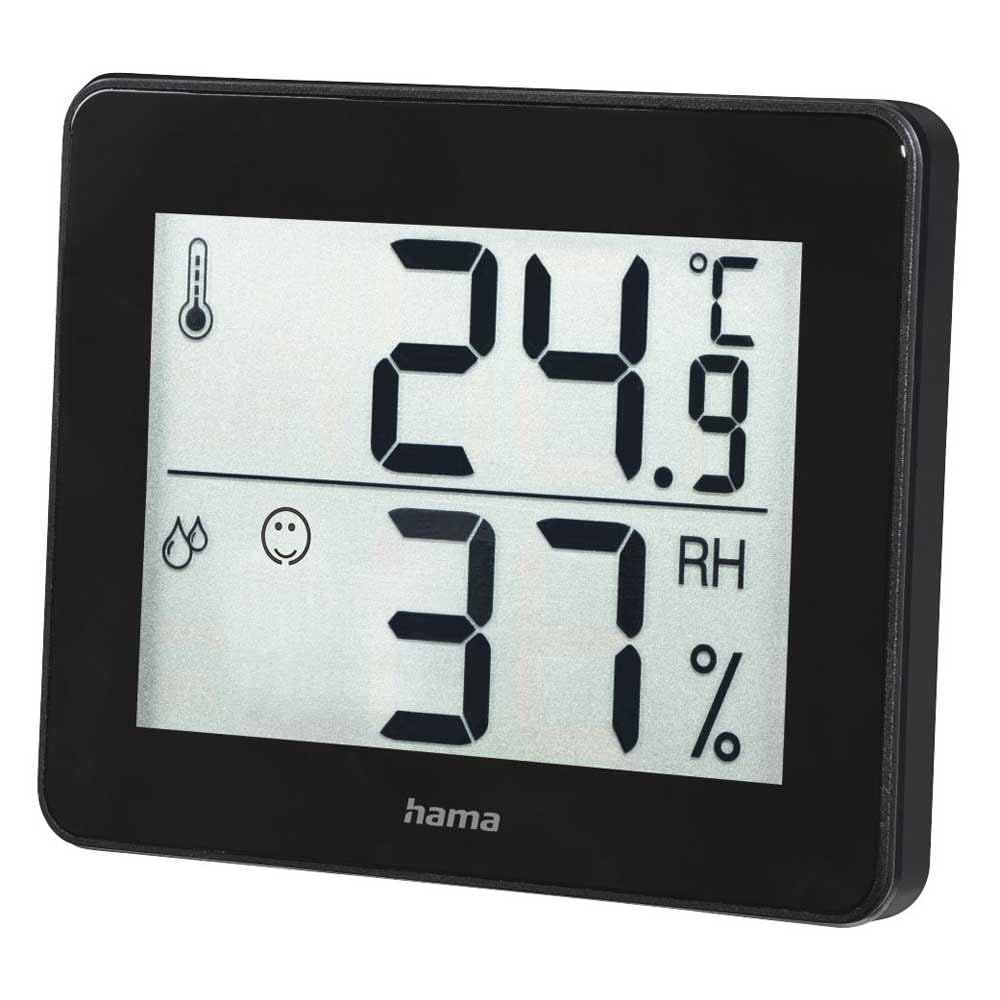
Hình 1: Đằng trước view of the Hama TH-130 Thermo/Hygrometer. The display shows temperature in Celsius (24.9°C) at the top and relative humidity (37% RH) at the bottom. A thermometer icon indicates temperature, and a droplet icon with a smiley face indicates humidity levels.
4.1 Thành phần hiển thị
- Hiển thị nhiệt độ: Shows current temperature in degrees Celsius (°C).
- Hiển thị độ ẩm: Shows current relative humidity in percentage (RH%).
- Chỉ số thoải mái: A smiley face icon indicates comfort levels based on humidity and temperature.
- Ngăn chứa pin: Nằm ở mặt sau của thiết bị.
5. Thiết lập
5.1 Lắp đặt pin
- Xác định vị trí ngăn chứa pin ở mặt sau của thiết bị.
- Mở nắp ngăn chứa pin.
- Insert one CR2025 Lithium Metal battery, ensuring correct polarity (+/-). The positive (+) side should face upwards.
- Đóng chặt nắp ngăn chứa pin.
- The display should now activate, showing current temperature and humidity readings.
5.2 Vị trí
- Place the thermo/hygrometer on a flat, stable surface, such as a tabletop.
- For accurate readings, avoid placing the device near heat sources (e.g., radiators, direct sunlight), air conditioning vents, or in areas with high drafts.
- Ensure the device is placed in the area where you wish to monitor temperature and humidity.
6. Vận hành thiết bị
The Hama TH-130 is designed for straightforward operation. Once batteries are installed, it automatically begins displaying current temperature and humidity.
6.1 Đọc màn hình
- The upper large digits indicate the current temperature in degrees Celsius (°C).
- The lower large digits indicate the current relative humidity in percentage (RH%).
- The comfort indicator (smiley face) provides a quick visual reference for indoor climate comfort.
6.2 Comfort Level Interpretation
The comfort indicator typically changes based on the humidity level, sometimes also considering temperature. Refer to the following general guidelines:
- Happy Face: Indicates optimal comfort (e.g., 20-25°C and 40-70% RH).
- Neutral Face: Indicates acceptable but not optimal conditions.
- Sad Face: Indicates uncomfortable conditions (e.g., too dry or too humid).
7. Bảo trì và chăm sóc
- Làm sạch thiết bị chỉ với một chút damp, lint-free cloth. Do not use abrasive cleaning agents.
- Đảm bảo không có hơi ẩm nào lọt vào thiết bị.
- Replace the battery when the display becomes dim or stops functioning.
KHAI THÁC. Xử lý sự cố
| Vấn đề | Nguyên nhân có thể | Giải pháp |
|---|---|---|
| Không hiển thị hoặc hiển thị mờ | Pin đã hết hoặc lắp không đúng cách. | Replace the battery (CR2025) and ensure correct polarity. |
| Các bài đọc không chính xác | Device placed near heat/cold sources or in a drafty area. | Relocate the device to a more stable environment. Allow 15-30 minutes for readings to stabilize. |
| Display shows "---" | Temperature or humidity is outside the measurable range. | Move the device to an environment within the specified operating range. |
9. Thông số kỹ thuật
- Người mẫu: Hama TH-130 (00186361)
- Kích thước sản phẩm: 11.5 x 10.5 x 2cm
- Trọng lượng sản phẩm: 92 gam
- Nguồn điện: 1 x CR2025 Lithium Metal battery (included)
- Kiểu lắp đặt: Bàn
- Optimal Operating Humidity: 30-70% RH (for comfort indication)
- Màu sắc: Đen
10. Thông tin thải bỏ
Do not dispose of the device or batteries with household waste. Electronic devices and batteries must be collected separately and recycled in an environmentally sound manner. Contact your local authorities for information on proper disposal facilities.
11. Bảo hành và Hỗ trợ
Hama GmbH & Co KG assumes no liability and provides no warranty for damage resulting from improper installation/mounting, improper use of the product, or failure to observe the operating instructions and/or safety notes. For technical support or warranty claims, please contact your retailer or Hama customer service. Please retain your proof of purchase.
Lưu ý: Điều khoản bảo hành cụ thể có thể thay đổi tùy theo khu vực.


