1. Giới thiệu
This manual provides comprehensive instructions for the setup, operation, maintenance, and troubleshooting of your Canyon CNS-SW71SS Smartwatch. Please read this manual carefully before using your device to ensure proper function and longevity.
The Canyon CNS-SW71SS Smartwatch is designed to help you monitor your fitness activities and stay connected. It features a 1.22-inch color screen, multi-sport modes, heart rate monitoring, sleep tracking, and notification alerts. Its IP68 water resistance makes it suitable for various environments.
2. Sản phẩm hếtview
2.1 Các tính năng chính
- 1.22-inch color touch screen display.
- Multi-sport mode for tracking various activities.
- Daily activity monitoring: calories, steps, heart rate, and sleep.
- Notifications for incoming calls, SMS, emails, calendar events, and social media.
- Music control and remote camera function.
- Smart alarm and weather data display.
- Thời lượng pin lên đến 7 ngày.
- IP68 water resistance (submersible up to 1 meter for 30 minutes).
- Kết nối Bluetooth 4.0.
- Compatible with iOS and Android operating systems.
- Comes with two interchangeable wristbands: metal and TPU.
2.2 Thành phần
The Canyon CNS-SW71SS Smartwatch consists of the main watch unit, interchangeable wristbands, and a charging cable.

Hình 1: Mặt trước view of the Canyon CNS-SW71SS Smartwatch, showing the display with steps, distance, calories, and heart rate data.

Hình 2: Góc cạnh view of the Canyon CNS-SW71SS Smartwatch, featuring a silver metal mesh strap and a round display.
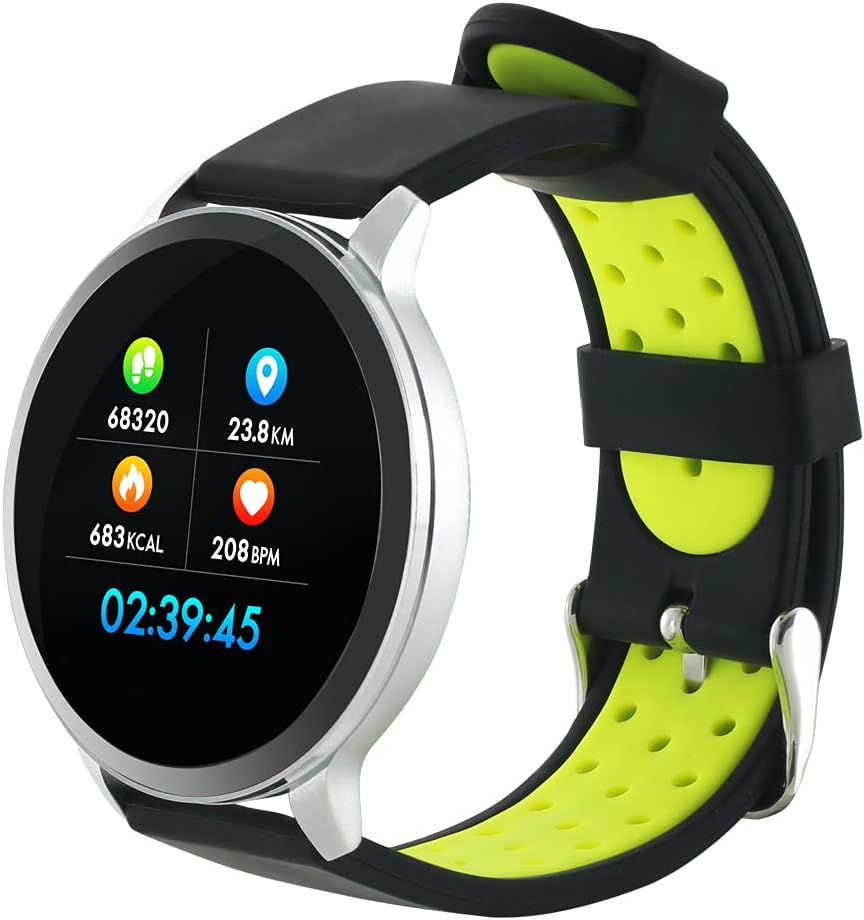
Figure 3: The Canyon CNS-SW71SS Smartwatch shown with an alternative black and lime green TPU strap, highlighting its interchangeable design.

Hình 4: Phía sau view of the Canyon CNS-SW71SS Smartwatch, displaying the optical heart rate sensor and magnetic charging contacts.

Figure 5: The retail packaging for the Canyon CNS-SW71SS Smartwatch, illustrating key features and the included two straps.
3. Thiết lập
3.1 Sạc đồng hồ thông minh
- Kết nối cáp sạc với bộ chuyển đổi nguồn USB (không kèm theo) hoặc cổng USB của máy tính.
- Align the magnetic charging pins of the cable with the charging contacts on the back of the smartwatch. The watch will vibrate and display a charging icon.
- Allow approximately 2-3 hours for a full charge. A full charge provides up to 7 days of usage.
3.2 Installing the Canyon Fit Application
- Scan the QR code provided in the packaging or search for "Canyon Fit" in your smartphone's app store (Google Play Store for Android, Apple App Store for iOS).
- Tải xuống và cài đặt ứng dụng.
- Open the Canyon Fit app and follow the on-screen instructions to create an account and set up your profile.
3.3 Ghép nối với điện thoại thông minh của bạn
- Hãy đảm bảo đồng hồ thông minh của bạn đã được sạc đầy và bật nguồn.
- Bật Bluetooth trên điện thoại thông minh của bạn.
- Open the Canyon Fit application.
- Navigate to the device pairing section within the app (usually found under 'Device' or 'Profile').
- Select your smartwatch (e.g., "CNS-SW71SS") from the list of available devices.
- Nếu được yêu cầu, hãy xác nhận yêu cầu ghép nối trên cả điện thoại thông minh và đồng hồ thông minh của bạn.
3.4 Attaching/Changing Wristbands
The smartwatch comes with two wristbands (metal and TPU) that can be interchanged. To attach or change a wristband, locate the quick-release pins on the underside of the strap. Slide the pin to detach the current strap and then align and slide the pin of the new strap into the corresponding holes on the watch body until it clicks into place.
4. Hướng dẫn vận hành
4.1 Điều hướng cơ bản
- Màn hình cảm ứng: Swipe left/right to navigate through different functions and menus. Swipe up/down to view Thông báo hoặc cài đặt nhanh.
- Nút bên: Press the side button to return to the main watch face or to wake up the screen. A long press may access power options or specific features depending on the context.
4.2 Theo dõi thể dục
- Chế độ đa thể thao: Access the 'Workout' or 'Sport' menu on your watch. Select your desired activity (e.g., running, cycling, walking) to start tracking. The watch will record duration, distance, calories burned, and heart rate.
- Hoạt động hàng ngày: The watch automatically tracks your steps, distance, and calories burned throughout the day. View these statistics on the watch face or in the Canyon Fit app.
- Theo dõi nhịp tim: The watch continuously monitors your heart rate. You can also manually initiate a heart rate measurement from the heart rate interface.
- Theo dõi giấc ngủ: Wear the smartwatch to bed, and it will automatically track your sleep patterns, including deep sleep, light sleep, and wake times. View detailed sleep analysis in the Canyon Fit app.
4.3 Thông báo
Once paired with your smartphone and with notification permissions granted in the Canyon Fit app, your smartwatch will display alerts for:
- Cuộc gọi đến
- Tin nhắn SMS
- Lịch sự kiện
- Social Media Apps (e.g., WhatsApp, Facebook, Instagđập)
Vuốt lên trên mặt đồng hồ để view recent notifications. You can dismiss notifications from the watch.
4.4 chức năng bổ sung
- Kiểm soát âm nhạc: While music is playing on your phone, you can use the watch to play/pause, skip tracks, and adjust volume.
- Máy ảnh từ xa: Open the camera function in the Canyon Fit app. Use your smartwatch as a remote shutter button to take photos on your phone.
- Báo động thông minh: Set alarms through the Canyon Fit app. The watch will vibrate to wake you up gently.
- Dữ liệu thời tiết: Once connected to your phone, the watch will display current weather conditions and forecasts for your location.
5. Bảo trì
5.1 Vệ sinh
- Lau sạch màn hình và thân đồng hồ bằng khăn mềm.amp vải.
- For the metal strap, use a soft brush to gently clean any debris. For the TPU strap, wash with mild soap and water.
- Đảm bảo các điểm tiếp xúc sạc sạch và khô trước khi sạc.
- Tránh sử dụng hóa chất mạnh hoặc vật liệu mài mòn để làm sạch.
5.2 Khả năng chống nước (IP68)
The Canyon CNS-SW71SS Smartwatch is IP68 rated, meaning it is resistant to dust and can be immersed in water up to 1 meter deep for a maximum of 30 minutes. While it can withstand splashes, rain, and brief immersion, it is not recommended for hot showers, saunas, or diving, as steam and high water pressure can compromise the seals.
- Không được nhấn bất kỳ nút nào khi đồng hồ đang ở dưới nước.
- Hãy lau khô đồng hồ thật kỹ sau khi bị dính nước.
5.3 Chăm sóc pin
- Tránh xả hết pin thường xuyên.
- Sạc thiết bị thường xuyên, ngay cả khi không sử dụng, để duy trì tuổi thọ của pin.
- Bảo quản đồng hồ ở nơi khô ráo, thoáng mát khi không sử dụng trong thời gian dài.
KHAI THÁC. Xử lý sự cố
- Đồng hồ không bật: Đảm bảo đồng hồ đã được sạc đầy. Kết nối đồng hồ với bộ sạc trong ít nhất 30 phút.
- Không thể ghép nối với điện thoại thông minh:
- Đảm bảo rằng Bluetooth được bật trên điện thoại của bạn.
- Ensure the Canyon Fit app has necessary permissions.
- Khởi động lại cả điện thoại và đồng hồ thông minh của bạn.
- Hãy thử hủy ghép nối và ghép nối lại thiết bị thông qua ứng dụng.
- Thông báo không xuất hiện:
- Check notification settings in the Canyon Fit app and your phone's system settings.
- Đảm bảo đồng hồ được kết nối qua Bluetooth.
- Dữ liệu nhịp tim/hoạt động không chính xác:
- Đảm bảo đồng hồ được đeo vừa vặn trên cổ tay, không quá chặt hoặc quá lỏng.
- Vệ sinh cảm biến ở mặt sau của đồng hồ.
- Environmental factors or certain movements can affect accuracy.
- Màn hình không phản hồi: Try restarting the smartwatch by holding down the side button. If unresponsive, allow the battery to fully drain and then recharge.
7. Thông số kỹ thuật
| Tên mẫu | CNS-SW71SS |
| Thương hiệu | CANYON |
| Kích thước hiển thị | 1.22 inch |
| Khả năng tương thích của hệ điều hành | Android, iOS |
| Công nghệ kết nối | Bluetooth 4.0 |
| Xếp hạng khả năng chống nước | IP68 |
| Tính năng đặc biệt | Wireless Charging (implied by product data), Multi-Sport Mode, Heart Rate Monitor, Sleep Tracker, Notifications |
| Thiết bị tương thích | Điện thoại thông minh |
| Ắc quy | Rechargeable (1 included) |
| Tùy chọn màu sắc | Black, Lime Green, Silver |
8. Bảo hành và Hỗ trợ
For warranty information and technical support, please refer to the documentation included with your purchase or visit the official Canyon website. You can also contact Canyon customer service for assistance with product issues or inquiries.
Hỗ trợ trực tuyến: https://canyon.eu/support/ (Bán tạiamp(Vui lòng kiểm tra liên kết trên trang hỗ trợ chính thức)


