1. Giới thiệu
This manual provides detailed instructions for the installation, operation, and maintenance of your COMAP Smart Home Wireless Programmable Thermostat. This system is designed to optimize the control of electric heating systems equipped with a pilot wire, enhancing comfort while contributing to energy efficiency. The thermostat can be managed locally or remotely via a dedicated application available on Play Store and Apple Store, and is compatible with Google Assistant and Amazon Alexa voice assistants.
2. Thông tin an toàn
- Always disconnect power to the heating system before installing or servicing the heating module.
- Việc lắp đặt phải do thợ điện có trình độ thực hiện nếu bạn không chắc chắn về hệ thống dây điện.
- Use only AAA non-rechargeable batteries for the thermostat. Do not mix old and new batteries, or different types of batteries.
- Tránh xa thiết bị khỏi nước và nhiệt độ khắc nghiệt.
- Không tự ý mở hoặc sửa chữa thiết bị. Hãy nhờ đến nhân viên kỹ thuật có chuyên môn.
3. Nội dung gói hàng
Xác minh rằng tất cả các thành phần sau đây đều có trong gói của bạn:
- 1 x COMAP Smart Home Thermostat
- 1 x Heating Module
- 1 x Gateway
- 1 x Cáp USB
- 1 x Cáp Ethernet RJ45
- 3 x AAA Batteries (non-rechargeable)
- 4 x Screws/Wall Plugs for mounting
- 1 x Installation Guide (separate document)

Hình 3.1: Hếtview of the COMAP Smart Home Thermostat and Heating Module.
4. Thiết lập và Cài đặt
4.1. Thermostat Setup
- Chèn pin: Open the battery compartment on the back of the thermostat and insert the 3 AAA non-rechargeable batteries, ensuring correct polarity.
- Lắp đặt: Choose a central location in the room, away from direct sunlight, drafts, or heat sources. Mount the thermostat on the wall using the provided screws and wall plugs.

Image 4.1: The COMAP Smart Home Thermostat installed on a wall.
4.2. Kết nối cổng
- Kết nối nguồn điện: Connect the gateway to a power source using the provided USB cable (5V DC 200mA).
- Kết nối Internet: Connect the gateway to your internet router using the provided RJ45 Ethernet cable. Ensure your internet connection is active.
4.3. Heating Module Installation
The heating module connects to your electric radiator's pilot wire. Refer to the separate installation guide for detailed wiring diagrams specific to your heating system. It is recommended to consult a qualified electrician for this step.
4.4. Tải xuống ứng dụng và ghép nối
- Tải ứng dụng: Download the COMAP Smart Home application from the Apple App Store or Google Play Store.
- Tạo tài khoản: Hãy làm theo hướng dẫn trong ứng dụng để tạo tài khoản người dùng mới.
- Ghép nối thiết bị: Follow the in-app instructions to pair your thermostat, heating module, and gateway with your account. This typically involves a discovery process and confirmation on the devices.
5. Hướng dẫn vận hành
5.1. Điều chỉnh nhiệt độ thủ công
On the thermostat display, use the touch controls (up/down arrows) to manually adjust the desired temperature. The thermostat will maintain this temperature until the next programmed event or until it is manually changed again.
5.2. Điều khiển và lập trình ứng dụng
The COMAP Smart Home application provides comprehensive control over your heating system:
- Quản lý từ xa: Adjust temperature, switch modes (Comfort, Eco, Frost Protection, Off) from anywhere using your smartphone, tablet, or PC.
- Lập trình hàng tuần: Create customized heating schedules for each day of the week to match your lifestyle.
- Heating History: Access historical data on heating periods and temperatures to optimize your energy consumption.
- Điều khiển đa vùng: If you have multiple heating modules, the app allows for independent control of different zones.

Image 5.1: Controlling the thermostat via the COMAP Smart Home web application on a laptop.

Image 5.2: Adjusting heating settings using the COMAP Smart Home mobile application.
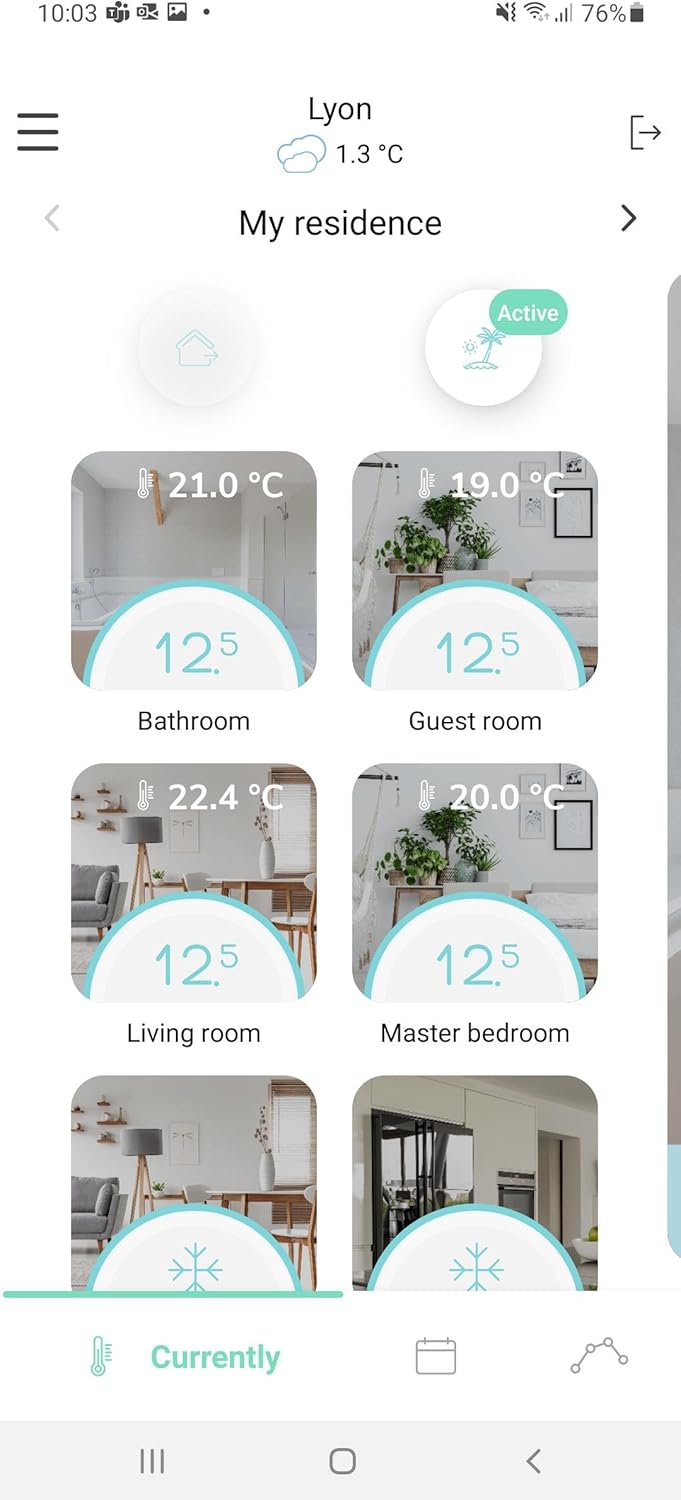
Image 5.3: The COMAP Smart Home app interface showing temperature control for multiple zones.
5.3. Tích hợp trợ lý giọng nói
The COMAP Smart Home system is compatible with Google Assistant and Amazon Alexa. To enable voice control, link your COMAP Smart Home account within the respective voice assistant application (Google Home or Amazon Alexa app) and follow the setup instructions.
6. Bảo trì
- Thay thế pin: Replace the AAA batteries in the thermostat approximately every 2 years, or when the low battery indicator appears on the display or in the app. Always use new, non-rechargeable AAA batteries.
- Vệ sinh: Clean the thermostat and other components with a soft, dry cloth. Do not use abrasive cleaners or solvents.
- Cập nhật chương trình cơ sở: Ensure your system's firmware is up to date through the COMAP Smart Home application for optimal performance and new features.
KHAI THÁC. Xử lý sự cố
7.1. No Display on Thermostat
- Check if the AAA batteries are correctly inserted and not depleted. Replace if necessary.
7.2. No Connection to App/Gateway
- Ensure the gateway is powered on and connected to your internet router via the RJ45 cable.
- Hãy kiểm tra xem kết nối internet của bạn có hoạt động hay không.
- Check if the thermostat and heating module are within the wireless range of the gateway (up to 20m in open field, but can be affected by building structure).
- Restart the gateway and your internet router.
- Re-pair the devices through the app if the connection is lost persistently.
7.3. Incorrect Temperature Readings
- Đảm bảo rằng bộ điều nhiệt không được đặt gần các nguồn nhiệt (ví dụ: ánh nắng trực tiếp, v.v.).amps, appliances) or cold drafts.
- Allow some time for the thermostat to stabilize after initial setup or significant temperature changes.
7.4. Heating Not Responding to Commands
- Verify the heating module is correctly wired to the electric radiator's pilot wire.
- Check the connection status of the heating module in the app.
- Ensure the main power to the heating system is on.
8. Thông số kỹ thuật
| Tính năng | Đặc điểm kỹ thuật |
|---|---|
| Số hiệu mẫu | QTW12-EW-CO-EU (L151015001) |
| Bộ nguồn (Bộ điều nhiệt) | 3 x AAA Batteries (non-rechargeable) |
| Thermostat Consumption (Standby) | 10µA |
| Thermostat Consumption (Active) | 40mA |
| Gateway Consumption (Active) | 100mA |
| Heating Module Consumption | 1/2 Watt |
| Tuổi thọ pin trung bình | 2 năm |
| Trưng bày | Low consumption LED |
| Giao diện vô tuyến | 868 MHz (6LoWPAN protocols) |
| Kết nối cổng | USB 5V DC 200mA, RJ45 Ethernet |
| Wireless Dải | Max 20m in open field (indicative) |
| Phạm vi đo lường | 0°C đến 50°C |
| Độ nhạy | +/- 0.05°C |
| Phạm vi nhiệt độ điểm đặt | 4°C đến 28°C |
| Tăng nhiệt độ | 0.5°C |
| Cảm biến | Wide-field presence sensor, Humidity sensor |
| Kích thước (D x R x C) | 10.7 x 10.7 x 2.6cm |
| Cân nặng | 460 gram |
| Vật liệu | Nhựa |
| Màu sắc | Trắng |
9. Bảo hành và Hỗ trợ
For warranty information, technical support, or service inquiries, please refer to the official COMAP website or contact COMAP customer service directly. Keep your purchase receipt as proof of purchase for warranty claims.


