Giới thiệu
The Sharp Atomic Clock provides precise timekeeping and temperature monitoring for your home or office. Featuring a large, easy-to-read display, this clock automatically synchronizes with the atomic time signal (WWVB) broadcast from Fort Collins, Colorado, ensuring accuracy without manual adjustments. It also includes a wireless outdoor sensor to display both indoor and outdoor temperatures.
Tính năng sản phẩm
- Atomic Time Accuracy: Automatically synchronizes with the WWVB atomic time signal for precise timekeeping.
- Jumbo 3" Easy-to-Read Numbers: Large digital display for clear visibility of time, date, and temperature.
- Indoor/Outdoor Temperature Display: Monitors both indoor ambient temperature and outdoor temperature via a wireless sensor.
- Cảm biến ngoài trời không dây: Transmits outdoor temperature data to the main unit.
- Dùng pin: Operates on batteries for flexible placement (batteries not included).
- Điều chỉnh giờ tiết kiệm ánh sáng ban ngày (DST) tự động: Automatically adjusts for daylight saving time changes.
- Các múi giờ có thể lựa chọn: Allows selection of various US time zones.
- Định dạng 12/24 giờ: Tùy chọn hiển thị thời gian ở định dạng 12 giờ hoặc 24 giờ.
- Celsius/Fahrenheit Display: Chuyển đổi giữa đơn vị đo nhiệt độ Celsius và Fahrenheit.
Nội dung gói
Vui lòng đảm bảo tất cả các vật dụng đều có đủ trước khi tiến hành cài đặt.
- Sharp Atomic Clock Main Unit
- Cảm biến ngoài trời không dây
- Hướng dẫn sử dụng
Note: Batteries are not included. The main unit requires 2 AA batteries, and the outdoor sensor requires 2 AA batteries.
Cài đặt
1. Lắp đặt pin
- Mở ngăn chứa pin ở phía sau thân đồng hồ chính.
- Lắp 2 pin AA, chú ý đúng cực (+ và -).
- Đóng nắp ngăn chứa pin.
- Open the battery compartment on the wireless outdoor sensor.
- Insert 2 AA batteries into the outdoor sensor, observing the correct polarity.
- Close the outdoor sensor's battery compartment cover.
2. Initial Synchronization and Settings
After battery installation, the clock will attempt to receive the WWVB atomic time signal and connect to the outdoor sensor. This process may take several minutes or up to 24 hours depending on your location and environmental interference.
- Múi giờ: Press the "TIME ZONE" button (often labeled "UP TIME ZONE") on the back of the clock to cycle through available time zones (PST, MST, CST, EST). Select your desired time zone.
- Định dạng 12/24 giờ: Press the "12/24" button to switch between 12-hour and 24-hour display.
- Độ C / độ F: Press the "°C/°F" button to toggle between Celsius and Fahrenheit temperature display.
- Outdoor Sensor Pairing: If the outdoor temperature does not appear, press the "CHANNEL" button on the main unit to search for the sensor signal. Ensure the outdoor sensor is within range and not obstructed.
For optimal signal reception, place the clock away from large metal objects, electronic devices, and areas with heavy concrete or brick walls. The outdoor sensor should be placed in a shaded, dry location, protected from direct sunlight and precipitation, for accurate readings.
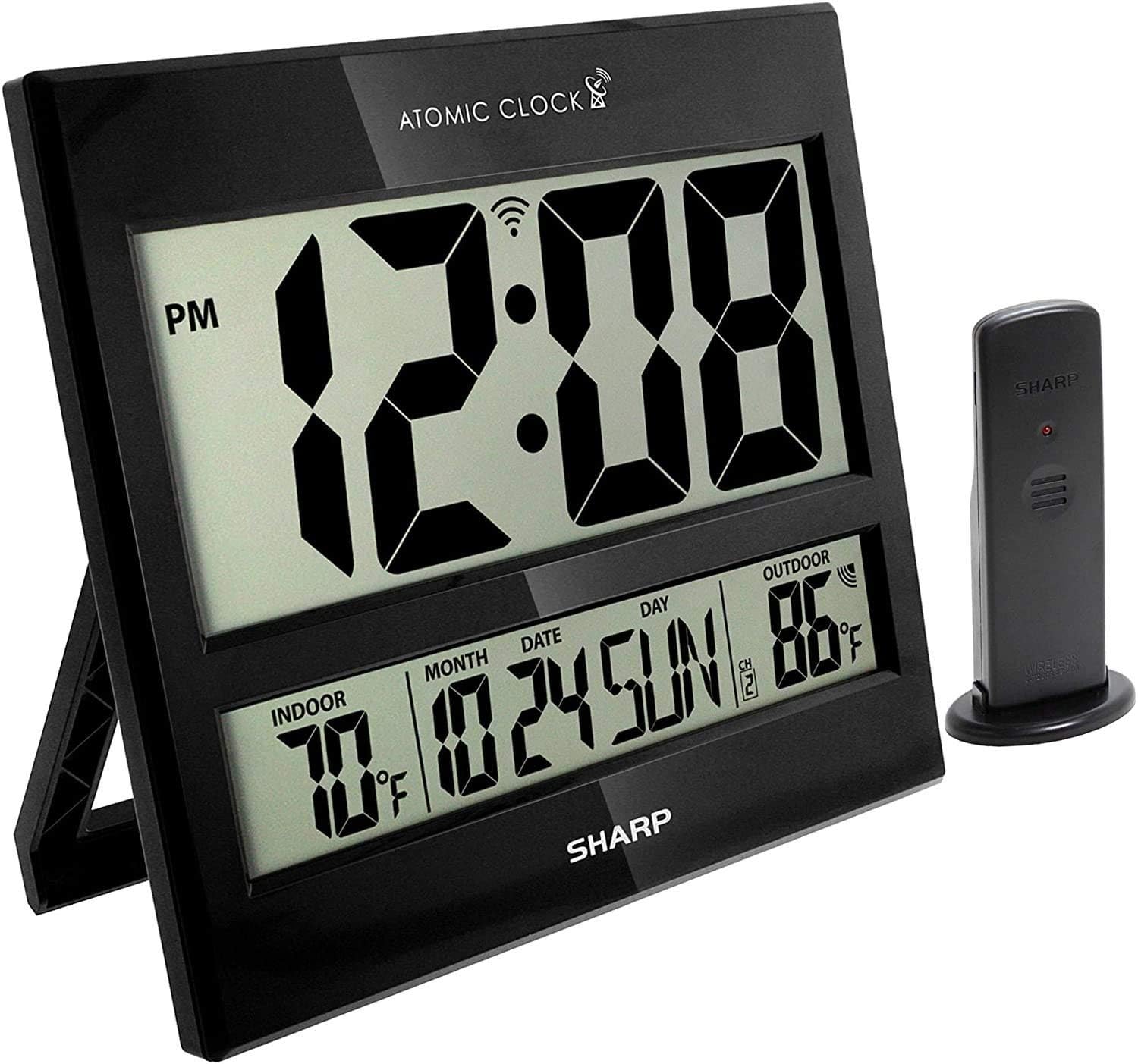
Image: The Sharp Atomic Clock main unit displaying time, indoor temperature, date, and outdoor temperature, alongside its wireless outdoor sensor.
Hoạt động
Hiển thị thông tin
The clock's large LCD screen displays the following information:
- Thời gian: Current time in selected 12-hour or 24-hour format.
- Chỉ số PM: Displays "PM" for afternoon hours in 12-hour format.
- Atomic Signal Indicator: Shows the status of the WWVB atomic time signal reception.
- Nhiệt độ trong nhà: Nhiệt độ hiện tại được đo bởi thiết bị chính.
- Month/Date/Day: Current calendar information.
- Nhiệt độ ngoài trời: Current temperature measured by the wireless outdoor sensor.
- Outdoor Sensor Channel: Indicates the channel the outdoor sensor is transmitting on.
- Chỉ báo pin yếu: An icon will appear when batteries are low and need replacement.
Button Functions (Rear Panel)
| Cái nút | Chức năng |
|---|---|
| LỊCH | Press and hold for 2 seconds to manually set calendar (Year, Month, Date, Language). Use UP/DOWN buttons to change values. |
| THỜI GIAN | Press and hold for 2 seconds to manually set time (DST ON/OFF, Hour, Minute). Use UP/DOWN buttons to change values. |
| 12/24 | Switches between 12-hour and 24-hour time display. |
| KÊNH | Press to switch between outdoor sensor channels (1, 2, 3). Press and hold for 2 seconds to pair with the outdoor sensor. |
| ° C / ° F | Chuyển đổi giữa chế độ hiển thị nhiệt độ Celsius và Fahrenheit. |
| SÓNG | Initiates a manual search for the WWVB atomic time signal. |
| CÀI LẠI | Resets the clock to factory default settings. Requires a pointed object (e.g., paperclip). |
| UP / TIME ZONE | Increases values during manual setting. Press to cycle through time zones. |
| XUỐNG | Decreases values during manual setting. |
BẢO TRÌ
- Thay thế pin: Replace batteries in both the main unit and outdoor sensor when the low battery indicator appears on the display. Always replace all batteries at the same time with new ones.
- Vệ sinh: Clean the clock and sensor with a soft, dry cloth. Do not use abrasive cleaners or solvents.
- Vị trí cảm biến ngoài trời: Periodically check the outdoor sensor's location to ensure it remains protected from extreme weather conditions, direct sunlight, and moisture.
Xử lý sự cố
- Clock not syncing with atomic time:
- Ensure the clock is placed away from electronic interference (TVs, computers, microwaves).
- Try placing the clock near a window facing Fort Collins, Colorado (if applicable to your region).
- Press the "WAVE" button to initiate a manual signal search.
- Allow up to 24 hours for initial synchronization.
- Outdoor temperature not displaying or incorrect:
- Check batteries in the outdoor sensor.
- Ensure the outdoor sensor is within the effective transmission range (typically up to 100 feet, line of sight).
- Press the "CHANNEL" button on the main unit to re-establish connection.
- Verify the outdoor sensor is placed in a location protected from direct sunlight and rain, which can affect readings.
- Màn hình mờ hoặc tối:
- Replace all batteries in the main unit with fresh ones.
- Đảm bảo pin được lắp đúng cực.
- Thời gian hoặc ngày tháng không chính xác:
- Hãy kiểm tra xem múi giờ đã được chọn chính xác chưa.
- Check if Daylight Saving Time (DST) setting is correct for your region.
- If atomic signal is not received, manually set the time and date using the "TIME" and "CALENDAR" buttons.
Thông số kỹ thuật
| Tính năng | Chi tiết |
|---|---|
| Thương hiệu | Sắc |
| Số hiệu mẫu | 8541848315 |
| Mã số UPC | 049353998732 |
| Màu sắc | Bóng đen |
| Kiểu hiển thị | LCD kỹ thuật số |
| Tính năng đặc biệt | Atomic Time Synchronization (WWVB), Indoor/Outdoor Temperature |
| Kích thước sản phẩm | 13"W x 1.5"H (Main Unit) |
| Nguồn điện | Pin chạy bằng |
| Số lượng pin cần thiết | Main Unit: 2 AA; Outdoor Sensor: 2 AA |
| Vật liệu | Nhựa |
| Kiểu lắp đặt | Giá treo tường / Giá để bàn |
| Sử dụng trong nhà/ngoài trời | Indoor (Main Unit), Outdoor (Sensor) |
Bảo hành và Hỗ trợ
Sharp products are manufactured to high-quality standards. For warranty information, technical support, or service inquiries, please refer to the contact information provided with your product packaging or visit the official Sharp webtrang web. Giữ lại biên lai mua hàng làm bằng chứng mua hàng khi yêu cầu bảo hành.


