1. Giới thiệu
Welcome to the user manual for your AAXA LED Pico Micro Video Projector. This compact and versatile projector is designed for personal media sharing, business presentations, and home cinema experiences. This manual provides detailed instructions on setting up, operating, maintaining, and troubleshooting your device to ensure optimal performance.
Nội dung gói
Vui lòng kiểm tra xem có đầy đủ các mục trong gói hàng của bạn không:
- AAXA LED Pico Micro Video Projector
- Cáp USB
- Cable AV
- Mini Tripod (optional, may vary by package)
- Power Adapter (not explicitly listed but implied for charging)
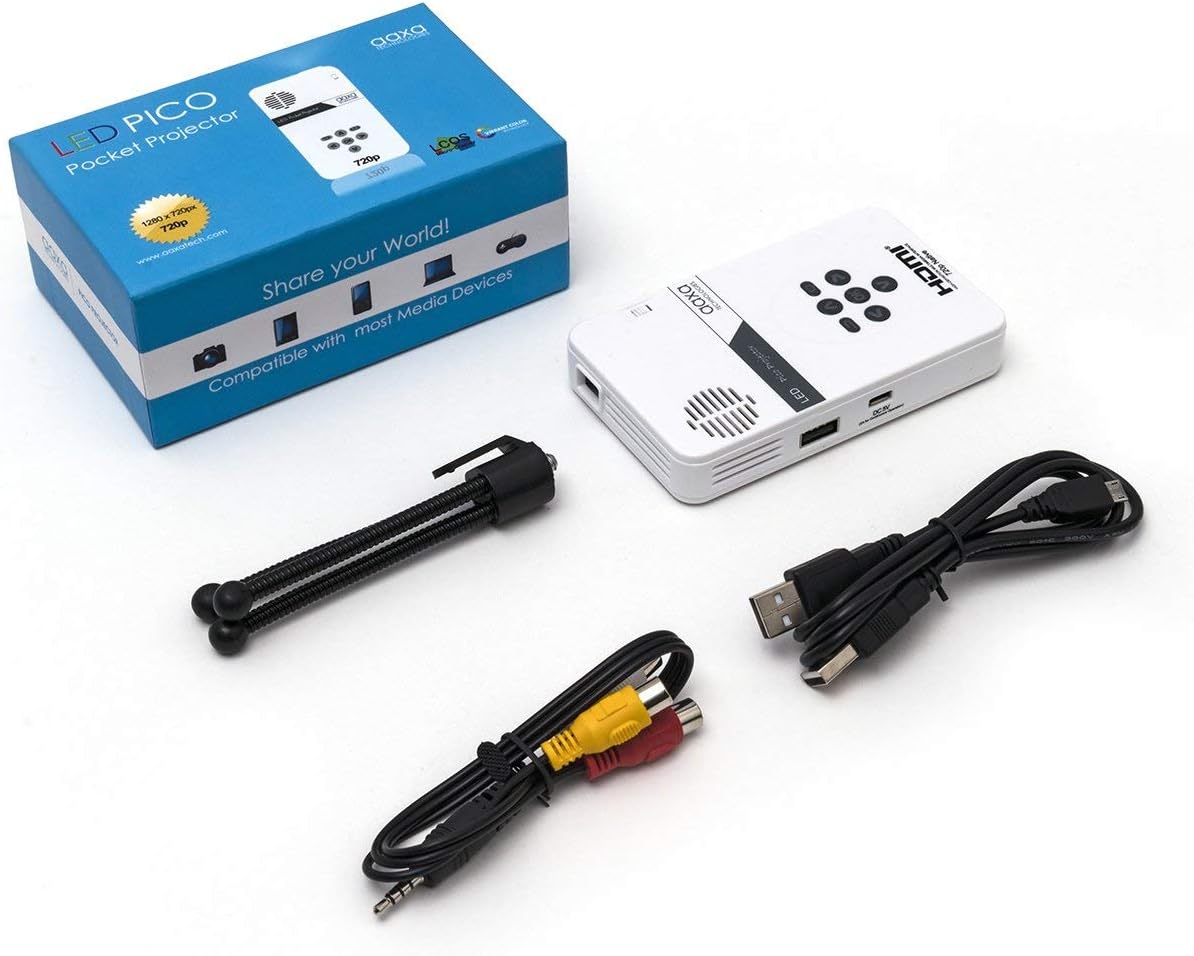
Figure 1: Package contents including the projector, cables, and tripod.
2. Sản phẩm hếtview
The AAXA LED Pico Micro Video Projector is a compact device featuring a user-friendly interface and multiple connectivity options. It is designed for portability and ease of use.
Các tính năng chính:
- Ultra Bright 25 Lumens LED light source with 15,000-hour lifespan.
- High Definition 720p (1280x720) native resolution, supporting up to 1080p input.
- Vibrant Color Technology for rich and accurate colors.
- Built-in 80-minute rechargeable Lithium-ion battery.
- Integrated media player and speakers.
- Compact and lightweight design (4.25 x 2.36 x 0.7 inches, 6.3 ounces).
Điều khiển và cổng:
Familiarize yourself with the various controls and connection ports on your projector:

Hình 2: Trên cùng view of the projector with navigation buttons (Up, Down, Left, Right, OK, Menu, Back) and speaker grille.
- Nút điều hướng: Được sử dụng để điều hướng menu và chọn tùy chọn.
- Lưới tản nhiệt của loa: For audio output from the built-in speakers.
- Bánh xe lấy nét: Located on the side, used to adjust image clarity.

Hình 3: Mặt trước view of the projector showing the HDMI, AV, and 3.5mm audio out ports.
- Đầu vào HDMI: Connect to laptops, gaming consoles, or other HDMI-enabled devices.
- Đầu vào AV: Để kết nối các thiết bị cũ hơn bằng cáp AV đi kèm.
- Đầu ra âm thanh 3.5mm: Kết nối tai nghe hoặc loa ngoài.

Hình 4: Mặt bên view of the projector showing the USB port and DC 5V charging port.
- Cổng USB: Dùng để kết nối ổ USB phát lại đa phương tiện.
- Đầu vào DC 5V: Power input for charging the internal battery.

Hình 5: Mặt bên view of the projector showing the TF Card slot.
- Micro SD (TF Card) Slot: Insert a Micro SD card (up to 16GB) for media playback.
3. Thiết lập
3.1 Bật/Tắt nguồn và sạc
- Sạc: Connect the supplied micro USB cable to the DC 5V input on the projector and a compatible USB power source. The LED indicator will show charging status.
- Bật nguồn: Press and hold the power button (usually located near the focus wheel or on the top panel) until the projector powers on.
- Tắt nguồn: Press and hold the power button again until the projector shuts down.
3.2 Định vị máy chiếu
Place the projector on a stable, flat surface. For optimal image quality, project onto a smooth, light-colored wall or a dedicated projector screen. The distance from the surface will determine the image size.

Figure 6: The projector can be mounted on a tripod for stable positioning and angle adjustment.
3.3 Điều chỉnh tiêu điểm
To achieve a clear image, rotate the focus wheel located on the side of the projector until the projected image appears sharp and in focus.
4. Hướng dẫn vận hành
4.1 Kết nối thiết bị
- HDMI: Connect an HDMI cable from your source device (laptop, game console, etc.) to the HDMI input port on the projector. Select HDMI as the input source in the projector's menu.
- CỦA: Use the provided AV cable to connect to devices with composite video and audio outputs. Select AV as the input source.
- USB / Micro SD: Insert a USB flash drive into the USB port or a Micro SD card into the TF Card slot. The projector's media player interface will typically appear, allowing you to browse and play files.
4.2 Phát lại phương tiện
The built-in media player supports various video, music, and picture formats. Use the navigation buttons on the projector to browse files and select content for playback.
4.3 Ngõ ra âm thanh
The projector has built-in speakers. For private listening or enhanced audio, connect headphones or external speakers to the 3.5mm Audio Out port.
5. Bảo trì
- Vệ sinh: Use a soft, dry cloth to clean the exterior of the projector. For the lens, use a lens cleaning cloth and specialized lens cleaning solution. Do not use abrasive cleaners.
- Kho: Khi không sử dụng, hãy bảo quản máy chiếu ở nơi khô ráo, thoáng mát, tránh ánh nắng trực tiếp và nhiệt độ quá cao hoặc quá thấp.
- Chăm sóc pin: To prolong battery life, avoid fully discharging the battery frequently. Charge the projector regularly, even if not in active use.
KHAI THÁC. Xử lý sự cố
| Vấn đề | Nguyên nhân có thể | Giải pháp |
|---|---|---|
| Không có hình ảnh nào được chiếu | Projector not powered on; incorrect input source; loose cable connection. | Ensure projector is on and charged. Select correct input source (HDMI, AV, USB/SD). Check all cable connections. |
| Hình ảnh bị mờ | Tiêu cự chưa được điều chỉnh; máy chiếu quá gần/quá xa bề mặt cần chiếu. | Adjust the focus wheel until the image is clear. Adjust the distance of the projector from the projection surface. |
| Không có âm thanh | Volume too low; external audio device connected; audio format not supported. | Increase volume. Disconnect external audio devices if using internal speakers. Ensure audio format is supported. |
| Máy chiếu tắt đột ngột | Low battery; overheating. | Charge the battery. Ensure proper ventilation and clear any obstructions from vents. |
7. Thông số kỹ thuật
| Tính năng | Chi tiết |
|---|---|
| Thương hiệu | Công nghệ AAXA |
| Số hiệu mẫu | KP-101-01-cr |
| Độ phân giải màn hình | 1280 x 720 (Native), Max 1080p Input |
| Độ sáng | 25 Lumen |
| Nguồn sáng Cuộc sống | 15,000 giờ (LED) |
| Công nghệ kết nối | HDMI, USB, Micro SD, 3.5mm Aux Out, Composite AV |
| Tuổi thọ pin | Up to 80 minutes (Lithium-Ion) |
| Kích thước sản phẩm | 4.25 x 2.36 x 0.7 inch |
| Trọng lượng sản phẩm | 6.3 ounce |
| Sử dụng được đề xuất | Kinh doanh, Giáo dục, Rạp chiếu phim tại gia |
8. Bảo hành và Hỗ trợ
This product is offered as an Amazon Renewed item, which means it has been professionally inspected and tested to work and look like new. Amazon Renewed products are eligible for replacement or refund under the Amazon Renewed Guarantee if you are not satisfied with your purchase.
For further assistance or technical support, please refer to the official AAXA Technologies webtrang web hoặc liên hệ trực tiếp với bộ phận chăm sóc khách hàng của họ.


