Giới thiệu
The Xfinity HD 720p Wireless Indoor/Outdoor Home Security Camera allows you to monitor your home environment with live video accessible from anywhere. Designed for both indoor and outdoor use, this camera provides essential security features to keep you informed.
Có gì trong hộp
- Xfinity HD 720p Wireless Security Camera (Model: SCHC2AEW)
- Bộ đổi nguồn
- Cáp USB
- Phần cứng lắp đặt (vít và neo)

Image: Xfinity Home Security Camera and accessories neatly packaged in its box.
Hướng dẫn thiết lập
- Kết nối nguồn điện: Connect the camera to the power adapter using the provided USB cable, then plug the adapter into a standard electrical outlet.
- Tải xuống ứng dụng: Download the official Xfinity Home app from your smartphone's app store (iOS App Store or Android Google Play).
- Ghép nối thiết bị: Open the Xfinity Home app and follow the on-screen instructions to add a new device. You will typically need to scan a QR code on the camera or manually enter its details to pair it with your home Wi-Fi network. Ensure your Wi-Fi network is 2.4 GHz for compatibility.

Image: The Xfinity Home Security Camera placed on a surface, ready for setup.
Hướng dẫn sử dụng
Sống View và các điều khiển cơ bản
Once paired, access the live video feed through the Xfinity Home app. The app provides controls for:
- Phát trực tiếp: View foo thời gian thựctage từ máy ảnh của bạn.
- Ghi âm: Manually record video clips.
- Ảnh chụp màn hình: Chụp ảnh tĩnh từ nguồn cấp dữ liệu trực tiếp.
- Âm thanh hai chiều: Speak through the camera's speaker and hear audio from its microphone.
Tầm nhìn ban đêm
The camera features night vision capabilities for clear monitoring in low-light conditions. This feature automatically activates when ambient light is insufficient, providing a black-and-white image. Some models may offer color night vision depending on ambient light and settings.
Phát hiện chuyển động và cảnh báo
Configure motion detection settings within the Xfinity Home app to receive alerts on your smartphone when activity is detected. You can customize sensitivity levels and notification preferences.
Tùy chọn lưu trữ
The camera supports local storage via a MicroSD card (not included). Insert a compatible MicroSD card into the designated slot to store recorded video clips directly on the device. Cloud storage options may also be available through your Xfinity Home service subscription.
Lắp đặt và gắn kết
The Xfinity Home Security Camera can be placed on a flat surface or mounted to a wall. Use the included mounting hardware for secure wall installation. Ensure the camera is positioned to cover the desired monitoring area.
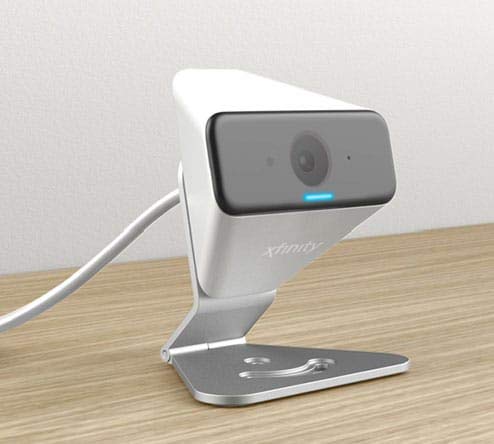
Image: The Xfinity Home Security Camera positioned on a desk, demonstrating its compact design.
Thông số kỹ thuật sản phẩm
| Tính năng | Chi tiết |
|---|---|
| Số hiệu mẫu | SCHC2AEW |
| Độ phân giải quay video | 720p |
| Công nghệ kết nối | Không dây (Wi-Fi) |
| Giao thức kết nối | Wi-Fi (2.4 GHz compatible) |
| Sử dụng trong nhà/ngoài trời | Trong nhà, Ngoài trời |
| Tính năng đặc biệt | Cảm biến chuyển động, tầm nhìn ban đêm |
| Nguồn điện | DC (12 Volts, 1 Watt) |
| Kích thước (D x R x C) | 3 x 3 x 2 inch |
| Trọng lượng sản phẩm | 1.57 pound |
| Bảo vệ quốc tế Rating | IP65 |
Xử lý sự cố
- Không có điện: Hãy đảm bảo bộ chuyển đổi nguồn được kết nối chắc chắn với cả máy ảnh và ổ cắm điện đang hoạt động.
- Các vấn đề kết nối: Verify your Wi-Fi network is 2.4 GHz. Restart your router and the camera. Ensure the camera is within range of your Wi-Fi signal.
- Ứng dụng không phản hồi: Close and reopen the Xfinity Home app. If the issue persists, try reinstalling the app.
- Chất lượng video kém: Kiểm tra cường độ tín hiệu Wi-Fi. Đảm bảo ống kính máy ảnh sạch sẽ và không bị vật cản.
Bảo hành và Hỗ trợ khách hàng
For warranty information, please refer to the documentation included with your purchase or visit the official Xfinity support website. For technical assistance or customer service, please contact Xfinity customer support directly.


